
MSBA-360 · Lesson 1 of 12 · 20 min
The GitHub Advanced Security products
▶ Video coming soon A video version of this lesson is on the way.
Priya Nair had expected the security sessions at Skerry Outdoor Group to be about tools. The first one began with a number instead. Freya Abernathy-Oduya, Skerry's security lead, put a single slide on the screen in the Thursday working room: in the four weeks after the last organizations were migrated into the new enterprise, secret scanning had raised 1,312 alerts across the old repository histories, and 214 of them were for credentials that a validity check said were still active.
"Most of these were not pushed last month," Freya said. "They were pushed years ago, by people who meant to remove them later. The migration just let us see them." She turned to the platform team. "This course of sessions is about two things: stopping secrets before they reach a repository, and knowing exactly what our software is made of and where it was built. GitHub sells those as security products. We need to understand what we are paying for and what we already get for free."
This course follows those sessions. Priya, who leads the small engineering team at Tidewater Trail Guides and learned the basics of GitHub security in MSBA-161, attends as an observer because Skerry sponsors Tidewater's TrailCheck app and has offered to share its security practices. Seraphine Kowalik-Duarte, an application security engineer on Freya's team, runs most of the hands-on work. The course covers the GH-500 exam domains for Secret Protection and supply chain security; MSBA-361 covers Code Security with CodeQL and security operations.
From one bundle to two products
For several years GitHub sold its security features for private code as a single licence called GitHub Advanced Security, usually shortened to GHAS. Buying it was an enterprise decision: it was available only to GitHub Enterprise customers and was licensed for every active committer in the repositories where it was turned on.
On April 1, 2025, GitHub split that bundle into two products that can be bought separately. GitHub Secret Protection covers secret scanning, push protection, custom patterns, validity checks and the related security overview views. GitHub Code Security covers code scanning with CodeQL, Copilot Autofix, security campaigns, premium Dependabot features such as dependency review on private repositories, and the security overview for code findings. At launch GitHub listed Secret Protection at 19 US dollars and Code Security at 30 US dollars per active committer per month, and for the first time made both available to organizations on the GitHub Team plan as well as to Enterprise customers.
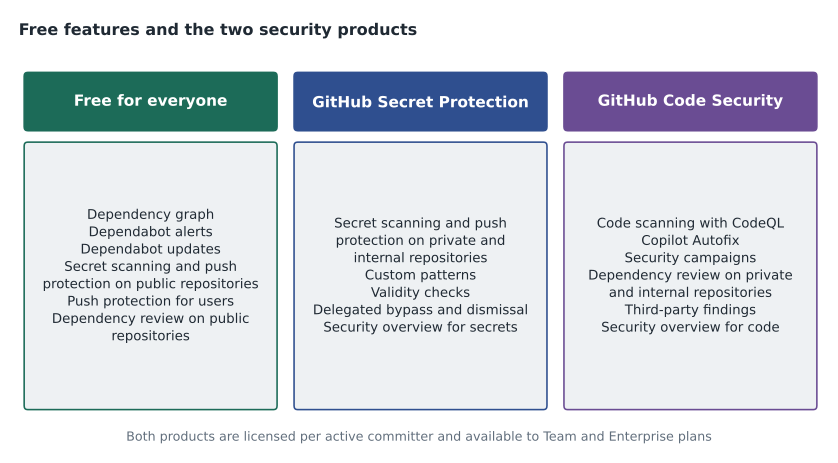
The name GitHub Advanced Security did not disappear. GitHub still uses it as the umbrella term for its security offering, the GH-500 certification is still called GitHub Advanced Security, and enterprises that had signed GHAS agreements before the split kept the combined licence until renewal. When you read older documentation, "GHAS" usually means the combined bundle; in current documentation the two product names are used for specific features.
The GH-500 exam outline that took effect in July 2026 follows the new naming. Its domains are now called "Configure and use Secret Protection (formerly secret scanning)" and "Configure and use supply chain security (formerly Dependabot/Dependency Review)". Each carries 15 to 20 percent of the exam. The other domains cover the security suites in general, Code Security, security operations and administration.
| GH-500 domain (skills as of July 2026) | Weight | Where this program covers it |
|---|---|---|
| Describe GitHub Security suites, features and ecosystem | 15 to 20 percent | MSBA-161 and this lesson |
| Configure and use Secret Protection | 15 to 20 percent | Lessons 2 to 4 of this course |
| Configure and use supply chain security | 15 to 20 percent | Lessons 5 to 10 of this course |
| Configure and use Code Security | 10 to 15 percent | MSBA-361 |
| Security operations: best practices, prioritization and remediation | 15 to 20 percent | Lesson 11 of this course and MSBA-361 |
| GitHub Security suites administration | 10 to 15 percent | MSBA-361 and lessons 1 and 11 |
What everyone gets for free
A surprising amount of GitHub's security tooling costs nothing. Public repositories get secret scanning and push protection without any licence, because a secret leaked in public code is a risk to everyone. The dependency graph, Dependabot alerts, Dependabot security updates and Dependabot version updates are free for every repository, public or private. Push protection for users, which blocks a person from pushing a supported secret to any public repository on GitHub.com, is turned on by default for personal accounts. Dependency review is free on public repositories.
GitHub also offers a free secret risk assessment, launched alongside the new products. It is a point-in-time scan an organization owner can run without buying anything. It looks across public, private, internal and archived repositories and reports how many secrets are exposed, of which types and where, without storing or sharing the secret values themselves. GitHub described it in public preview at launch. For a company deciding whether to buy Secret Protection, it gives a factual starting point instead of a guess.
Worked problem
What Tidewater gets without paying
Tidewater Trail Guides is on the GitHub Team plan. Its TrailCheck app is a public repository; its guidebook production repositories are private. Priya wants to know which of these protections Tidewater has today without buying a security product: secret scanning on TrailCheck, secret scanning on the guidebook repositories, Dependabot alerts on both, and dependency review on the guidebook repositories.
Show solution
- TrailCheck is public, so secret scanning and push protection are available without a licence.
- The guidebook repositories are private, so secret scanning there needs Secret Protection.
- Dependabot alerts are free for all repositories, so both have them as long as they are turned on.
- Dependency review on private repositories is a Code Security feature, so the guidebook repositories do not have it today.
- Tidewater could run the free secret risk assessment to see whether its private repositories hold secrets before deciding to buy Secret Protection.
Active committers and how licences are counted
Both products are licensed per active committer. An active committer is a person who has pushed a commit in the last 90 days to a repository where the product is turned on, counted once no matter how many repositories they push to. If a developer commits to ten protected repositories, they use one licence. If they stop committing for 90 days, the licence is released. Bots and GitHub Apps that commit are not people and are not counted in the same way.
This counting rule changes how a company should roll the products out. Turning Secret Protection on for every repository costs the same as turning it on for one repository if the same people commit to both. Turning it on for a repository with many occasional contributors costs more than its importance might justify. The security overview shows how many committers a given rollout would add before you enable it, and organization owners can see current licence use in the billing settings.
Skerry's numbers, from the work in MSBA-291, were about 1,020 active committers for Secret Protection, which was enabled across the whole enterprise, and about 430 for Code Security, which was enabled only on repositories classified as confidential or restricted. Lorcan Adeyemi-Brooke, the finance partner for technology, wanted a monthly report of both numbers. Seraphine added it to the governance scorecard.
Worked problem
Estimating a monthly cost
Using the launch list prices of 19 US dollars per active committer per month for Secret Protection and 30 US dollars for Code Security, estimate Skerry's monthly list-price cost for 1,020 Secret Protection committers and 430 Code Security committers.
Show solution
- Secret Protection: 1,020 committers multiplied by 19 is 19,380 US dollars a month.
- Code Security: 430 committers multiplied by 30 is 12,900 US dollars a month.
- Together that is 32,280 US dollars a month at list price.
- Enterprise agreements and billing through an Azure subscription can change the actual figure, so the platform team treated this as a ceiling for budgeting, not a quote.
Where the features are turned on
Every security feature can be turned on repository by repository, but at any scale that is the wrong way to do it. The recommended tool is a security configuration: a named collection of settings for secret scanning, push protection, Dependabot, code scanning and the related options, applied to many repositories at once. GitHub provides a GitHub-recommended configuration that turns on the features most organizations want. Organizations and enterprises can create their own configurations and set one as the default for new repositories.
Security configurations can also be enforced. Since September 2026 there are three enforcement choices for an enterprise configuration: don't enforce, enforce for repository owners, and enforce for repository and organization owners. The last option stops even organization owners from changing settings the enterprise has decided on. Skerry's two enterprise configurations, Skerry baseline and Skerry code security, use that strongest setting, while the store-systems organization has its own Stores restricted configuration with stricter push protection rules. MSBA-361 covers security configurations as an administration topic in more depth.
| Configuration | Applied to | Main settings | Enforcement |
|---|---|---|---|
| Skerry baseline | Every repository in the enterprise | Dependency graph, Dependabot alerts and malware alerts, secret scanning, push protection, validity checks | Enforced for repository and organization owners |
| Skerry code security | Repositories with data-classification confidential or restricted | Everything in the baseline plus code scanning default setup and dependency review | Enforced for repository and organization owners |
| Stores restricted | The skerry-stores organization | Baseline plus delegated bypass for push protection and stricter alert routing | Organization configuration |
The security overview
The security overview is the dashboard that ties the features together. At organization and enterprise level it shows how many repositories have each feature enabled, how many alerts are open, how quickly they are being fixed and which repositories carry the most risk. Its coverage view answers the question every auditor asks first: which repositories are not protected? Its risk views and alert lists let a security team filter by severity, alert type, custom property and team.
Seraphine opened the enterprise security overview at the end of the first session and filtered it by the owning-team custom property. Forty repositories had no owning team, which meant their alerts had nobody to go to. That became the first action item: give every repository an owner before trying to fix its alerts.
Free features, licensed features and responsibility
One misunderstanding Freya wanted to stop early was the idea that buying a product transfers responsibility. Secret scanning finds a leaked key; it does not rotate it. Dependabot opens a pull request for a patched version; it does not test or merge it. Attestations prove where an artifact was built; they do not decide whether to run it. Each feature produces information or a proposed change, and each one needs an owner who acts on it. The rest of this course pairs every feature with the human process around it.
Priya wrote a short list in her notebook that she later used at Tidewater: know which repositories are protected, know who owns each alert, know what the first action is for each kind of alert, and measure how long that action takes. Those four questions return in lesson 11 and in the capstone.
Security products on other platforms
Microsoft also sells GitHub Secret Protection and GitHub Code Security for Azure DevOps, under the same product names, so the concepts in this course apply to repositories hosted there as well. Billing there runs through the Azure subscription rather than GitHub. Skerry kept a handful of older pipelines in Azure DevOps for its finance systems, and Seraphine noted that the alert types and the response process would be the same, even though the screens differ. GitHub Enterprise Server customers receive the products through their server licence, with features arriving in each server release some time after they reach GitHub.com, so a feature described in a GitHub.com changelog may not yet be available on a server.
Common mistakes
MistakeSaying GitHub Advanced Security must be bought before any security feature works.
InsteadDependency graph, Dependabot alerts and updates, and secret scanning on public repositories are free; the paid products add features for private and internal code.
MistakeCounting a licence for every repository a developer commits to.
InsteadAn active committer is counted once, however many protected repositories they commit to in 90 days.
MistakeTurning features on one repository at a time across a large organization.
InsteadUse security configurations, set a default for new repositories and enforce where appropriate.
MistakeAssuming an alert is the same as a fix.
InsteadEvery alert needs an owner and a defined first action.
Summary and key terms
- Since April 1, 2025, GitHub sells GitHub Secret Protection and GitHub Code Security as separate products, available to Team and Enterprise plans.
- GitHub Advanced Security remains the umbrella name and the name of the GH-500 certification.
- Dependency graph, Dependabot alerts and updates, push protection for users, and secret scanning on public repositories are free.
- Licences are counted per active committer: a person who pushed to a protected repository in the last 90 days, counted once.
- Security configurations apply and enforce settings across many repositories; the security overview shows coverage and risk.
- GitHub Advanced Security
- GitHub's umbrella name for its security products, formerly a single combined licence.
- GitHub Secret Protection
- The product covering secret scanning, push protection, custom patterns and validity checks for private and internal repositories.
- GitHub Code Security
- The product covering code scanning, Copilot Autofix, security campaigns and premium dependency features for private code.
- Active committer
- A person who has pushed a commit to a repository with the product enabled in the last 90 days.
- Security configuration
- A named set of security settings applied to many repositories and optionally enforced.
- Security overview
- The organization and enterprise dashboard for security coverage, alerts and risk.
- Secret risk assessment
- A free point-in-time scan that reports exposed secrets across an organization.
Practice problems
Work each problem on paper first, then reveal the answer to check.
Which product would a company buy to get secret scanning on its private repositories?
Show answer
GitHub Secret Protection.
A developer commits to 12 repositories that have Code Security turned on. How many licences does she use?
Show answer
One.
What can an organization run before buying anything to see how many secrets it has exposed?
Show answer
The free secret risk assessment.
Lesson quiz · 5 questions
Score 60% or more to complete this lesson.
Create a free account to save your progress, take quizzes and earn a certificate.