
MSBA-360 · Lesson 11 of 12 · 18 min
Prioritizing alerts
▶ Video coming soon A video version of this lesson is on the way.
By the eleventh session Skerry had more alerts than people. There were 1,312 historical secret alerts, now down to 380 open; 3,140 Dependabot alerts that needed a human; and a steady flow of new ones every day. Freya did not ask anyone to work harder. She asked them to work in a different order. "Every team will fix the same things first," she said. "Then we will all know what 'first' means, and so will the auditors."
Why order matters
Most security alerts do not represent equal risk, and treating them as if they did wastes effort on low-risk items while high-risk ones wait. A list sorted by date or by severity alone puts a critical vulnerability in a test tool ahead of a moderate one in the payment service that attackers are actively exploiting. Risk-based prioritization sorts alerts by a combination of how likely they are to be exploited and how much harm exploitation would cause in that particular place.
The GH-500 outline's security operations domain is about exactly this: prioritization, remediation and the best practices around them. It sits alongside the Secret Protection and supply chain domains and carries a similar weight, because a team that cannot prioritize will not get value from the tools.
Prioritizing secret alerts
For secret scanning alerts, the strongest single signal is the validity check. An active secret is a working credential sitting in a place people can read. Next come exposure: a secret in a public repository can be read by anyone, one in an internal repository by every member of the enterprise, one in a private repository by its collaborators. What the secret unlocks matters as well, from extended metadata or the secret type: a production cloud key is worse than a sandbox key. Location affects both exposure and cleanup: a secret in an issue comment may have been read and emailed in notifications. Age cuts both ways: an old secret has been exposed longer, but is also more likely to have been rotated already.
| Priority | Secret alert criteria at Skerry | Target time to revoke |
|---|---|---|
| P1 | Active and in a public repository, or active and granting production access | 4 hours |
| P2 | Active in an internal or private repository, non-production | 2 working days |
| P3 | Unknown validity, provider type, any repository | 10 working days |
| P4 | Inactive, or a non-provider pattern needing review | 30 days to close with a reason |
Prioritizing dependency alerts
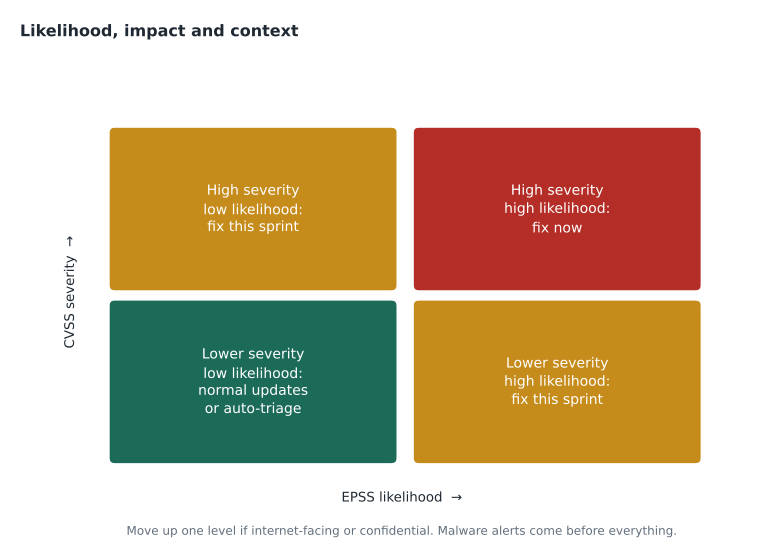
For Dependabot alerts, EPSS estimates likelihood and CVSS severity estimates impact. Context sharpens both. Is the dependency a runtime dependency that ships to production, or only a development tool? Is the repository's service reachable from the internet? Does it handle sensitive data? Skerry's custom properties answered the last two questions: data-classification said how sensitive a repository was, and the platform team added a new property, exposure, with the values internet, internal and offline.
Malware alerts go to the top regardless of other signals, because they may mean compromise has already happened. Vulnerabilities in the CISA Known Exploited Vulnerabilities catalogue, where an advisory references one, are treated like high EPSS scores. Alerts with no patched version available need a different response: a mitigation, a replacement library, or an accepted risk recorded with an owner.
Worked problem
Ordering five alerts
Seraphine has five alerts on her screen: (A) a malware alert on an npm package in a data pipeline; (B) an active sandbox payment key in a private repository; (C) a critical vulnerability with EPSS 0.002 in a development dependency of an internal tool; (D) a high vulnerability with EPSS 0.64 in the internet-facing checkout service; (E) an active production cloud key in an internal repository. In what order should they be handled?
Show solution
- A first: a malware alert is treated as possible compromise.
- E next: an active production credential readable by every enterprise member is P1.
- D next: a likely-exploited vulnerability in an internet-facing service.
- B after that: active but sandbox-only, so P2.
- C last: critical in theory, but unlikely to be exploited and not shipped to production; normal updates or an auto-triage rule handle it.
Using the security overview
The security overview turns these rules into lists. Its alert views can be filtered by alert type, severity, validity, EPSS, custom property, team, repository and age, and filters can be saved as views. Skerry built one saved view per priority level and shared them with every owning team. Each team lead's Monday routine was to open their team's P1 and P2 views, which by the end of November were usually empty.
The overview's metrics pages report how the program is doing rather than what is open: how many secrets push protection blocked and how many were bypassed, how quickly alerts are remediated, and how many are closed by each reason. Freya reported three numbers to the leadership team each month: active secrets open longer than their target, exploit-likely dependency alerts open longer than two weeks, and the median days to fix each category. Raw alert counts were deliberately not on the list, because they rose every time coverage improved.
Assigning alerts to the right people
An alert without an owner waits forever. Ownership starts with the repository: Skerry's owning-team custom property named the responsible team, and alert routing used it. Secret alerts can be assigned to individuals, and since December 2025 anyone who can dismiss or reopen a secret alert can manage its assignees, while assignees can work the alert and unassign themselves. Dependabot alerts are usually owned through the pull requests that fix them.
Who can see and act on alerts is controlled by roles. The security manager role lets a team view and manage security alerts across an organization's repositories without being organization owners. Custom organization and repository roles can include fine-grained permissions for viewing, dismissing or managing secret scanning and Dependabot alerts. Skerry gave application security the security manager role, and gave each owning team a custom repository role, Security triager, that could view and dismiss alerts on its own repositories but not change security settings.
Routing alerts outside GitHub
Most organizations already run a ticketing system and a chat tool for incidents, and they want alerts there. GitHub sends webhooks for security events, such as secret scanning alert, Dependabot alert and security advisory events, to a configured endpoint at repository or organization level, or through a GitHub App. The REST API provides alert lists and updates for scheduled jobs. Several security information and event management products and ticketing tools have ready-made GitHub integrations.
# Webhook events Skerry subscribed its alert-router GitHub App to
secret_scanning_alert            # created, resolved, reopened, assigned
secret_scanning_alert_location   # a new location for an existing secret
secret_scanning_scan             # a scan completed
dependabot_alert                 # created, dismissed, fixed, reintroduced, reopened
exemption_request_secret_scanning  # bypass and dismissal requests
Skerry's alert router was a small GitHub App. On a new secret alert it looked up the repository's owning team, computed the priority from validity and the custom properties, opened a ticket in that team's queue and, for P1, posted in the incident channel. On a Dependabot alert labelled exploit-likely by the auto-triage rule, it did the same. Closing the ticket did not close the alert; closing the alert, through a merged fix or a dismissal with a reason, closed the ticket.
One detail mattered for integrations in November 2026: GitHub changed the business field in some secret scanning audit log events from the enterprise's display name to its slug from November 12, 2026, and recommended filtering on the numeric business identifier. Skerry's audit stream filter used the display name and had to be updated. Small changes like that are why integrations need an owner too.
Remediation at scale
Some problems affect many repositories at once: a vulnerable version of a library used in 120 services, or the same leaked test key copied into 30 repositories. Fixing those one repository at a time is slow. Dependabot security updates help, because the pull requests are created automatically. Grouped security updates reduce their number. Security campaigns, a Code Security feature covered in detail in MSBA-361, collect a set of alerts across repositories into a time-boxed effort with a target date and a contact, and GitHub has been extending campaigns beyond code scanning to supply chain alerts; the GH-500 outline lists remediating supply chain alerts through campaigns.
Skerry ran its first campaign in November on a vulnerable version of an XML parser present in 74 repositories. The campaign listed every affected repository with its owning team, the alert and the Dependabot pull request where one existed. Teams had three weeks. On November 20, 66 of the 74 were fixed; the remaining 8 were in repositories with no working tests, which became a separate problem for the platform team.
Dismissals as evidence
Every dismissal is a decision someone might need to defend. Freya's rule was that a dismissal had to answer three questions in its reason and comment: why the risk is acceptable or the alert wrong, who decided, and when it should be looked at again. Auto-triage rules met the rule through their definitions, which were reviewed like code. For secret alerts, delegated dismissal put the decision with the security team for won't fix and false positive reasons.
Service levels and exceptions
Targets without consequences drift. Skerry's targets were written into an internal standard that the leadership team approved, with a defined way to extend them. A team that could not meet a target for a specific alert, for example because a fix needed a vendor release, could request an extension with a reason and a new date, approved by application security for P2 and below and by Freya for P1. Extensions were tracked in the same scorecard as everything else, and any team with more than three in a quarter was asked to present its plan at the next security review.
Developers in the loop
Prioritization is not only a security team activity. The most effective change Seraphine made was to put each team's own alert lists into the place developers already looked every day. The developer portal's service page showed open P1 and P2 alerts beside build status and deployment history, and the pull request template asked whether the change fixed any open security alert. Developers who could see their own alerts, in their own tools, fixed them faster than developers who received a weekly email from security, by a factor of about three in Skerry's measurements.
Reporting to leadership
The monthly report to Skerry's leadership team fitted on one page. It showed the three numbers from the start of this lesson with their trend over six months, the coverage of each feature across repositories, the largest open risks with their owners and dates, and any extensions granted. Raw alert counts appeared only in an appendix, labelled as context. Lorcan added one line of his own: the licence cost per protected repository, which fell every month as more repositories were brought under the same active committers.
Priorities change
A priority is a judgment made with the information available, and the information changes. EPSS scores are recalculated daily as exploitation activity changes, so an alert that was low likelihood on Monday may be high by Friday. A validity check can turn an unknown secret into an active one. A repository can become internet-facing when a team publishes a new endpoint. Skerry's router recomputed priorities nightly and re-notified owners when an alert moved up a level. In November, 31 alerts moved up because their EPSS scores rose, and two of those were vulnerabilities that were added to the CISA catalogue the following week.
Small teams and priorities
At Tidewater, Priya adapted the priority table to three levels instead of four and set targets in working days, because nobody was on call. The principles stayed the same: active secrets first, likely-exploited vulnerabilities in what ships second, everything else in normal work. Writing the table down took an hour and ended the team's weekly debate about what to fix first.
Common mistakes
MistakeWorking through alerts in date order.
InsteadSort by likelihood and impact, adjusted for exposure and sensitivity.
MistakeReporting raw alert counts to leadership.
InsteadReport time-to-fix and overdue high-priority alerts; counts rise as coverage improves.
MistakeLeaving alerts without an owning team.
InsteadGive every repository an owner and route alerts by it.
MistakeClosing a ticket and assuming the alert is fixed.
InsteadClose tickets from the alert state, which changes only when the fix merges or a reasoned dismissal is made.
Summary and key terms
- Risk-based prioritization combines likelihood, impact and context instead of using date or severity alone.
- Secret alerts are prioritized by validity, exposure, what the secret unlocks, location and age.
- Dependency alerts combine EPSS, severity, runtime scope, internet exposure and data sensitivity; malware comes first.
- The security overview's filters, saved views and metrics turn priorities into team work lists and program measures.
- Roles, assignment, webhooks, the REST API and campaigns route alerts to owners and fix problems across many repositories.
- Risk-based prioritization
- Ordering alerts by likelihood and impact in context.
- Exposure
- How widely a secret or vulnerable service can be reached or read.
- Security manager role
- An organization role that can view and manage security alerts without owner rights.
- Saved view
- A stored set of security overview filters.
- Webhook
- A message GitHub sends to a URL when an event happens.
- Security campaign
- A time-boxed effort to fix a set of alerts across repositories.
- Known Exploited Vulnerabilities catalogue
- CISA's list of vulnerabilities known to be exploited in the wild.
Practice problems
Work each problem on paper first, then reveal the answer to check.
Which signal most strongly raises the priority of a secret alert?
Show answer
A validity check showing the secret is active.
Why did Freya not report raw alert counts?
Show answer
They rise as coverage improves, so they do not show whether risk is falling.
What does the security manager role allow?
Show answer
Viewing and managing security alerts across an organization without being an owner.
Lesson quiz · 5 questions
Score 60% or more to complete this lesson.
Create a free account to save your progress, take quizzes and earn a certificate.