
MSBA-360 · Lesson 4 of 12 · 20 min
Custom patterns and validity checks
▶ Video coming soon A video version of this lesson is on the way.
GitHub's built-in patterns know about hundreds of providers, but they do not know about Skerry. Its store systems use internal service tokens issued by a home-grown gateway, its loyalty program has partner keys in a format it designed in 2018, and its warehouse scanners authenticate with device secrets that look like nothing on the public internet. None of these would ever match a provider pattern. In the fourth session Seraphine set out to change that with custom patterns, and then turned to the other half of the problem: knowing which detected secrets still work.
What a custom pattern is
A custom pattern is a regular expression, defined by an organization, that tells secret scanning what one of its own secrets looks like. Custom patterns can be defined at repository, organization or enterprise level. An enterprise pattern applies to every repository in the enterprise that has Secret Protection; an organization pattern to that organization's repositories; a repository pattern to one repository. Custom patterns need Secret Protection; they are not available on free public scanning.
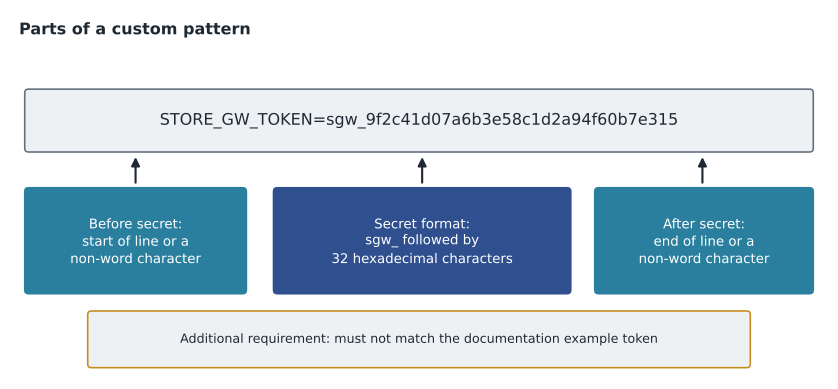
Each custom pattern has a few parts. The secret format is the regular expression for the secret itself. An optional before secret and after secret expression describe what must surround it, which is how you avoid matching the same characters in the middle of a longer string. Optional additional match requirements say what the matched secret must or must not contain. GitHub uses a regular expression syntax based on the Hyperscan library, which supports most common constructs but not every feature of other engines; GitHub's documentation lists the supported syntax.
Designing a precise pattern
A good custom pattern is precise enough that its alerts are worth reading. The best secret formats have a fixed, distinctive prefix and a fixed length or character set. Skerry's store gateway tokens were easy: every one began with sgw_ followed by 32 hexadecimal characters. The loyalty partner keys were harder: 40 characters of letters and digits with no prefix, which on their own would match thousands of harmless strings such as commit identifiers and image hashes.
Secret format:   sgw_[a-f0-9]{32}
Before secret:   (?:\A|[^0-9A-Za-z_])
After secret:    (?:\z|[^0-9A-Za-z_])
Must not match:  sgw_0{32}
For the loyalty keys, Seraphine used context instead of the value. The keys always appeared next to a variable or setting name containing LOYALTY and KEY, so the before-secret expression required that context. That made the pattern miss a key that someone had pasted on its own into a comment, but it turned an unusable pattern into one with very few false positives. She recorded the trade-off in the pattern's description.
Worked problem
Using context to make a vague format precise
Loyalty partner keys are 40 random letters and digits with no prefix. A pattern of just the 40-character format matched 3,900 strings in a dry run, almost all Git commit identifiers. How can the pattern be made usable?
Show solution
- Note that commit identifiers are exactly 40 hexadecimal characters, while loyalty keys use the whole alphabet. A requirement that the match contains at least one letter after f removes most commit identifiers.
- Require context: a before-secret expression matching a setting name such as LOYALTY_PARTNER_KEY followed by an equals sign, colon or quote.
- Run the dry run again. It returned 31 matches, of which 27 were real keys and 4 were examples in old documentation.
- Add a must-not-match requirement for the documentation example, then publish.
Dry runs before publishing
A new pattern is not applied straight away. You first run a dry run, which scans a chosen set of repositories, or all repositories at organization level, and shows up to a set number of sample results without creating any alerts. You examine the results, adjust the expressions and dry-run again until the results are almost all real secrets. Only then do you publish the pattern, at which point secret scanning starts creating alerts for it across the history and new pushes.
Dry runs are where most of the work happens. Seraphine's rule was that a pattern could be published only when at least nine of every ten dry-run results were real secrets. Patterns below that line went back for more context. A pattern that floods teams with false positives does more harm than no pattern, because people learn to dismiss its alerts without reading them.
Push protection for custom patterns
Once a custom pattern has been published and has proved precise, it can be enabled for push protection, so that pushes containing a match are blocked just as provider-pattern secrets are. This is a separate decision for each pattern. Skerry enabled push protection for the store gateway pattern after two weeks with no false positives, and left the loyalty pattern as alert-only, because its reliance on context meant it could be both missed and occasionally misfired.
Editing and managing patterns
Patterns change as systems change. When you edit a published pattern, secret scanning rescans and adjusts alerts. Since October 2026, when an open alert still matches an edited pattern, the alert stays open rather than being closed and reopened, which keeps its history and assignment intact. When a pattern is deleted, you choose whether to close its existing alerts or leave them open.
Ownership of patterns is another practical issue. In December 2025 GitHub made it generally available for enterprise owners and enterprise security managers to edit any custom pattern in the enterprise, not only those they created, which addressed patterns left without an owner when their author moved on. Skerry kept its patterns' expressions, descriptions and dry-run results in its governance repository, so that changes were reviewed like code.
| Pattern | Level | Dry-run precision | Push protection |
|---|---|---|---|
| Store gateway token (sgw_) | Enterprise | 41 of 41 real | Enabled after two weeks |
| Loyalty partner key | Enterprise | 27 of 31 real | Alert only |
| Warehouse scanner device secret | skerry-stores organization | 12 of 13 real | Enabled |
| Legacy reporting service password | One repository | 6 of 9 real | Alert only; system being retired |
Validity checks
The second half of the session turned to the question that decides priority: is a detected secret still working? A validity check answers it. For supported secret types, GitHub sends the detected secret to the provider in a safe way and records whether it is active, inactive or unknown. The result appears on the alert and can be used to filter and sort alerts. Validity checks are part of Secret Protection and must be turned on, usually through a security configuration.
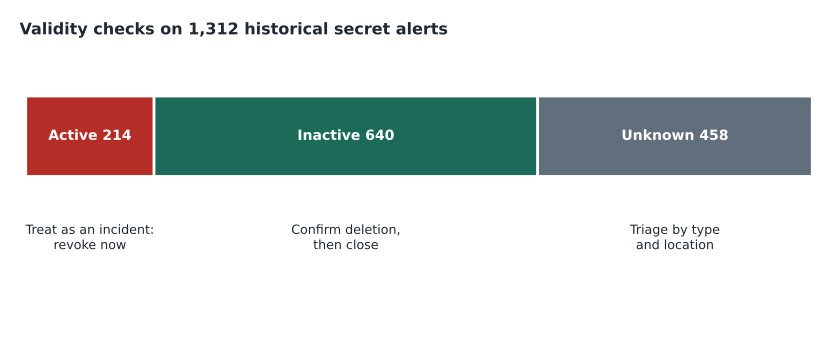
Validity checks are what turned Freya's 1,312 historical alerts into a manageable list. The 214 with an active result were treated as live incidents. The 640 with an inactive result still needed closing with a reason and, where relevant, a check that the old account was gone, but they were not emergencies. The rest, unknown because the type had no check or the provider did not answer, were triaged by type and location.
Validity checks run periodically as well as when the alert is first created, so a key that is rotated later will eventually show as inactive. Teams can also request an on-demand check from the alert. A secret reported inactive is not necessarily harmless: some providers report a key inactive because it has been disabled rather than deleted, and a disabled key can be re-enabled. Inactive means lower priority, not safe to ignore.
Extended metadata and other signals
For some token types, GitHub can show extended metadata gathered with the provider's cooperation, such as the account or organization the token belongs to, its owner's email, or when it was created. That turns "an active key" into "an active key belonging to the data platform's production account", which matters both for priority and for finding the right owner. Extended metadata checks are a newer feature with coverage that varies by provider; check GitHub's current list.
Alerts also carry signals that do not need any provider: whether the secret is in a public repository, whether it was found in a commit or in an issue comment, how many locations it appears in and how old it is. A secret in a public repository is exposed to everyone; one in an issue comment may have been read by every collaborator; one in 30 locations is probably copied into a script that many people use. Lesson 11 combines these signals into a priority order.
Revoking GitHub's own tokens
GitHub tokens are a special case, because GitHub is both the scanner and the issuer. When a GitHub token is found in a public repository, GitHub revokes it automatically. For private and internal repositories on GitHub.com, GitHub has offered, in public preview, a revocation action on the alert that lets an authorized user revoke a detected GitHub token directly. In October 2026 that action was extended to base64-encoded classic and fine-grained personal access tokens, OAuth access tokens and GitHub App user access tokens, which GitHub decodes automatically.
Worked problem
Choosing what to do with an inactive alert
A historical alert shows a payment provider live key in a 2019 commit, and the validity check reports inactive. The team that owned it no longer exists. Should Seraphine close it as revoked?
Show solution
- Inactive is strong evidence the key no longer works, but she confirms with the payment provider's dashboard that the key was deleted, not merely disabled.
- The dashboard shows it was rolled in 2020. That is a revocation, so revoked is the right closing reason.
- She adds a comment with the date and the evidence so that an auditor can see why it was closed.
- Because the old team no longer exists, she also checks that the repository has a current owning team, so future alerts have somewhere to go.
Custom patterns at different levels
Choosing the level for a pattern is a design decision. An enterprise pattern is the right place for a credential format that can appear anywhere, such as Skerry's store gateway tokens, which developers in every organization might copy into a script. An organization pattern suits a format that only one part of the business uses, such as the warehouse scanners' device secrets, which only skerry-stores developers handle. A repository pattern is useful for a temporary or very local secret, such as the legacy reporting service's password, which was due to disappear with its system.
Levels also affect who can manage the pattern and who sees its alerts. Enterprise patterns are managed by enterprise owners and enterprise security managers, organization patterns by organization owners and security managers, and repository patterns by repository administrators. Skerry kept most patterns at enterprise level, so that one team owned them, and used the lower levels sparingly. Seraphine wrote a short checklist for anyone proposing a new pattern: what system issues the secret, who owns that system, what the format is, what dry run results look like, and who should receive its alerts.
How many patterns is too many
Patterns cost attention. Each one adds alerts that someone has to triage, and imprecise patterns teach people to ignore alerts. Skerry set a rule that every pattern must be reviewed every six months against its alert history: patterns whose alerts were mostly closed as false positives were tightened or removed, and patterns with no alerts for a year were checked to see whether the system they protected still existed. In the first review, one pattern for a decommissioned payroll interface was removed and its remaining open alerts closed with a comment explaining why.
Validity checks also change how teams talk about alerts. Before they were turned on, Skerry's teams argued about whether old credentials still worked; afterwards the argument was settled by the alert itself, and the time spent on each historical alert fell sharply. Seraphine called it the cheapest improvement of the whole program.
Common mistakes
MistakePublishing a custom pattern straight after writing it.
InsteadDry-run it, review the results and publish only when nearly all matches are real secrets.
MistakeEnabling push protection for a new, untested custom pattern.
InsteadRun it as alert-only first and enable push protection once it has proved precise.
MistakeTreating an inactive validity result as proof that a secret is harmless.
InsteadInactive lowers priority; confirm deletion with the provider before closing as revoked.
MistakeKeeping pattern definitions only in the settings screen.
InsteadStore patterns and their dry-run results in version control so changes are reviewed and owned.
Summary and key terms
- Custom patterns are organization-defined regular expressions for internal secrets, at repository, organization or enterprise level.
- Before-secret, after-secret and additional requirements make vague formats precise; dry runs test them without creating alerts.
- A proven custom pattern can be enabled for push protection, as a separate decision per pattern.
- Validity checks report whether a detected secret is active, inactive or unknown, and are the main input to priority.
- Extended metadata and alert context help identify owners and exposure; GitHub tokens can be revoked by GitHub itself.
- Custom pattern
- An organization-defined regular expression that secret scanning uses to find its own secrets.
- Secret format
- The part of a custom pattern that matches the secret value.
- Before secret and after secret
- Expressions describing what must surround the secret for a match.
- Dry run
- A test of a custom pattern that shows sample matches without creating alerts.
- Validity check
- A check with the provider reporting whether a secret is active, inactive or unknown.
- Extended metadata
- Provider-supplied details about a detected token, such as its owner or account.
Practice problems
Work each problem on paper first, then reveal the answer to check.
Why should a custom pattern be dry-run before publishing?
Show answer
To check its precision without creating alerts, and adjust it until nearly all matches are real.
What are the three results a validity check can give?
Show answer
Active, inactive or unknown.
What changed in October 2026 for alerts on edited custom patterns?
Show answer
Open alerts that still match stay open instead of being closed and reopened.
Lesson quiz · 5 questions
Score 60% or more to complete this lesson.
Create a free account to save your progress, take quizzes and earn a certificate.