
MSBA-360 · Lesson 3 of 12 · 21 min
Push protection
▶ Video coming soon A video version of this lesson is on the way.
Secret scanning tells you about a secret after it is in the repository. By then the damage is done: the value is in history, it may have been cloned, and it has to be rotated. In the third session Seraphine put it bluntly. "Every alert we closed last week was a secret that push protection would have stopped if it had existed when it was pushed. From now on, the goal is that new alerts are rare."
What push protection does
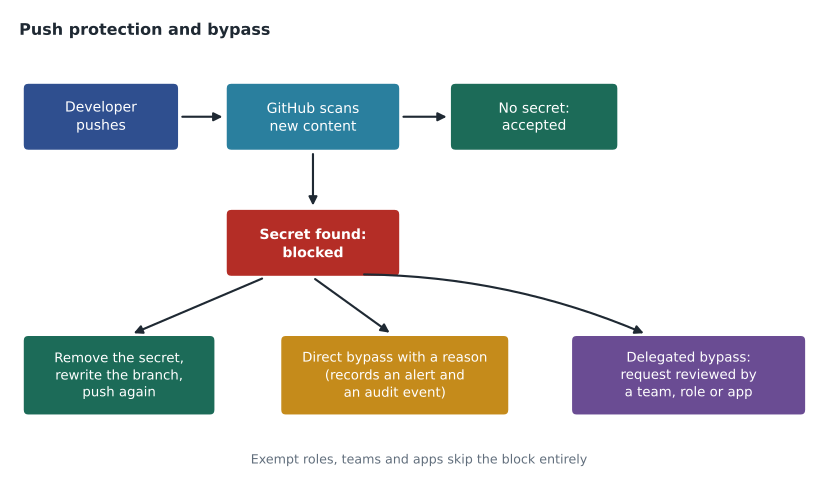
Push protection checks content for secrets before it is accepted. When a developer pushes commits from the command line, uploads a file through the web interface, commits through the web editor or creates content through the REST API, GitHub scans the incoming changes. If it finds a supported secret, it blocks the push and tells the developer what it found, where, and what to do. Nothing is written to the repository, so there is nothing to rotate if the developer removes the secret and pushes again.
Push protection works on the high-confidence patterns, mostly provider patterns, because blocking a push on a false positive is disruptive. Organizations can also include custom patterns in push protection once they are confident the pattern is precise. GitHub keeps a list of which secret types are supported by push protection; it is a subset of the types secret scanning detects.
Push protection can be enabled per repository, through a security configuration for many repositories, or by default for new repositories. Like secret scanning, it is free for public repositories and part of Secret Protection for private and internal ones. Separately, push protection for users protects people rather than repositories: it blocks a person from pushing supported secrets to any public repository on GitHub.com, and it is on by default for personal accounts.
What a blocked push looks like
A developer pushing from the command line sees the block in the remote's response. The message names the secret type, the file and line, and the commit, and gives a link for the bypass options. Teodric Nnaji-Lund, a developer on Skerry's commerce team, volunteered to show what happened when he tried to push a test branch that still contained a payment sandbox key.
git push origin checkout-retry-tests

remote: error: GH013: Repository rule violations found for refs/heads/checkout-retry-tests.
remote:
remote: - GITHUB PUSH PROTECTION
remote:   —————————————————————————————————————————
remote:     Resolve the following violations before pushing again
remote:
remote:     - Push cannot contain secrets
remote:
remote:       (?) To push, remove secret from commit(s) or follow this URL to allow the secret.
remote:
remote:       —— Payment API Test Key ——————————————————
remote:        locations:
remote:          - commit: 8c41e2a
remote:            path: tests/fixtures/gateway.env:3
 ! [remote rejected] checkout-retry-tests -> checkout-retry-tests (push declined due to repository rule violations)
The right response is almost always to remove the secret from the commit. If the secret is in the most recent commit, the developer edits the file, amends the commit and pushes again. If it is buried in an older commit on the branch, the developer rewrites the branch, for example with an interactive rebase, so that no commit contains it. Because the push was blocked, the secret never reached GitHub, and nothing needs rotating unless the secret was exposed somewhere else first.
Worked problem
Fixing a blocked push
Teodric's branch has three commits. The sandbox key was added to tests/fixtures/gateway.env in the first commit and is still there in the third. How should he fix the branch?
Show solution
- Removing the key in a fourth commit is not enough, because push protection scans every commit being pushed and the first commit still contains the key.
- He rewrites the branch so that the first commit never adds the key: an interactive rebase that edits the first commit, or recreating the branch from main and reapplying the changes.
- He moves the key into the repository's GitHub Actions secrets for the test workflow, and the fixture now reads an environment variable.
- He pushes again. The push succeeds and no alert is created, because the secret never reached the repository.
Bypassing push protection
Sometimes a developer has a good reason to push something push protection flags: a fake key in a test fixture that happens to match a real pattern, or a string that is not a secret at all. Push protection therefore allows a bypass. Following the link in the message, the developer chooses one of three reasons: it's used in tests, it's a false positive, or I'll fix it later. The push is then allowed for that secret for a short time.
Every bypass leaves a trace. When a developer bypasses with "I'll fix it later", GitHub creates an open secret scanning alert, because the secret is now in the repository and needs attention. A bypass as used in tests or as a false positive creates an alert that is closed with that reason, so security teams can review the decision. The bypass itself is recorded in the audit log, and organization owners and security managers receive notification of bypasses.
| Bypass reason | What GitHub records | What should happen next |
|---|---|---|
| It's used in tests | A closed alert with the used-in-tests reason and an audit log event | Security reviews whether the value really is a test value |
| It's a false positive | A closed alert with the false-positive reason and an audit log event | Security reviews; if the pattern is custom, consider tightening it |
| I'll fix it later | An open alert and an audit log event | The secret is treated as exposed: revoke and replace |
Delegated bypass
Letting every developer bypass push protection is fine for many organizations, but not for repositories where a single leaked credential could be costly. Delegated bypass removes the developer's ability to bypass on their own. Instead, a developer whose push is blocked submits a bypass request with a comment explaining why. A designated reviewer approves or denies it. If approved, the developer can push the specific secret for a limited time; if denied, the developer must remove it.
Reviewers are set in the security configuration as a bypass list. Over 2025 GitHub broadened who can be on that list. Delegated bypass controls became available at the enterprise level in September 2025, and in December 2025 GitHub made it generally available to delegate bypass permissions to enterprise teams, organization roles and GitHub Apps, and removed the earlier requirement that the bypass list contain at least one actor. Custom roles with the fine-grained bypass permission can also review requests.
Skerry turned delegated bypass on in the Stores restricted configuration for skerry-stores, where point-of-sale and payment code lives, with the application security team as reviewers. In the main skerry organization developers could still bypass directly, but every bypass was reviewed weekly.
Worked problem
Reviewing a bypass request
A developer in skerry-stores submits a bypass request for a string in a log-parsing test. The comment says it is a sample token from vendor documentation. Seraphine is the reviewer. What should she check before approving?
Show solution
- Open the request and look at the detected secret type and the exact string.
- Compare it with the vendor's documentation: published sample tokens are usually marked as examples and do not authenticate.
- If a validity check is available for that type, check whether it reports active. An active result means it is not a sample.
- If it is a genuine sample, approve with a note, and suggest replacing it with an obviously fake value so the test does not trigger push protection again.
- If there is any doubt, deny. The developer can always push a fake value instead.
Bypass requests can be managed in the web interface, through webhooks, and since February 2025 through the REST API, which lets teams handle them from a chat or ticketing tool. Requests expire if nobody reviews them, so a delegated bypass rollout needs reviewers with time set aside and a target response time. Skerry set four working hours.
Exemptions
Some actors should never be blocked by push protection: for example, a GitHub App that mirrors repositories from a system that has its own scanning, or a migration tool pushing historical content during a planned move. In March 2026 GitHub added push protection exemptions, configured through security configurations at organization and enterprise level. Exempt roles, teams and apps skip push protection entirely; their pushes are not blocked and no bypass request is created. A few days later GitHub added the ability to manage exemptions from repository settings as well.
Exemptions are powerful, and the platform team treated them as exceptions to be justified. Skerry exempted exactly one actor, the migration app used for the last Enterprise Server weekends in MSBA-291, and removed the exemption when the migration finished. Secret scanning still scanned what the app pushed, so anything it brought in still produced alerts.
| Control | Who decides | Effect on the push | Record created |
|---|---|---|---|
| Direct bypass | The developer, choosing a reason | Allowed for that secret | Alert (open or closed by reason) and audit event |
| Delegated bypass | A reviewer from the bypass list | Allowed only after approval | Request, decision, alert and audit events |
| Exemption | Configured in advance for a role, team or app | Never blocked | No bypass request; secret scanning still creates alerts for what is pushed |
Where push protection does not help
Push protection only sees content as it reaches GitHub. It cannot stop a developer from pasting a key into a chat message, saving it in a shared document or committing it to a repository on another platform. It also cannot help with secrets that were never in a recognized format. And it does nothing for content that was pushed before it was turned on, which is why Skerry still had more than a thousand historical alerts.
For that reason Freya paired push protection with two other habits. Developers were encouraged to install a local pre-commit secret check, so that most problems were caught before a push, and every team stored credentials in a vault and read them at run time, so that there was less reason to have a secret in a file at all. Push protection then became the last line rather than the only line.
Measuring push protection
Two numbers tell you whether push protection is working. The first is blocks: how many pushes were stopped. That number should be well above zero in the first months and then fall as habits change. The second is bypasses, broken down by reason. A high share of "I'll fix it later" means secrets are getting in on purpose; a high share of false positives means a pattern needs attention. The security overview's secret scanning metrics page shows both.
In its first month on the new enterprise, Skerry's push protection blocked 173 pushes. Developers bypassed 22 of them: 9 as used in tests, 8 as false positives and 5 as I'll fix it later. All five of the last group were reviewed and the secrets rotated within two days. Freya set a target of fewer than two such bypasses a month by spring.
Push protection and the web editor
Push protection is not only a command-line feature. When a developer edits a file in the browser or uploads a file through the web interface and the content contains a supported secret, GitHub shows a warning in the page before the commit is made, with the same choices: remove the secret, or bypass with a reason. Delegated bypass applies there too; GitHub added delegated bypass for web uploads in 2024. Content created through the REST API, for example by a script that writes files, is checked as well, and a blocked API request returns an error that names the push protection rule. Skerry's platform team updated two internal tools that created repositories from templates, because their error handling had treated the push protection response as a generic failure and retried endlessly.
Priya asked how Tidewater should start, with no security team to review bypass requests. Seraphine's advice was to turn on push protection everywhere it was available, leave direct bypass allowed, and read the weekly list of bypasses as a team. For a team of six, that conversation was worth more than any approval workflow.
Common mistakes
MistakeRemoving the secret in a new commit after a blocked push.
InsteadRewrite the branch so that no commit being pushed contains the secret.
MistakeTreating a bypass as harmless because the push succeeded.
InsteadEvery bypass is recorded; "I'll fix it later" creates an open alert that needs revocation.
MistakeTurning on delegated bypass without assigning reviewers time to respond.
InsteadName reviewers, set a response target and monitor expired requests.
MistakeGranting exemptions to whole teams of developers for convenience.
InsteadExempt only specific automation with a documented reason and remove it when no longer needed.
Summary and key terms
- Push protection scans pushes, web uploads, web edits and API content and blocks supported secrets before they are stored.
- Push protection for users protects personal accounts pushing to public repositories by default.
- Developers can bypass with a reason; each bypass is recorded and "I'll fix it later" creates an open alert.
- Delegated bypass replaces direct bypass with requests reviewed by designated teams, roles or apps.
- Exemptions, added in March 2026, let specific roles, teams or apps skip push protection entirely.
- Push protection
- Scanning of incoming content that blocks supported secrets before they reach the repository.
- Push protection for users
- Protection on a personal account that blocks pushes of supported secrets to public repositories.
- Bypass
- Allowing a push that push protection blocked, with a recorded reason.
- Delegated bypass
- A setting under which bypasses need approval from designated reviewers.
- Bypass request
- A developer's request, with a comment, to push a blocked secret.
- Bypass list
- The roles, teams or apps allowed to review bypass requests.
- Exemption
- A configured actor that push protection never blocks.
Practice problems
Work each problem on paper first, then reveal the answer to check.
What happens when a developer bypasses push protection with "I'll fix it later"?
Show answer
The push is allowed and an open secret scanning alert is created.
What changes when delegated bypass is turned on?
Show answer
Developers cannot bypass on their own; they submit a request that a reviewer approves or denies.
When did GitHub add push protection exemptions for roles, teams and apps?
Show answer
March 2026.
Lesson quiz · 5 questions
Score 60% or more to complete this lesson.
Create a free account to save your progress, take quizzes and earn a certificate.