
MSBA-320 · Lesson 7 of 12 · 19 min
Journals and posting
▶ Video coming soon A video version of this lesson is on the way.
Most vouchers in the ledger come from subledgers: invoices, payments, inventory movements and depreciation. But every finance team also posts entries by hand: accruals, reclassifications, corrections, payroll from an outside provider and month-end adjustments. In Finance these are entered in journals. The seventh session covered how journals are set up, controlled and posted, and how Cobalt Ridge would make sure that manual entries followed the same discipline as automated ones.
Journals, journal names and vouchers
A journal in Finance has a header and lines. The header identifies the journal by a number, a description and, most importantly, a journal name. The lines hold the entries: each line has a date, an account, an offset account if needed, a description, an amount and a voucher number. A voucher is a group of lines that balance, and it is the unit that posts to the ledger. One journal can contain many vouchers, such as thirty accruals entered together at month end, each balancing on its own.
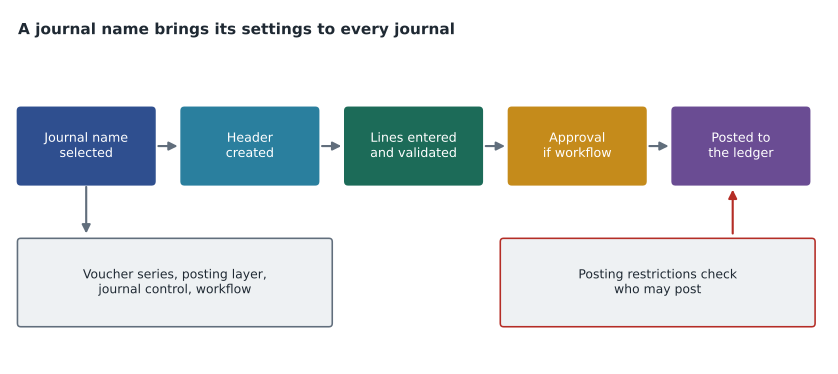
The journal name is the setup that controls how a journal behaves. It is created on the Journal names page in each legal entity, and it decides the journal type, the number sequence used for vouchers, whether vouchers are numbered by change in date or balance, the default posting layer, whether approval workflow is required, which accounts are allowed and who can post. Users choose a journal name when they create a journal, so the design of journal names is really the design of the journal controls.
Journal types
Each journal name has a journal type. The type controls which pages and features the journal uses. The most common is Daily, used for the general journal. Others include Allocation for allocation journals produced by allocation rules, Periodic for recurring entries that are copied into other journals, Approval for vendor invoice approval journals, Elimination for consolidation eliminations, and journal types used by specific modules such as fixed assets, payments and vendor invoices. Cobalt Ridge needed only a handful of journal names for general ledger work.
| Journal name | Type | Purpose | Workflow |
|---|---|---|---|
| GENJRN | Daily | General entries and corrections | Approval above 50,000 |
| ACCRUAL | Daily | Month-end accruals with reversing entries | Approval by controller |
| PAYROLL | Daily | Imported payroll from the provider | No; restricted to integration user |
| RECURRING | Periodic | Rent, insurance and service contracts | Approved when set up |
| ALLOC | Allocation | Output of ledger allocation rules | No |
| ELIM | Elimination | Consolidation eliminations | Controller only |
Voucher series and numbering
Each journal name is linked to a voucher series, a number sequence that numbers the vouchers created in journals of that name. Many companies give each journal name its own series, so that a voucher number like ACR-CRCA-002315 immediately shows that it was an accrual in CRCA. Annelise did exactly that, following the numbering convention from the foundation course. The journal name also has a New voucher setting that decides when a new voucher number is taken: only one voucher number for the whole journal, a new number whenever the lines balance, or a new number manually. For accruals, a new voucher when balanced was the most practical choice.
Posting layers
Every voucher posts to a posting layer. Current is the default layer for normal transactions. Operations and Tax are additional layers that companies can use for adjustments that should appear in some reports but not others, for example tax-basis adjustments that the tax return needs but the management accounts do not. Financial reports and the trial balance can include or exclude layers. Cobalt Ridge used Current for nearly everything and the Tax layer for a small number of year-end adjustments that brought book depreciation to the tax basis in the US. The journal name sets the default layer, and users can only change it if the journal name allows.
Journal controls
The Journal control settings on a journal name restrict which accounts can be used. You can list main accounts, ranges or account types that are allowed or excluded on that journal name. Cobalt Ridge used journal control on PAYROLL so that the payroll import could only post to salary, benefits, payroll tax and payroll liability accounts. If the provider's file contained a line for any other account, the journal would refuse it. This is a much stronger control than a policy document, because it is enforced at entry.
Worked problem
Designing journal controls for payroll
The payroll file sometimes contains a line for an employee advance, which should post to an asset account, 140500 Employee advances. Thandeka wants the PAYROLL journal to allow salary expense 610000..619999, payroll liabilities 230000..234999 and the advances account, and nothing else. How should journal control be set?
Show solution
- Open the PAYROLL journal name and turn on journal control for the ledger account type.
- Add the allowed ranges 610000..619999 and 230000..234999.
- Add the single account 140500 as allowed.
- Test by importing a file with a line to a travel account and confirm it is rejected.
Answer: Allow the two ranges and the advances account in journal control. Anything else is blocked when the journal is validated or posted.
Posting restrictions
Posting restrictions on a journal name control who can post journals of that name. They can be set by user group or by user. If restrictions are on, only the listed users or groups can post, even though other users can create and enter the journal. At Cobalt Ridge, any accountant could prepare a GENJRN journal, but only the senior accountants and the controller could post it. Combined with workflow, this meant every manual entry had a preparer and a reviewer.
Approval workflow for journals
Journal names can require approval before posting. With approval on, either a fixed approver group must approve each journal, or a ledger daily journal workflow routes the journal using conditions such as the total amount, the accounts used or the person who submitted it. Cobalt Ridge used workflow for GENJRN, with automatic approval below 50,000 and controller approval above it, and controller approval for every ACCRUAL journal. The workflow concepts are the same ones covered in the foundation course: conditions, assignments, escalation and delegation. A journal under review cannot be posted until it is approved, and if it is changed after approval it returns to the workflow.
Validating and posting
Before posting, users can Validate a journal. Validation checks balances, account combinations against account structures, period status, currencies, journal controls and other rules, and lists any errors without posting. Post performs the same checks and, if everything passes, writes the vouchers to the ledger. A post option can transfer lines with errors to a new journal so the valid lines post and the problem lines can be fixed separately, which is useful for large imported journals. Large journals can also be posted in a batch, so the user does not wait while thousands of lines are processed.
Reversing entries
Accruals are typically reversed at the start of the next period. A journal line can be marked as a reversing entry with a reversing date. When the journal posts, the system posts the original entry and, on the reversing date, an equal and opposite entry. Thandeka's team accrued unbilled freight every month end. With reversing entries, the October 31 accrual automatically reversed on November 1, and the real freight invoices posted during November against the same expense account. No one had to remember to reverse anything.
| Date | Entry | Freight expense 512300 | Accrued liabilities 225100 |
|---|---|---|---|
| October 31 | Accrual | Debit 18,400 | Credit 18,400 |
| November 1 | Automatic reversal | Credit 18,400 | Debit 18,400 |
| November 12 | Freight invoice posted | Debit 18,950 | Payable credited |
| Net in November | Debit 550 | Zero |
Periodic journals
Recurring entries, such as monthly rent on the Denver warehouse or an insurance prepayment released each month, can be stored in a periodic journal with a frequency. Each month, an accountant retrieves the periodic journal into a daily journal, reviews it and posts it. The periodic journal remembers when it was last used, so it will not be retrieved twice for the same period. Annelise set up four periodic journals for each company and added the retrieval step to the month-end checklist.
The global general journal
Finance also provides a global general journal, which lets a user create general journals for several legal entities from one page. It is useful for a shared service centre like Thandeka's, which handles accounting for all three companies. Each journal still belongs to one legal entity and follows that company's journal names, controls and workflow. For postings that cross companies within one voucher, intercompany accounting is used instead, as lesson 8 explains.
Journals in Excel
Many accountants prefer to prepare large journals in a spreadsheet. Finance supports this with the Microsoft Excel add-in through the Open in Microsoft Office option on journal pages. A user can open the journal lines in Excel, enter or paste hundreds of lines, and publish them back to the journal, where the usual validation, workflow and posting apply. Annelise showed the team how to download a blank journal template, but stressed that Excel is only an entry tool: every control still runs when the lines reach Finance.
Common posting errors
Thandeka asked which errors her team would see most often. Annelise listed the usual ones from her previous projects. The period is closed or on hold for the module: the accounting date falls in a period that has been locked, so the user must either change the date or ask the controller to reopen. The combination is not valid: a required dimension is missing or a value is suspended for the company, which the account structures and overrides from earlier lessons were designed to catch. The voucher does not balance: debits and credits differ within a voucher, often because a line was deleted. The account does not allow manual entry: someone tried to post to a control account. The journal is not approved: workflow is on and the journal has not finished approval.
Each of these is the system doing its job. Annelise recommended against creating a general suspense account where users could park lines that failed validation, a common habit from older systems. A suspense account fills up quickly and must be cleared at every close. It is better to fix the cause, whether that is a missing default dimension, a period setting or a misunderstanding about which account to use. The error lists produced by Validate name the line and the reason, which makes fixing the cause practical.
Continuous voucher numbers
The foundation course decided that voucher number sequences at Cobalt Ridge would be continuous, so that there would be no gaps in voucher numbers. Some auditors and some tax authorities expect this. Continuous sequences have a small performance cost and require the system to keep track of numbers that were taken but not used, for example when a user deletes a journal before posting. Those numbers are recycled or listed for review through the number sequence cleanup process. Annelise checked with the Mexican controller that CRMX's voucher series met local expectations, and added the cleanup job to the batch schedule.
Inquiry after posting
After posting, vouchers can be found through Voucher transactions and the trial balance. The trial balance can drill from a balance to the transactions behind it and from a voucher to the journal it came from. The Audit trail shows who posted what and when. Thandeka asked her team to start every month-end review from the trial balance and to drill down from there, rather than from spreadsheets exported from the old system.
Journal design checklist
At the end of the session Annelise gave the team a checklist for designing any new journal name. Who will prepare journals of this name, and who will post them? Which accounts should be allowed, and which must never appear? Does it need approval, and above what amount? Which voucher series will make its vouchers easy to recognize? Which posting layer should it use? Will it be used for imports, and if so, how will rejected lines be handled? Asking these questions before creating a journal name avoids the common problem of one all-purpose journal used for everything, which makes controls weak and audit trails hard to follow. Thandeka kept the checklist with the design document so it would be used for every new journal name after go-live.
Common mistakes
MistakeUsing one journal name for every kind of manual entry.
InsteadCreate journal names for each purpose so voucher series, controls and workflow fit the entries.
MistakeRemembering to reverse accruals by hand.
InsteadMark accrual lines as reversing entries with the reversing date.
MistakeLetting imported journals post to any account.
InsteadUse journal control to limit integration journals to the accounts they should use.
MistakeGiving everyone who prepares journals the right to post them.
InsteadUse posting restrictions and approval workflow so preparation and posting are separated.
Summary and key terms
- Journals have a header with a journal name and lines grouped into balanced vouchers.
- The journal name sets the journal type, voucher series, posting layer, approval, journal control and posting restrictions.
- Current is the default posting layer; Operations and Tax layers hold adjustments that some reports exclude.
- Validate checks a journal without posting; reversing entries and periodic journals automate accruals and recurring entries.
- The global general journal and the Excel add-in help shared service teams enter journals, with all controls still applied.
- Journal name
- The setup that controls a journal type, voucher numbering, controls and workflow.
- Voucher
- A balanced group of journal lines that posts to the ledger as one unit.
- Posting layer
- A layer such as Current, Operations or Tax that separates kinds of postings for reporting.
- Journal control
- Journal name settings that allow or exclude accounts on journals of that name.
- Posting restriction
- A journal name setting that limits who can post journals.
- Reversing entry
- A journal line that automatically posts an opposite entry on a chosen date.
Practice problems
Work each problem on paper first, then reveal the answer to check.
What is the difference between Validate and Post?
Show answer
Validate checks the journal and lists errors without posting; Post runs the same checks and posts if they pass.
How does Cobalt Ridge separate preparation from posting of general journals?
Show answer
Posting restrictions limit who can post, and approval workflow requires review above a threshold.
Why is the freight accrual net only 550 in November?
Show answer
The accrual reversed on November 1, so only the difference between the accrual and the actual invoice remains.
Lesson quiz · 5 questions
Score 60% or more to complete this lesson.
Create a free account to save your progress, take quizzes and earn a certificate.