
MSBA-320 · Lesson 6 of 12 · 18 min
Currencies and exchange rates
▶ Video coming soon A video version of this lesson is on the way.
Cobalt Ridge was a three-currency group from January 2027: Canadian dollars, US dollars and Mexican pesos, plus the euros it paid to a German supplier of seals and bearings. Thandeka's old system handled foreign currency with a monthly spreadsheet of rates typed in by hand, and month-end revaluation took a full day. The sixth session covered how Finance stores currencies and rates, how it converts amounts on every voucher, and how rates can be imported automatically.
Three currencies on every voucher
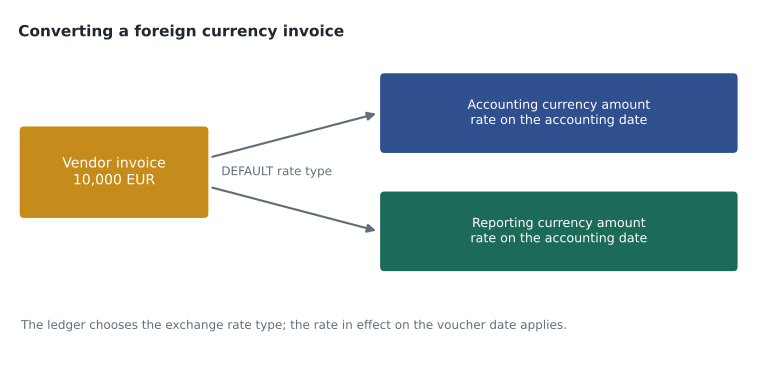
Every amount in the general ledger is recorded in up to three currencies. The transaction currency is the currency of the document or journal line: the euros on the German supplier's invoice. The accounting currency is the currency in which the legal entity keeps its books, set on the Ledger page: Canadian dollars for CRCA. The reporting currency, if one is set on the ledger, is a second currency in which every amount is also recorded: Canadian dollars for the group, which for CRCA is the same as its accounting currency. When the transaction currency is the accounting currency, the conversion is one to one.
The Currencies page
Currencies are shared setup, created on the Currencies page and identified by their ISO codes, such as CAD, USD, MXN and EUR. Each currency has a name, a symbol and rounding rules. The general rounding rule controls how amounts are rounded in the ledger; separate rules can be set for purchase orders, sales orders and prices. Mexico, Canada, the US and the euro area all use two decimals, so Cobalt Ridge kept the standard rounding of 0.01. A currency with no subunits, such as the Japanese yen, would use a rounding of 1. Finance ships with a standard list of currencies, so in practice the task is usually to check the settings rather than to create currencies.
Exchange rate types
Rates are stored under exchange rate types, named sets of rates for different purposes. A company might keep a Default type for daily transactions, a Budget type with planning rates fixed for the year, and an Average type used in consolidation for income statement translation. The ledger chooses which type to use for which purpose: the default exchange rate type for transactions and the budget exchange rate type for budget amounts. Consolidation setup chooses types for translation, as lesson 10 explains.
| Exchange rate type | Used for | How rates are maintained |
|---|---|---|
| DEFAULT | Transactions in all three companies | Imported daily from a provider |
| BUDGET | Budget amounts | Set once a year by the controller |
| AVERAGE | Translating profit and loss in consolidation | Monthly average calculated and entered at month end |
| CLOSING | Translating balance sheet in consolidation and revaluation | Month-end rate imported from the provider |
Entering rates
Within an exchange rate type, rates are entered for currency pairs on the Currency exchange rates page. Each pair, such as EUR to CAD, has a list of rates with a start date. A rate applies from its start date until the next rate's start date, so the system always finds the rate in effect on a transaction's accounting date. Rates can be entered in either direction, and the system calculates the inverse when it needs the other direction. Each pair also has a conversion factor, which lets rates be quoted per 1, per 100 or per 1,000 units; this matters for currencies whose rates are very small or very large numbers.
Finance can also use triangulation. If a rate is not stored for a pair, the system can calculate it through a third currency, such as converting MXN to EUR through USD. Some countries and some company policies require triangulation through a specific currency. Annelise preferred to store direct rates for every pair Cobalt Ridge used, because direct rates from a provider were easier to explain to auditors.
Worked problem
Converting a euro invoice
CRUS posts a vendor invoice for 10,000 euros on November 16, 2026. In the DEFAULT exchange rate type, the EUR to USD rate starting November 13 is 1.09, and the next rate starts November 17. What is the accounting currency amount, and which rate applies?
Show solution
- Find the rate in effect on the accounting date, November 16: the rate that started November 13.
- Multiply the transaction amount by the rate: 10,000 times 1.09.
- The voucher records 10,000 EUR in transaction currency and 10,900 USD in accounting currency.
- The reporting currency amount is calculated in the same way using the rate from EUR to the reporting currency.
Answer: 10,900 US dollars, using the rate that started on November 13. The rate starting November 17 does not apply yet.
Importing rates from providers
Typing rates by hand is slow and error prone. Finance can import rates automatically through exchange rate providers. Providers are set up on the Configure exchange rate providers page, which lists the providers available in the environment. Microsoft includes connections to some central bank sources, and other providers, including commercial rate services, are available through partners and AppSource or can be built by a developer with the provider framework. The Import currency exchange rates process then retrieves rates for a chosen exchange rate type and date range. Like other periodic tasks, it can run as a recurring batch job, so rates are in place each morning before users start posting.
Cobalt Ridge chose a provider that offered rates for all four of its currencies and set the import to run every business day at 6:00 a.m. Eastern time into the DEFAULT type. The import would also create the month-end rates in the CLOSING type on the last business day of each month. AVERAGE rates would be calculated by the treasury analyst from the daily rates and entered at month end, a choice Thandeka made so that the method matched the one the auditors had accepted in the past.
Reporting currency in more detail
The reporting currency on the ledger is not the same as translation during consolidation. When a ledger has a reporting currency, every voucher converts its transaction amount directly into the reporting currency at the rate in effect on the accounting date. This gives each company a full set of books in the group currency at historical daily rates. Consolidation, by contrast, translates balances at the end of a period using rates chosen for each type of account. Both are useful. The reporting currency lets local and group managers see the same numbers in one currency every day; consolidation produces the group statements that follow accounting rules for translation.
Because reporting currency amounts are calculated at transaction time, the reporting currency balances of balance sheet accounts that are held in a foreign currency also need adjustment at month end. Finance provides a reporting currency adjustment and foreign currency revaluation to deal with this. Revaluation is covered with period close in a later course; here it is enough to know that the reporting currency is recorded on every voucher and adjusted at close.
Exchange gains and losses
When a foreign currency invoice is paid, the payment rate is usually different from the invoice rate. The difference is a realized exchange gain or loss, posted automatically when the payment is settled against the invoice. Open foreign currency balances at month end can produce unrealized gains and losses when they are revalued. The main accounts for these postings are set up per currency on the currency's ledger setup, or as defaults in the general ledger's accounts for currency revaluation. Annelise mapped them to main accounts 740100 Realized exchange gain and loss and 740200 Unrealized exchange gain and loss.
| Event | Rate used | Result |
|---|---|---|
| Invoice posts November 16 | DEFAULT rate on November 16 | Payable recorded at that rate |
| Month-end revaluation November 30 | CLOSING rate on November 30 | Unrealized gain or loss on the open balance |
| Payment posts December 14 | DEFAULT rate on December 14 | Realized gain or loss when settled |
| Consolidation for November | CLOSING for balance sheet, AVERAGE for profit and loss | Translation difference to equity |
Currencies on master records and documents
Most foreign currency amounts start on documents, so the currency on master records matters. Each vendor and customer account has a default currency, which becomes the currency of new purchase orders, invoices and sales orders. Lakehead Forge's vendor account in CRUS uses US dollars, while the German seal supplier's account in CRCA uses euros. Bank accounts have a currency too, and a payment from a US dollar bank account in CRCA records the US dollar amount and its Canadian dollar equivalent. Getting the currency right on master records during migration is as important as getting default dimensions right.
Documents can also carry a fixed exchange rate. A sales order for a mining customer in Chile, priced in US dollars, might be quoted with an agreed rate that both parties have accepted. Where the business allows it, users can fix the rate on the document so that the invoice converts at that rate rather than the rate in the daily table. Thandeka allowed fixed rates only on sales orders above a threshold, approved by the sales director, because fixed rates move risk between the company and the customer and should be a deliberate decision.
Finally, users can view amounts in other currencies without posting anything. Many inquiry pages and reports can display amounts in the accounting or reporting currency, and the trial balance can show the reporting currency side by side with the accounting currency. That made the reporting currency useful immediately: the Akron plant manager could see CRCA's spending in US dollars and compare it with CRUS without asking finance for a spreadsheet.
Currency settings on main accounts
Lesson 3 mentioned that main accounts can restrict currencies. Cobalt Ridge used this for its foreign bank clearing accounts. The euro clearing account in CRCA was set to accept only EUR transactions, so a payment in US dollars could not be posted to it by mistake. Main accounts can also be excluded from revaluation where that is appropriate. Annelise kept these settings minimal, because overly strict currency rules tend to block legitimate corrections.
Rates and the ledger date
One more detail mattered for month end. The rate used for a voucher is determined by its accounting date, not the date someone entered it. If an accountant posts an accrual dated October 31 on November 3, the October 31 rate applies. That is exactly what accounting rules require, but it means the rate table must contain rates for every date in an open period, including weekends and holidays, or at least have a rate whose start date covers them. Because a rate applies until the next rate starts, a Friday rate naturally covers the weekend.
Mexico and the official rate
CRMX added one requirement. For some tax purposes, Mexican companies use the official exchange rate published by the central bank, which can differ from the commercial rate in the provider feed. Annelise noted this for the CRMX case study and recommended confirming with the Mexican controller which rate type each Mexican report needs. Where an official rate is required, a separate exchange rate type can hold it without changing the rates used for the group. This is a good example of why exchange rate types exist: different purposes sometimes need different rates for the same currency pair on the same day.
Controls on rates
Because rates affect every foreign currency posting, Thandeka wanted controls around them. Access to the Currency exchange rates page was limited to the treasury analyst and the finance master data team. The daily import job sent an alert if it failed, so a missing rate would be noticed before users started posting. And at each month end, the treasury analyst compared the CLOSING rates in the system with the provider's published month-end rates and saved the comparison with the close file. Auditors routinely test exchange rates, and a simple, documented check answers most of their questions.
Common mistakes
MistakeTyping exchange rates by hand every day.
InsteadConfigure an exchange rate provider and schedule the import as a batch job.
MistakeUsing one exchange rate type for every purpose.
InsteadKeep separate types for transactions, budgets and consolidation rates.
MistakeAssuming the reporting currency replaces consolidation.
InsteadReporting currency converts each voucher at transaction-date rates; consolidation translates balances with rules by account type.
MistakeForgetting rates for dates in an open period.
InsteadMake sure a rate covers every accounting date in open periods; a rate applies until the next one starts.
Summary and key terms
- Each voucher records transaction, accounting and, if set, reporting currency amounts.
- Currencies and exchange rate types are shared; the ledger selects default and budget rate types.
- Rates are stored per currency pair with start dates and apply until the next rate starts; triangulation can calculate missing pairs.
- Exchange rate providers and the import process can bring in rates automatically on a schedule.
- Realized and unrealized exchange gains and losses post to accounts set up for currency revaluation.
- Transaction currency
- The currency of a document or journal line.
- Reporting currency
- A second ledger currency in which every voucher amount is also recorded.
- Exchange rate type
- A named set of exchange rates used for a purpose, such as default or budget.
- Triangulation
- Calculating a rate between two currencies through a third currency.
- Exchange rate provider
- A configured source from which exchange rates are imported.
- Realized exchange gain or loss
- The difference caused by a change in rate between an invoice and its payment.
Practice problems
Work each problem on paper first, then reveal the answer to check.
Which rate applies to an accrual dated October 31 but posted on November 3?
Show answer
The rate in effect on October 31, the accounting date.
Why keep a separate BUDGET exchange rate type?
Show answer
Budgets often use fixed planning rates that should not change with daily rates.
What process brings rates in from a provider?
Show answer
Import currency exchange rates, usually run as a recurring batch job.
Lesson quiz · 5 questions
Score 60% or more to complete this lesson.
Create a free account to save your progress, take quizzes and earn a certificate.