
MSBA-320 · Lesson 3 of 12 · 18 min
Chart of accounts and main accounts
▶ Video coming soon A video version of this lesson is on the way.
Thandeka arrived at the third session with a printout of the old chart of accounts: 1,140 accounts, many of them variations of the same thing. There were separate accounts for travel in Hamilton, travel in Akron and travel in Calgary; separate revenue accounts for every product line in every plant; and a block of accounts numbered 9000 to 9999 that nobody could explain. Annelise's goal for the morning was to show why the new chart could be much shorter, and how main accounts in Finance are designed, controlled and shared.
What a chart of accounts is in Finance
A chart of accounts is a list of main accounts that classify financial amounts by their nature: cash, receivables, inventory, payables, sales revenue, salaries, travel. In Finance, a chart of accounts is created once on the Chart of accounts page and is shared across the environment. One chart can be assigned to many ledgers, so every legal entity that uses it sees the same main accounts with the same numbers and names. Cobalt Ridge would use one chart, named CR-COA, for CRCA, CRUS and CRMX.
A shared chart has three big advantages. First, consolidation and comparison become simple, because account 401100 means product sales in every company. Second, maintenance is done once: a new expense account is created in one place and is immediately available to every company that uses the chart. Third, reports built in financial reporting or Power BI work for every company without separate account mappings. A company can still be different where it must be, through legal entity overrides described later in this lesson.
Main accounts and dimensions: what goes where
The biggest change from Thandeka's old chart was the move of detail into financial dimensions. In the old system, account numbers carried meaning in their digits: travel for Hamilton, travel for Akron. In Finance, the main account records only the nature of the amount, travel, and the dimensions record who and where: business unit, department, cost centre, plant. A posting to travel for the Hamilton plant's engineering department is one main account combined with dimension values, not a special account.
The rule of thumb Annelise gave was this: if a classification is used by accountants to decide where an amount belongs in the financial statements, it is a main account. If it describes an organization, a place, a product line or a project, it is a dimension. Following that rule, the 1,140 old accounts collapsed into about 260 main accounts and five dimensions.
| Old account | New main account | New dimension values |
|---|---|---|
| 6110 Travel Hamilton Engineering | 620100 Travel | Plant HAM, Department ENG |
| 6111 Travel Akron Engineering | 620100 Travel | Plant AKR, Department ENG |
| 4010 Slurry pump sales Hamilton | 401100 Product sales | Business unit MIN, Product line SLURRY, Plant HAM |
| 4020 Municipal pump sales Akron | 401100 Product sales | Business unit MUN, Product line CENTRIF, Plant AKR |
Main account types
Every main account has a main account type. The type controls how the account behaves at year end and how it appears in default reports. Finance distinguishes balance sheet types, whose balances carry forward into the next year, from profit and loss types, whose balances are closed to retained earnings at year end. The current list of types includes Asset, Liability, Equity and the general Balance sheet type on one side; Revenue, Expense and the general Profit and loss type on the other; and Total, Reporting and Common for special purposes. The more specific types, such as Asset rather than Balance sheet, are recommended because they make default reports and analysis more accurate.
| Type | Carried forward at year end? | Typical use |
|---|---|---|
| Asset | Yes | Cash, receivables, inventory, fixed assets |
| Liability | Yes | Payables, accruals, loans, tax payable |
| Equity | Yes | Share capital, retained earnings |
| Revenue | No; closed to retained earnings | Sales, service revenue, other income |
| Expense | No; closed to retained earnings | Cost of goods sold, salaries, travel |
| Total | Not posted to | Sums of account ranges for inquiry |
| Reporting | Not posted to | Headings and structure for reports |
Numbering the chart
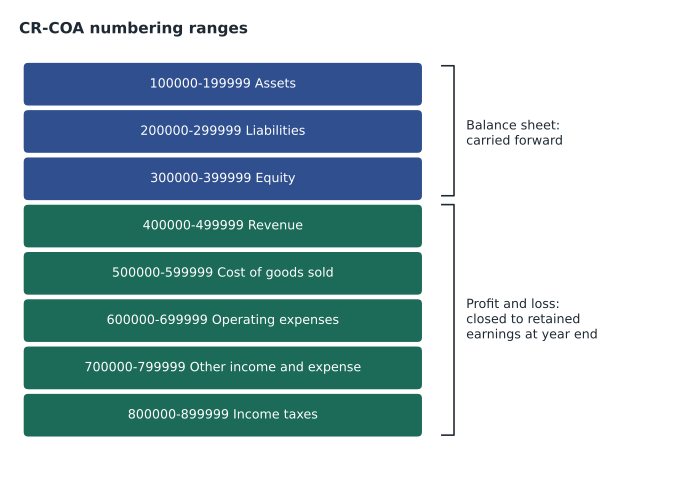
Main account numbers in Finance are alphanumeric, but most companies use numbers grouped in ranges that follow the order of the financial statements. Annelise proposed six-digit numbers with the first digit for the statement section: 1 for assets, 2 for liabilities, 3 for equity, 4 for revenue, 5 for cost of goods sold, 6 for operating expenses, 7 for other income and expense, and 8 for taxes. Six digits left room to insert new accounts without renumbering. Thandeka asked for the gaps to be wide in the expense range, where new accounts are most often needed.
Main account categories
A main account category groups main accounts for reporting and analysis, for example Cash, Accounts receivable, Inventory or Salaries and wages. Categories are used by default financial reports, by Power BI content and by some analytical workspaces. Each main account is assigned one category, and categories can be shared by many accounts. Annelise created about forty categories that matched the lines in Thandeka's management pack, so the default reports would already look familiar.
Important main account settings
The main account page holds settings that protect the ledger from mistakes. Annelise went through the ones that matter most.
| Setting | What it does | Cobalt Ridge use |
|---|---|---|
| Do not allow manual entry | Stops users entering the account on journals; only automatic postings can use it | Receivables, payables, inventory and tax control accounts |
| Debit/credit requirement | Forces postings to be debits or credits only | Rarely; considered too strict for corrections |
| Debit/credit proposal | Suggests debit or credit on entry | Revenue accounts propose credit |
| Currency validation | Restricts transactions to a currency | Foreign bank clearing accounts |
| User validation | Restricts posting to specified users | Intercompany and equity accounts |
| Consolidation account | Maps the account to a different account in a consolidation | Not needed; one shared chart |
| Active from and to dates, suspended | Controls when an account can be used | Retired accounts are suspended, not deleted |
Do not allow manual entry is the most important. Control accounts such as accounts receivable should only be updated by the subledger, so that the subledger balance and the general ledger balance always agree. If a user could post a manual journal to receivables, the customer balances would no longer reconcile. Thandeka recalled spending two days every quarter in the old system finding exactly that kind of difference.
Worked problem
Should receivables allow manual entry?
A senior accountant asks for permission to post a manual correction directly to the accounts receivable control account 110100, because a customer payment was applied to the wrong legal entity. What should Annelise recommend?
Show solution
- Keep Do not allow manual entry on 110100 so the subledger and ledger stay in agreement.
- Correct the problem in accounts receivable: reverse the settlement and reapply the payment, or use an intercompany payment correction.
- If a ledger-only correction is unavoidable, use a separate adjustment account and reconcile it.
- Document the procedure so the same question does not come up every month.
Answer: Do not open the control account. Make the correction through the subledger, which keeps customer balances and the ledger reconciled.
Legal entity overrides
A shared chart does not mean every company must use every account in exactly the same way. On each main account, the Legal entity overrides section lets you suspend the account for particular companies, set different active dates, and in some cases set default values such as a default sales tax group or default dimensions for one company. CRMX, for example, would not use the Canadian goods and services tax accounts, so those accounts were suspended for CRMX. CRCA and CRUS would not use the Mexican value-added tax accounts. The overrides at the shared level cannot be more restrictive than those at the legal entity level.
Posting profiles and automatic accounts
Most postings do not come from journals at all. When a vendor invoice posts, the system finds the accounts to use from posting profiles in accounts payable, inventory posting setup and other module settings. The general ledger also has accounts for automatic transactions, such as the accounts for penny differences, currency rounding, exchange rate gains and losses, and the error account. Annelise listed these in the design so that every automatic account would point to a sensible main account before the first test transaction. The subledger courses cover posting profiles in detail; here the key point is that control accounts referenced by posting profiles should not allow manual entry.
Mapping the old chart
Migration needed a map from the old chart to the new one. Annelise built a spreadsheet with one row for each old account, the new main account, and the dimension values that reproduce the old detail. Some old accounts mapped to the same new account with different dimension values; a few old accounts were split between two new accounts; and the mysterious 9000 range turned out to be a set of clearing accounts used by an old interface, which would not be needed in Finance at all. The same spreadsheet would later drive the opening balance import described in lesson 11.
Mexican grouping codes
CRMX added one more requirement. Mexican companies submit their chart of accounts electronically with each account mapped to an official grouping code. In Finance, the Mexico localization lets you assign these codes so the required electronic accounting reports can be generated through electronic reporting. Because the chart is shared, the codes can be assigned on the shared main accounts and are simply ignored by CRCA and CRUS. Annelise added the mapping to the design document and asked the Mexican part-time controller to review it.
Governing the chart after go-live
A shared chart is only an advantage if it stays clean. Annelise proposed a simple governance rule that Thandeka adopted: only the group controller's team can create or change main accounts, and every request goes through a short form that states the account's nature, its type, its category, which companies need it and why an existing account plus dimensions would not do. In Finance, this is enforced with security: the privileges for maintaining main accounts and the chart of accounts were granted only to a small finance master data role. Everyone else can view accounts but not create them.
The same discipline applies to account names. A name like Miscellaneous expense invites every hard-to-classify amount, and over a few years such an account fills with items that belong elsewhere. Thandeka's rule was that any account named miscellaneous or other must stay below a set threshold each month, and anything larger must be reclassified. This was a policy, not a system setting, but the system's account inquiry and trial balance pages made it easy to check at every month end.
Reporting structure and the chart
Main account numbers do not have to match the order of every report, because financial reporting lets you arrange rows in any order and group accounts by ranges or categories. Even so, a chart that follows the order of the statements makes reports simpler to build and easier to audit. Annelise also created a few accounts with the Total type for quick inquiries, such as a total of all current assets, which accountants can look up on the trial balance without building a report. Total accounts are never posted to; they only sum ranges of other accounts.
Thandeka asked whether the chart should carry separate accounts for amounts that differ between Canadian and US accounting rules. Annelise recommended against parallel accounts. Where a company needs a different view for tax or statutory purposes, the usual tools are the Tax and Operations posting layers described in lesson 7, or a separate reporting tree in financial reporting. Keeping the chart single-purpose avoids doubling the number of accounts and the work of reconciling them.
Common mistakes
MistakeCreating a main account for every combination of account and organization.
InsteadUse main accounts for the nature of the amount and dimensions for organizations, places and products.
MistakeUsing the general Balance sheet or Profit and loss type for every account.
InsteadUse the more specific types such as Asset, Liability, Revenue and Expense for better default reporting.
MistakeLeaving receivables and payables control accounts open to manual entry.
InsteadSet Do not allow manual entry so only subledgers update them.
MistakeDeleting retired accounts.
InsteadSuspend them or set an end date so history stays intact.
Summary and key terms
- A chart of accounts is a shared list of main accounts that can be assigned to many ledgers.
- Main accounts classify amounts by nature; financial dimensions describe organizations, places and products.
- Main account types decide year-end behaviour; specific types such as Asset and Revenue are recommended.
- Categories group accounts for default reports; settings such as Do not allow manual entry protect control accounts.
- Legal entity overrides let a company suspend or default accounts without leaving the shared chart.
- Chart of accounts
- A shared list of main accounts assigned to one or more ledgers.
- Main account
- An account that classifies financial amounts by their nature.
- Main account type
- The setting that decides whether an account is balance sheet or profit and loss and how it is closed.
- Main account category
- A grouping of main accounts used in default reports and analysis.
- Legal entity override
- A company-level setting on a shared main account, such as suspension or default values.
Practice problems
Work each problem on paper first, then reveal the answer to check.
Why did the old travel accounts for each plant become one main account?
Show answer
Plant and department are dimensions; the main account only records the nature, travel.
What happens to Revenue and Expense account balances at year end?
Show answer
They are closed to retained earnings; balance sheet balances carry forward.
How can CRMX avoid using Canadian sales tax accounts in a shared chart?
Show answer
Suspend those accounts for CRMX with legal entity overrides.
Lesson quiz · 5 questions
Score 60% or more to complete this lesson.
Create a free account to save your progress, take quizzes and earn a certificate.