
MSBA-309 · Lesson 7 of 12 · 18 min
Domain review: developer use cases
▶ Video coming soon A video version of this lesson is on the way.
Thursday, August 26 started with the second practice assessment, taken before the session at eight. Dmitri scored 42 of 50, eight better than Monday. Priya looked at the breakdown and moved on quickly; lesson 11 comes back to it. The morning's session reviewed the domain on improving developer productivity, worth 10 to 15 parts in 100. It covers the everyday jobs developers use Copilot for: generating code, refactoring, writing documentation, modernizing legacy code, generating unit and integration tests, identifying edge cases, and suggesting security and performance improvements. Questions in this domain usually describe a task and ask which approach or feature gets it done well and safely.
Generating code
Copilot generates code in three main ways: completions as you type, chat that produces a block on request, and agent mode or the coding agent for multi-step work. The exam's angle is choosing the right one and giving it enough to work with. For a small function in the file you are editing, a descriptive name and a docstring followed by completions is fastest. For a self-contained piece that needs explaining, chat is better, because you can ask follow-up questions. For changes across several files with tests to run, agent mode fits, with approvals for each command. For a well-defined issue that can be worked on independently, the coding agent can do it on its own branch.
Good generation starts from intent. A comment such as "Return the number of trails closed for more than seven days, ignoring archived trails" gives completions a specification. So does an existing test. Without intent, Copilot guesses from patterns, and the guess is often plausible but wrong in the detail that matters.
Tests, edge cases and assertions
Testing is the use case the study guide spells out most fully: generating unit and integration tests, identifying edge cases, and writing good assertions. A unit test checks one function or class in isolation. An integration test checks that parts work together, such as a parser feeding a database or an API returning the right page. Copilot can generate both, with /tests in chat or a prompt that names the function and the framework.
The most important exam point is where the expected values come from. Tests generated by reading the code tend to check what the code does, including its bugs. Tests generated from the specification check what it should do. In MSBA-304 Dmitri found a bug in the Cove Path status logic this way: the code subtracted dates in the wrong order, and tests written from the code would have enshrined the mistake. Prompts for tests should reference the specification or requirements, ask for normal, edge and error cases, and ask for specific assertions rather than "assert result is not None".
| Case type | Examples for a date-based report parser |
|---|---|
| Normal | A valid line with today's date; a valid line from last month |
| Boundary | A report dated exactly today; one dated tomorrow; the last day of a month; February 29 |
| Unusual input | Extra spaces; upper-case condition; accented trail names; an empty line |
| Error | A missing field; an invalid date; a future date |
Copilot is good at suggesting edge cases you had not thought of, if you ask. "List edge cases for this function, then write a test for each" is a stronger prompt than "write tests". It can also help generate synthetic test data: invented names, addresses and records that look realistic without being real, which keeps personal data out of repositories.
Worked problem
Judging a generated test
Copilot generated this test for a function that should reject future dates: it called the function with tomorrow's date and asserted that the result was not None. Is that a good test?
Show solution
- The function returns an error dictionary for a future date, but it also returns a dictionary for a valid line.
- So "not None" is true whether the function accepts or rejects the date.
- The test passes even if the bug is present, so it tests nothing useful.
- A strong assertion checks the exact expected result, such as the error key and message.
Answer: No. A weak assertion lets the bug through; ask for assertions on the exact expected value.
Refactoring and explaining code
Refactoring means improving the structure of code without changing its behaviour. Copilot can propose refactors, explain unfamiliar code with /explain and suggest clearer names. The safe method, which the exam rewards, is incremental: first make sure tests pin the current behaviour (characterization tests, if there were none), then make one small change at a time, run the tests after each, and commit each step. Behaviour changes, such as bug fixes, go in separate commits or pull requests so reviewers can see what changed and why. Asking Copilot to "rewrite the whole module" in one step produces a large diff that is hard to review and easy to get wrong.
Modernizing legacy code
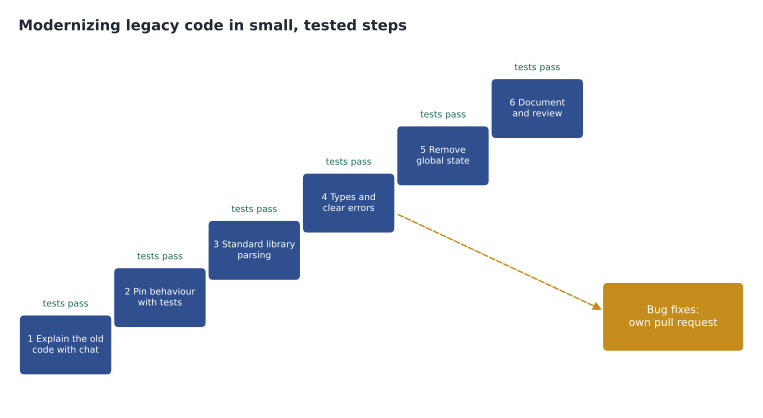
The study guide names modernizing legacy code specifically. Typical tasks are updating code to a newer language version, replacing hand-written parsing with a standard library, removing global state, adding type hints and translating code from one language to another. Copilot helps in each, but the same discipline applies: understand the old code first (chat can explain it), pin its behaviour with tests, change in small steps and review each. Tidewater's capstone in MSBA-304 modernized trails/legacy_import.py from 160 lines to 74, with tests going from 2 to 19. Along the way the tests revealed two old bugs: trails with commas in their names had been silently missing for three years, and 3 of 214 rows were skipped without any message.
Documentation
Copilot drafts docstrings, comments, README sections, API references, commit messages and pull request descriptions. /doc in editor chat writes documentation for selected code. The exam angle is verification: generated documentation can describe what the author intended rather than what the code does, or invent parameters. Read it against the code. Docstrings with runnable examples, such as Python doctests, are a good habit because the examples are checked when the tests run, so documentation that drifts from the code fails visibly.
Security and performance suggestions
Copilot can be asked to review code for security problems, suggest safer patterns and propose performance improvements. Common security suggestions include using parameterized queries instead of building SQL from strings, validating and escaping input, avoiding hard-coded secrets and using secure defaults. Tidewater found one of each kind in the summer: a search query built by joining strings, fixed with parameters. Performance suggestions include choosing better data structures, avoiding repeated work in loops and caching results.
Two cautions apply. Copilot's security suggestions do not replace security tools such as code scanning, secret scanning and dependency review, which find issues systematically. And performance changes need measurement: a suggestion that "should be faster" may not be, so time the code before and after on realistic input. An exam option that says "accept Copilot's optimization because it is more efficient" without measurement is a trap.
An integration test with Copilot
Integration tests are where Copilot needs the most context, because they depend on how pieces fit together. Dmitri asked chat, with the parser and the report store both referenced, for a test that loads a small invented report file, runs it through the parser and checks what the store holds. He asked for invented trail names and a temporary folder so the test would not touch real data. The result needed one correction, a hard-coded path, and then became part of the suite.
def test_import_then_store(tmp_path):
    sample = tmp_path / "reports.txt"
    sample.write_text("2027-08-20|Gull Point|dry\n2027-08-21|Fern Hollow|closed: bridge\n")
    store = ReportStore(tmp_path / "store.db")
    count = import_reports(sample, store)
    assert count == 2
    assert store.latest("Fern Hollow") == {"condition": "closed", "note": "bridge", "date": "2027-08-21"}
The exam will not ask you to write pytest, but it may show a test like this and ask what makes it good: isolated data, invented records, an exact expected result, and a check that two parts work together rather than one.
Measuring the gain honestly
The productivity domain also touches on how to tell whether Copilot is helping. Tidewater's summer pilot compared the four pilot developers with a comparison group who did not have Copilot, rather than only looking at the pilot group's own before-and-after numbers, because other things changed over the same months.
pilot_before, pilot_after = 26, 19
group_before, group_after = 25, 23
pilot_change = pilot_after - pilot_before
group_change = group_after - group_before
print("pilot change:", pilot_change, "hours")
print("comparison change:", group_change, "hours")
print("estimated Copilot effect:", pilot_change - group_change, "hours")pilot change: -7 hours comparison change: -2 hours estimated Copilot effect: -5 hours
What this code does
The example takes the median time to merge a pull request, in hours, before and after the pilot for two groups: the developers using Copilot and a comparison group who were not. It works out how much each group changed, then subtracts the comparison group's change from the pilot group's. The output shows the pilot group improving by 7 hours and the comparison group by 2, so about 5 hours of the improvement can reasonably be credited to Copilot rather than to other changes.
The comparison does not prove cause, and four people is a small group, but it is far more honest than quoting the 7-hour drop alone. Bugs found after release stayed at about three a month in both periods, which Tidewater reported alongside the speed gain: faster without being worse is the result a team wants.
Debugging
Debugging is not named as its own skill line, but it runs through the domain. Copilot is most useful when given evidence: the expected behaviour, the actual behaviour, the error message or stack trace, and the code involved. /fix proposes a fix for selected code, and in VS Code /fixTestFailure works from a failing test. The exam tests judgement here: a proposed fix that makes a test pass by hiding the symptom, such as wrapping a date difference in an absolute value so negative results disappear, is not a fix. Prefer fixes that address the cause, and add a test that would have caught the bug.
| Task | Good Copilot approach | Check |
|---|---|---|
| New small function | Descriptive name and docstring, then completions | Read it; test it |
| Tests for existing code | Reference the specification; ask for normal, edge and error cases | Assertions are specific; tests fail if the bug is present |
| Refactor | Characterization tests, then small steps | Tests pass after each step |
| Legacy modernization | Explain, pin, change in steps, separate bug fixes | Review each step |
| Documentation | /doc, or ask for docstrings with examples | Matches what the code does |
| Security review | Ask for weaknesses and safer patterns | Also run code scanning and secret scanning |
| Performance | Ask for improvements with reasons | Measure before and after |
| Debugging | Give expected, actual, trace and code | Fix the cause; add a test |
By the end of the session Dmitri had turned the table into the kind of answer he would give in an interview, and Priya, who had interviewed developers in Moncton for years, said that was the right test of readiness: if you can explain why each check matters, you can handle whatever scenario the exam wraps around it.
One habit links every use case in this domain: decide how you will check the result before you ask for it. For code, that is a test; for a refactor, the existing tests passing after each step; for documentation, reading it against the code; for a security fix, a scan or a test with hostile input; for a performance change, a timing. Questions in this domain often include an option that skips the check, and it is almost always the wrong one.
Copilot can also help with the chores around these tasks: writing a commit message that describes a refactor step, summarizing a pull request for reviewers, or drafting a changelog entry. The same rule applies to each: read it, and correct anything that describes what you meant rather than what you did.
Common mistakes
MistakeGenerating tests by asking Copilot to read the code and test it.
InsteadGenerate tests from the specification so bugs are caught, not copied.
MistakeAccepting weak assertions such as "result is not None".
InsteadAssert the exact expected value or error.
MistakeRefactoring a whole module in one step.
InsteadPin behaviour with tests and change in small, committed steps.
MistakeTrusting Copilot's security review instead of security tools.
InsteadUse both; Copilot suggestions do not replace code and secret scanning.
MistakeAccepting a "faster" version without measuring.
InsteadTime before and after on realistic input.
Summary and key terms
- Developer productivity is worth 10 to 15 parts in 100.
- Choose completions, chat, agent mode or the coding agent according to the size and shape of the task.
- Generate unit and integration tests from the specification, covering normal, edge and error cases with specific assertions.
- Refactor and modernize in small, tested steps, keeping bug fixes separate.
- Verify generated documentation against the code; runnable examples help.
- Use Copilot for security and performance suggestions, but confirm with security tools and measurement.
- Unit test
- A test of one function or class in isolation.
- Integration test
- A test that checks that parts of a system work together.
- Edge case
- An input at or beyond the normal range, such as an empty value or a boundary date.
- Characterization test
- A test that records what existing code currently does, before it is changed.
- Synthetic data
- Invented but realistic data used for testing instead of real personal data.
Practice problems
Work each problem on paper first, then reveal the answer to check.
Why should test prompts reference the specification?
Show answer
So expected values come from what the code should do, not from what it currently does.
What is the first step before refactoring code that has no tests?
Show answer
Write characterization tests that pin its current behaviour.
Name two security improvements Copilot commonly suggests.
Show answer
For example, parameterized queries, input validation, removing hard-coded secrets, secure defaults.
Lesson quiz · 5 questions
Score 60% or more to complete this lesson.
Create a free account to save your progress, take quizzes and earn a certificate.