
MSBA-309 · Lesson 1 of 12 · 18 min
What the GitHub Copilot exam covers
▶ Video coming soon A video version of this lesson is on the way.
On Monday, August 23, 2027, at eight in the morning, Dmitri Kovac sat down in the Tidewater boardroom in Moncton with a coffee, a printed copy of the GH-300 study guide and one week left before his exam. He had spent the spring and summer learning GitHub Copilot properly: the features, plans and responsible-use course from May to July, then four weeks of prompt engineering sessions that ended on Friday. The exam was booked for the following Monday, August 30. Priya Nair, the team's technical lead, had cleared her calendar for a readiness week of two sessions a day. "You know how to use Copilot," she told him. "This week is about knowing what the exam asks, how it asks it, and where you are still guessing." This course follows that week. It is the last course in the GitHub Copilot path, and it assumes you have completed the two before it or have the same experience.
Who the certification is for
The GitHub Copilot certification, earned by passing Exam GH-300, is an intermediate-level credential. Microsoft, which delivers GitHub's certification exams, describes the audience as app makers, developers, DevOps engineers and technology managers who want to show that they can use Copilot to improve how software is built: faster, with better quality and with security in mind. There is no formal prerequisite, but the overview expects familiarity with GitHub fundamentals and experience in at least one programming language. That matters for the exam: questions assume you can read short pieces of code, recognize a pull request, a repository setting or a workflow file, and follow what a developer is trying to do. They do not test whether you can write a sorting algorithm from memory.
The certification sits beside the other GitHub credentials. GitHub Foundations (GH-900) covers Git and GitHub basics and was the exam Owen Tremblay passed in the spring. Other GitHub exams cover GitHub Actions, GitHub Administration and GitHub Advanced Security. GH-300 is the only one centred on an AI tool, and that shapes its content: about a fifth of it is about using AI responsibly, and a further share is about data, privacy and safeguards. A candidate who knows every Copilot feature but cannot explain why output must be validated, or what content exclusions do, will lose marks that a feature list cannot recover.
The skills measured
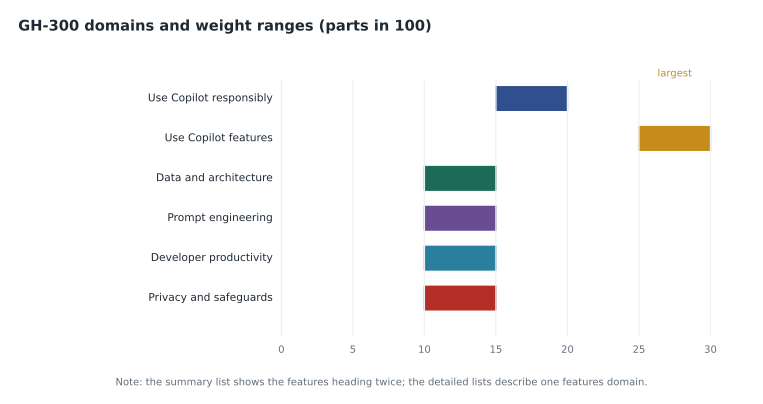
The study guide is the official list of what the exam can ask about. Dmitri's copy showed skills measured as of August 7, 2026, the outline that applied to his booking. The guide groups the skills into domains, each with a weight range. The weight tells you roughly how many questions come from that domain: a domain worth 25 to 30 parts in 100 will supply about a quarter of the exam, and one worth 10 to 15 will supply about an eighth.
| Domain | Weight (parts in 100) | What it covers |
|---|---|---|
| Use GitHub Copilot responsibly | 15 to 20 | Responsible AI principles, risks and limitations of generative AI, validating output, operating Copilot responsibly |
| Use GitHub Copilot features | 25 to 30 | Copilot in the editor, Copilot Chat, agent mode and edits, the CLI, code review, MCP, Spaces and Spark, plans, organization policies, audit events and subscription management |
| Understand GitHub Copilot data and architecture | 10 to 15 | How data flows, how prompts are built, the proxy and its filters, the life of a code suggestion, limits of large language models |
| Apply prompt engineering and context crafting | 10 to 15 | Prompt structure, how context is determined, zero-shot and few-shot prompting, prompt flow and chat history |
| Improve developer productivity with GitHub Copilot | 10 to 15 | Generating code, refactoring, documentation, modernizing legacy code, tests and edge cases, security and performance suggestions |
| Configure privacy, content exclusions and safeguards | 10 to 15 | Content exclusions and editor settings, ownership and limits of output, public code filter and code referencing, troubleshooting |
The "Skills at a glance" list at the top of the guide showed one oddity when Dmitri read it in the spring: the features domain appeared twice, once as "Use GitHub Copilot features" and again as "GitHub Copilot features", both weighted 25 to 30, but only one of them had a detailed list of skills further down the page. Two features domains of that size would push the total well past 100, so the sensible reading is a duplicated heading. Priya's advice was to study from the detailed skill lists, which are what question writers work from, and to check the guide again on the weekend before the exam in case Microsoft corrected or changed it.
What "intermediate" means in practice
An intermediate exam does not ask you to recite a menu. It asks you to choose. A typical question describes a team, a goal and a constraint, then asks which Copilot feature, setting or practice fits. "A developer wants Copilot to stop suggesting code from a file that holds customer test data" is a content exclusion question. "An organization wants to see which members used Copilot last month" is a usage metrics or audit question. "A team wants every chat answer to follow its error format" is a custom instructions question. The skill is recognizing the problem underneath the story and knowing which tool was built for it.
Because many Copilot capabilities overlap, the exam also tests boundaries. Copilot Chat in the editor and agent mode can both change code; the difference is that agent mode plans and carries out multi-step work, runs tools and iterates, while ask-style chat answers and proposes. Code completion and next edit suggestions both appear as you type; the difference is where the suggestion lands. The coding agent, now called Copilot in the cloud in GitHub's newer documentation, works on its own branch in a cloud environment and opens a pull request; agent mode works in your editor with you watching. Questions often turn on exactly those differences.
Worked problem
Recognizing the domain behind a question
Dmitri sorted five sample question stems by domain. (1) "Which setting prevents suggestions that match public code?" (2) "A model confidently suggests a function that does not exist in the library. What is this called?" (3) "Where should a rule go so that it applies to every chat request in the repository?" (4) "Which plan is required for organization-wide content exclusions?" (5) "What happens to prompts sent from code completion in the editor on a business plan?"
Show solution
- Stem 1 is about the public code filter: privacy, content exclusions and safeguards.
- Stem 2 describes a hallucination, a limitation of generative AI: responsible use.
- Stem 3 is about custom instructions shaping context: prompt engineering and context crafting.
- Stem 4 is about plans and organization settings: features.
- Stem 5 is about data retention: data and architecture.
Answer: Safeguards, responsible use, prompt engineering, features, data and architecture. Naming the domain first narrows the answer choices to the facts that domain teaches.
Generally available features and previews
Copilot changes quickly, and the study guide says so: most questions are about features that are generally available, but preview features can appear if they are commonly used. That has two consequences. First, study the stable core thoroughly: completions, chat, instructions, exclusions, plans, policies, the public code filter and how data is handled. Second, know the headline facts about popular previews without memorising details that may change. Dmitri kept a short list of features whose status he would recheck on the Sunday before the exam, including prompt files and the MCP Registry, both described as public preview on GitHub's pages that summer.
The exam is written in English first. Localized versions usually follow about eight weeks after the English version is updated, so a candidate taking a translated exam soon after a change may see the older outline. Microsoft does not promise that timing, which is another reason to read the guide's change log close to your date.
How this course works
Each lesson follows one session of Dmitri's readiness week. Lessons 1 and 2 cover the exam itself: what it measures, how it is delivered and how questions are built, and how to turn the domain weights and a baseline score into a study plan for the week. Lessons 3 to 8 review the domains: responsible AI; plans and features; how Copilot works with data; prompt engineering; developer use cases; and privacy and safeguards. Lesson 9 collects the mistakes candidates most often make. Lesson 10 is hands-on practice in the editor and on GitHub.com, lesson 11 builds the plan for the last two days, and lesson 12 is the final review on the Sunday afternoon.
| Session | Day | Lesson |
|---|---|---|
| 1 | Monday morning | What the exam covers |
| 2 | Monday afternoon | Format and question styles |
| 3 | Tuesday morning | Responsible AI review |
| 4 | Tuesday afternoon | Plans and features review |
| 5 | Wednesday morning | Data and architecture review |
| 6 | Wednesday afternoon | Prompt engineering review |
| 7 | Thursday morning | Developer use cases review |
| 8 | Thursday afternoon | Privacy and safeguards review |
| 9 | Friday morning | Common mistakes |
| 10 | Friday afternoon | Hands-on practice |
| 11 | Saturday | A study plan for the last two days |
| 12 | Sunday afternoon | Final review |
Priya added one rule for the week: every fact Dmitri wrote on a flash card had to come from the study guide, GitHub's documentation or Microsoft Learn, with the page noted on the back. Blog posts and forum answers could point him somewhere, but not be the source. Copilot moves fast enough that a confident post from six months earlier can describe a plan that no longer exists, and the exam is written against current documentation.
The baseline practice assessment
Microsoft offers a free practice assessment for GH-300 on Microsoft Learn. It shows the style, wording and difficulty of real questions, though not the real questions themselves, and it reports a score with a breakdown by area. Dmitri took it after the first session, on Monday at eleven, without notes. He scored 34 of 50. Priya was pleased rather than worried: a baseline taken honestly, with a breakdown, is worth more than a high score taken with the documentation open, because it shows where the week's hours should go. The end of lesson 2 turns that breakdown into a study plan for the week.
| Area | Questions | Correct |
|---|---|---|
| Responsible AI | 9 | 7 |
| Plans and features | 16 | 10 |
| Data and architecture | 7 | 4 |
| Prompt engineering | 6 | 6 |
| Developer productivity | 6 | 5 |
| Privacy and safeguards | 6 | 2 |
| Total | 50 | 34 |
Two things stood out. Features lost the most questions (6), which made sense: it is the biggest domain and the one where plans and settings change most. Privacy and safeguards had the worst rate, 2 of 6, which surprised Dmitri, since he had helped Rosa set up the content exclusions for the pilot. Looking at the wrong answers, he saw that he knew what Tidewater had configured but not the general rules behind it: which plans support exclusions, what exclusions do not cover, and how the public code filter differs from code referencing. Prompt engineering, fresh from four weeks of practice, was perfect.
Reading the study guide well
The study guide repays slow reading. Each skill line is written as an action, such as "explain", "identify", "configure" or "describe", and the verb tells you the depth expected. "Identify the risks" means recognizing them in a scenario; "configure content exclusions" means knowing where the setting lives, who can change it and what it affects. Dmitri went through the detailed lists line by line and marked each skill green (could teach it), amber (could recognize it) or red (unsure). By lunch he had 11 red lines, 7 of them in features and safeguards, which matched the practice assessment closely.
The guide also lists resources: Microsoft Learn modules and GitHub documentation. They are useful but uneven in date. Where a Learn module and the current GitHub documentation disagree, for example about a plan's allowance or a feature's name, the documentation is usually more current, and the exam is periodically refreshed to match. When in doubt, Dmitri noted both and the date he checked.
Common mistakes
MistakeStudying every Copilot feature equally.
InsteadWeight study by the domain ranges and by your own baseline.
MistakeTreating the duplicated features heading as two separate domains.
InsteadStudy from the detailed skill lists and recheck the guide before the exam.
MistakeLearning only what your own organization configured.
InsteadLearn the general rules: plans, limits and what each setting does and does not cover.
MistakeMemorising details of preview features.
InsteadKnow the stable core well and the headline facts about popular previews.
MistakeTaking the practice assessment with notes open.
InsteadTake the baseline honestly so the breakdown is useful.
Summary and key terms
- GH-300 is an intermediate exam for developers, DevOps engineers, app makers and technology managers who use GitHub Copilot.
- The August 7, 2026 outline has six domains: responsible AI (15 to 20), features (25 to 30) and four others at 10 to 15 each.
- The summary list showed the features domain twice; the detailed lists show one, so study from them.
- Questions are scenario-based and test choosing the right feature, setting or practice.
- Most questions cover generally available features, but commonly used previews can appear.
- A baseline practice assessment shows where study time should go.
- Study guide
- Microsoft's official list of the skills an exam measures, with domain weights.
- Domain
- A group of related skills in the study guide, with a weight range.
- Weight range
- The share of the exam, in parts per 100, that a domain is expected to supply.
- Practice assessment
- A free set of sample questions on Microsoft Learn that shows the style and difficulty of the exam.
- Generally available
- A feature that has left preview and is fully supported.
Practice problems
Work each problem on paper first, then reveal the answer to check.
Which GH-300 domain carries the largest weight?
Show answer
Use GitHub Copilot features, at 25 to 30 parts in 100.
Why should a candidate recheck the study guide shortly before the exam?
Show answer
Copilot changes quickly and the outline, feature names and statuses can be updated.
A question asks which setting stops suggestions that match public code. Which domain is it from?
Show answer
Configure privacy, content exclusions and safeguards.
Lesson quiz · 5 questions
Score 60% or more to complete this lesson.
Create a free account to save your progress, take quizzes and earn a certificate.