
MSBA-309 · Lesson 4 of 12 · 20 min
Domain review: Copilot plans and features
▶ Video coming soon A video version of this lesson is on the way.
Tuesday afternoon tackled the largest domain. Using GitHub Copilot features is worth 25 to 30 parts in 100, so on an exam of about 60 questions it supplies 15 or more. It was also where Dmitri lost the most marks on Monday: 6 of 16. Priya split the session into three parts. First, the plans and what each includes. Second, the features a developer uses, in the editor, on GitHub.com and in the terminal. Third, the features an administrator uses: policies, audit events and managing seats. "Most wrong answers here come from mixing up two features that sound alike," she said, "or from remembering a plan detail that changed."
The plans
Copilot is sold in individual plans and organization plans. Individual plans are bought by a person for their own account; organization plans are bought by an organization or enterprise and assigned to members as seats. The prices below are the ones GitHub listed when Dmitri checked in November 2026 and again in the spring; they are in US dollars on both GitHub's Canadian and US pages, and they change, so the exam tests the structure more than the numbers.
| Plan | For | Price (US dollars) | Key points |
|---|---|---|---|
| Copilot Free | Individuals | Free | Limited monthly completions and chat; no organization controls |
| Copilot Pro | Individuals | 10 a month | Unlimited completions; a monthly allowance of AI credits |
| Copilot Pro+ | Individuals | 39 a month | Larger allowance and access to more models |
| Copilot Max | Individuals | 100 a month | The largest individual allowance |
| Copilot Business | Organizations | 19 per seat a month | Policies, content exclusion, audit logs, usage metrics; credits pooled |
| Copilot Enterprise | Enterprises on GitHub Enterprise Cloud | 39 per seat a month | Everything in Business, with larger pooled credits and enterprise features |
Students, teachers and maintainers of popular open source projects can qualify for Copilot Pro at no cost through GitHub's education and open source programs. Copilot Enterprise requires GitHub Enterprise Cloud; an organization on the Team plan can buy Copilot Business but not Enterprise.
How usage is billed
From June 1, 2026, GitHub moved Copilot to usage-based billing with GitHub AI credits, replacing the earlier "premium requests". Chat, agent mode, the coding agent, code review and other model-backed features consume credits according to the tokens used and the model chosen; on paid plans, code completions and next edit suggestions do not consume credits. Individual plans include a monthly credit allowance. On organization plans each seat adds credits to a pool shared by the organization: 1,900 per Business seat and 3,900 per Enterprise seat, according to GitHub's plans page. Usage beyond the pool is billed at one cent per credit if the organization allows it, and administrators can set budgets and alerts.
Worked problem
A pooled-credit check
Tidewater planned 8 Copilot Business seats from September 2027. In a busy month the team expects to use about 17,000 credits. How many credits does the pool hold, and what would the extra usage cost?
Show solution
- Each Business seat adds 1,900 credits to the pool.
- \[8 \times 1{,}900 = 15{,}200 \text{ credits}\]
- \[17{,}000 - 15{,}200 = 1{,}800 \text{ credits over}\]
- At one cent per credit, 1,800 credits cost 18 US dollars.
Answer: The pool holds 15,200 credits; about 1,800 more would cost about 18 US dollars, inside the 20-dollar budget alert Rosa set during the pilot.
Features in the editor
Most Copilot use happens in a supported editor, such as VS Code, Visual Studio, JetBrains IDEs, Xcode and others, through the Copilot extension. The exam expects you to tell the editor features apart.
| Feature | What it does | How you use it |
|---|---|---|
| Code completion | Suggests the rest of a line or block as you type | Accept with Tab; cycle alternatives; dismiss with Esc |
| Next edit suggestions | Predicts the next edit you are likely to make, possibly elsewhere in the file | Accept or skip the highlighted edit |
| Chat, ask mode | Answers questions about code and proposes changes | Chat view or inline chat; you apply changes |
| Chat, edit mode | Makes changes across files you choose, shown for review | Pick files, describe the change, accept or reject edits |
| Agent mode | Plans multi-step work, edits files, runs tools and terminal commands, iterates on errors | Describe the goal; approve tool runs; review changes |
| Slash commands and participants | Shortcuts such as /explain, /fix, /tests, /doc and participants such as @workspace or @terminal | Type them in chat |
Questions often hinge on scope. Code completion and next edit suggestions work on what you are typing. Ask mode answers. Edit mode changes files you name. Agent mode decides which files to change and can run commands, so it needs approvals and a clear goal. A question that says "the developer wants Copilot to run the tests and fix failures until they pass" points to agent mode; "the developer wants an explanation of this function" points to ask mode or /explain.
Features on GitHub.com and beyond the editor
Copilot also works on GitHub itself. Copilot Chat on GitHub.com answers questions about repositories, issues, pull requests and documentation. Copilot code review can be requested on a pull request like a human reviewer; it leaves comments, not an approval, and it reads the repository's custom instructions. The coding agent, which GitHub's newer documentation calls Copilot in the cloud, takes an assigned issue or a prompt, works on its own branch in a cloud environment powered by GitHub Actions, and opens a pull request for people to review; rulesets and branch protection still apply. Copilot Spaces gather selected files, documentation and notes into a shared context that chat can draw on, which Tidewater used for its trail data format. GitHub Spark builds small web apps from natural-language descriptions. Pull request summaries and other GitHub.com features also use Copilot.
In the terminal, GitHub Copilot CLI brings chat and agent-style help to the command line: explaining and suggesting commands, working with files and running scripts with your approval. The study guide lists installing it, using its commands, scripting with it and managing files. Treat command syntax as version-dependent and focus on what it does and what it asks you to approve.
Model Context Protocol (MCP) is the open standard that lets Copilot connect to external tools and data sources through MCP servers, such as the GitHub MCP server. Agent mode, the coding agent and code review can use MCP servers that have been configured. For organizations on Business and Enterprise, the policy that allows MCP servers in Copilot is off by default, so an administrator must enable it.
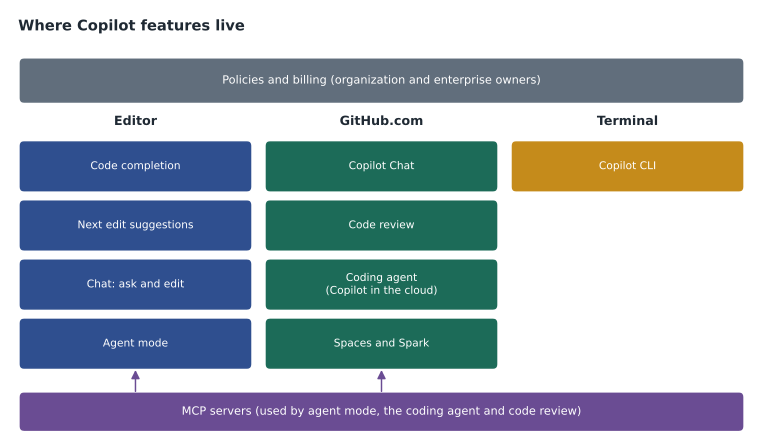
Administration: policies, audit and seats
Organization owners and enterprise owners control Copilot through policies. Policies decide which features are available (for example, Copilot Chat on GitHub.com, the coding agent, previews, MCP servers), which models can be used, whether suggestions matching public code are blocked, and whether overage beyond the credit pool is allowed. In an enterprise, owners can set a policy for every organization or let each organization decide. GitHub's documentation notes that when a user gets Copilot from several organizations within one enterprise, the least restrictive setting generally applies, while across different enterprises the most restrictive applies. Exam questions on policies often ask who can change a setting (organization owner or enterprise owner) and at what level.
Seats are assigned to members or teams. Assigning Copilot to a team means new team members get a seat automatically, which keeps access in step with team membership. Administrators can manage seats in the settings or through the REST API, which has endpoints to list Copilot seat assignments, add or remove users and teams, and read usage metrics; the study guide lists subscription management through the REST API as a skill. The audit log records Copilot events such as policy changes, seat assignments and settings changes, so administrators can see who changed what and when. Audit logs record administrative events; they are not a record of individual prompts.
Worked problem
Choosing the administrative tool
Rosa needed to do four things. (1) Find who turned on the coding agent for the open-trail-report repository last week. (2) Give the new partner liaison developer a seat automatically when HR adds them to the web team. (3) Block suggestions matching public code for everyone. (4) See how many members used Copilot in the last 28 days.
Show solution
- Task 1 is a question about who changed a setting and when: the audit log.
- Task 2 is seat management, which can be scripted through the REST API or done by assigning seats to the team.
- Task 3 is a policy setting for suggestions matching public code.
- Task 4 is usage metrics, available in the dashboard or through the API.
Answer: Audit log, seat assignment by team or REST API, the public code policy, and usage metrics.
What each plan unlocks
Questions about plans rarely ask for prices. They ask which plan a scenario needs. The dividing line is control. Individual plans give one person Copilot on their own account, and that person makes the settings decisions: whether to allow suggestions that match public code, which models to use, whether to turn on previews. Organization plans move those decisions to owners and add the tools an organization needs to govern use: policies for every member, content exclusion, audit log events, usage metrics, seat management and the pooled credits. A question that mentions a company wanting to stop certain files being used as context, or to see who has a seat, or to enforce a setting for everyone, is pointing at Copilot Business or Enterprise.
Between Business and Enterprise the differences are smaller and change more often. Enterprise requires GitHub Enterprise Cloud, includes a larger pool of credits per seat, and has historically been where features tied to an enterprise account appear first, such as enterprise-wide policies and some knowledge features. When a question names GitHub Enterprise Cloud, enterprise owners or policies applied across many organizations, Enterprise is the likely answer; when it describes a single organization that needs governance, Business is usually enough.
A person can also have more than one source of Copilot: a personal Pro plan and a seat from an employer, for example. In that case the organization's seat and policies apply when they work in the organization's repositories, and the personal plan covers their own projects. Tidewater asked its pilot users to sign in to their editors with the account that held the organization seat, so that the content exclusions and the public code policy applied to their work.
Pairs that are easy to confuse
| These two | The difference |
|---|---|
| Code completion and next edit suggestions | Completion continues where you are typing; next edit predicts your next change, possibly elsewhere |
| Agent mode and the coding agent | Agent mode works in your editor while you watch; the coding agent works in the cloud on its own branch and opens a pull request |
| Edit mode and agent mode | Edit mode changes files you choose; agent mode chooses files and can run tools |
| Code review and code scanning | Copilot code review gives AI review comments; code scanning is a security analysis tool such as CodeQL |
| Spaces and custom instructions | Spaces collect context you choose for chat; instructions are rules added to every request in scope |
| Audit log and usage metrics | The audit log records administrative events; usage metrics summarize how much Copilot is used |
Dmitri's Monday errors in this domain were mostly in that table: two on agent mode versus the coding agent, one on policy levels, one on what the audit log contains, and two on plan details he remembered from before the move to AI credits. By the end of the session he had rewritten six flash cards and added a seventh: "Credits replaced premium requests on June 1, 2026; completions and next edit suggestions use none on paid plans."
Common mistakes
MistakeQuoting premium request allowances.
InsteadSince June 1, 2026, usage is billed in GitHub AI credits.
MistakeChoosing agent mode when the work should happen on its own branch in the cloud.
InsteadThat is the coding agent, which opens a pull request.
MistakeTreating a Copilot code review as an approval.
InsteadCode review leaves comments; people approve.
MistakeLooking in the audit log for users' prompts.
InsteadThe audit log records administrative events, not prompts.
MistakeAssuming MCP servers are on by default in organizations.
InsteadThe MCP policy is off by default for Business and Enterprise.
Summary and key terms
- Features is the largest domain, at 25 to 30 parts in 100.
- Individual plans are Free, Pro, Pro+ and Max; organization plans are Business and Enterprise, with Enterprise needing GitHub Enterprise Cloud.
- Since June 1, 2026, model-backed features consume GitHub AI credits; organization seats add credits to a shared pool.
- In the editor: completion, next edit suggestions, chat in ask and edit modes, and agent mode.
- On GitHub.com and beyond: chat, code review, the coding agent, Spaces, Spark, the CLI and MCP servers.
- Administrators use policies, seat management (including the REST API), the audit log and usage metrics.
- GitHub AI credits
- The usage unit for Copilot's model-backed features since June 1, 2026.
- Seat
- A Copilot licence assigned to a member of an organization.
- Agent mode
- An editor mode in which Copilot plans and carries out multi-step changes, running tools with approval.
- Coding agent
- Copilot working in the cloud on its own branch from an issue or prompt, then opening a pull request; also called Copilot in the cloud.
- Policy
- An organization or enterprise setting that controls which Copilot features and models are available.
Practice problems
Work each problem on paper first, then reveal the answer to check.
Which plan is required for Copilot Enterprise?
Show answer
GitHub Enterprise Cloud.
What happens to a pull request opened by the coding agent?
Show answer
People review it like any other pull request; rulesets and branch protection still apply.
How many credits do 5 Business seats add to the pool?
Show answer
9,500 credits (5 x 1,900).
Lesson quiz · 5 questions
Score 60% or more to complete this lesson.
Create a free account to save your progress, take quizzes and earn a certificate.