
MSBA-309 · Lesson 6 of 12 · 19 min
Domain review: prompt engineering
▶ Video coming soon A video version of this lesson is on the way.
Wednesday afternoon's session was the one Dmitri expected to be easy. He had spent four weeks in July and August on prompt engineering and scored 6 of 6 on it on Monday. Priya agreed the domain was strong, which is exactly why she gave it a full session: "Six questions is a small sample. The exam will ask about this domain in ways the practice assessment did not, and it is worth 10 to 15 parts in 100. We are going to make sure you can explain the ideas, not just use them." Applying prompt engineering and context crafting covers how prompts are structured, how Copilot determines context, zero-shot and few-shot prompting, and how prompts flow through a conversation.
The structure of a good prompt
GitHub's guidance on prompting Copilot boils down to a handful of habits, and the exam expects you to recognize them. Start general, then get specific: state the overall goal first, then the requirements. Give examples of inputs and expected outputs where they help. Break complex tasks into smaller steps rather than asking for everything at once. Avoid ambiguity, such as "this" or "it" when several things could be meant. Indicate the relevant code, by selecting it, opening it or referencing it. Iterate: if the first answer misses, refine the prompt instead of starting over or accepting a poor result. And keep the conversation relevant, starting a new thread when the topic changes.
A useful way to remember the parts of a prompt is goal, details, constraints and output: what you want, the facts Copilot needs, the rules it must follow and the form the answer should take. Not every prompt needs all four, but a prompt that produces a poor answer is usually missing one.
| Part | Question it answers | Example from TrailCheck |
|---|---|---|
| Goal | What do you want? | Add validation to parse_condition |
| Details | What does Copilot need to know? | Reports are date|trail|condition; see docs/report-format.md |
| Constraints | What rules apply? | Reject future dates; return the error dictionary; standard library only |
| Output | What form should the answer take? | The changed function and three pytest tests |
Worked problem
Improving a weak prompt
A practice question showed the prompt "fix the dates" and asked which revision best follows GitHub's guidance. The options were: A) "fix the dates properly"; B) "In trails/parse.py, parse_condition accepts dates in the future. Change it to return the error dictionary for any date after today, keep ISO 8601 parsing, and add tests for today, tomorrow and an invalid date."; C) "rewrite the parser"; D) "fix the dates, it is urgent".
Show solution
- A adds a vague word but no information.
- B names the file and function, states the problem and the goal, gives constraints and asks for a specific output.
- C widens the task instead of narrowing it.
- D adds urgency, which does not help the model.
Answer: B. It has a goal, details, constraints and an output, and it points at the relevant code.
Zero-shot and few-shot prompting
A zero-shot prompt asks for something without examples: "Write a function that converts kilometres to miles." It relies on the model's general training and is fine for common tasks. A few-shot prompt includes one or more examples of input and the expected output, so the model can copy the pattern: "Convert these report lines to JSON. Example: 2027-07-12|Cove Path|wet becomes {"date": "2027-07-12", "trail": "Cove Path", "condition": "wet"}. Now convert: ...". Few-shot prompting is the better choice when the format is unusual, the rules are local or you want consistent output. The exam often describes a team getting inconsistent formats and asks what would help; adding examples is the expected answer.
Convert each trail report line to a JSON object with keys date, trail and condition.

Example input:
2027-07-12|Cove Path|wet
Example output:
{"date": "2027-07-12", "trail": "Cove Path", "condition": "wet"}

Example input:
2027-07-13|Ridge Loop|closed: washout
Example output:
{"date": "2027-07-13", "trail": "Ridge Loop", "condition": "closed", "note": "washout"}

Now convert:
2027-07-14|Harbour Walk|dry
Notice what the second example does: it shows a case the first does not, a condition with a note after a colon. Good few-shot examples cover the variations you care about. One example teaches the basic shape; two or three that differ teach the rule.
How Copilot determines context
The other half of the domain is context crafting. Copilot decides what to include from several sources, and you can steer it. In the editor, it uses the current file, the cursor position and selection, related open files, and custom instructions. In chat you can add context explicitly: select code before asking; use # references such as #file, #selection or a symbol; use participants such as @workspace to search the project or @terminal for the terminal; attach files or images; and in agent mode let Copilot search and read files itself. On GitHub.com, chat can use the repository, an issue, a pull request or a Copilot Space as context.
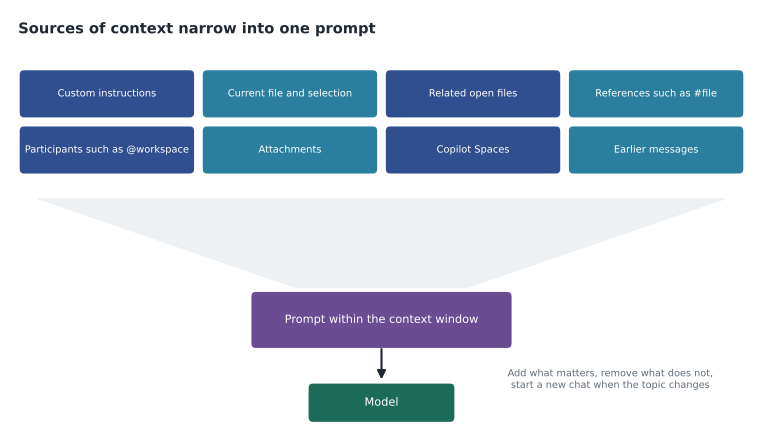
Context can also hurt. Irrelevant open files and a long conversation about something else can pull answers in the wrong direction or crowd out what matters. The remedies are simple: close unrelated tabs, reference the right file explicitly, and start a new chat for a new task. Rules that must always apply belong in custom instructions, because they are added to every request in scope and do not depend on the conversation.
Prompt flow and chat history
The study guide asks about the prompt process flow and how chat history is used. Each new chat message is sent with relevant parts of the earlier conversation, so a follow-up such as "now add tests for that" works. But history is not unlimited. As a conversation grows, older turns may be summarized or left out to fit the context window, which is why a rule given at the start of a long chat can stop being followed. The exam may describe exactly that and ask for the fix: put the rule in custom instructions or restate it, and start a fresh chat for a new topic.
| Situation | Better approach |
|---|---|
| Answers ignore a team convention | Add it to .github/copilot-instructions.md |
| Output format is inconsistent | Give few-shot examples |
| Copilot changes the wrong function | Select or reference the right code; name it in the prompt |
| A long chat drifts off topic | Start a new chat for the new task |
| A complex task produces a muddled answer | Break it into steps and iterate |
| Copilot does not know the local data format | Reference the format note or use a Copilot Space |
Instructions, prompt files and agent files
Context crafting also includes the files that shape prompts automatically or on demand. Repository instructions in .github/copilot-instructions.md apply to chat, the coding agent and code review in that repository. Path-specific files in .github/instructions/ with an applyTo pattern add rules for matching files. Personal and organization instructions add their own layers, and all apply together, with personal instructions taking priority. Prompt files, saved as .prompt.md in .github/prompts/, are reusable task templates that run only when invoked. AGENTS.md files give agents build and test guidance, and the nearest one in the folder tree takes precedence. The exam tends to ask which file a scenario needs; the scope of each is the deciding fact.
Tidewater's trailcheck repository in Moncton had all of them by August: the repository instructions file Priya maintained, the data and templates instructions owned by Owen and Lena, four prompt files and an AGENTS.md. Dmitri could explain each from memory, which was the point of the session: to turn habits into explanations.
Prompting for code, not just text
Several prompt engineering techniques are specific to code. Writing a descriptive function name and a docstring or comment before the body gives completions strong context. Writing the test first, then asking for the implementation, gives Copilot a precise specification. Showing the existing style, such as an existing test file, helps it match conventions. Asking for an explanation of the plan before code, in chat, lets you correct the approach before any code is written. And asking Copilot to list its assumptions surfaces misunderstandings early.
Priya had Dmitri practise one more habit for the exam: reading a prompt in a question and predicting what will go wrong. A prompt that says "optimize this" with no measure of success will get guesses. A prompt that asks for code using a library the project does not have will get an answer that does not run. A prompt with a long pasted log and no question will get a summary rather than a fix. Spotting the gap is the skill being tested.
Prompting agents
Agent mode and the coding agent need prompts that look more like task descriptions than questions. Because an agent decides which files to change and can run commands, the prompt should say what done means, which files or folders it may touch, how to check the work (for example, which test command must pass) and what it must not do, such as editing existing tests or adding dependencies. For the coding agent, the "prompt" is often a GitHub issue, so a well-written issue with acceptance criteria is itself prompt engineering. AGENTS.md supplies the standing parts of that description, such as build and test commands, so each issue can focus on the task.
The exam may describe an agent that "fixed" failing tests by changing the tests, or that edited files outside the intended area, and ask what would have prevented it. The answer is a bounded task: explicit scope, a definition of done, a verification step and a protected-files rule, plus human review of the resulting pull request. A vague instruction such as "make the tests pass" invites the wrong kind of success.
Three more exam-style cases
Priya closed the topic with three short cases. In the first, a developer asks Copilot Chat "why is this slow?" with nothing selected, and gets a general lecture on performance. The missing piece is context: selecting the function, or referencing the file, and saying what "slow" means, such as a timing for a given input, would have produced a specific answer. In the second, a developer pastes a 400-line log into chat with no question, and gets a summary. The missing piece is the goal: "find the first error and suggest the cause" turns the log into evidence. In the third, a team writes a prompt file for generating tests but finds that it is never used. The missing piece is invocation: prompt files run only when someone runs them, so the team needs to tell people it exists or reference it in their workflow; if the rules must apply to every request, they belong in instructions instead.
Each case has the same structure as many exam questions: a reasonable person did something nearly right, and one part of the prompt or context was missing. Naming the missing part, whether goal, details, constraints, output, context or scope, is usually enough to pick the right answer. Dmitri added the list of six to the front of his flash card box.
Responsible prompting
Prompt engineering overlaps with responsible use in one area the exam likes: what goes into a prompt. Never paste secrets, credentials or real personal data into a prompt. Use invented data for examples. If a file holds sensitive data, the right control is a content exclusion, not hoping nobody references it. Tidewater's organization instruction, set by Rosa, told Copilot never to use real volunteer or customer details in code, tests or documentation, and the guidelines told people never to paste them into chat.
Priya's last point on the domain was about iteration. The exam treats a poor first answer as normal, not as a failure of the tool, and expects the developer to refine: add the missing detail, give an example, narrow the scope or reference the right file, then ask again. Starting over in a new chat is right when the topic has changed; refining in the same chat is right when the first answer was close, because the conversation already holds useful context.
Common mistakes
MistakeAdding urgency or vague words to a weak prompt.
InsteadAdd the goal, details, constraints and output format.
MistakeUsing a single example to teach a rule with variations.
InsteadUse few-shot examples that show the variations.
MistakeRelying on a rule stated early in a long chat.
InsteadPut lasting rules in custom instructions or restate them; start new chats for new tasks.
MistakeLeaving many unrelated tabs open.
InsteadClose irrelevant files and reference the right ones.
MistakePasting real personal data into a prompt to get realistic output.
InsteadUse invented data; exclude sensitive files.
Summary and key terms
- Prompt engineering and context crafting is worth 10 to 15 parts in 100.
- Start general, then specific; give examples; break tasks down; avoid ambiguity; indicate relevant code; iterate; keep history relevant.
- A good coding prompt has a goal, details, constraints and an output format.
- Zero-shot prompts have no examples; few-shot prompts include examples to copy.
- Context comes from the editor, explicit references, participants, attachments, Spaces, instructions and history.
- Long conversations may drop early turns; lasting rules belong in custom instructions.
- Zero-shot prompt
- A prompt with no examples.
- Few-shot prompt
- A prompt that includes examples of input and expected output.
- Context crafting
- Choosing and shaping what Copilot sees so that it answers well.
- Chat participant
- A named helper in chat, such as @workspace or @terminal, that adds a source of context.
- Reference
- A # tag in chat, such as #file, that adds specific context.
Practice problems
Work each problem on paper first, then reveal the answer to check.
When is a few-shot prompt better than a zero-shot prompt?
Show answer
When the format or rules are unusual or local and you want consistent output.
Why might Copilot ignore a rule given at the start of a long chat?
Show answer
Older turns can be summarized or dropped to fit the context window.
Name two ways to add context explicitly in editor chat.
Show answer
For example, select code, use #file or other references, use a participant such as @workspace, or attach a file.
Lesson quiz · 5 questions
Score 60% or more to complete this lesson.
Create a free account to save your progress, take quizzes and earn a certificate.