
MSBA-304 · Lesson 7 of 12 · 21 min
Documentation with Copilot
▶ Video coming soon A video version of this lesson is on the way.
The third week began on Monday, August 9, with the job developers put off most: documentation. TrailCheck's README still described a setup process from two years earlier, half the functions had no docstrings, and the volunteer contributors to open-trail-report regularly asked questions that a good contributing guide would have answered. "Copilot will happily write all of it," Priya said. "The question is whether what it writes is true." This lesson covers docstrings and comments, README files and guides, API documentation, commit messages and pull request descriptions, keeping documentation accurate, and the special care needed for documentation that other people rely on.
Why documentation suits an assistant, and where it does not
Documentation is mostly describing what is in front of you, and models are good at describing code they can see. Given a function, Copilot can write an accurate summary of its parameters and return value in seconds. The GH-300 guide lists documentation alongside code generation and refactoring as a core productivity use. The limits are just as clear. A model can describe what code does, but not why the team chose to do it that way, what was tried and rejected, or what is planned. And it describes the code as written, so if the code is wrong, the documentation will confidently describe the wrong behaviour.
| Documentation type | Copilot is good at | A person must supply |
|---|---|---|
| Docstrings and comments | Parameters, return values, raised errors | Why the function exists, non-obvious constraints |
| README | Structure, setup steps drawn from the code | Purpose, audience, what is current versus planned |
| API reference | Endpoints, fields and examples from the code | Stability promises, deprecation plans |
| Contributing guide | A standard outline, commands from the build files | The project's real review norms and governance |
| Commit messages and PR descriptions | A summary of the diff | The reason for the change and what was tested |
| Architecture notes | A description of how modules connect | Decisions, trade-offs and history |
Docstrings and comments
In Visual Studio and Xcode, the /doc slash command writes documentation comments for selected code; in other editors you ask in plain language or start typing a docstring and let completions finish it. A good docstring prompt says which style to use, since teams differ. Tidewater's instructions file asked for a one-line summary plus sections for arguments, return value and errors when a function was public.
def km_to_miles(km: float) -> float:
    """Convert a distance in kilometres to miles, rounded to one decimal.

    Args:
        km: Distance in kilometres. Must not be negative.

    Returns:
        The same distance in miles, rounded to one decimal place.

    Raises:
        ValueError: If km is negative.

    >>> km_to_miles(8.4)
    5.2
    """
    if km < 0:
        raise ValueError("distance cannot be negative")
    return round(km / 1.609344, 1)

import doctest
result = doctest.testmod()
print("examples tried:", result.attempted, "failed:", result.failed)
print(km_to_miles.__doc__.splitlines()[0])examples tried: 1 failed: 0 Convert a distance in kilometres to miles, rounded to one decimal.
What this code does
The function converts a distance in kilometres to miles and rounds the answer to one decimal place, refusing negative distances. Its docstring describes the input, the result and the error, and includes a small worked example written as if typed at a Python prompt. The doctest module finds that example and runs it to check that the documented answer is really what the function returns. The output shows one example tried with no failures, followed by the docstring's first line, so the documentation is shown to match the code.
The example in the docstring is more than decoration. Python's doctest module runs it, so if someone later changes the rounding and forgets the documentation, the example fails. Asking Copilot to "include one runnable example in each public docstring" turns documentation into a small test, which is one of the best defences against documentation drifting away from the code.
Comments need a different touch. A comment that restates the code, such as "add one to the counter", is noise, and generated code often contains many of them. The useful comment explains why: "reports from the future are rejected because some phones send dates in UTC and appear a day ahead". Copilot cannot know that reason unless someone tells it. Priya asked the team to delete generated "what" comments and to write "why" comments themselves.
README files and guides
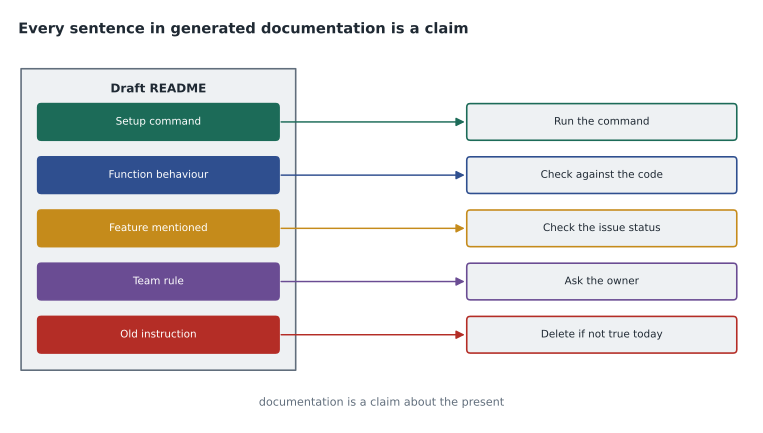
A README answers a newcomer's first questions: what is this, who is it for, how do I run it, how do I help. Copilot can draft one from the repository, especially in agent mode or on GitHub.com where it can read several files. Dmitri asked for a new README for trailcheck, referencing the requirements file, the start script and the contributing notes. The draft was well organized and mostly right. It also described a "make deploy" command that no longer existed, because an old comment in the start script mentioned it, and it described a feature for trail closures that was only planned for September, because an issue title mentioned it.
Both errors came from the same cause: Copilot reported what it found in the text, without knowing what was current. The fix was a review pass with a simple question for each sentence: "is this true today?" Dmitri then ran every command in the setup section on a fresh checkout, which found one more error, a missing environment variable.
Worked problem
Checking a setup section
The generated README lists six setup commands. On a fresh checkout, Dmitri finds that one command no longer exists and one fails because an environment variable is missing. What share of the commands worked as written, and what should he change?
Show solution
- Commands that worked: 6 - 2 = 4.
- Share: 4 / 6 is about 0.67, or about 67 in 100.
- Changes: remove the command that no longer exists, and add a step that sets the missing environment variable, with an example value that is not a real secret.
Answer: About two-thirds worked. Running the steps is the only reliable way to know, and it took ten minutes.
API documentation
TrailCheck exposes a small API that the partner publisher's app uses to read trail conditions. Its documentation had been written once and never updated. Copilot can generate reference documentation from the route definitions: each endpoint, its parameters, its response fields and an example. That is valuable, because reference documentation is tedious and errors in it are common. The person reviewing it must check three things the code does not reveal: which fields are stable and which may change, what the error responses look like in practice, and any limits such as how often the partner may call the API.
GET /api/trails/{slug}/status

Returns the current status of one trail.

Response 200:
  {"trail": "Cove Path", "status": "open", "updated": "2027-08-06", "reports_last_7_days": 3}

Response 404:
  {"error": "unknown trail"}

Stability: "trail", "status" and "updated" are stable.
"reports_last_7_days" is new and may change before version 2.
The stability note at the end is the kind of statement only the team can make. It tells the partner which fields they can rely on. Without it, the partner would reasonably treat every field as permanent.
Commit messages and pull request descriptions
Copilot can draft commit messages in many editors and pull request summaries on GitHub.com. Both summarize a diff, and both are better when the author adds the reason. A generated commit message such as "update status.py" is accurate and useless. "Fix trail status counting reports older than seven days" is better, and the team's convention added a short body explaining the cause and the test that proves the fix. Priya's rule: let Copilot draft, then make sure the message answers "why", which the diff alone never shows.
| Draft from Copilot | Improved by the author |
|---|---|
| Update status.py | Fix trail status counting reports older than seven days |
| Refactor summary module | Refactor build_summary: replace SKIP global with a parameter (no behaviour change) |
| Add tests | Add characterization tests for build_summary before refactor |
| Update README | README: remove old deploy command; add DATA_DIR setup step |
Pull request descriptions deserve the same care. A good description tells the reviewer what changed, why, how it was tested and what to look at closely. Copilot's summary on GitHub.com is a fast first draft of the first part. The author adds the rest, and in particular points the reviewer at the risky lines, such as a changed date comparison, rather than leaving them to find it among forty lines of renamed variables.
Documentation for a community
The open-trail-report project, moved into the organization in the spring, had volunteer contributors who relied on its CONTRIBUTING.md, its GOVERNANCE file and its issue templates. These are not just descriptions of code; they are promises about how the project works. Malik, who leads the project, asked chat to draft a clearer contributing guide. He kept the structure and rewrote every rule in his own words, because the rules were commitments he would have to keep. A generated sentence such as "all pull requests are reviewed within 48 hours" might be a nice goal, but nobody had agreed to it.
For the bilingual trails, Malik also asked Copilot to draft French versions of two short sections of the contributing guide. He sent them to a volunteer who is a native French speaker for review before publishing, because machine-drafted translations in community documents need a fluent reader.
Onboarding notes and explanations for newcomers
Some of the most useful documentation is written for one reader at one moment. When the partner publisher's liaison developer was due to join in September, Priya asked Copilot to draft an onboarding plan for TrailCheck: which modules to read first, which tests to run, which issues were good first tasks. GitHub's customization library includes an onboarding plan among its example prompt files, and the idea fits a small team well. The draft was a reasonable reading order, because Copilot could see which modules imported which. Priya added the parts it could not know: who to ask about what, which areas were about to change, and the team's habit of pairing on the first pull request. She saved the prompt as a prompt file so it could be run again for the next newcomer, with the output checked each time against the current state of the code.
Diagrams as documentation
Copilot can also draft diagrams in text formats that GitHub renders, such as Mermaid, which turns a few lines of text in a Markdown file into a flowchart or sequence diagram. Dmitri asked for a sequence diagram showing how a trail report travels from the partner app through the API to the status page. The draft got the order of calls right and invented a caching step that did not exist. Diagrams are claims too, and a wrong arrow can mislead a reader more than a wrong sentence, because people trust pictures. He corrected it by checking each arrow against the code, and kept the source next to the README so it could be updated in the same pull request as the code.
Keeping documentation true over time
Documentation decays as code changes. Copilot helps in two ways. It makes updating documentation cheap enough that it gets done in the same pull request as the code change. And it can check documentation against code: "compare the README setup steps with the start script and list any differences" or "list docstrings in this module that no longer match their function signatures". Copilot code review, from the first course, can be guided by instructions to flag pull requests that change behaviour without updating documentation.
Tidewater added one line to its copilot-instructions.md: "When code changes behaviour, update the docstring, README or API reference in the same change." It also added a pull request template checkbox asking whether documentation had been updated. Neither guarantees good documentation, but together they made forgetting harder.
Worked problem
Budgeting time for documentation
Before Copilot, Dmitri estimated docstrings took him about 6 minutes per public function. With Copilot drafting and him reviewing, it takes about 2 minutes. The module has 18 public functions without docstrings. How much time does the new approach save?
Show solution
- Old: 18 x 6 = 108 minutes.
- New: 18 x 2 = 36 minutes.
- Saved: 108 - 36 = 72 minutes.
Answer: About 72 minutes, a little over an hour. The review time is the part that cannot be cut, because it is what makes the docstrings true.
Common mistakes
MistakePublishing generated documentation without checking each claim.
InsteadAsk of every sentence: is this true today?
MistakeKeeping generated comments that restate the code.
InsteadDelete "what" comments; write "why" comments yourself.
MistakeLetting a commit message say only what changed.
InsteadAdd why the change was made and how it was tested.
MistakeLetting Copilot write policy or governance rules for a community.
InsteadUse drafts for structure; the people who keep the promises write the rules.
MistakeUpdating documentation in a separate, later pull request.
InsteadChange documentation in the same change as the code.
Summary and key terms
- Copilot drafts documentation well because it can describe the code it sees.
- It cannot know reasons, history, plans or what is current, and it documents bugs as if they were features.
- Docstrings with runnable examples, checked by doctest, keep documentation tied to the code.
- Generated README and setup steps must be checked by running them.
- Commit messages and pull request descriptions need the "why" that only the author knows.
- Community documents are promises; people write the rules, and translations need fluent review.
- Docstring
- A string at the start of a function, class or module that documents it.
- Doctest
- A Python tool that runs examples written in docstrings and checks their output.
- README
- The first document in a repository, explaining what it is and how to use it.
- API reference
- Documentation listing an interface's operations, inputs and outputs.
- Documentation drift
- The gap that grows between documentation and code as the code changes.
Practice problems
Work each problem on paper first, then reveal the answer to check.
Name two things Copilot cannot supply in documentation.
Show answer
Any two of: the reasons for design choices, history, plans, what is current, and promises such as stability or review times.
How can a docstring example act as a test?
Show answer
If written in doctest form, Python runs it and fails if the output no longer matches.
What is the best way to check generated setup instructions?
Show answer
Run every step on a fresh checkout.
Lesson quiz · 5 questions
Score 60% or more to complete this lesson.
Create a free account to save your progress, take quizzes and earn a certificate.