
MSBA-304 · Lesson 3 of 12 · 19 min
Custom instructions and prompt files
▶ Video coming soon A video version of this lesson is on the way.
By Friday, July 30, Dmitri had noticed a pattern. In almost every chat request he typed the same reminders: use Python type hints, use the team's error dictionary format, follow the date format in the report note, write tests with plain assert statements. "I am repeating myself to a machine," he said. Priya agreed that was a sign. Rules that apply to every request should not live in each prompt; they belong in custom instructions, which Copilot adds to the context automatically. Tasks that the team repeats, such as writing a test file in a set style, can be saved as prompt files and reused. This lesson covers both, plus agent instruction files such as AGENTS.md, and how the different kinds combine.
Three places instructions can live
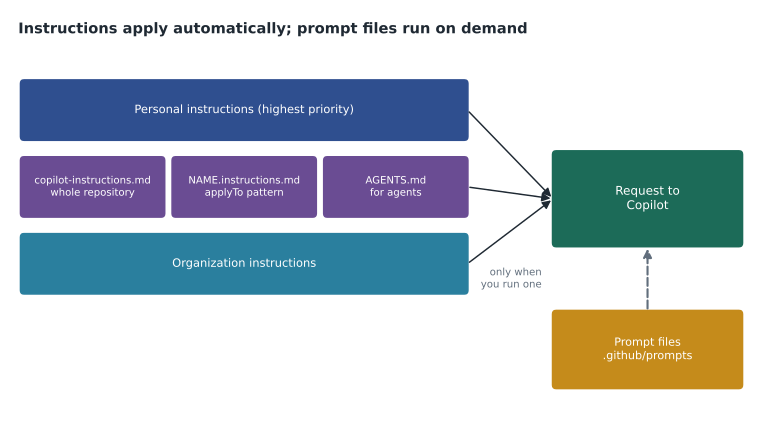
Custom instructions are plain Markdown text that tells Copilot about your project and how you want it to work. They can be set at three levels. Personal instructions belong to one user and follow them across repositories, for example a preference for short answers. Repository instructions live in files in the repository and apply to anyone using Copilot there. Organization instructions, available on business plans, are set by owners and apply across the organization's repositories. When more than one set applies, Copilot receives all of them. GitHub's documentation gives personal instructions the highest priority, then repository instructions, then organization instructions, but it also recommends avoiding conflicts, because the model sees all the sets and may not resolve a clash the way you expect.
Repository-wide instructions
The most common file is .github/copilot-instructions.md. Its contents apply to requests made in the context of the repository. Copilot Chat uses it, and so do the cloud agent and code review on GitHub.com. When chat uses the file, it appears in the list of references under the answer, which is a useful way to check that it was picked up. There is no special syntax; short, specific statements work best. GitHub ignores whitespace between instructions, so you can format them as a list.
# TrailCheck: instructions for Copilot

## About the project
- TrailCheck is a Python 3.12 web app that shows trail conditions for Tidewater Trail Guides.
- Trail reports are single lines: date|trail|condition. See docs/report-format.md.

## How we write code
- Use type hints on every function and a one-line docstring.
- Parsers return a dict; errors are {"error": "<message>"} rather than exceptions.
- Dates are ISO 8601 (YYYY-MM-DD). Reject dates in the future.
- Use only the standard library unless requirements.txt already lists the package.

## Tests
- Tests live in tests/ and use pytest with plain assert statements.
- Every new function gets at least one normal case, one edge case and one error case.

## Never
- Never put credentials or real volunteer names in code, tests or examples.
Look at what the file contains: facts the model cannot infer (Python version, report format, where the format note is), team conventions (type hints, error dictionaries, ISO dates) and firm rules (no credentials or real names). It does not contain vague advice such as "write good code", which adds tokens and changes nothing. Priya kept the file to about thirty lines, because it is sent with every request and a long file crowds out other context.
Worked problem
Deciding what belongs in instructions
Dmitri listed six rules. Which belong in copilot-instructions.md, and which do not? (1) Use type hints. (2) Fix the bug in issue 214. (3) Dates are ISO 8601. (4) Be concise. (5) The API key is in config/secrets.toml. (6) Tests use pytest with plain asserts.
Show solution
- Rules 1, 3 and 6 are lasting project conventions, so they belong.
- Rule 2 is a single task; it belongs in a prompt or an issue, not in instructions.
- Rule 4 is a personal preference; it fits personal instructions better than repository ones.
- Rule 5 points Copilot at a secret; it must never be in instructions, and that path is excluded anyway.
Answer: Rules 1, 3 and 6. Tasks go in prompts, preferences in personal instructions, and anything about secrets stays out entirely.
Path-specific instructions
Some rules apply only to part of a repository. TrailCheck's data files have rules that make no sense for Python code, and its templates follow HTML conventions. Path-specific instructions handle this. They live in files named NAME.instructions.md inside .github/instructions/ (subfolders are allowed), and each starts with a short frontmatter block whose applyTo value is a glob pattern saying which files it covers. Several patterns can be separated by commas. When a file matches, Copilot uses both the path-specific instructions and the repository-wide file.
---
applyTo: "data/**/*.csv,data/**/*.txt"
---
# Trail data files
- One trail per line. Fields are separated by a vertical bar.
- Trail names use title case and match the names in data/trails.csv exactly.
- Never add or invent volunteer names; the volunteer column stays empty in examples.
GitHub's documentation notes an important limit: on GitHub.com, path-specific instruction files are currently used only by the Copilot cloud agent and Copilot code review, and support is described as limited. Editors such as VS Code also read them in chat and agent features. A frontmatter keyword, excludeAgent, can stop either the code review or the cloud agent from reading a particular file, for example when a rule is meant for writing code but would produce noisy review comments.
Agent instructions: AGENTS.md
Agents, which lesson 8 covers, also read instruction files. Copilot supports one or more AGENTS.md files anywhere in a repository, or a single CLAUDE.md or GEMINI.md at the root, so that teams using several agent tools can share one set of guidance. When an agent works on a file, the nearest AGENTS.md in the folder tree above it takes precedence, which lets a subfolder carry its own rules. Agent instructions usually describe how to build, test and check the project, because an agent that runs commands needs to know which commands are safe and which prove the work is done.
# AGENTS.md (repository root)

## Build and test
- Create a virtual environment and install requirements.txt.
- Run the tests with: pytest -q
- Run the data checks with: python tools/validate_data.py data/

## Done means
- All tests pass and the data check reports no errors.
- New code has tests; changed behaviour is described in CHANGELOG.md.

## Do not
- Do not edit files under data/archive/ or change requirements.txt without asking.
Prompt files
Prompt files are different in one key way: they are not applied automatically. A prompt file is a reusable Markdown template for a particular task, saved with the extension .prompt.md, usually in .github/prompts/. You run it on purpose from chat, by selecting or referencing it, when you want that task done. Prompt files can include placeholders for input and references to files that give context, so one template can be reused with different inputs. GitHub lists them as available in VS Code, Visual Studio, JetBrains IDEs and Xcode, and its customization library describes them as being in public preview, so details may change.
---
description: "Write pytest tests for a TrailCheck function"
---
Write pytest tests for the function I name below, following
.github/copilot-instructions.md and the examples in tests/test_parse.py.

Function: ${input:function_name}

Include:
- at least two normal cases taken from docs/report-format.md
- edge cases: empty string, extra spaces, upper-case condition
- error cases that check the exact error dictionary
Put the tests in tests/test_${input:function_name}.py and do not change the function.
Treat the exact frontmatter fields and placeholder syntax as editor details that can change; the concept is what matters. Instructions answer "how do we always work here?" Prompt files answer "how do we do this particular task well?" Tidewater started with three prompt files: write tests, explain a module for a newcomer, and draft a changelog entry.
| Feature | Applies | Where it lives | Good for |
|---|---|---|---|
| Personal instructions | Automatically, for one user | User settings | Answer length, preferred language for explanations |
| Repository instructions | Automatically, in the repository | .github/copilot-instructions.md | Project facts and conventions |
| Path-specific instructions | Automatically, for matching files | .github/instructions/*.instructions.md | Rules for data, templates or a subproject |
| Organization instructions | Automatically, across the organization | Organization settings | Company-wide rules such as no real customer data |
| Agent instructions | Automatically, for agents | AGENTS.md, or CLAUDE.md or GEMINI.md at the root | Build, test and done criteria |
| Prompt files | Only when you run one | .github/prompts/*.prompt.md | Repeatable tasks |
Measuring the effect
Priya wanted evidence that the instructions file helped, not just a feeling. For a week before adding it, Dmitri had kept a tally of chat answers that needed a follow-up because they ignored a team convention. He kept the same tally for a week after.
before = {"answers": 46, "needed_fix": 19}
after = {"answers": 51, "needed_fix": 7}
for label, week in (("before", before), ("after", after)):
    share = week["needed_fix"] / week["answers"]
    print(label, "needed a follow-up:", round(share * 100), "in 100")
change = before["needed_fix"] / before["answers"] - after["needed_fix"] / after["answers"]
print("fall:", round(change * 100), "in 100 answers")before needed a follow-up: 41 in 100 after needed a follow-up: 14 in 100 fall: 28 in 100 answers
What this code does
The example takes two weeks of Dmitri's tallies: how many chat answers he received and how many needed a follow-up because they broke a team rule. For each week it divides the second number by the first to get a rate per 100 answers, then subtracts to show the change. The output shows the rate falling from about 41 to about 14 answers in 100, a drop of about 28 in 100, which suggests the instructions file was doing its job.
Two weeks of one person's tally is a small sample, and Dmitri was also getting better at prompting, so the improvement is not all due to the file. It was still a large enough change to justify keeping the file and adding the path-specific one for data.
Organization instructions and personal instructions in practice
Tidewater is small, but Rosa still set one organization instruction for every repository: never use real volunteer or customer names, addresses or phone numbers in code, tests, examples or documentation, and use invented data instead. The rule came from the privacy advice the owners received about the volunteer list in the first course, and putting it at organization level meant it applied even in repositories nobody had written instructions for yet. Personal instructions were left to each person. Dmitri set his to ask for short answers with code first and explanation after; Lena set hers to explain unfamiliar terms, because she was still learning the Moncton team's codebase. Because personal instructions have the highest priority, the two of them could ask the same question in the same repository and get answers shaped differently, both following the same project rules.
Maintaining instructions
Instructions are code-adjacent documents and should be treated like code. Tidewater put .github/ under the same rules as the rest of the repository: changes go through a pull request, the code owners for the folder are Priya and Dmitri, and a reviewer checks that a new rule is specific, true and not in conflict with another file. When the project changes, for example a move to a newer Python version, the instructions change in the same pull request. Stale instructions are worse than none, because they confidently steer Copilot toward the old way.
A quick check that instructions are working is to ask chat a question whose answer depends on a rule, such as "write a parser for the volunteer roster line format", and look for two things: the instructions file listed among the references under the answer, and the rule actually followed in the code. If the file is listed but the rule is ignored, the rule is probably too vague or contradicted elsewhere. If the file is not listed at all, check its path and name, because a file saved as .github/copilot_instructions.md or outside the .github folder will simply not be found.
Copilot can help write the first draft. GitHub's cloud agent can be asked to generate a copilot-instructions.md by studying a repository, and in editors you can ask chat to propose instructions based on the codebase. Priya used that as a starting point and then cut the draft by half, removing anything generic.
Common mistakes
MistakeTyping the same team rules into every prompt.
InsteadPut lasting conventions in .github/copilot-instructions.md.
MistakeWriting long, vague instructions such as "write high quality code".
InsteadKeep instructions short, specific and checkable.
MistakePutting a one-off task in the instructions file.
InsteadUse a prompt or a prompt file for tasks.
MistakeExpecting a prompt file to apply automatically.
InsteadPrompt files run only when you invoke them.
MistakeLetting personal, repository and organization instructions contradict each other.
InsteadAvoid conflicts; all sets are sent to the model.
Summary and key terms
- Custom instructions are Markdown guidance that Copilot adds to requests automatically.
- Personal, repository and organization instructions can all apply; personal has the highest priority, but conflicts should be avoided.
- .github/copilot-instructions.md covers the whole repository and is used by chat, the cloud agent and code review.
- Path-specific .instructions.md files use an applyTo glob; on GitHub.com they are used by the cloud agent and code review.
- AGENTS.md files give agents build, test and done criteria; the nearest file takes precedence.
- Prompt files (.prompt.md) are reusable task templates that run only when invoked.
- Custom instructions
- Guidance in Markdown that Copilot includes with requests automatically.
- applyTo
- The frontmatter value in a path-specific instructions file that lists the file patterns it covers.
- AGENTS.md
- An instructions file for AI agents; the nearest one in the folder tree takes precedence.
- Prompt file
- A reusable task template with the .prompt.md extension, run on demand.
- Frontmatter
- A short block of settings at the top of a Markdown file, between lines of three hyphens.
Practice problems
Work each problem on paper first, then reveal the answer to check.
Where does repository-wide guidance for Copilot go?
Show answer
In .github/copilot-instructions.md.
What is the difference between an instructions file and a prompt file?
Show answer
Instructions apply automatically to requests in their scope; a prompt file is a task template that runs only when you invoke it.
How can a path-specific instructions file be kept away from code review?
Show answer
Add excludeAgent with the value "code-review" to its frontmatter.
Lesson quiz · 5 questions
Score 60% or more to complete this lesson.
Create a free account to save your progress, take quizzes and earn a certificate.