
MSBA-304 · Lesson 2 of 12 · 21 min
Giving Copilot context
▶ Video coming soon A video version of this lesson is on the way.
On Wednesday, July 28, Priya began with a demonstration. She asked Copilot Chat the same question twice: "How should I validate a trail report?" The first time she had only an empty file open. The answer was generic advice about checking strings. The second time she had TrailCheck's report parser, its tests and the data format note open, and she had selected the parser function. The answer named the three fields, used the existing error format and suggested a missing check for future dates. "Same words," she said. "Different context." This lesson explains what context Copilot uses, how it is chosen, how you can add or remove it, how chat history affects answers, and how the size of the context window shapes what is possible.
What context means
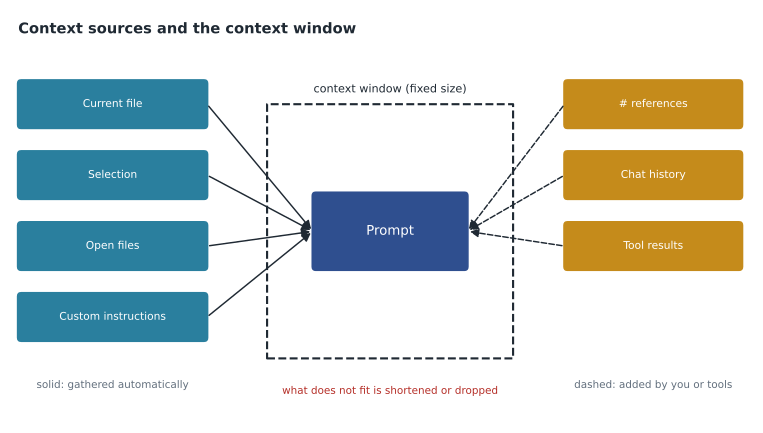
Context is the information that travels with your request so the model can answer it. The model has no memory of your project between requests and cannot browse your computer on its own. It only knows what is in the prompt: your message plus whatever the editor, GitHub or a tool added. The GH-300 study guide asks candidates to understand how context is determined, and the practical summary is that Copilot gathers some context automatically, you can add more explicitly, and everything competes for limited space.
| Source of context | How it gets in | Example |
|---|---|---|
| The current file and cursor position | Automatically, in completions and editor chat | The function you are editing |
| Selected code | Automatically when you select before asking | A highlighted loop you want explained |
| Other open files | Sometimes, when the editor judges them related | The test file next to the module |
| Explicit references | You add them with # references or attachments | #file pointing at the data format note |
| Chat history | Earlier messages in the same conversation | Your previous question and its answer |
| Custom instructions | Automatically when the repository has them | .github/copilot-instructions.md |
| Tool results | When agent features or MCP servers run tools | A list of failing tests from the terminal |
| Repository knowledge on GitHub.com | When you ask in a repository or a Copilot Space | Code search results across the repository |
Two consequences follow. First, if the information that matters is not in any of these sources, Copilot will fill the gap with a plausible guess. Second, irrelevant information is not harmless: it takes space and can pull the answer in the wrong direction. GitHub's own guidance says to open relevant files and close unrelated ones, which sounds trivial but changes results noticeably.
Adding context on purpose
In Visual Studio Code, chat accepts references that start with a hash sign. GitHub's cheat sheet lists references such as #file, #selection, #function, #class, #block, #line, #path, #project and #sym; other editors use similar ideas with different names. Visual Studio, for instance, lets you type a file name with line numbers after the hash sign. You can also attach files or images, drag files into the chat box, or select code before you ask. Chat participants, written with an at sign, route a question to a specialist: @terminal for terminal commands, @vscode for editor features, and @github for GitHub-specific skills such as searching issues or pull requests.
#file:docs/report-format.md #selection
Using the format described in the attached note, add validation to the selected
parse_condition function so that dates in the future are rejected with the same
error dictionary style the function already uses.
Explicit references remove guesswork. Without the #file reference, Copilot might or might not have picked up the format note; with it, the note is certainly included. Priya's rule for the team was simple: if the answer depends on a particular file, reference it rather than hoping.
Worked problem
Choosing context for a question
Lena wants to know why the trail list page shows trails in the wrong order. The sorting happens in trails/sort.py, the page template is in templates/list.html, and the bug report includes a screenshot. What context should she give?
Show solution
- Reference the sorting module with #file:trails/sort.py, because the order is decided there.
- Attach the screenshot so the model can see the actual wrong order.
- Include the expected order in words, such as "alphabetical by trail name, ignoring a leading The".
- Leave out the template unless the sorting code looks correct, because it adds tokens without helping.
Answer: The sorting module, the screenshot and a sentence stating the expected order. Relevant context in, unrelated files out.
Chat history is context too
Within a conversation, earlier messages and answers are usually sent again with each new request, so the model can follow a thread. That is useful while you are working on one problem. It becomes harmful when the conversation wanders, because old messages keep influencing new answers. If an early answer contained a wrong assumption, that assumption can resurface many turns later. GitHub recommends starting a new thread for each new task and deleting requests that are no longer useful.
Long conversations also get shortened. When the history no longer fits in the space available, the client summarizes or drops older parts. You may notice the model "forgetting" a constraint you gave at the start. The fix is either to restate the constraint or, better, to put lasting rules in custom instructions, covered in lesson 3, where they are included with every request instead of depending on chat history.
| Sign | Likely cause | What to do |
|---|---|---|
| Answers ignore a rule you gave earlier | History was shortened | Restate it, or move it into custom instructions |
| Answers keep returning to an old idea | An early message is still in context | Start a new conversation |
| Answers mix two unrelated tasks | One conversation was used for both | Use one conversation per task |
| Answers suddenly improve after you close files | Unrelated files were crowding the context | Keep only relevant files open |
The context window and tokens
Models measure text in tokens, chunks of a word or symbol. A rough rule for English is about three-quarters of a word per token, and code often uses more tokens per line than prose because of punctuation and indentation. Every model has a context window, the maximum number of tokens it can consider at once, covering the prompt and the response. Copilot clients use only part of the model's full window for automatic context, leaving room for your message, instructions and the answer.
You do not need exact numbers for the exam or for daily work, but the budget idea matters. If you open twenty files, select a long file and paste a big log, some of it will not fit and the client must choose what to keep. A small, focused prompt with the right two files usually beats a huge one.
budget = 16000          # tokens the client allows for this request
reserve_answer = 2000   # room kept for the response
parts = {
    "instructions": 600,
    "your message": 150,
    "selected function": 900,
    "#file report-format.md": 1400,
    "chat history": 5200,
    "open file sort.py": 3100,
    "open file list.html": 4300,
}
used = 0
for name, size in parts.items():
    if used + size <= budget - reserve_answer:
        used += size
        print("kept   ", name, size)
    else:
        print("dropped", name, size)
print("tokens used:", used, "of", budget - reserve_answer)kept instructions 600 kept your message 150 kept selected function 900 kept #file report-format.md 1400 kept chat history 5200 kept open file sort.py 3100 dropped open file list.html 4300 tokens used: 11350 of 14000
What this code does
The example lists the pieces that could go into one request with an invented size for each, and keeps some room free for the answer. It adds the pieces one at a time in priority order and keeps each one only if there is still space. The output shows that everything fits except the large page template, which is dropped, and that the request uses 11,350 of the 14,000 tokens available; a real client chooses more cleverly, but the trade-off is the same.
The example is a teaching model, not how any particular client works, but it shows why the long chat history is costly: at 5,200 tokens it took more space than the two pieces of code combined. Starting a new conversation would have made room for the template if it had mattered.
Repository context on GitHub.com and Copilot Spaces
When you use Copilot Chat on GitHub.com from inside a repository, it can search the repository's code, issues and pull requests to find context, rather than relying only on what you paste. Copilot Spaces go further: they let you collect a set of files, notes and repositories into a named space and ask questions grounded in that collection. In the first course the team created a space called "TrailCheck data format" containing the format note, the parser and examples of real reports with personal details removed. Dmitri used it in this session to ask how far-future dates should be handled, and the answer quoted the format note correctly.
Spaces are useful for knowledge that lives in several places and that many people ask about. They are also a natural place to apply the data rules from the first course: only material that is safe to send to Copilot belongs in a space, and excluded content stays out.
Context and content exclusion
Content exclusion, set up in the first course, removes chosen files from Copilot's context. If a file is excluded, completions do not appear in it and chat does not use it, even if it is open. That is a protection, but it can also explain a confusing answer: if Copilot seems not to know about a configuration file, check whether it is excluded before blaming the prompt. GitHub notes that some agent and edit features do not yet honour content exclusion in every editor, which is one reason Tidewater keeps sensitive material out of repositories where agent features are on.
Practical habits for context
Priya summarized the session with habits for everyday work. They are small, and they compound.
| Habit | Reason |
|---|---|
| Open the files that matter and close the rest | Relevant files are more likely to be picked; unrelated ones add noise |
| Select the code you are asking about | The selection is sent explicitly |
| Reference key documents with #file | Guarantees they are included |
| State facts the model cannot see | Versions, business rules, the expected output |
| Use one conversation per task | Keeps history relevant and short |
| Put lasting rules in custom instructions | They are included every time, not only when remembered |
| Use a Copilot Space for shared knowledge | Grounds answers in curated material |
| Never add secrets or real personal data | Context leaves your computer |
Worked problem
How much history is too much?
A conversation has 14 exchanges averaging 450 tokens each. The client allows 6,000 tokens for history. How many of the most recent exchanges can be kept whole, and what happens to the rest?
Show solution
- Total history: 14 x 450 = 6,300 tokens, which is over the 6,000 allowed.
- Whole exchanges that fit: 6,000 / 450 is about 13.3, so 13.
- The oldest exchange is summarized or dropped.
Answer: The 13 most recent exchanges fit; the oldest is shortened or dropped. If that first exchange held an important rule, the rule may be lost, which is why lasting rules belong in instructions.
Owen, who mainly edits data files, asked whether any of this mattered for him. Priya pointed out that it mattered most for him: when he asked Copilot to check a batch of trail entries, the answer was only as good as the format note and the examples in context. With the "TrailCheck data format" space selected, Copilot flagged two entries with invalid dates; without it, it said they looked fine.
Context in completions compared with chat
Completions and chat gather context differently, and knowing the difference explains a lot of behaviour. Completions must be fast, so they use a small, automatically chosen context: mainly the code just before and after the cursor, the file name and language, and short snippets from related open files. You cannot add # references to a completion. You steer it by what is in the file: a comment stating intent, descriptive names and an earlier example. Chat can take longer and accepts explicit context, so it is the better tool when the answer depends on a document, several files or a long explanation. Dmitri adopted a simple rule: if he caught himself writing a long comment just to steer a completion, he switched to chat and referenced the files instead.
Common mistakes
MistakeAsking a question about a file that is not open, selected or referenced.
InsteadReference it with #file or open it, so it is certainly included.
MistakeKeeping dozens of unrelated files open while asking for help.
InsteadOpen only what matters to the task.
MistakeUsing one long conversation for a whole day of different tasks.
InsteadStart a new conversation for each task.
MistakeRelying on chat history to remember team rules.
InsteadPut lasting rules in custom instructions.
MistakeAssuming Copilot can see an excluded file.
InsteadCheck content exclusion when answers seem uninformed.
Summary and key terms
- Context is the information sent with a request; the model knows nothing about your project beyond it.
- Some context is gathered automatically, such as the current file and selection; you can add more with # references, attachments and participants.
- Chat history is context; long or wandering conversations get shortened and can mislead later answers.
- Prompts and responses share a limited context window measured in tokens.
- Repository chat on GitHub.com and Copilot Spaces ground answers in curated or searched material.
- Excluded files never become context, which protects data and can explain uninformed answers.
- Context
- The information sent with a request so the model can answer it.
- Context window
- The maximum number of tokens a model can consider at once.
- Token
- A chunk of text, often part of a word, that models count.
- Chat participant
- A specialist that handles a question, written with an at sign such as @terminal.
- Copilot Space
- A curated collection of files, notes and repositories that grounds Copilot answers.
Practice problems
Work each problem on paper first, then reveal the answer to check.
Why can closing unrelated files improve an answer?
Show answer
They no longer compete for space in the context or pull the answer toward irrelevant code.
What does #selection do in VS Code chat?
Show answer
It adds the currently selected code to the context of the request.
Where should a rule that must apply to every request go?
Show answer
In custom instructions, which are included automatically, rather than in chat history.
Lesson quiz · 5 questions
Score 60% or more to complete this lesson.
Create a free account to save your progress, take quizzes and earn a certificate.