
MSBA-304 · Lesson 1 of 12 · 22 min
Prompt basics for code
▶ Video coming soon A video version of this lesson is on the way.
Dmitri Kovac finished the first Copilot course in July with a clear picture of what GitHub Copilot can do and how Tidewater Trail Guides had set it up. What he did not yet have was a reliable way to get good results from it. Priya suggested a second series, three short sessions a week in the Moncton boardroom from Monday, July 26 to Friday, August 20, 2027, with a readiness week after that and his GH-300 exam planned for the end of August. Everything in this course is written as a plan or rehearsal, because the sessions are still ahead. The first session was about the most basic skill of all: writing a prompt that a coding assistant can act on.
"Last month I asked Copilot Chat to 'fix the trail page'", Dmitri admitted. "It changed the colours of the header." Priya laughed. "It did exactly what you asked. You just did not ask for what you wanted." This lesson covers what a prompt is, the parts of a good one, zero-shot and few-shot prompting, how to iterate, and the habits that make results predictable. Later lessons build on it: lesson 2 on context, lesson 3 on instructions and prompt files, and lessons 4 to 7 on using prompts for tests, refactoring, debugging and documentation.
What a prompt is
A prompt is everything a language model receives before it answers. When you type a question into Copilot Chat, your words are only part of the prompt. The editor or GitHub adds context: the file you are in, code you selected, earlier messages in the conversation, any custom instructions for the repository, and sometimes results from tools. The model reads all of this as one long piece of text and predicts a response. The part you control directly is your message, and the most common reason for a poor answer is a message that leaves the model to guess.
Completions, the ghost text from the first course, also use a prompt, but you build it differently. For completions the prompt is mostly the code around your cursor, so you steer it with comments, names and examples in the file. For chat you write the request yourself. The principles in this lesson apply to both: say what you want, give the information needed to do it, and show the shape of the answer when the shape matters.
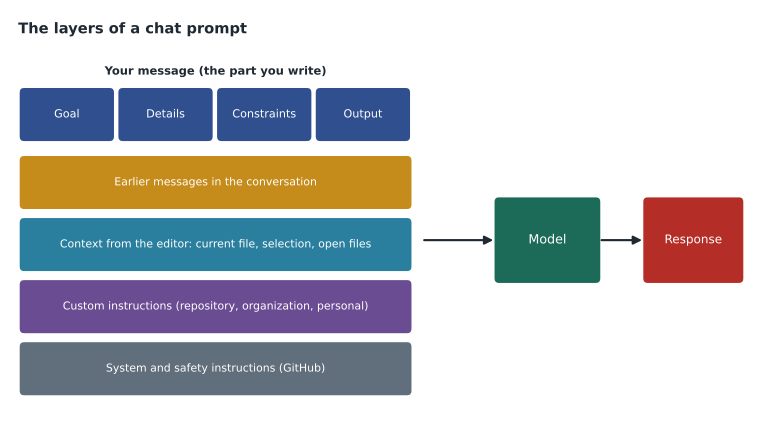
The parts of a good request
GitHub's guidance for Copilot comes down to a handful of habits, and Priya turned them into a four-part checklist that Dmitri could hold in his head while typing. Not every prompt needs all four, but a prompt that fails usually lacks one of them.
| Part | Question it answers | Example for TrailCheck |
|---|---|---|
| Goal | What do I want in one sentence? | Write a function that converts a trail length to the other unit system |
| Details | What does the code need to know? | Input is a number and a unit, "km" or "mi"; 1 mile is 1.609344 km |
| Constraints | What must it do or avoid? | Round to one decimal place; reject negative lengths and unknown units; no new libraries |
| Output | What shape should the answer take? | One Python function with type hints and a docstring, then three example calls |
Start general, then get specific. GitHub recommends describing the overall goal first and then listing requirements. A model that knows the goal can make sensible choices about details you forgot; a model given only details may satisfy each one and miss the point. Avoid ambiguity: name the function, file or library instead of saying "this" or "the page". Break big tasks into smaller ones: a request for a whole feature invites a large, unreviewable answer, while a sequence of small requests gives you something to check at each step.
Worked problem
Rewriting a vague prompt
Dmitri's first attempt was "make a function for distances". Rewrite it using the four-part checklist.
Show solution
- Goal: "Write a Python function that converts a trail length between kilometres and miles."
- Details: "The input is a length and a unit string, either 'km' or 'mi'. One mile is 1.609344 kilometres."
- Constraints: "Return the length in the other unit, rounded to one decimal place. Raise ValueError for negative lengths or any other unit. Use only the standard library."
- Output: "Give one function called convert_length with type hints and a docstring, followed by three example calls showing the results."
Answer: The rewritten prompt names the function, the inputs, the conversion factor, the rules for bad input and the form of the answer, so the model has nothing important left to guess.
Priya pointed out that writing the four parts took Dmitri less than a minute, and that the minute was cheaper than reading, rejecting and re-asking for a vague answer two or three times. It is also cheaper in a literal sense: since June 2026, chat requests on business plans draw on a pool of AI credits that depends on the tokens used, so a conversation that circles because the first prompt was vague costs more than one that lands quickly.
Zero-shot and few-shot prompting
The GH-300 study guide names two prompting styles. A zero-shot prompt asks for something without showing any examples: "Write a function that converts trail lengths between kilometres and miles." Modern models handle many zero-shot requests well, because they have seen countless similar tasks. A few-shot prompt includes one or more examples of the input and the output you expect, so the model can copy the pattern. Few-shot prompting is most useful when the format matters more than the logic, or when your project does something in its own particular way.
TrailCheck stores trail condition reports as single lines, such as 2027-07-20|Headland Loop Trail|muddy. The team wanted every new parser to report problems in the same structured way. Dmitri tried a few-shot prompt that showed two input lines and exactly what the function should return for each. The model followed the pattern on the first try, including the error format, which it could not have guessed from a description alone.
Write a Python function parse_condition(line) for TrailCheck report lines.
Follow these examples exactly:

Input:  "2027-07-20|Headland Loop Trail|muddy"
Output: {"date": "2027-07-20", "trail": "Headland Loop Trail", "condition": "muddy"}

Input:  "2027-07-20|Headland Loop Trail"
Output: {"error": "expected 3 fields, got 2"}

Return a dictionary in every case. Do not raise exceptions.
A few-shot prompt does not need many examples. One or two well-chosen ones usually set the pattern; more mainly help when examples differ in an important way, such as a normal case and an error case. Examples also work in completions: if a file already contains one parser written the way the team likes, Copilot tends to write the next one the same way. Unit tests are another kind of example, and lesson 4 shows how a test written first can act as a precise specification.
The answer Dmitri got
Using his rewritten zero-shot prompt from the worked example, Dmitri received the function below. He ran it on a normal case, a case in miles and two bad inputs before keeping it.
def convert_length(length: float, unit: str) -> float:
    """Convert a trail length between kilometres and miles.

    unit is "km" or "mi" and describes the input; the result is in the other unit,
    rounded to one decimal place.
    """
    KM_PER_MILE = 1.609344
    if length < 0:
        raise ValueError("length cannot be negative")
    if unit == "km":
        return round(length / KM_PER_MILE, 1)
    if unit == "mi":
        return round(length * KM_PER_MILE, 1)
    raise ValueError(f"unknown unit: {unit}")

print(convert_length(8.4, "km"))
print(convert_length(3.0, "mi"))
for bad in [(-1, "km"), (5, "feet")]:
    try:
        convert_length(*bad)
    except ValueError as e:
print("rejected:", e)5.2 4.8 rejected: length cannot be negative rejected: unknown unit: feet
What this code does
The function takes a trail length and the unit it is in, and gives back the same length in the other unit, rounded to one decimal place. It divides by 1.609344 to turn kilometres into miles and multiplies to go the other way, and it refuses negative lengths and any unit other than the two it knows. The output shows 8.4 km becoming 5.2 miles, 3 miles becoming 4.8 km, and the two bad inputs being rejected with a clear message.
Every requirement in the prompt shows up in the answer: the name, the type hints, the docstring, the rounding, the two kinds of rejection and the example calls. That is the point of a structured prompt. It also makes review easier, because Dmitri could check the answer against his own list instead of against a vague memory of what he meant.
Iterating: refine, build on, or start over
Even good prompts sometimes produce answers that are not quite right. GitHub's advice is to experiment and iterate, and there are three ways to do it. You can refine the prompt, editing your original message to add the detail that was missing. You can build on the answer in a follow-up message, such as "now make it accept upper-case unit strings too". Or you can start over in a new conversation, which is the right choice when the conversation has drifted and earlier messages are steering the model in the wrong direction.
| Situation | Best move | Why |
|---|---|---|
| The answer is close but misses one requirement | Follow-up message | The earlier context is still useful |
| The answer misunderstood the goal | Edit and resend the original prompt | A corrected start avoids carrying the misunderstanding forward |
| You have moved on to a different task | New conversation | Old messages are now irrelevant context |
| The answer keeps repeating the same mistake | New conversation with a clearer prompt | Chat history may be reinforcing the mistake |
Lesson 2 explains why chat history matters so much: every earlier message in a conversation can be sent again as context, so a long conversation about the wrong thing keeps pulling later answers toward it. Keeping each conversation to one task is one of the simplest habits that improves results.
Prompts that ask for reasoning or options
Some prompts work better when they ask the model to think before it writes code. "Explain two ways to store the conversion factor and recommend one" produces a short comparison you can judge before any code exists. "List the edge cases this function should handle, then write it" makes the model surface assumptions, and you can correct a wrong assumption before it becomes a wrong line. Asking for a plan first is also how agent features work, as lesson 8 shows: the agent proposes steps, you approve or adjust them, and only then does it change files.
Prompts can also ask for the answer in a particular form: a table comparing options, a numbered list of steps, only the changed lines rather than the whole file, or code without explanation when you just need the code. Saying "show only the changed function" saves tokens and reading time. Saying "explain each step briefly" is better when you are learning, which Lena Fischer, the newest developer, found useful for understanding parts of the codebase she had not touched before.
Habits that keep prompts reliable
Priya ended the session with the habits she wanted the team to share. They come from GitHub's own guidance, adjusted for Tidewater.
| Habit | What it means in practice |
|---|---|
| Say the goal first | One sentence about the outcome before any details |
| Name things exactly | Function, file, library, version and unit, not "this" or "it" |
| Show an example when format matters | One input and output pair is often enough |
| Keep tasks small | One function, one test file or one fix per request |
| State the constraints | Libraries allowed, style rules, performance or security limits |
| Ask for the shape you need | Code only, a table, a plan, or the changed lines |
| Check against your own list | Review the answer against the requirements you wrote |
| Leave secrets out | No passwords, keys or real personal data in any prompt |
The last habit links back to the first course. Prompts are sent to GitHub's service and on to a model, so anything typed into them leaves your computer. On Tidewater's Business plan, prompts from the editor are not kept after the answer is returned, but the safe rule is never to put a secret or a real volunteer's personal details into a prompt. When a prompt needs data, use invented sample data, which Copilot is good at generating, as lesson 4 shows.
Worked problem
Counting the cost of a vague prompt
A vague request takes four rounds of chat to reach a usable answer, and each round uses about 3,000 tokens of input and output. A structured prompt reaches the same answer in one round of about 3,500 tokens. How many tokens does the structured prompt save, and roughly what share of the original is that?
Show solution
- Vague: 4 x 3,000 = 12,000 tokens.
- Structured: 3,500 tokens.
- Saved: 12,000 - 3,500 = 8,500 tokens.
- Share: 8,500 / 12,000 is about 0.71, or about 71 in 100.
Answer: About 8,500 tokens, roughly seven-tenths of the vague conversation. The bigger saving is the developer's time spent reading answers that were never going to be used.
Prompting is a skill, not a trick
Dmitri asked whether there were magic phrases that always worked better. Priya said no. Phrases such as "you are an expert developer" have little effect on modern coding models compared with clear requirements and good context. What reliably helps is the same thing that helps a human colleague: knowing what you want, explaining it plainly, and giving enough information to do it well. A good test is to imagine handing your prompt to a new member of the team. If they would need to ask three questions before starting, the model needs the answers too.
Common mistakes
MistakeAsking for "a fix" or "a function" without saying what it must do.
InsteadState the goal, the inputs, the rules and the form of the answer.
MistakeReferring to "this" or "the page" and hoping Copilot knows which.
InsteadName the function, file or library explicitly.
MistakeAsking for a whole feature in one prompt.
InsteadBreak the work into small, checkable requests.
MistakeContinuing a long conversation after switching tasks.
InsteadStart a new conversation for each new task.
MistakePasting real personal data or a key into a prompt to get a realistic answer.
InsteadUse invented sample data and leave secrets out.
Summary and key terms
- A prompt is everything the model receives: your message plus instructions, context and conversation history.
- Good coding prompts state the goal, the details, the constraints and the form of the output.
- Start general, then get specific; avoid ambiguity; break complex tasks into small steps.
- Zero-shot prompts give no examples; few-shot prompts include examples so the model copies a pattern.
- Iterate by refining the prompt, building on the answer, or starting a new conversation.
- Asking for a plan, options or edge cases first exposes assumptions before code is written.
- Prompt
- All the text a model receives before it responds, including instructions, context and your message.
- Zero-shot prompt
- A request with no examples of the expected output.
- Few-shot prompt
- A request that includes one or more examples of input and output.
- Constraint
- A rule the answer must follow, such as a library limit or a style rule.
- Iteration
- Improving a result by refining the prompt, following up, or starting again.
Practice problems
Work each problem on paper first, then reveal the answer to check.
Name the four parts of Priya's prompt checklist.
Show answer
Goal, details, constraints and output format.
When is a few-shot prompt more useful than a zero-shot one?
Show answer
When the exact format of the result matters, or the project does something in its own particular way that a description would not capture.
A conversation about one bug has drifted and the answers keep repeating a wrong idea. What should you do?
Show answer
Start a new conversation with a clearer prompt, so the old messages stop steering the answers.
Lesson quiz · 5 questions
Score 60% or more to complete this lesson.
Create a free account to save your progress, take quizzes and earn a certificate.