
MSBA-304 · Lesson 5 of 12 · 20 min
Refactoring and explaining code
▶ Video coming soon A video version of this lesson is on the way.
On Wednesday, August 4, Priya opened a file nobody on the web team liked: trails/summary.py, written years earlier by a contractor and changed many times since. It produced the weekly summary email of trail conditions for subscribers. It worked, mostly, but nobody wanted to touch it. "Two jobs today," Priya said. "First, use Copilot to understand this file. Then use it to improve the file without changing what it does." Explaining and refactoring go together: you cannot safely change code you do not understand. This lesson covers asking Copilot to explain code, the discipline of refactoring, how to request refactors in small steps, how to keep behaviour the same, and when to stop.
Asking Copilot to explain code
Explaining code is one of Copilot Chat's most useful and least risky features. Select a function or a whole file and use the /explain slash command, or ask in your own words. The answer describes what the code does, step by step, and can highlight things worth noticing. The GH-300 guide lists accelerating learning and reducing context switching among the productivity benefits, and this is a clear case: instead of tracing a tangled function by hand or interrupting a colleague, you get a first explanation in seconds.
Explanations improve with a focused question. "/explain" on a whole file gives an overview. "Explain how the summary decides which trails to include, and list any conditions that look like bugs" gives an answer aimed at what you need. You can also ask for explanations at a level: "explain this for someone new to Python" or "explain only the date handling". Lena used the second form constantly in her first months.
#file:trails/summary.py
Explain build_summary step by step. Then list:
1. every input it reads (arguments, globals, files, the clock)
2. every output or side effect
3. anything that looks like a bug or a surprise
The answer listed a surprise straight away: build_summary read a global variable called SKIP that another module set, so its output depended on whether that module had run first. Nobody on the current team had known. An explanation is still a model's reading of the code, so Priya checked it by searching for SKIP herself. It was true, and it became the first thing to fix.
What refactoring is, and is not
Refactoring means changing the structure of code without changing its behaviour. Renaming a variable, splitting a long function into smaller ones, removing duplication and replacing a global with a parameter are refactors. Adding a feature or fixing a bug is not; those change behaviour and belong in a separate step. Keeping the two apart matters because a pure refactor can be checked simply: the tests should give exactly the same results before and after.
| Refactor | What it improves | TrailCheck example |
|---|---|---|
| Rename | Readability | d and t become report_date and trail_name |
| Extract function | Size and reuse | Move the formatting of one line into format_line() |
| Remove duplication | Maintenance | Two copies of the date check become one helper |
| Replace global with parameter | Testability, fewer surprises | Pass skip_trails into build_summary |
| Simplify conditionals | Readability, fewer bugs | Nested if statements become early returns |
| Introduce a data type | Clarity | A Report dataclass instead of a list of three strings |
Step zero: tests that pin the behaviour
Before changing anything, you need tests that capture what the code currently does. For legacy code these are called characterization tests: they record present behaviour, including odd behaviour, so you notice if a refactor changes it. This is the one case where writing tests from the current code is correct, because the goal is to preserve behaviour, not to judge it. Copilot is good at this. Dmitri asked it to write tests for build_summary that captured its output for a handful of inputs, and to note any behaviour that looked wrong rather than "correcting" it in the tests.
The suspicious behaviours went on a list for later. One of them, a summary that silently dropped trails whose names contained an apostrophe, was clearly a bug, but fixing it would change behaviour, so it waited until after the refactor, as its own pull request with its own test.
Refactoring in small steps
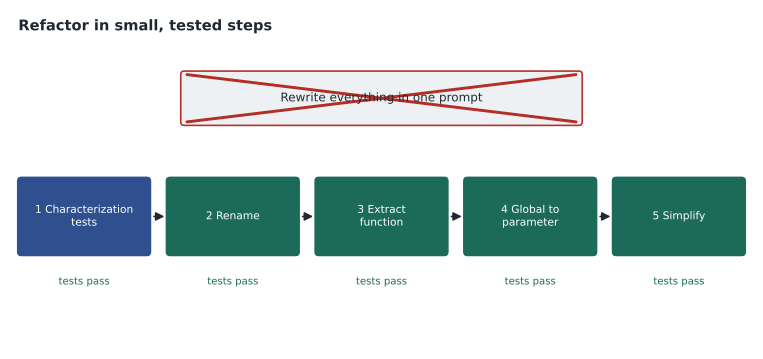
A tempting prompt is "refactor this file to be clean and modern". It produces a large rewrite that is hard to review and may change behaviour in ways nobody notices. A better approach is a sequence of small, named refactors, each followed by running the tests. GitHub's general advice to break complex tasks into simpler ones applies with special force here.
Worked problem
Planning the refactor
build_summary is 90 lines long, reads the global SKIP, uses single-letter names and repeats the same date check twice. Plan a sequence of prompts.
Show solution
- Prompt 1: "Write characterization tests for build_summary that capture its current output for these five inputs."
- Prompt 2: "Rename the single-letter variables in build_summary to descriptive names. Change nothing else."
- Prompt 3: "Extract the repeated date check into a helper function is_recent(report_date, today). Change nothing else."
- Prompt 4: "Replace the global SKIP with a parameter skip_trails that defaults to an empty set, and update the one caller."
- Run the tests after each step and commit each step separately.
Answer: Four small prompts, tests after each, one commit per step. Each change is easy to review and easy to undo.
In VS Code, edit mode or agent mode can apply a refactor across several files, such as renaming a function and updating every caller. Lesson 8 covers agents; for refactoring the same rule holds. Ask for one kind of change at a time, review the diff, and run the tests before moving on.
Before and after
The code below shows a cut-down version of the change. The "before" function relies on a global and repeats itself. The "after" version takes its inputs as parameters, uses a helper and has clear names. The check at the end runs both on the same reports and confirms they give identical results, which is what makes it a refactor.
from datetime import date, timedelta

SKIP = {"Old Mill Path"}

def summary_before(rs, t):
    out = []
    for r in rs:
        if r[1] in SKIP:
            continue
        if (t - date.fromisoformat(r[0])).days <= 7 and (t - date.fromisoformat(r[0])).days >= 0:
            out.append(r[1] + ": " + r[2])
    return out

def is_recent(report_date: date, today: date, days: int = 7) -> bool:
    return timedelta(0) <= today - report_date <= timedelta(days=days)

def summary_after(reports, today, skip_trails=frozenset()):
    lines = []
    for when, trail, condition in reports:
        if trail in skip_trails:
            continue
        if is_recent(date.fromisoformat(when), today):
            lines.append(f"{trail}: {condition}")
    return lines

reports = [("2027-08-01", "Headland Loop Trail", "dry"), ("2027-07-20", "Cape Trail", "muddy"),
           ("2027-08-03", "Old Mill Path", "flooded"), ("2027-08-04", "Cove Path", "wet")]
today = date(2027, 8, 4)
old = summary_before(reports, today)
new = summary_after(reports, today, skip_trails={"Old Mill Path"})
print(new)
print("same behaviour:", old == new)['Headland Loop Trail: dry', 'Cove Path: wet'] same behaviour: True
What this code does
Both versions take a list of trail reports and today's date and build the lines for the weekly summary: they skip trails on a skip list and keep only reports from the last seven days. The first version reads its skip list from a shared global and repeats the date arithmetic; the second takes the skip list as an input and uses a small helper for the date test. The output shows the summary lines from the new version and confirms that both versions give exactly the same result for the same reports.
The comparison at the end is a miniature of what the characterization tests do at full scale. If a step had changed behaviour, for example by making the seven-day window exclusive instead of inclusive, the comparison would have printed False and the step would have been rejected.
Keeping behaviour the same
Models sometimes "improve" code while refactoring it: they fix a bug they noticed, change an error message, reorder output or swap a library. Each of these can be a good idea, but none of them is a refactor, and slipping them into a refactor makes review harder. Tell Copilot explicitly: "change structure only; do not change behaviour, output, messages or dependencies." When reviewing the diff, look for any change to string literals, return values, conditions or imports. Those are the places where behaviour changes hide.
| Look for in the diff | Why it matters |
|---|---|
| Changed string literals or messages | Output or error text changed |
| Changed comparison operators or boundaries | Behaviour at the edges changed |
| New or removed imports | A dependency changed |
| Reordered loops or sorting | Output order changed |
| Removed exception handling | Failures now behave differently |
| Code deleted as "unused" | It may be called dynamically or from another module |
Small refactors with completions and next edit suggestions
Not every refactor needs chat. Many of the smallest ones happen as you type. When Dmitri renamed the parameter rs to reports at the top of summary_before, next edit suggestions, covered in the first course, offered to update each later use of rs in the function, one Tab press at a time. When he started typing a helper called is_recent, completions offered a body based on the repeated date check already in the file, because that check was the obvious pattern to continue. These small, local suggestions are often the safest form of refactoring help, because each one is visible and easy to judge. Their limit is scope: they work within the open file, so a rename that affects other modules still needs the editor's own rename tool, edit mode or an agent, followed by the tests.
Modernizing idioms
Older Python code often uses idioms that still work but are harder to read than their modern equivalents: string building with plus signs instead of f-strings, index-based loops instead of unpacking, manual dictionaries of counts instead of collections.Counter, and functions that return lists of three strings instead of a small data class. Copilot knows these idioms well and can suggest modern versions, and the GH-300 guide lists modernizing legacy code as a productivity skill. The same discipline applies: one idiom at a time, tests after each, and a check that the modern version really is equivalent. Priya pointed out one trap. A dictionary that was built in a particular order and then printed may print in a different order after a rewrite that looks equivalent, and the weekly email's subscribers would notice their trails moving around. Order is behaviour, and the characterization tests had to cover it.
Explaining to others
Copilot can also explain code for an audience other than you. Dmitri asked it to "write a short explanation of the new build_summary for the pull request description, covering what changed and how it was tested". The draft was a good start. He edited it to mention the apostrophe bug that would be fixed separately, because Copilot did not know about the team's plan. Pull request summaries are one of the places where GitHub.com offers Copilot directly, and lesson 7 returns to documentation more generally.
When to stop
Refactoring has no natural end, and assistants make it so easy to keep going that it is worth setting a limit. Priya's rule was to refactor only as much as the next change needs. The weekly summary needed a new section for trail closures in September, so the refactor aimed at making that addition easy: clear inputs, a helper for dates, a place to add a section. It stopped there. A full rewrite, which Copilot would have produced cheerfully, would have carried more risk than value.
Stopping also includes knowing when not to start. Code that is about to be deleted, code that nobody will change again, and code whose behaviour is not understood well enough to write characterization tests are poor candidates. In the last case, the right first step is more explanation and more tests, not a refactor, however confident Copilot's suggested rewrite looks.
Worked problem
Measuring the change
Before the refactor, build_summary was 90 lines with a cyclomatic complexity of 14. After four steps it was 52 lines across three functions with a highest complexity of 5. By how much did the length fall, and what share of the original is that?
Show solution
- Lines removed: 90 - 52 = 38.
- Share: 38 / 90 is about 0.42, or about 42 in 100.
- Complexity of the most complex function fell from 14 to 5.
Answer: About 38 lines, roughly four-tenths of the original, and the hardest function became much simpler. Behaviour stayed the same, as the tests showed.
Common mistakes
MistakeAsking Copilot to "clean up" a whole file in one prompt.
InsteadRequest one named refactor at a time and test after each.
MistakeRefactoring code that has no tests.
InsteadWrite characterization tests first.
MistakeMixing bug fixes or features into a refactor.
InsteadKeep behaviour changes in separate commits or pull requests.
MistakeTrusting an explanation without checking it.
InsteadVerify surprising claims in the code itself.
MistakeAccepting deletions of code described as unused.
InsteadSearch for callers, including dynamic ones, before deleting.
Summary and key terms
- Copilot Chat's /explain and plain-language questions help you understand unfamiliar code quickly.
- Focused explanation prompts can list inputs, side effects and suspicious behaviour.
- Refactoring changes structure without changing behaviour; bug fixes and features are separate.
- Characterization tests pin current behaviour before you change legacy code.
- Request small, named refactors one at a time and run the tests after each.
- Review refactor diffs for hidden behaviour changes and stop when the next change is easy.
- Refactoring
- Changing the structure of code without changing its behaviour.
- Characterization test
- A test that records how existing code currently behaves.
- Extract function
- A refactor that moves part of a function into a new, named function.
- Side effect
- Something a function does besides returning a value, such as writing a file or changing a global.
- Cyclomatic complexity
- A count of the independent paths through code; higher means harder to test.
Practice problems
Work each problem on paper first, then reveal the answer to check.
Why are characterization tests allowed to be based on current behaviour?
Show answer
Their purpose is to preserve behaviour during a refactor, not to judge whether it is correct.
Name three places in a diff where behaviour changes often hide.
Show answer
String literals or messages, comparison boundaries, and imports. Reordering and removed exception handling are others.
What should you add to a refactoring prompt to stop unwanted improvements?
Show answer
An explicit instruction such as "change structure only; do not change behaviour, output, messages or dependencies".
Lesson quiz · 5 questions
Score 60% or more to complete this lesson.
Create a free account to save your progress, take quizzes and earn a certificate.