
MSBA-253 · Lesson 7 of 12 · 19 min
Data loss prevention policies
▶ Video coming soon A video version of this lesson is on the way.
In mid-November 2026, during a routine look at new flows, Rupert found one at Ridgeview that made him stop. An instructor had built a tidy flow that collected students' assignment marks from a SharePoint list and emailed a weekly summary, with names and marks, to a personal email address so she could check it at home. She meant no harm. But the flow moved student records out of the college's systems into a consumer mailbox, which the college's privacy rules forbid. The flow was possible because the default environment's data policy at the time allowed consumer connectors alongside SharePoint. That afternoon Rupert changed the policy, contacted the instructor, and added the incident to the agenda for the next hub meeting.
What data policies are
Power Platform data loss prevention (DLP) policies, which the admin center now calls data policies, control which connectors can be used together. Every connector, from SharePoint and Dataverse to Gmail, X and hundreds of others, can be placed in one of three groups in a policy. Apps and flows can combine connectors from the same group but not across the business and non-business groups, and they cannot use blocked connectors at all. Data policies act as guardrails: they do not decide who can see data, which is the job of security roles and sharing, but they stop makers building things that move data from business systems to places it should not go.
| Group | Meaning | Examples at Lumenvale |
|---|---|---|
| Business | Connectors that handle the organization's data; can be used together | Dataverse, SharePoint, Office 365 Outlook, Microsoft Teams, Approvals, the Student Records custom connector |
| Non-business | Connectors for personal or non-sensitive use; can be used together but not with business connectors | Outlook.com, Gmail, RSS, weather and other consumer services |
| Blocked | Connectors that cannot be used at all in the environments the policy covers | File-sharing and social media connectors the college does not allow |
The rule that makes the groups work is simple: a single app or flow cannot use connectors from both the business and non-business groups. The Ridgeview flow used SharePoint, which was business, and Outlook.com, which had been left in the business group in the old default policy by mistake. Moving Outlook.com and similar consumer connectors to non-business stopped the flow from saving and turned off the existing one with a policy violation message. Lumenvale's privacy officer, Dr. Philippa Ondaatje-Ruiz, asked that the instructor be helped rather than blamed, and the hub's response, a short guide called Sending reports safely, is still on the maker site.
Scope: tenant and environment policies
Policies can be scoped to the whole tenant, to all environments except some, or to selected environments. Several policies can apply to one environment at once, and when they do, the most restrictive combination applies: if any applicable policy blocks a connector, it is blocked; if two policies place two connectors in different groups, they cannot be used together. That makes layering powerful but easy to misunderstand. A common design, and the one Lumenvale adopted, is a baseline tenant-wide policy plus stricter policies for particular environments.
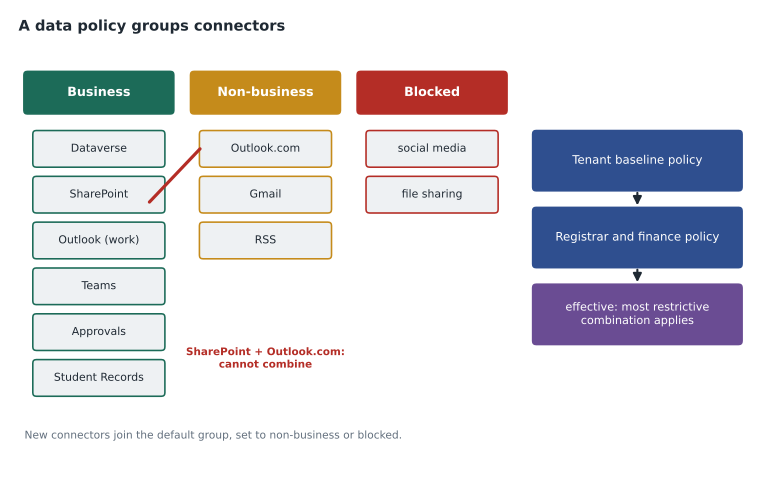
Lumenvale ended the term with four policies. Tenant baseline applied to all environments: Microsoft 365 connectors and Dataverse in business, a list of consumer connectors in non-business, and a short blocked list. Default environment added restrictions for the default environment only: premium connectors that personal productivity has no need for, such as HTTP and the custom connectors, were blocked there. Registrar and finance applied to the registrar and finance environments: only the connectors those solutions need were business, and everything else was blocked, so a new connector cannot appear in those environments without a policy change. Personal development applied to the routed developer environments and was close to the baseline, so makers could learn freely without touching business data.
New connectors and the default group
Microsoft adds connectors constantly. Each policy has a default group, the group that newly released connectors join automatically. Leaving it as business means a new connector to a consumer service could be combined with SharePoint the day it appears. Microsoft's guidance, which Rupert followed, is to set the default group to non-business, or to blocked for strict environments, and to review new connectors at the hub before moving any to business.
Connector action control and endpoint filtering
Groups operate at the level of whole connectors, which is sometimes too blunt. Two finer controls exist. Connector action control lets an administrator allow or block individual actions of a connector: for example, allow the Teams connector to post messages but block actions that create teams. Endpoint filtering lets an administrator allow or deny the specific endpoints a connector can reach, for example allowing the SQL Server connector to reach only the college's own servers, or limiting the HTTP connector to approved domains. Endpoint filtering is available for a limited set of connectors, including the HTTP connectors, SQL Server, Azure Blob Storage and SMTP; it uses allow and deny patterns evaluated in order, and Microsoft's documentation lists the connectors currently supported.
Lumenvale used action control to block the Office 365 Outlook action that forwards email to arbitrary addresses in the registrar's environments, and endpoint filtering to allow the HTTP connector in finance environments to call only LedgerPoint's reporting API domain. Both controls are configured in the policy and apply in the policy's environments.
Custom connectors
Custom connectors deserve attention because they are how makers reach systems that have no standard connector. In a data policy, custom connectors are classified by URL pattern: an administrator lists host patterns, such as the college's own API domain, and assigns each pattern to a group. Custom connectors that match no pattern fall into a default custom connector rule, which administrators usually set to blocked or non-business. Signe's Student Records connector and LedgerPoint connector both matched lumenvale.example patterns in the business group; anything else was blocked in the governed environments.
Desktop flows and AI
Data policies also cover desktop flows. In managed environments, administrators can classify desktop flow action groups, such as browser automation, file operations or scripting, into business, non-business or blocked, so that, for instance, desktop flows in finance cannot run arbitrary scripts. Microsoft lists data policies for desktop flows among the Managed Environments capabilities. Copilot Studio agents are also governed by data policies: the connectors an agent uses as tools, its knowledge sources and channels are subject to the environment's policies, and administrators can block features such as publishing to certain channels or using web search as knowledge. Lumenvale's registrar policy blocked web search as a knowledge source for agents, so the Registrar Helper could answer only from the college's own content.
Designing policies
Good policy design starts from the data, not the connectors. Lumenvale's process was to classify each environment by the most sensitive data in it, decide which external services that data may reach, and then express that as connector groups. A few principles kept the policies understandable.
| Principle | Why |
|---|---|
| Start with a tenant baseline that covers every environment | New environments are protected from the moment they are created |
| Make the default group non-business or blocked | New connectors cannot be combined with business data by accident |
| Keep sensitive environments allow-list only | Anything not needed by the solution is blocked |
| Document each policy's purpose and owner | Makers and auditors can understand why a connector is blocked |
| Test policy changes in a non-production environment | Changes can suspend existing flows that violate the new policy |
The last principle matters. When a policy changes, existing apps and flows that now violate it stop working: flows are suspended and apps show an error when they try to use a blocked combination. Before changing a policy that applies to production, Rupert used the admin center's view of which resources use which connectors, and the CoE inventory, to find what would break, and contacted the owners first. The Ridgeview change was the exception, made immediately because personal data was leaving the college.
Worked problem
Choosing groups for a new solution
The bursary office's new agent will use Dataverse, SharePoint and Office 365 Outlook, call the student portal's API through a custom connector at api.lumenvale.example, and send Teams notifications. It must never reach consumer services or the open web. The environments are Bursary Dev, Test and Prod. How should the policy be set?
Show solution
- Create a Bursary policy scoped to the three bursary environments.
- Put Dataverse, SharePoint, Office 365 Outlook and Microsoft Teams in business, and add a custom connector pattern for api.lumenvale.example in business.
- Set the default group and the default custom connector rule to blocked, and block every other connector, so the environments are allow-list only.
- Use action control to block Outlook's forwarding action, and block web search as a knowledge source for agents. Test in Bursary Dev before scoping the policy to production.
Answer: A dedicated allow-list policy, layered on the tenant baseline, gives the bursary solution exactly the connectors it needs and blocks everything else, including new connectors.
Data policies in context
Data policies are one layer of protection among several. Microsoft Entra Conditional Access decides who can sign in to Power Platform and from where. Environment security groups decide who can access an environment. Dataverse security roles decide what each user can do with each table. Sharing limits restrict how widely apps spread. Microsoft Purview applies sensitivity labels and data loss prevention to the data in Microsoft 365. Power Platform data policies fill a specific gap among them: they stop the apps and flows themselves from becoming channels that move data where it should not go.
For AB-410, the related skills are recommending connectors and designing solutions that respect the policies the administrators set. Expect scenarios where a flow cannot be saved because it mixes business and non-business connectors, and questions about what the maker or administrator should do.
Communicating policies to makers
Policies that makers do not understand feel arbitrary, and makers route around arbitrary rules. Lumenvale publishes a plain-language summary of each data policy on the maker site: which environments it covers, which common connectors are business, non-business and blocked, and why. When a maker tries to save a flow that breaks a policy, the error message names the policy, and the summary explains it. The page also tells makers how to ask for a connector to be moved, which the hub reviews at its fortnightly meeting with the data owner.
Requests are common and usually reasonable. In October the library asked for a connector to a book metadata service so that the study room app could show reading suggestions. The hub reviewed what data the connector would receive, which was only book identifiers, and moved it to business in the Campus Operations policy. Saying yes quickly to safe requests is what gives the hub credibility when it has to say no.
Reviewing policies over time
Data policies drift out of date as Microsoft adds connectors and the organization's needs change. Rupert reviews all policies each term: new connectors that have landed in the default group, connectors no longer used anywhere that can be blocked, and environments that have been created since the last review and need to be covered. The admin center shows which connectors are used in each environment, which makes the review practical. Each change is recorded in the hub's notes with the reason, so that the next administrator can understand why the policies look the way they do.
Data policies are quick to change, which is both a strength and a risk. Each change at Lumenvale is made by one administrator and checked by another before it is saved, a habit borrowed from the college's firewall change process. The second person's job is simple: confirm which environments the policy covers, which connectors move, and which existing resources will be affected.
Common mistakes
MistakeLeaving the default group as business.
InsteadSet it to non-business or blocked so new connectors are not automatically combined with business data.
MistakeTreating data policies as a replacement for security roles.
InsteadUse data policies for connector combinations and security roles and sharing for who sees data.
MistakeChanging a production policy without checking what uses the connectors.
InsteadReview affected resources, tell owners and test the change first.
MistakeAllowing all custom connectors in sensitive environments.
InsteadClassify custom connectors by URL pattern and block the rest.
Summary and key terms
- Data policies, formerly called DLP policies, place connectors in business, non-business or blocked groups.
- An app or flow cannot combine business and non-business connectors, and blocked connectors cannot be used.
- Policies can apply to the tenant or to selected environments; when several apply, the most restrictive combination wins.
- Set the default group for new connectors to non-business or blocked, and classify custom connectors by URL pattern.
- Connector action control and endpoint filtering give finer control, and policies also govern desktop flow actions and agents.
- Policy changes can suspend existing flows, so check what is affected and test before changing production.
- Data policy
- A Power Platform policy that groups connectors to control which can be used together.
- Business group
- The connector group for services that handle organizational data.
- Non-business group
- The connector group for personal or non-sensitive services.
- Blocked group
- Connectors that cannot be used in the environments the policy covers.
- Connector action control
- A data policy setting that allows or blocks individual actions of a connector.
- Endpoint filtering
- A data policy setting that allows or denies the endpoints a connector can reach.
Practice problems
Work each problem on paper first, then reveal the answer to check.
Why did the Ridgeview flow stop working after the policy change?
Show answer
Outlook.com moved to non-business, so the flow could no longer combine it with SharePoint in the business group.
Two policies apply to an environment and disagree. Which applies?
Show answer
The most restrictive combination of the two.
How are custom connectors classified in a data policy?
Show answer
By URL patterns assigned to groups, with a default rule for those that match no pattern.
What does endpoint filtering control?
Show answer
Which specific endpoints, such as hosts or servers, a connector can reach.
Lesson quiz · 5 questions
Score 60% or more to complete this lesson.
Create a free account to save your progress, take quizzes and earn a certificate.