
MSBA-253 · Lesson 4 of 12 · 20 min
Environment variables and connection references
▶ Video coming soon A video version of this lesson is on the way.
The media services equipment system that Maribeth and Signe built in September had a release in October that everybody at Lumenvale remembers. Version 1.4.0.0 raised the budget officer's approval threshold from 1,500 to 2,000 dollars. In the old way of working, someone would have opened the approval flow in production and typed a new number into a condition. Instead, the threshold lived in an environment variable called Approval Threshold, and the change was a value set during deployment. Nobody touched the flow at all. That release became Rupert's favourite example of why two small solution components, environment variables and connection references, are the difference between a solution that deploys and one that has to be fixed by hand after every deployment.
The problem they solve
A solution moves between environments, but some things about it should be different in each environment. In development, the transcript flow should email a test mailbox; in production, the real registrar mailbox. In test, the SharePoint site for delivery receipts is a test site; in production, the live one. And the flows must sign in to services with connections that belong to the right account in each environment: a maker's own account in development, a controlled service account in production.
Without a way to separate these values from the logic, makers hard-code them. Then every deployment needs manual edits in the target, which breaks the rule that production is changed only by deployment, and sooner or later someone forgets a step. Environment variables hold the values that change; connection references hold the connections. Both are solution components, so the logic deploys unchanged and the environment supplies its own values.
Environment variables
An environment variable is a named setting with a data type, a default value stored in the solution, and an optional current value that is set in a particular environment. When a flow, app or agent reads the variable, it gets the current value if one exists, otherwise the default. Supported data types include decimal number, text, JSON, yes/no, data source and secret.
| Data type | Typical use at Lumenvale |
|---|---|
| Decimal number | Approval Threshold (media services); confidence threshold 0.80 for invoice extraction |
| Text | Registrar mailbox address; Teams channel ID for alerts |
| Yes/no | Send student emails on or off, so test environments never email real students |
| JSON | A small table of campus codes and their finance managers |
| Data source | The SharePoint site and list used by a flow or canvas app |
| Secret | A reference to a secret in Azure Key Vault, such as the API key for a custom connector |
The secret type deserves a note. It does not store the secret itself in Dataverse. It stores a reference to a secret in Azure Key Vault, and the platform retrieves the value at run time for components that support it. That is how Signe's LedgerPoint custom connector gets its API key without anyone pasting the key into a flow. It requires an Azure subscription, a key vault, and permission for the Dataverse service to read the secret.
Default and current values
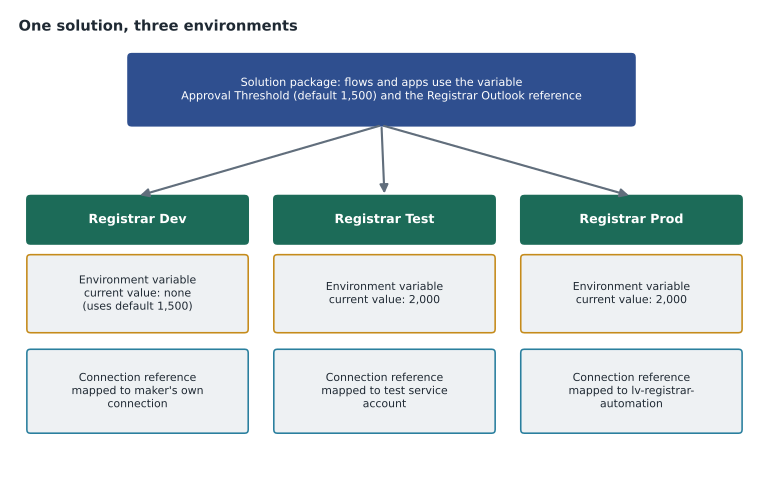
The distinction between default and current values causes more confusion than anything else about environment variables. A practical rule keeps it clear: the default value is part of the solution and travels with it; the current value belongs to the environment and should not travel. If a solution is exported with current values included, they overwrite the target's values on import, which is rarely what you want.
Lumenvale's convention follows Microsoft's guidance. The default value is set to something safe for any environment, often the development value or a harmless placeholder. The current value is set in each test and production environment, either by an administrator after the first import or, better, through the deployment itself: pipelines and the Power Platform command line both let the deploying person or identity supply values for environment variables during deployment. Before export, makers remove current values from the solution, and the hub's release checklist has a line for it.
Using environment variables in components
Each kind of component reads environment variables differently. In a cloud flow, environment variables appear in dynamic content and can be used anywhere a value is needed, including in conditions and in a connector's site or list fields. In a canvas app, environment variables of the data source type let the app connect to a different SharePoint site in each environment, and other types can be read from the Environment Variable Values table in Dataverse. In Copilot Studio, agents can use environment variables in topics and tool configuration. A flow reads the value when the run starts, so a new current value applies to new runs, not to runs already in progress.
// Power Fx in a canvas app: read the current value of Approval Threshold,
// falling back to the default if no current value is set
With(
    { def: LookUp('Environment Variable Definitions', 'Schema Name' = "lcc_ApprovalThreshold") },
    Coalesce(
        LookUp('Environment Variable Values', 'Environment Variable Definition'.'Environment Variable Definition' = def.'Environment Variable Definition').Value,
        def.'Default Value'
    )
)
Connection references
A connection is an authenticated link to a service, such as a specific user's Office 365 Outlook account. Connections belong to people or service principals and live in an environment; they are not solution components, because they contain credentials. A connection reference is a solution component that stands in for a connection: it names a connector and is mapped to an actual connection in each environment. Flows and canvas apps in a solution use the connection reference, not the connection directly.
When the solution is imported into a new environment, each connection reference must be mapped to a connection there. If the target already has a connection reference with the same name mapped, the mapping is kept. Pipelines and the import wizard prompt for connections and validate them before deployment begins, and administrators can preconfigure some connections. Microsoft's pipelines documentation adds a detail worth remembering: a connection reference that has no value in either the solution or the target cannot be updated during deployment, but once a value has been deployed it can be updated in the target.
Whose connection?
The most important design question is whose account each connection uses in production. If a flow runs on a maker's personal connection, it stops working when that person leaves, changes their password or loses a licence, and every email it sends appears to come from them. Lumenvale's finance automation used a service account, lv-finance-automation, for its production connections, and the registrar did the same with lv-registrar-automation. Service accounts are ordinary user accounts reserved for automation, with strong authentication, Conditional Access policies and their own licences, owned by the IT team rather than an individual.
Where a connector supports it, a service principal connection is better still. A service principal is an application identity in Microsoft Entra ID rather than a user, so it has no mailbox, no password to expire and no interactive sign-in. Dataverse and many Azure connectors support service principal authentication, and Microsoft's pipelines documentation notes that service principal connections can be used for connectors that support them, including custom connectors. Lumenvale used a service principal for the Dataverse connections in its finance flows and a service account for Outlook, which needs a mailbox.
Worked problem
Fixing a flow that broke after deployment
After the first deployment of Registrar Transcripts to Registrar Test, the New request flow is turned off with an error about an invalid connection. In development it works. The solution contains a connection reference called Registrar Outlook. What should Maribeth check?
Show solution
- Open the solution in Registrar Test and look at the Registrar Outlook connection reference. It is not mapped to any connection, because no connection existed for it when the solution was imported.
- Create or choose a connection in Registrar Test using the test service account, map the connection reference to it, and turn the flow on.
- Check that the flow uses the connection reference and not a direct connection; one action had been added outside the solution's references during a quick fix in development, so it pointed at Maribeth's personal connection.
- Fix that action in development so that it uses the reference, increase the version and redeploy. Next time, set up the target connections before deploying, or let the pipeline prompt for them.
Answer: Connection references must be mapped to valid connections in each environment, and every action must use a reference rather than a personal connection. Prepare connections in the target before deploying.
Sharing connections and run-only users
Flows triggered by users, such as instant flows started from an app or a button, raise another question: should the flow run with the caller's own connections or with the flow's? For an instant cloud flow, run-only users settings let the owner choose, for each connection, whether users provide their own connection or the flow uses the one configured. Using the flow's connection means users can trigger actions they could not do themselves, which is sometimes the point, such as writing to a list they cannot edit, and sometimes a security risk. Lumenvale's rule was that any flow using a shared connection on behalf of users is reviewed at the hub before release.
Reviewing a solution before release
Rupert's release checklist has six lines about these components. Every environment-specific value is an environment variable, not a literal. No current values are exported. Every flow action uses a connection reference. Every production connection uses a service account or service principal. Secrets are referenced from Key Vault, not typed into components. And the target environment's connections and current values are prepared before the pipeline runs.
It sounds bureaucratic, but most of the hub's deployment problems in the autumn traced back to one of those six lines. When the finance office's go-live on November 2 went smoothly, Ysaline Dabrowski, the accounts payable supervisor, said it was the first system change she had seen where nobody had to stay late on launch night.
Environment variables for AI and agents
Copilot features and agents bring new kinds of environment-specific values. A prompt might use a different model setting in test than in production while a team evaluates it. An agent might point at a test knowledge source, such as a SharePoint library of draft policies, during development and the published policies in production. The finance team's invoice flows kept their extraction confidence threshold, 0.80, in an environment variable so that the accounts payable supervisor could ask for it to be raised or lowered after reviewing results, without anyone editing the flow.
The general principle holds: anything that might reasonably differ between environments, or that a business owner might want to change without a new release of logic, belongs in an environment variable. Things that define how the solution works, such as the order of approval stages, belong in the logic and change through releases.
Documenting variables and references
Environment variables and connection references are easy to create and easy to forget. Each one at Lumenvale has a description that says what it is for, what values are expected and who decides them, written in the component's description field so that it travels with the solution. The release notes for each version list any new variables and references and the values or connections the target needs. Before the finance go-live, Signe produced a one-page table of all eleven variables and six references in the Finance Invoices solution with their production values, which Rupert used to prepare Finance Prod the day before deployment.
Connection references also make access reviews easier. Because every production flow in the Finance Invoices solution uses references mapped to one service account and one service principal, the security team's quarterly review can list exactly what those identities can reach and confirm that each permission is still needed. When flows use a scatter of personal connections, nobody can answer that question without opening every flow. The same applies to agents: an agent's tools use connection references too, and their identities should be reviewed in the same way.
Common mistakes
MistakeHard-coding mailbox addresses, site URLs or thresholds in flows.
InsteadStore them in environment variables and set current values per environment.
MistakeExporting solutions with current values included.
InsteadRemove current values before export and supply them in each target.
MistakeRunning production flows on a maker's personal connection.
InsteadUse a service account or, where supported, a service principal.
MistakePasting API keys into flows or custom connectors.
InsteadUse a secret environment variable that references Azure Key Vault.
Summary and key terms
- Environment variables separate values that differ by environment from the logic of flows, apps and agents.
- A variable has a default value that travels in the solution and a current value that belongs to each environment.
- Secret environment variables reference Azure Key Vault instead of storing the secret in Dataverse.
- Connection references are solution components mapped to actual connections in each environment.
- Production connections should belong to service accounts or service principals, not individual makers.
- Prepare connections and current values in the target before deploying, and check that every action uses a reference.
- Environment variable
- A solution component that holds a setting with a default value and an optional per-environment current value.
- Current value
- The environment-specific value of an environment variable, which overrides the default.
- Secret environment variable
- An environment variable that references a secret stored in Azure Key Vault.
- Connection
- An authenticated link to a service, owned by a user or service principal in one environment.
- Connection reference
- A solution component that stands in for a connection and is mapped to one in each environment.
- Service principal
- An application identity in Microsoft Entra ID used by automation instead of a person.
Practice problems
Work each problem on paper first, then reveal the answer to check.
Why are connections not included in solutions?
Show answer
They contain credentials and belong to a user or service principal in one environment.
Which value of an environment variable should travel with the solution?
Show answer
The default value; current values belong to each environment.
What does a secret environment variable store?
Show answer
A reference to a secret in Azure Key Vault, not the secret itself.
Why is a service principal often better than a service account for automation?
Show answer
It is an application identity with no mailbox, password expiry or interactive sign-in.
Lesson quiz · 5 questions
Score 60% or more to complete this lesson.
Create a free account to save your progress, take quizzes and earn a certificate.