
MSBA-253 · Lesson 3 of 12 · 20 min
Solutions: managed and unmanaged
▶ Video coming soon A video version of this lesson is on the way.
In early October 2026 a small mistake in Registrar Test showed everyone at Lumenvale why solutions matter. A tester noticed that the Transcript Request form had a field nobody recognized, Courier Account Number. It had been added directly in Registrar Test by a well-meaning adviser who had system customizer rights there, outside any solution. The next deployment from Registrar Dev did not include it, so it was invisible to the pipeline, to source control and to Signe, who maintained the data model. It would have gone unnoticed in production for months if the tester had not asked. Rupert used the incident to open the hub's session on solutions.
What a solution is
A solution is the container Power Platform uses to package, move and track customizations. It holds components: tables, columns, forms and views, model-driven and canvas apps, cloud flows and agent flows, agents, security roles, environment variables, connection references, plug-ins, web resources and more. When work is built inside a solution, the solution knows exactly what belongs to it, and it can be exported from one environment and imported into another as a single file.
Every environment also has a hidden default solution that contains every component in the environment, and a Common Data Services Default Solution that makers sometimes use by accident. Working in either is like working outside a solution: changes are not grouped, cannot be moved as a unit and are hard to trace. Lumenvale's rule, written on the hub's one-page release checklist, is simple: every component of a shared business solution is created or added inside a named solution in a development environment.
Publishers and prefixes
Every solution has a publisher, which records who owns the customizations and sets a prefix that is added to the names of new components. When Signe creates a table called Inspection in a solution whose publisher prefix is lcc, its logical name becomes lcc_inspection. Prefixes make it obvious who created a component and prevent clashes when solutions from different publishers meet in one environment.
Organizations usually create one publisher for themselves and use it for all their solutions, which keeps components consistent. Lumenvale has one publisher, Lumenvale Community Colleges, with the prefix lcc, used for the registrar, facilities and finance solutions alike. The default publisher, with its new_ or cr-number prefixes, appears when makers forget to choose; spotting new_ prefixes in an environment is a quick sign that someone built outside the agreed solutions.
Unmanaged and managed solutions
Solutions come in two forms, and understanding the difference is central to ALM.
| Unmanaged solution | Managed solution | |
|---|---|---|
| Where it lives | Development environments | Test and production environments |
| Can components be edited? | Yes, freely | No, unless a component's managed properties allow it |
| What deleting the solution does | Removes the container but leaves the components in the environment | Removes the solution and all its components, including their data |
| How it is produced | By building in an environment | By exporting an unmanaged solution as managed |
| Purpose | Source of truth for development | A sealed, versioned package for deployment |
The pattern is consistent: build unmanaged, deploy managed. Makers work in an unmanaged solution in development. When a release is ready, the solution is exported as managed and imported into test and then production. In the downstream environments nobody can edit the components directly, so production always matches what was tested. When a change is needed, it is made in development and deployed again.
The Courier Account Number incident happened because Registrar Test had at that time received an unmanaged import during an early experiment, so its components could be edited. After the incident, Rupert removed the unmanaged layer from Registrar Test and made pipelines the only route into it, which deploy managed solutions to test and production by default. He also reviewed who held the System Customizer role in test and production and removed it from everyone except the deployment identity and two administrators.
Layers
Every component in an environment can have several solution layers. The bottom is the system layer, Microsoft's own definition. Above it come managed layers, one for each managed solution that contains the component, stacked in the order they were installed. At the top is the unmanaged layer, which holds any direct edits. What users see is the result of all layers, with higher layers winning where they differ.
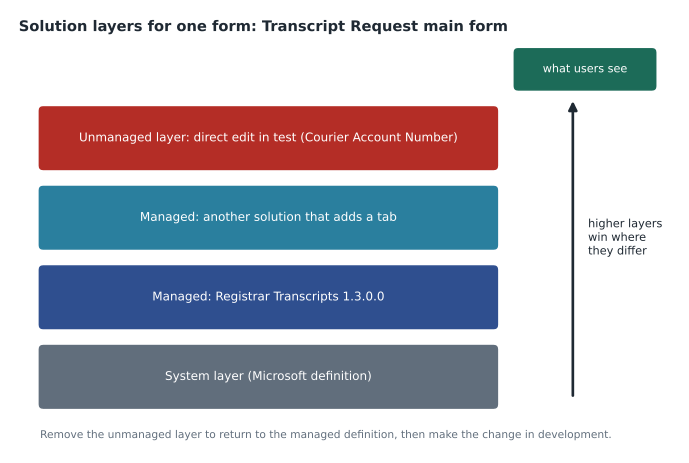
Layers explain a lot of confusing behaviour. If a form looks different from what the latest deployment should have produced, an unmanaged edit is usually sitting on top. The admin center and the maker portal both let you see the layers of a component and remove an unmanaged active layer, which returns the component to the managed definition. Rupert did exactly that for the Transcript Request form in test, after Signe added the courier field properly in development so that it would come back through the next release.
Managed properties
A solution's author can choose, component by component, what downstream environments are allowed to customize through managed properties. A table can be marked so that new forms can be added to it in production but its existing columns cannot be changed, for example. Most organizations deploying their own solutions leave managed properties at their defaults, but independent software vendors use them to protect their products. If a component cannot be customized in production, check its managed properties before assuming a bug.
Versions, upgrades and patches
Each solution has a version number with four parts, major, minor, build and revision, such as 1.4.0.0. Increasing the version with each release lets everyone see what is installed where. Lumenvale's convention increases the minor number for a release with new features, the build number for a fix, and the major number for a redesign.
When a newer managed version is imported over an older one, administrators choose how it is applied. An upgrade replaces the old version completely, removing components that are no longer in the solution. An update brings in the new version without deleting components that were removed from the solution. Pipelines in Power Platform import as an upgrade by default, which is usually what you want: the target ends up exactly matching the package. Microsoft also supports patches, which contain only changed components, and cloned solutions, but its current guidance favours deploying complete versions, and pipelines do not use patches.
Segmenting solutions
How many solutions should a project have? Microsoft's guidance is to keep the number small, because each extra solution adds dependencies and deployment steps, but to separate work that has a different owner, lifecycle or audience. Two patterns are common at Lumenvale. The registrar has a single Registrar Transcripts solution containing its tables, apps, flows and agent, because one team owns and releases it all. Facilities has two: Lumenvale Facilities, holding the shared Building, Room and inspection tables, and Facilities Work Orders, which depends on it. Splitting them let the work orders team release on their own schedule without redeploying the inspection solution.
When one solution depends on another, the dependent solution must be imported after the one it depends on, and the dependency is recorded. Solution import fails if a required component is missing in the target. The solution dependency view shows which components rely on which, and checking it before removing a component from a solution prevents broken imports.
Worked problem
Diagnosing a missing component on import
Signe exports Facilities Work Orders 1.2.0.0 as managed and imports it into Facilities Test. The import fails with an error that a required component, the Location table, is missing. The Location table was created in Facilities Dev last week. What happened, and how should it be fixed?
Show solution
- Open the solution in Facilities Dev and check whether Location is in Facilities Work Orders or in Lumenvale Facilities. Signe finds that she created it in Lumenvale Facilities, because it relates to Building and Room.
- Facilities Work Orders depends on it, but the version of Lumenvale Facilities in Facilities Test is older and does not contain Location.
- Export and deploy Lumenvale Facilities first, with a new version number, then deploy Facilities Work Orders.
- Add a note to the release checklist: when a shared table changes, release the base solution before its dependants.
Answer: The dependent solution was deployed before the solution that contains the component it needs. Release solutions in dependency order and version the base solution whenever its contents change.
Adding existing components
Makers often need to include a component that already exists, such as the standard Contact table. Adding an existing table to a solution offers choices: include all its components, or only selected columns, forms and views, and optionally its metadata. Including the whole Contact table in a solution would make the solution claim components it did not change and could overwrite customizations from other solutions. Microsoft's guidance is to add only what you changed. Signe's rule of thumb for Lumenvale is: add the table without all components, then add only the specific columns, views and forms you created or modified.
Solutions and non-solution resources
Not everything in Power Platform lives in solutions. Personal flows created outside a solution, canvas apps saved outside a solution and some connection objects are environment resources rather than solution components. Microsoft has steadily moved new resources into solutions: cloud flows and canvas apps can be created inside solutions, agents built in Copilot Studio are solution-aware, and Microsoft's admin features increasingly assume solutions. In 2026 Lumenvale's makers were told to start every shared app or flow inside a solution from the first click, because moving it in later is possible for many resources but tedious, and connections often have to be reconfigured.
Solutions and the exam
AB-410 asks candidates to deploy a Power Platform solution and recommend an ALM strategy. In practice that means knowing why solutions exist, the difference between managed and unmanaged solutions, the role of publishers and versions, and how solutions move between environments, which lessons 4 to 6 continue. Expect scenario questions that describe a team editing production directly or exporting unmanaged solutions to production, and ask what they should do instead.
A solution checklist
Lumenvale's champions use a short checklist for every solution before its first release. The solution uses the Lumenvale publisher and a clear name. Every component that belongs to the solution is in it, and nothing else is: no whole standard tables, no stray components from experiments. The version number has been increased since the last release. Solution checker has been run and its critical issues fixed. Dependencies on other solutions are documented in the solution's description. And the solution has been exported as managed from development and imported into test successfully at least once.
The checklist exists because most solution problems are discovered at the worst moment, when a production deployment fails or behaves oddly. A test import of the managed solution into a clean environment, even a temporary developer environment, catches missing components and dependency problems early. Signe keeps a developer environment called Facilities Scratch for exactly this purpose and deletes its contents after each check.
One more habit helps when several makers share a development environment: agree who owns which components. If Maribeth and a colleague both edit the same form in Registrar Dev, the last save wins and the other person's change is lost. Splitting work by component, or using separate developer environments with source control as lesson 6 describes, avoids that kind of quiet loss.
When a release does go wrong in production, the solution model also shapes the response. Because production holds a managed solution, the fastest safe fix is usually to redeploy the previous version or a corrected new version through the pipeline, not to edit components in place. Rupert's rule for emergencies is that even an urgent fix goes through development and the pipeline; the pipeline is quick enough that the rule costs minutes, and it keeps production matching source control. The one exception the hub allows is turning off a misbehaving flow in production, which stops harm without changing the solution's definition, followed by a proper fix.
Common mistakes
MistakeBuilding in the default solution or the Common Data Services Default Solution.
InsteadCreate a named solution with your organization's publisher and build inside it.
MistakeImporting unmanaged solutions into production.
InsteadExport as managed for test and production, and keep unmanaged solutions in development.
MistakeFixing problems directly in production.
InsteadFix in development and deploy a new version; remove any unmanaged layer that was created.
MistakeAdding whole standard tables with all components to a solution.
InsteadAdd only the columns, forms and views you created or changed.
Summary and key terms
- Solutions package components such as tables, apps, flows, agents, roles, environment variables and connection references so they can be moved and tracked together.
- A publisher sets a prefix on component names; use one organizational publisher consistently.
- Build in unmanaged solutions in development and deploy managed solutions to test and production.
- Components have layers; a direct edit creates an unmanaged layer that overrides managed layers until it is removed.
- Version every release, deploy complete versions as upgrades, and release dependent solutions after the solutions they depend on.
- Keep the number of solutions small, splitting only for different owners, lifecycles or audiences.
- Solution
- A container for packaging, moving and tracking Power Platform components.
- Publisher
- The owner of a solution, which sets the prefix added to new component names.
- Unmanaged solution
- An editable solution used in development.
- Managed solution
- A sealed, versioned package whose components cannot be edited directly in the target environment.
- Solution layer
- One of the stacked definitions of a component contributed by the system, managed solutions or unmanaged changes.
- Upgrade
- Importing a new managed version that fully replaces the old version, removing components that were dropped.
Practice problems
Work each problem on paper first, then reveal the answer to check.
What happens when you delete a managed solution from an environment?
Show answer
The solution and all its components, including their data, are removed.
Why did the Courier Account Number column not reach production?
Show answer
It was added directly in test outside any solution, so it was never part of the deployed package.
What does a component's unmanaged layer contain?
Show answer
Direct edits made in that environment, which override the managed layers beneath.
In what order should dependent solutions be deployed?
Show answer
The base solution first, then the solutions that depend on it.
Lesson quiz · 5 questions
Score 60% or more to complete this lesson.
Create a free account to save your progress, take quizzes and earn a certificate.