
MSBA-250 · Lesson 5 of 12 · 22 min
Choices, keys and alternate keys
▶ Video coming soon A video version of this lesson is on the way.
Kwabena had a list of complaints about the old spreadsheet, and the longest was about the Result column. It held "OK", "ok", "Pass", "P", "Fine", "N/A", "na", "Fail", "FAIL - see note" and, once, a smiley face. Counting failures meant a formula with eleven conditions. "If the new system lets people type whatever they like into Result," he said, "I'm going back to paper." Signe promised him it would not. The answer was a choice column, and the rest of the session was about two related ideas: keeping values consistent, and making sure every row can be found again reliably.
This lesson covers choices, the Dataverse way to store a value from a defined list; Yes/No columns; the primary key that every row has; and alternate keys, which let you identify rows by business values such as a building code and prevent duplicates. AB-410 lists creating and modifying columns and configuring table properties among its data modelling skills, and choices and keys appear throughout the exam's scenarios.
Choice columns
A choice column (called an option set in older documentation and in the Web API) lets a user pick one value from a defined list. Each option has a label that people see, such as Pass, and an integer value stored in the database, such as 412,770,000. Because the stored value is a number from a fixed list, every row uses the same values, filters and reports are exact, and labels can be translated for users in other languages without changing the data. A choices column (multi-select) lets a user pick several values from the list, such as all the campuses where a contractor works.
| Column | Holds | Inspection model example |
|---|---|---|
| Choice | One value from a list | Result: Pass, Fail, Not applicable |
| Choices (multi-select) | Several values from a list | Campuses served by a contractor |
| Yes/No | One of two values, with your own labels | Safety critical: Yes or No |
| Status and Status Reason | Built-in state of the row and its reason | Finding: Active (Open, In repair) or Inactive (Resolved, Cancelled) |
Each option can also have a colour, which model-driven views and charts can show, and a description. Signe gave Fail a red colour and Pass a green one so the findings view can be read at a glance, and described each option for Copilot: Not applicable means "the item does not exist in this room".
Local and global choices
When you create a choice column you either define its options just for that column, a local choice, or connect it to a global choice, a list defined once in the solution and reused by any number of columns in any table. Global choices keep lists consistent: Lumenvale has a Campus global choice used by Building, Contractor and Room Booking, so adding a fourth campus is one change. Local choices suit lists that belong to one column only. Global choices are the default when you create a choice column in Power Apps, and they can be created and managed in the solution's Choices area.
Lumenvale's Campus choice lists its three campuses, Downtown, Lakeshore and Ridgeview, all in the Okanagan region of British Columbia. A fourth option was added later for the college's online learning centre, and every column using the choice saw it at once.
Option values and the publisher prefix
Option values for custom choices are generated from the solution publisher's choice value prefix, a five-digit number set on the publisher. If Lumenvale's prefix is 41,277, new options get values such as 412,770,000, 412,770,001 and so on. The prefix keeps values from different publishers from clashing when solutions are combined in one environment. It is another reason to create the publisher and solution first: options created under the default publisher get its prefix.
The stored value is what code, flows and integrations use, so treat values as permanent. You can rename a label (Pass to Passed) safely, because the value stays the same. You can add options at any time. Deleting an option that rows already use leaves those rows with a value that no longer has a label, so retire options instead: rename them "(Retired) Monitor" or hide them on forms, and migrate rows to a current option before deleting.
Worked problem
Cleaning up Result during migration
The old Result column has eleven different spellings. How do they map to the new choice, and what happens to rows that do not fit?
Show solution
- Define the choice with three options and stable values: Pass, Fail, Not applicable.
- Build a mapping table for the migration: OK, ok, Pass, P and Fine map to Pass; Fail and "FAIL - see note" map to Fail; N/A and na map to Not applicable.
- Route anything not on the mapping list, including the smiley face, to a review list instead of guessing.
- Import with the mapping, then check the counts per option against the spreadsheet.
Answer: Map every known spelling to one of three options and send the rest to a person for review; never let the import invent a value.
Yes/No and status columns
A Yes/No column is a choice with exactly two options. You can change the labels, for example to Safety critical and Not safety critical, but not the number of options. Use it only when the answer really is binary; if there is any chance of a third answer such as Unknown, use a choice from the start, because a Yes/No column cannot be turned into a choice later.
Every standard table has two built-in columns that work like choices. Status holds the row's state, Active or Inactive, and controls whether it can be edited. Status Reason gives the detail within each state, and you can add your own reasons: for Finding, Active has Open and In repair, and Inactive has Resolved and Cancelled. Deactivating a row moves it to the Inactive state with one of its reasons. Using Status Reason rather than a separate custom status column means views, search and other features already understand which rows are active.
Choices columns and their limits
Multi-select choices columns are convenient but more limited than single choices. They work on forms and in views and can be filtered with "contains" conditions, but some features handle them less fully than single choices, and analytics tools need extra work to split the values. If a multi-select list is central to reporting, consider a many-to-many relationship to a small table instead: Contractor to Campus as related rows is easier to report on than a Campuses column. For Lumenvale, which only filters contractors by campus occasionally, the choices column was fine.
The primary key
Every Dataverse row has a primary key: a globally unique identifier (GUID) in a column named after the table, such as lcc_inspectionid. Dataverse creates it automatically, it never changes, and every lookup stores it. It is perfect for the system and useless for people: nobody can remember 7c3e1f0a-6b2d-4e88-9f35-0d41b2c6e9aa. The primary column from lesson 2 is what people see; the primary key is what the system uses.
Alternate keys
An alternate key defines one or more columns whose combined values must be unique in the table and can be used to identify a row instead of its GUID. Lumenvale's buildings have official codes, such as OSC for the Orchard Science Centre, used on floor plans, in the maintenance system and in the space-booking system. An alternate key on Building Code means two buildings cannot share a code, and any system that knows the code can find, update or upsert the building without knowing its GUID.
Alternate keys serve two purposes. The first is integration. When the maintenance system sends updates every night, it can upsert rows by key: update the building whose code is OSC, or create it if it does not exist. The second is data quality. Unlike duplicate detection rules, which warn, an alternate key is enforced by a unique index in the database: a create or update that would produce a duplicate fails, whether it comes from a form, an import, a flow or the API.
| Feature | What it does | Enforced? |
|---|---|---|
| Primary key (GUID) | Identifies every row; created automatically | Always |
| Primary column | Shows a readable name in lookups and forms | No uniqueness rule |
| Alternate key | Unique business identifier of one or more columns; usable in APIs | Yes, by a unique index |
| Duplicate detection rule | Warns users about likely duplicates | No; warns and can be overridden |
Creating an alternate key
In Power Apps, open the table, go to Keys, select New key, give it a display name, and choose the columns. The columns must be of supported types: single line of text, whole number, decimal number, date and time, lookup and choice are supported; multiple lines of text, files and images are not. A key can combine several columns, which is how Signe made Room unique: an alternate key on Building (a lookup) plus Room Number means room 114 can exist once per building.
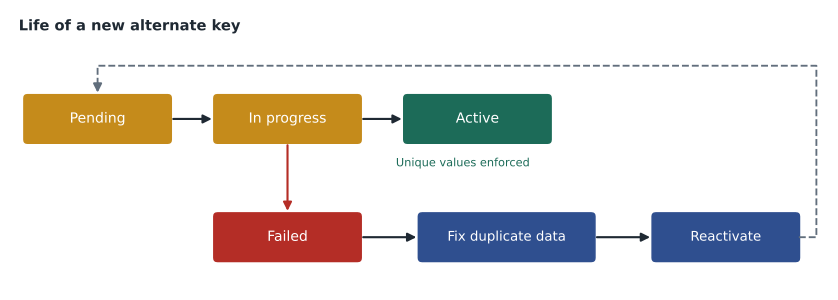
Creating a key starts a system job that builds the unique index. The key's status shows Pending, In progress, Active or Failed. If the table already contains duplicate values for the key, the job fails, and the key is not enforced until you fix the data and reactivate it. A table can have only a limited number of alternate keys, ten at the time of writing, and the combined size of the key's columns is limited, so use short columns. Keys belong in the solution and move between environments with it.
PATCH /api/data/v9.2/lcc_buildings(lcc_buildingcode='OSC')
Content-Type: application/json

{
  "lcc_name": "Orchard Science Centre",
  "lcc_floors": 4
}
Worked problem
A key that failed
Signe created the Building Code key in the test environment and its status became Failed. What should she do?
Show solution
- A failed key usually means the table already has duplicate values for the key columns, or a value too large for the index.
- Use a view grouped or sorted by Building Code to find duplicates; two test buildings both had the code TEST.
- Correct the data: give each building a unique code, or merge or delete true duplicates.
- Reactivate the key from the Keys area and confirm that its status becomes Active.
Answer: Find and fix the duplicate codes, then reactivate the key; it enforces nothing until it is Active.
Duplicate detection rules
Alternate keys catch exact duplicates. Real data also has near duplicates: Orchard Science Ctr and Orchard Science Centre. Duplicate detection rules compare rows using conditions such as "same first 10 characters of the name" and warn users when they save a likely duplicate, and administrators can run duplicate detection jobs over existing data. They are a warning system, not a constraint: a user can choose to save anyway. Lumenvale uses a key for building codes and a duplicate detection rule for building names, so an exact code clash is impossible and a near match on the name is flagged for a person to judge.
Choosing the right identifier
Signe ended the session with a rule of thumb for Maribeth. Let Dataverse own the GUID. Give people a readable primary column. Give integrations an alternate key built from the business's own identifiers, and enforce uniqueness with it. Use duplicate detection where people make the near-duplicates that keys cannot catch. And put every list of values that matters for reporting into a choice, ideally a global one, so Kwabena never has to count smiley faces again.
Choices, keys and Copilot
Choices and keys also help AI features. When Copilot in a model-driven app or a Copilot Studio agent answers "how many failed findings are high priority on the Lakeshore campus?", it works far more reliably with a Result choice, a Priority choice and a Campus global choice than with free text, because each value has one meaning and a description. Alternate keys help agents and flows find the exact row a person names, such as "building OSC", instead of guessing from a name. Signe adds a sentence to each option's description that says when to use it, and checks that key columns have clear descriptions too.
Common mistakes
MistakeUsing free text for values that come from a fixed list.
InsteadUse a choice or choices column, ideally a global choice when several columns share the list.
MistakeDeleting a choice option that rows use.
InsteadRetire it by renaming or hiding it, migrate the rows, then remove it if needed.
MistakeUsing Yes/No for answers that might need a third value.
InsteadUse a choice from the start; a Yes/No cannot become a choice later.
MistakeRelying on duplicate detection to prevent duplicates.
InsteadUse an alternate key to enforce uniqueness; detection rules only warn.
MistakeAssuming a new key is enforced immediately.
InsteadWait for the key's status to be Active; fix duplicates if it fails.
Summary and key terms
- Choice columns store integer values with labels, keeping data consistent and translatable; choices columns allow several values.
- Global choices are defined once and reused; option values come from the publisher's choice value prefix and should be treated as permanent.
- Status and Status Reason give every standard table a built-in lifecycle.
- Every row has a GUID primary key; people use the primary column; integrations use alternate keys.
- An alternate key is a unique index on one or more supported columns, built by a background job and usable for upserts.
- Duplicate detection rules warn about near duplicates but do not block them.
- Choice
- A column that stores one value from a defined list of options, each with a label and an integer value.
- Global choice
- A list of options defined once in a solution and reused by many choice columns.
- Choice value prefix
- A five-digit number on the solution publisher used to generate option values.
- Status Reason
- A built-in column that gives the detailed reason within a row's active or inactive state.
- Primary key
- The GUID that uniquely and permanently identifies a Dataverse row.
- Alternate key
- One or more columns whose combined values must be unique and can identify a row in API calls.
- Upsert
- An operation that updates a row if it exists and creates it if it does not.
Practice problems
Work each problem on paper first, then reveal the answer to check.
Why is a choice column better than free text for Result?
Show answer
Every row stores one of a fixed set of values, so filters, counts and translations are exact.
What is the safe way to change the label of an option?
Show answer
Rename the label; the stored value stays the same, so data and integrations are unaffected.
How does an alternate key differ from a duplicate detection rule?
Show answer
The key is enforced by a unique index and blocks duplicates; a detection rule only warns.
What does a Failed status on a new key usually mean?
Show answer
The table already has duplicate values for the key columns, or values unsuitable for the index; fix the data and reactivate.
Lesson quiz · 5 questions
Score 60% or more to complete this lesson.
Create a free account to save your progress, take quizzes and earn a certificate.