
MSBA-250 · Lesson 12 of 12 · 28 min
Case study: a field inspection data model
▶ Video coming soon A video version of this lesson is on the way.
Three months after the first whiteboard session, Rupert asked Signe for a design document he could file with the privacy office and hand to whoever maintains the solution after her. "Everything we decided," he said, "and why, on as few pages as possible." This lesson is that document, followed by a set of problems that test the same decisions on a new situation. It brings together every lesson in the course: design, tables and columns, relationships and behaviours, calculations, choices and keys, business rules, security roles and teams, business units, column security, auditing and data movement.
Read the design as a model answer to the question "how should a field inspection solution store and protect its data?" Then work through the problems at the end before reading the suggested answers. Exam AB-410 scenarios look like these: a short business story, a requirement, and a choice between features that sound similar.
Part 1: the requirements
The facilities department inspects every building on three campuses at least twice a year using checklists that depend on the type of room. Every checklist item checked produces a result. Failures need a note, a priority and often a photo, and are repaired by the trades crew. An inspection closes only when its failures are resolved. Inspectors work on phones; supervisors work on laptops; a director oversees all campuses; contractors inspect elevators; the health and safety office handles injuries; and an analyst reports across everything. Regulators can ask for seven years of evidence. A maintenance system sends building changes nightly.
Part 2: tables
| Table | Type and ownership | Primary column | Purpose |
|---|---|---|---|
| Building | Standard, user or team owned | Building Name | One row per building; Building Code alternate key |
| Room | Standard, user or team owned | Room Code, such as OSC-114 | One row per room; key on Building plus Room Number |
| Room Type | Standard, organization owned | Name | Kinds of room: chemistry lab, office, stairwell |
| Checklist Item | Standard, organization owned | Name | Things to check: eyewash station, extinguisher |
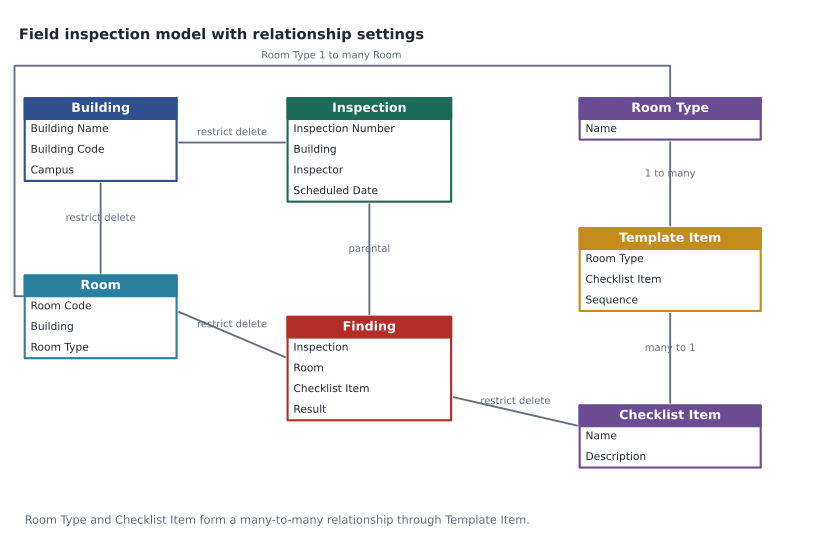
| Template Item | Standard, organization owned | Autonumber | Manual many-to-many of Room Type and Checklist Item with Sequence and Safety Critical |
| Inspection | Standard, user or team owned | Inspection Number, autonumber | One walk-through of one building by one inspector |
| Finding | Standard, user or team owned | Finding Number, autonumber | One result for one checklist item in one room |
The standard User table represents inspectors and the standard Contact table represents contractors. Every table and column has a description written for people and for Copilot. All components live in the Lumenvale Facilities solution with the lcc publisher prefix.
Part 3: key columns
| Table | Column | Type | Notes |
|---|---|---|---|
| Inspection | Scheduled Date | Date only | Same date for everyone |
| Inspection | Completed On | Date and time, user local | A moment in time |
| Inspection | Status Reason | Built-in | Scheduled, In progress; Completed, Cancelled |
| Finding | Result | Choice | Pass, Fail, Not applicable |
| Finding | Priority | Choice | Low, Medium, High |
| Finding | Note | Multiple lines of text | Required for failures |
| Finding | Photo | Image | File capacity |
| Finding | Safety Critical | Yes/No | Copied from the template item when created |
| Finding | Injured Person, Injury Details | Text, secured | Column security profiles |
| Finding | Days Open | Formula | Power Fx from Found On and Resolved On |
| Finding | Plain Summary | Prompt | One sentence from the note; not audited |
| Inspection | Open Failures | Rollup | Count of failed, open findings |
| Building | Campus | Choice (global) | Shared with other tables |
Part 4: relationships and behaviours
| Relationship | Behaviour | Reason |
|---|---|---|
| Building to Room | Referential, restrict delete | Buildings with rooms cannot be deleted by accident |
| Building to Inspection | Referential, restrict delete | Inspection history is evidence |
| Inspection to Finding | Parental | Findings belong to their inspection; assign and share cascade |
| Room to Finding | Referential, restrict delete | Finding already has a parental parent; history is protected |
| Checklist Item to Finding | Referential, restrict delete | Items with history cannot be deleted; retire them instead |
| Room Type and Checklist Item through Template Item | Manual many-to-many | The link holds Sequence and Safety Critical |
Part 5: logic
Business rules with Entity scope enforce the rules that must hold for every source: Completed On cannot be before Scheduled Date; a failed finding needs a priority and a note; a change from Fail to Pass needs a resolution note. A form-scoped rule shows the Photo column only for failures. A rule sets Priority to High for safety-critical failures. A plug-in blocks completing an inspection while any of its findings is failed and open, because that rule needs related rows. A cloud flow notifies the trades crew of high-priority failures after they are saved. A business process flow guides supervisors through Review, Assign repairs, Verify and Close.
Part 6: security
| Who | Business unit | Role (through a Microsoft Entra group team) | Inspection and Finding access | Column profile |
|---|---|---|---|---|
| Inspector | Their campus | Lumenvale Inspector | Create, read, write, append at user level | Incident Recorders (create only) |
| Campus supervisor | Their campus | Lumenvale Campus Supervisor | Read, write, assign, share at business unit level | None |
| Facilities director | Root | Lumenvale Facilities Director | Read and write at parent: child business units level | None |
| Lab safety officer | Ridgeview Campus | Inspector, plus Lab Safety Reviewer from Downtown and Lakeshore | Matrix access to lab inspections | None |
| Contractor | Root | Lumenvale Contractor (minimal) | Through access team sharing on specific inspections | None |
| Health and safety officer | Root | Lumenvale Health and Safety | Read at organization level | Health and Safety (read, create, update) |
| Report reader | Root | Lumenvale Report Reader | Read at organization level | None |
Record ownership across business units is on, so central inspectors' inspections can belong to the campus where the building is. Hierarchy security is off, by decision. No formula, calculated, rollup or prompt column uses a secured column. The privilege to view audit history and the export privilege are limited to supervisors, administrators and the privacy office.
Part 7: auditing and data movement
Auditing is on for the environment, with access logging, and on for Inspection, Finding, Building, Room and the template tables; Plain Summary and the prompt companion columns are excluded. Retention is seven years, matching the records schedule, and expected log growth is in the capacity plan. The nightly maintenance feed is a dataflow that upserts buildings by Building Code. Historical inspections were unpivoted in Power Query and loaded once. Checklist templates move between environments with the Configuration Migration tool. Analytics use a direct Power BI connection, and the data warehouse uses the Fabric link.
Part 8: problems
The college now wants a second solution for lab equipment calibration. Each lab has instruments such as balances, pH meters and fume hood monitors. Each instrument must be calibrated on a schedule set by its type, by either in-house technicians or an external calibration company. Each calibration produces a pass or fail, readings, a certificate file and the next due date. Failed instruments must be tagged out of service. Lab managers on each campus see their campus's instruments; the external company sees only the instruments it is asked to calibrate; the college's quality office sees everything; certificate files must be kept for ten years. Work through the problems before reading the answers that follow.
Worked problem
Problem 1: tables and ownership
Which tables does the calibration solution need, and which should be organization owned?
Show solution
- Instrument: one row per physical instrument, user or team owned so campus teams own their instruments. It looks up Room from the inspection model, reusing the existing table.
- Instrument Type: balances, pH meters and so on, with the calibration interval in days; organization owned reference data.
- Calibration: one row per calibration event, user or team owned, with a parental relationship from Instrument so calibrations follow their instrument's ownership and sharing.
- Calibration Reading: optional, one row per reading if several readings are recorded per calibration, as a child of Calibration rather than numbered columns.
- The external company is an Account, and its technicians are Contacts, using standard tables whose meaning matches.
Answer: Instrument, Calibration and optionally Calibration Reading as user- or team-owned tables, Instrument Type as organization-owned reference data, and Account and Contact for the external company.
Worked problem
Problem 2: calculations
How should the solution show each instrument's next due date and whether it is overdue?
Show solution
- The next due date depends on the latest calibration and the interval of the instrument's type.
- A rollup column on Instrument can hold the latest calibration date: the maximum Calibrated On of related calibrations with Result Pass.
- A formula column on Instrument adds the type's interval to the latest calibration date to give Next Due, reading the interval through the Instrument Type lookup.
- A second formula column compares Next Due with today to give an Overdue yes or no value, always current when read.
- Because the rollup refreshes on a schedule, the form offers recalculation after a calibration is saved, or a flow triggers it.
Answer: A rollup for the latest passing calibration date, then formula columns for Next Due and Overdue.
Worked problem
Problem 3: rules and logic
Failed instruments must be tagged out of service, and a calibration cannot be saved without a certificate when it is done by the external company. Where does each rule belong?
Show solution
- Tagging out of service changes the Instrument row when a Calibration is saved with Result Fail. That touches a related row, so a business rule on Calibration cannot do it; a plug-in or low-code plug-in can do it synchronously, or a cloud flow can do it immediately afterwards if a short delay is acceptable.
- The certificate rule is on the Calibration row itself: if Performed By equals External and Certificate does not contain data, show an error. An Entity-scoped business rule can check whether a file column contains data only if file columns are supported in its conditions; if not, a low-code plug-in or the app enforces it. Check support before relying on it.
- Either way, validation that must block the save belongs in synchronous logic.
Answer: Use server-side logic for the related-row update and synchronous validation for the certificate requirement, checking which column types business rules support.
Worked problem
Problem 4: security
Lab managers see their campus's instruments; the external company sees only instruments it is asked to calibrate; the quality office sees everything. Design it.
Show solution
- Reuse the campus business units. Lab managers hold a Lab Manager role with business-unit-level access to Instrument and Calibration, assigned through a Microsoft Entra group team.
- The quality office holds a role with organization-level Read, through its own group team.
- External technicians are users with a minimal role and no table-wide read on Instrument. An access team template on Instrument lets a lab manager add the company's technicians to the instruments it should calibrate; parental behaviour shares the related calibrations.
- If certificate files contained personal data, column security would be considered; here they do not.
Answer: Business units for campuses, roles through group teams for managers and the quality office, and an access team template for the external company.
Worked problem
Problem 5: retention and data
Certificates must be kept for ten years, and 600 instruments already exist in a spreadsheet. What about storage, auditing and the initial load?
Show solution
- Store certificates in a file column on Calibration, which uses file capacity; estimate the number and size of files over ten years for the capacity plan.
- Retention of the files is a records decision: calibrations with certificates must not be deleted for ten years, so restrict delete privileges and use restrict delete relationships to protect them.
- Audit Calibration and Instrument; the environment's audit retention covers the change history, separately from keeping the certificate files themselves.
- Load Instrument Type first, then Instruments from the spreadsheet with an alternate key on Asset Tag, mapping each to its Room by the Room alternate key.
Answer: File columns with a capacity plan, delete protection for ten years, auditing of the calibration tables, and an ordered import using alternate keys.
What the case study shows
The calibration problems are a new domain, but every answer reused a decision from the inspection model: describe the process before building; normalize repeated readings into rows; choose ownership deliberately; pick behaviours from the meaning of each relationship; use rollups to aggregate and formulas to present; put validation in synchronous logic and follow-up in asynchronous logic; express boundaries with business units and exceptions with access teams; protect a few sensitive columns with profiles; audit what is evidence; and design keys so data can be loaded and kept in step.
Rupert filed the design document with the privacy office the following week. Octavia asked for one more thing: a version she could show the facilities staff. Signe drew the seven boxes again, without the logical names, and wrote under it: "Every check you do is now a row. Every row is safe, and every change is recorded." It is pinned above the facilities office printer.
Common mistakes
MistakeAnswering scenario questions from feature names instead of requirements.
InsteadStart from the requirement: who, which rows, which columns, which sources of data, how current.
MistakeReusing a design without checking ownership and behaviours for the new tables.
InsteadDecide ownership and relationship behaviour afresh for each table.
MistakeExpecting business rules to change related rows.
InsteadUse plug-ins, low-code plug-ins or flows for logic that touches other rows.
MistakeForgetting capacity when files and audit logs must be kept for years.
InsteadEstimate file and log capacity over the retention period.
Summary and key terms
- A complete Dataverse design covers tables, columns, relationships, calculations, keys, logic, security, auditing and data movement.
- Every decision in the inspection model came from a requirement, and the reasons are recorded.
- New solutions reuse the same patterns: normalization, deliberate ownership, behaviours, rollups and formulas, synchronous validation, business units and access teams, column security and auditing.
- Scenario questions are answered by reading the requirement carefully and choosing the feature that runs where, and when, the requirement needs.
- Design document
- A record of a data model's decisions and the reasons for them.
- Reference data
- Rows that describe options or rules, such as room types, usually organization owned.
- Evidence
- Data that must be kept and protected because regulators or investigators may rely on it.
- Capacity plan
- An estimate of the database, file and log storage a solution will need over time.
Practice problems
Work each problem on paper first, then reveal the answer to check.
Why is Template Item organization owned while Inspection is user or team owned?
Show answer
Templates are reference data everyone reads and few change; inspections need per-user and per-campus access.
In the calibration problem, why is the next due date a formula column and not a rollup?
Show answer
It is a row-level calculation from the latest calibration date and the type's interval; the rollup supplies the latest date and the formula adds the interval.
Which feature gives the external company access to only the instruments it should calibrate?
Show answer
An access team template on Instrument, with sharing cascading to related calibrations.
Name two decisions from this course that cannot be changed later.
Show answer
Any two of: table ownership, table type, schema names, column data types.
Lesson quiz · 5 questions
Score 60% or more to complete this lesson.
Create a free account to save your progress, take quizzes and earn a certificate.