
MSBA-250 · Lesson 10 of 12 · 20 min
Auditing
▶ Video coming soon A video version of this lesson is on the way.
In late October a finding about a blocked fire exit on the Lakeshore campus changed from Fail to Pass without anyone remembering changing it. The exit was still blocked when Octavia walked past it the next morning. Nobody had done anything wrong on purpose, as it turned out: an inspector had opened the wrong finding on a small phone screen and tapped Pass. But for a few hours, the question "who changed this, and when?" mattered a great deal, and the answer came from Dataverse auditing in about thirty seconds.
Auditing records changes to data and, optionally, who accessed the system. This lesson explains what Dataverse audits, how auditing is turned on at three levels, how to read audit history, how to manage the log capacity it uses and how long to keep it, and how Dataverse activity can also be seen in Microsoft Purview. Auditing is part of the security design: roles decide who can change data, and auditing shows who did.
What auditing records
When auditing is on for a table and its columns, Dataverse writes an audit record for changes to rows: creating a row, updating columns (with the old and new values), deleting a row, and related operations such as assigning a row to a new owner, sharing it, associating and disassociating related rows, and changes to a user's security roles. Each audit record holds the date and time, the user who made the change (or on whose behalf it was made), the operation, and for updates the changed columns with their old and new values.
Auditing records changes to stored data, so values that are not stored are not audited: formula columns, which are calculated when read, have nothing to audit. The Power Apps documentation also notes that prompt columns are not audited. Rollup values are recalculated by the system rather than changed by users. If a calculated value matters for the record, audit the columns it depends on.
| Recorded | Examples |
|---|---|
| Row changes | Create, update with old and new values, delete |
| Ownership and sharing | Assign to a new owner, share, unshare |
| Relationships | Associate and disassociate rows in many-to-many relationships |
| Security changes | Security roles added to or removed from users and teams |
| User access (optional) | When users sign in and access the environment |
| Read activity (optional, through Purview) | Which rows users viewed, in environments where read logging is set up |
Three levels of settings
Auditing must be turned on at three levels before anything is recorded, which surprises people who turn it on in one place and wonder why the history is empty.
First, the environment. In the Power Platform admin center, open the environment, go to its settings, then Audit and logs, then Audit settings. There you start auditing for the environment, choose whether to log access (when users access the environment), choose whether to send read logs to Microsoft Purview where that is supported, and set the retention period for audit logs. Second, the table. In Power Apps, open the table's properties and turn on auditing for changes to its data. Third, the column. Each column has an auditing setting in its advanced options; once a table is audited, its columns are usually audited unless you turn individual columns off.
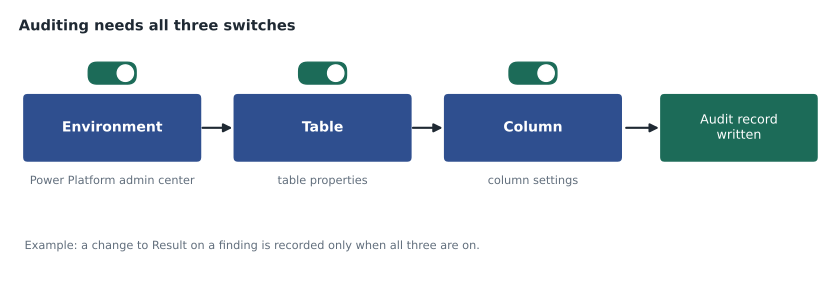
| Level | Where | Setting |
|---|---|---|
| Environment | Power Platform admin center, environment settings, Audit and logs | Start auditing; log access; read logs; retention |
| Table | Power Apps, table properties | Audit changes to its data |
| Column | Power Apps, column advanced options | Enable auditing for the column |
Planning what to audit
Auditing everything everywhere sounds safe and is not wise. Audit records use log capacity, a separate part of Dataverse storage from lesson 1, and a busy table with many audited columns can generate millions of records. Large audit logs also make the audit history of each row harder to read. Signe planned auditing table by table with Rupert and the privacy office.
| Table | Audited? | Reason |
|---|---|---|
| Inspection | Yes, all columns | Status, dates and inspector are evidence for regulators |
| Finding | Yes, except Plain Summary and companion columns | Results, priorities and resolutions are evidence; AI text is not a decision |
| Building and Room | Yes | Changes to the inventory are rare and important |
| Template Item and Checklist Item | Yes | Template changes alter what inspectors must check |
| Room Booking (another solution) | No | High volume, low evidential value |
| Security roles and team membership | Yes, through environment auditing | Required by the privacy office |
Reading audit history
Audit records can be read in several ways. On a model-driven form, the Related menu includes Audit history, which lists every audited change to that row: when, who, which operation, and for each changed column the old and new value. Users need the privilege to view audit history to see it. Administrators can review audit records across the environment in the audit summary in the Power Platform admin center or the advanced settings, filtering by date, table, operation and user. Developers can query audit records through the Web API, and reporting tools can read them where they have access.
Worked problem
Who changed the fire exit finding?
Finding FND-202610-00417, Blocked fire exit, Lakeshore Library east stair, shows Result Pass, but the exit is still blocked. How do you find out what happened?
Show solution
- Open the finding in the model-driven app and select Related, then Audit history.
- Find the update that changed Result. The audit row shows Result changed from Fail to Pass, with the date, time and user.
- Check the other columns changed in the same update; here only Result changed, which suggests a mistaken tap rather than a resolved finding.
- Change Result back to Fail with a note, and ask the inspector named in the audit row what happened. The audit history itself records this correction too.
Answer: Audit history showed the exact change, the time and the user in seconds, and the correction became part of the record.
The incident led to one design change as well. Signe added a business rule from lesson 6: if Result changes from Fail to Pass, Resolution Note becomes required, and an Entity-scoped rule shows an error if it is empty. The next accidental tap on a failed item would stop at "Explain how the failure was resolved."
Retention and log capacity
Each environment has a retention period for audit logs, set in the audit settings. Options range from a few weeks to several years, a custom number of days, or keeping logs indefinitely, which is the default in many environments. When a retention period is set, Dataverse deletes audit records older than the period automatically. Administrators can also delete audit logs manually to free capacity: by date (all logs older than a chosen date), by table, or by type, such as access logs, from the capacity and audit pages of the Power Platform admin center.
The right retention period comes from rules, not habit. Lumenvale's facilities records schedule says inspection evidence must be kept for seven years, so Signe set the retention period to seven years for the facilities environment. The college's student-facing environment has a shorter period, set by its own records schedule. Retention and capacity are linked: a seven-year log of a busy table needs log capacity, so Rupert added the expected audit volume to the capacity plan.
The college's records schedule reflects British Columbia's requirements for public post-secondary institutions, and the privacy office reviews it against the province's privacy legislation.
Access logging and read logs
Changes are not the only thing that can matter. Log access records when users access the environment, which helps answer questions such as "was this account used during the weekend?" Read logs go further: where available, Dataverse can send records of which rows users viewed to Microsoft Purview, the organization's compliance platform, so investigators can see who looked at sensitive data. Read logging generally requires a production environment and appropriate Microsoft Purview audit licensing, and its availability depends on the environment type and settings; check the current Power Platform documentation before relying on it.
Dataverse activity, including create, update and delete operations, can also appear in the Microsoft Purview audit log alongside activity from Exchange, SharePoint and Teams, which lets compliance teams search across services. Lumenvale's privacy office uses Purview for investigations across Microsoft 365 and uses Dataverse audit history for day-to-day questions about individual rows.
| Question | Where to look |
|---|---|
| Who changed this row, and what did they change? | Audit history on the row |
| Which rows did this user change last week? | Audit summary filtered by user and date |
| When did this account access the environment? | Access logs, if log access is on |
| Who viewed this sensitive row? | Read logs in Microsoft Purview, where configured |
| What did this person do across Microsoft 365 and Dataverse? | Microsoft Purview audit search |
Auditing and security work together
Auditing does not prevent anything; roles, business rules and column security do that. What auditing adds is accountability and evidence. People behave more carefully when changes are recorded, mistakes can be found and corrected, and regulators and investigators can see what happened. It also checks the security design itself: if the audit log shows a contractor changing rows they were only meant to read, the role or sharing design is wrong. Rupert schedules a quarterly review of audit summaries for the facilities environment for exactly that reason.
Audit data is itself sensitive. Audit history shows old values, including values of columns that were later changed, so a user who can view audit history might see information they could not see on the current row. Audit history respects column security for secured columns, but limit the privilege to view audit history to people who need it, and include it in the security test script. Lumenvale grants it to supervisors, administrators and the privacy office, not to inspectors or contractors.
Audit history in practice
Audit history is only useful if people know it exists and how to read it. Lumenvale's supervisors were shown how to open Audit history from a finding in the model-driven app during their training, using a test finding whose result had been changed three times. Each line showed the date and time, the user, the operation and the old and new values, and the supervisors practised answering three questions: who closed this finding, when was the priority changed, and was the photo removed or never added. Two of them said afterwards that they would have spent hours asking around without it.
Audit records also help with problems that are not mistakes by people. When a scheduled dataflow from lesson 11 began overwriting building names every night with old values from the maintenance system, the audit history of the affected buildings showed the same change at 02:00 each day by the dataflow's application user, which pointed straight to the cause. Signe fixed the mapping in the dataflow, and the audit history then showed the names stop changing. Without auditing, the problem would have looked like random data loss.
Auditing and solutions
The table and column audit settings are part of the table definition, so they travel in solutions from development to test to production, and a production table arrives with auditing already set as designed. The environment settings, including whether auditing is on, access logging and the retention period, belong to each environment and must be set in each one. Rupert's environment configuration script includes them, and the security test script includes a check that auditing is on in production before go-live, because a solution with audited tables in an environment with auditing switched off records nothing at all.
Checking the audit plan
Before go-live, Signe ran one more test: she changed a value in each audited table in the test environment, as each of the test users, and confirmed that every change appeared in audit history with the right user and values, and that the excluded columns, such as Plain Summary, did not. She also checked the log capacity report in the Power Platform admin center a week after the pilot started, multiplied the growth by the expected number of inspections a year, and confirmed that seven years of logs fit the capacity Rupert had planned.
Common mistakes
MistakeTurning on auditing for the environment and expecting history for every table.
InsteadTurn auditing on for the environment, the table and the columns.
MistakeAuditing every table and column by default.
InsteadPlan auditing by table and column, considering evidential value and log capacity.
MistakeKeeping audit logs forever without a reason.
InsteadSet the retention period from the organization's records schedule.
MistakeExpecting formula or prompt column changes in the audit log.
InsteadAudit the stored columns that calculations depend on.
MistakeGiving everyone the privilege to view audit history.
InsteadRestrict it; audit history can show old values of sensitive data.
Summary and key terms
- Auditing records creates, updates with old and new values, deletes, ownership, sharing, relationship and security changes.
- Auditing needs three switches: the environment, the table and the column.
- Audit history on a row shows who changed what and when; the audit summary searches across the environment.
- Audit records use log capacity; set a retention period that matches the records schedule and delete old logs when needed.
- Access logs record when users access the environment; read logs can be sent to Microsoft Purview where configured.
- Auditing provides accountability and checks the security design; access to audit history should be restricted.
- Audit record
- An entry recording an operation on data, with its time, user and changed values.
- Audit history
- The list of audited changes to one row, shown from the row in a model-driven app.
- Log capacity
- The part of Dataverse storage used by audit logs.
- Retention period
- How long audit records are kept before being deleted automatically.
- Access logging
- Recording when users access the environment.
- Read logs
- Records of which rows users viewed, sent to Microsoft Purview where supported.
Practice problems
Work each problem on paper first, then reveal the answer to check.
Auditing is on for the environment, but a finding's audit history is empty. What should you check?
Show answer
Whether auditing is turned on for the Finding table and for the columns that changed.
Why are formula column values not in the audit log?
Show answer
They are calculated when read and not stored, so there is no stored change to record.
Where should the audit retention period come from?
Show answer
The organization's records schedule and legal requirements, balanced with log capacity.
Why should the privilege to view audit history be restricted?
Show answer
Audit history shows old values and can reveal sensitive information.
Lesson quiz · 5 questions
Score 60% or more to complete this lesson.
Create a free account to save your progress, take quizzes and earn a certificate.