
MSBA-240 · Lesson 6 of 12 · 23 min
Entities and slot filling
▶ Video coming soon A video version of this lesson is on the way.
In the first test of the leave application topic, Hamish typed: "I want to start parental leave on the 3rd of March." The agent replied: "What type of leave would you like to apply for?" and then: "What date would you like your leave to start?" Hamish looked at Yusra. "I just told it both." The topic was asking its questions in order, as designed, without noticing that the answers had already arrived. Fixing that is the job of entities and slot filling.
An entity describes a kind of information the agent can recognize in what people type: a date, a number, an email address, a province or state, a leave type. When a question node asks for an entity, the agent knows what a valid answer looks like, can extract it from a longer sentence, and can store it as a typed value. Slot filling is the behaviour of taking values for the information a topic needs (its slots) from whatever the user has already said, and asking only for what is still missing. Together they make conversations shorter and answers cleaner.
Prebuilt entities
Copilot Studio includes prebuilt entities for common kinds of information. They cover things such as age, yes-or-no answers (Boolean), city, country or region, date and time, duration, email, money, number, ordinal ("the third"), percentage, person name, phone number, postal code, temperature, URL and others. A prebuilt entity understands many ways of expressing a value. The date and time entity, for example, recognizes "March 3", "3/3", "next Monday" and "the first of next month", and stores a real date value that a Power Fx formula can compare. Using the right prebuilt entity is almost always better than asking for free text and trying to interpret it later.
| User says | Entity | Stored value |
|---|---|---|
| "starting next Monday" | Date and time | The date of next Monday |
| "about three weeks" | Duration | A duration of 21 days |
| "yes please" | Boolean | true |
| "my number is 306 555 0142" | Phone number | 306 555 0142 |
| "the second one" | Ordinal | 2 |
Custom entities
When the information is specific to your organization, create a custom entity. A closed list entity contains a fixed set of items, each with synonyms. The HR agent's Leave type entity lists vacation, sick, parental, bereavement, compassionate care and unpaid leave, with synonyms such as "holiday" and "time off" for vacation, "maternity", "paternity" and "baby leave" for parental, and "funeral leave" for bereavement. When a user says "I need baby leave", the entity recognizes parental leave. A closed list can also allow smart matching, which tolerates misspellings and close variations, and can be extended with synonyms suggested by the platform. A regular expression entity matches a pattern instead of a list, which suits identifiers such as Quillfield's employee numbers, which are "QIB-" followed by five digits.
QIB-[0-9]{5}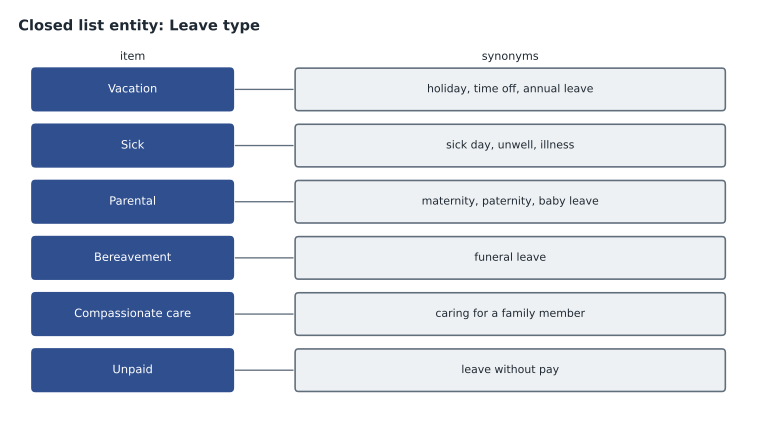
Custom entities need care. The list must match the policies the agent works with; when HR introduced a new "family responsibility" leave in the autumn, the entity had to be updated at the same time as the policy and the knowledge. Synonyms should come from how people actually talk, which is why Yusra collected them from the HR mailbox rather than inventing them. And a closed list should not try to capture open-ended information, such as the reason for a leave, which is better left as free text and handled with care.
How slot filling works
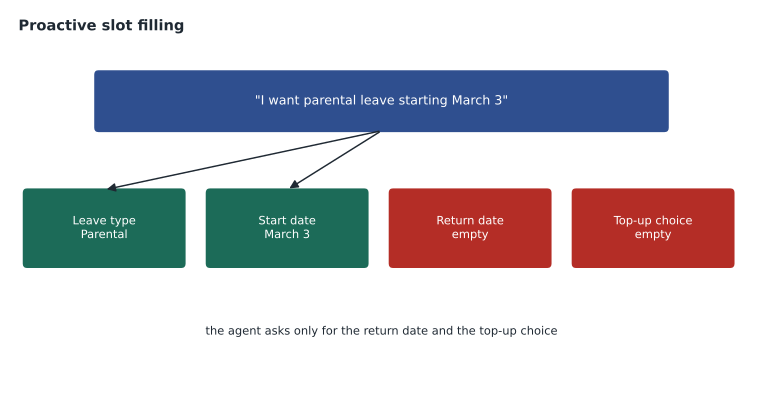
When a topic starts, Copilot Studio looks at the message that triggered it and the conversation so far, and tries to fill each question's entity from what is already there. This is proactive slot filling. If Hamish says "parental leave starting March 3", the Leave type and Start date questions are both filled, and the topic skips straight to the questions that are still empty. Each question node has a setting for whether it may be skipped when its variable already has a value. A question can also be set to always ask, which is right for information that must be confirmed even if mentioned, such as a bank account number. Slot filling also handles corrections: if the user changes their mind and says "actually make that March 10", the agent can update the stored value.
Under generative orchestration, slot filling extends to tools and to topic inputs. When a topic or tool has input parameters with descriptions, the planner fills them from the conversation and asks for any that are missing, often with a question it writes itself from the input's description. That is convenient, but the wording of those generated questions depends on the description, so describe inputs as you would explain them to a new colleague: "The first day of leave, as a date. Must be today or later."
Validation and reprompting
Recognizing a value is not the same as accepting it. A question node can validate the answer with a condition, for example that the start date is not in the past, and reprompt with a helpful message if it fails. You set how many times the agent retries before giving up, and what happens then: usually a redirect to escalation or a polite exit. Reprompts should say what was wrong and what is expected, not just repeat the question. "That date is in the past. When would you like your leave to start?" is far better than asking the same question again.
Worked problem
Validating dates in the leave topic
An employee enters a return date earlier than the start date. The topic currently accepts it and the HR system later rejects the case. How should Yusra change the topic?
Show solution
- Keep the date and time entity on both questions so values are real dates.
- Add validation on the return date: it must be later than Topic.StartDate.
- Write a reprompt: "Your return date needs to be after your start date of {start date}. When do you expect to return?"
- Allow two retries, then offer to connect the employee with HR.
Answer: The topic now catches impossible dates during the conversation, explains the problem in the employee's terms, and never sends a case the HR system would reject.
Entities and privacy
Entities can recognize personal information, and that is a reason to think about what the agent collects at all. The HR agent never needs an employee's health details to start a leave case, so it does not ask for them, and its instructions tell it not to record medical information volunteered in a message. Where personal information must be collected, collect the minimum, store it only in the system that needs it, and know where conversation transcripts are kept and for how long. Wendell reviewed every question the topic asked and removed one, an optional "reason for leave" field, because the HR system did not need it and it invited people to type medical details.
Testing entities and slot filling
Test entities with the phrasing real people use: abbreviations, misspellings, informal dates ("after the long weekend"), and answers that contain more than was asked. For each topic, try at least one message that fills every slot at once, one that fills none, one that fills some, and one that corrects an earlier answer. Check the stored variable values in the test pane, not only the conversation, because an entity can appear to work while storing the wrong value, such as reading "3/4" as March 4 when the employee meant April 3. Bram suggested asking for dates in an unambiguous way in questions ("for example, 3 March 2027") and confirming dates back in words before submitting.
Worked problem
Choosing entities for an underwriting topic
An underwriting topic needs: the client's policy number (format "QP" plus eight digits), the coverage type (property, liability, marine or cyber), the requested limit in dollars, and whether the client has had a claim in five years. Choose an entity for each.
Show solution
- Policy number: a regular expression entity, QP[0-9]{8}.
- Coverage type: a closed list with synonyms, for example "cargo" for marine and "data breach" for cyber.
- Requested limit: the prebuilt money entity.
- Recent claim: the prebuilt Boolean entity.
Answer: Regular expression, closed list, money and Boolean. With proactive slot filling, an underwriter who types "marine cover for QP12345678, two million limit" is asked only about recent claims.
Entities in generated questions
Under generative orchestration, many questions are not written by the maker at all. When the planner decides to call a tool or topic whose inputs are missing, it composes a question from each input's name and description. The input's type still matters: an input defined as a date leads the agent to recognize and store a date, and an input linked to a closed list entity limits valid answers to its items. This combination, generated wording with typed inputs, gives conversations that feel natural without losing structure. The trade-off is less control over the exact wording, which is why the leave application topic, where HR cares about wording, keeps its own question nodes, while the Talk to HR tool lets the planner ask for the question text in its own words.
Input descriptions deserve the same care as tool descriptions. Compare "date" with "The first day of leave, as a calendar date. It must be today or a future date, and no more than twelve months ahead." The second tells the planner what to ask, what counts as valid and, in effect, how to word a reprompt. Yusra kept a short style guide for descriptions so that inputs across Quillfield's agents read consistently: say what the value is, its format, its limits and an example.
Multiple values and confirmation
Some questions have more than one answer. An employee booking leave in two separate blocks, or listing several dependants, gives a list rather than a single value. Questions can store multiple values in a table variable, and topics can loop or confirm each item. Lists are harder for people to correct, so Bram recommended confirming them back in plain words before acting: "You've listed two blocks of leave: March 3 to 14 and April 7 to 11. Is that right?" More generally, confirm any value that will be used to take an action, even if slot filling captured it cleanly. Extraction is good, but it is not perfect, and a confirmation costs one short turn.
Slot filling and the user experience
Slot filling changes how a conversation feels. Without it, people who give full information up front are asked for it again and conclude the agent is not listening. With it, they move quickly, while people who give little are guided step by step. Two habits help. First, write the first question of a topic so that it invites more than the minimum: "Tell me about the leave you want, for example the type and when you'd like to start" encourages a fuller answer that fills several slots. Second, when the agent fills slots silently, mention what it understood, so mistakes are caught early: "Got it, parental leave starting March 3. When do you expect to return?"
Worked problem
Writing input descriptions for the Talk to HR tool
The Talk to HR tool takes three inputs: Category, Question and PreferredContact. With descriptions left blank, the agent asks "What is Category?" Write better descriptions.
Show solution
- Category: "The kind of HR question, one of: leave, benefits, pay, conduct or other. Choose from the conversation if clear; otherwise ask."
- Question: "The employee's question in their own words, including any dates or details they gave. Do not include medical details."
- PreferredContact: "How the employee wants HR to reply: Teams message or phone call. Default to Teams message if they have no preference."
Answer: With these descriptions, the agent asked natural questions, filled Category from context most of the time, kept medical details out of the case, and defaulted sensibly when the employee had no preference.
Slot filling is also where small entity mistakes become visible. If the Leave type entity lacks a common synonym, people who use that word are asked the question they thought they had answered, which feels like not being listened to. Yusra reviewed transcripts for leave-type questions that followed a message already naming a leave type, and found two missing synonyms ("mat leave" and "pat leave") in the first week. Adding them took a minute and removed a whole class of irritating turns.
Common mistakes
MistakeAsking for dates and numbers as free text.
InsteadUse prebuilt entities so answers become typed values that formulas can check.
MistakeInventing synonyms in a meeting.
InsteadCollect synonyms from how people actually ask, such as the support mailbox.
MistakeRepeating the same question after a bad answer.
InsteadReprompt with what was wrong and what is expected, and limit retries.
MistakeCollecting information "just in case".
InsteadAsk only for what the process needs, especially personal information.
Summary and key terms
- Entities define kinds of information the agent can recognize and store as typed values.
- Prebuilt entities cover dates, numbers, money, Booleans and more; custom entities are closed lists with synonyms or regular expressions.
- Proactive slot filling takes values from what the user has already said and asks only for missing information.
- Validate answers and reprompt with helpful messages; set retry limits and a fallback.
- Collect the minimum personal information and test with real phrasing and stored values.
- Entity
- A definition of a kind of information the agent can recognize in user messages.
- Prebuilt entity
- An entity supplied by Copilot Studio, such as date and time or money.
- Closed list entity
- A custom entity with a fixed set of items and synonyms.
- Regular expression entity
- A custom entity that matches a text pattern.
- Slot filling
- Filling the information a topic or tool needs from the conversation and asking only for what is missing.
- Reprompt
- A follow-up message asking again after an answer fails validation.
Practice problems
Work each problem on paper first, then reveal the answer to check.
What is proactive slot filling?
Show answer
Taking values for a topic's questions from what the user has already said, so those questions are skipped.
When would you set a question to always ask?
Show answer
When the value must be confirmed even if mentioned, such as a bank account number.
Which entity type suits an identifier with a fixed format?
Show answer
A regular expression entity.
Lesson quiz · 5 questions
Score 60% or more to complete this lesson.
Create a free account to save your progress, take quizzes and earn a certificate.