
MSBA-240 · Lesson 5 of 12 · 23 min
Topics, triggers and variables
▶ Video coming soon A video version of this lesson is on the way.
HR had one request that Yusra could not meet with knowledge alone. When an employee was ready to apply for parental leave, HR needed four pieces of information collected in a fixed order, a check that the employee had at least ninety days of service, and a clear confirmation before anything was submitted. "This part has to be the same every time," Thomasina said. "It's the part the auditors look at." That is exactly what topics are for.
In the classic Copilot Studio experience, a topic is a designed piece of conversation: a trigger that decides when it starts and a path of nodes that decides what happens next, such as asking a question, checking a condition, calling a tool or sending a message. Generative orchestration can answer many questions without any topic, but topics remain the right tool when a conversation must follow a defined path, collect specific information, apply business rules or produce an auditable result. This lesson covers how topics are triggered, how they are built, and how variables carry information through them.
When to use a topic
A useful rule is to let knowledge and tools handle what can vary, and to use topics for what must not. Answering "How many days of bereavement leave do I get?" from the policy is a knowledge job. Starting a leave application, where the questions, their order, the eligibility rule and the confirmation are fixed by HR, is a topic job. Topics also suit system behaviour that every agent needs, such as greeting people, handling errors, escalating to a person and ending conversations, which is why every new agent comes with a set of system topics you can edit.
| Situation | Better handled by | Why |
|---|---|---|
| General question answered by a policy | Knowledge | Answers change when the policy changes |
| Fixed procedure with required information | Topic | Same steps, same order, auditable |
| Business rule that must always apply | Topic with a condition | Rules should not depend on the model's judgment |
| Action in a system | Tool, often called from a topic | Inputs can be collected and confirmed first |
| Greeting, error, escalation | System topics | Consistent behaviour across the agent |
Triggers
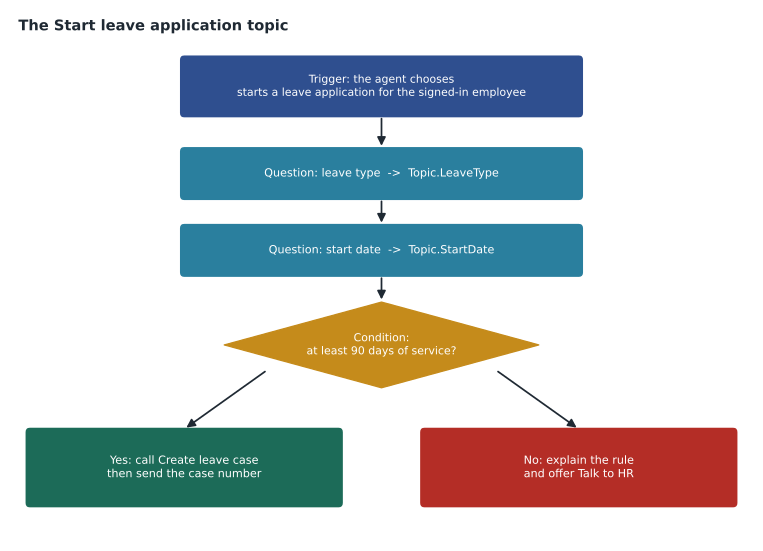
Every topic has a trigger. Under generative orchestration, the usual trigger for a custom topic is "The agent chooses": the planner decides to run the topic when the conversation matches the topic's name and description, exactly as it would choose a tool. Under classic orchestration, the trigger is a set of trigger phrases, example sentences such as "apply for parental leave" or "start my leave application"; the agent matches the user's message to the closest topic using natural language understanding, so a handful of varied phrases covers many ways of saying the same thing. Other triggers start a topic from an event rather than a message, for example when the conversation starts, when a message or activity of a certain kind is received, when the user has been inactive for a set time, when the agent hits an error, or when the plan is complete. Some are used mainly by system topics, but makers can use them too.
System topics
New agents include system topics that handle standard moments of a conversation. Conversation Start sends the greeting when a conversation opens, in channels that support it. Fallback runs when the agent cannot work out what the user wants; under generative orchestration it applies after the planner finds nothing suitable. On Error runs when something fails, such as a tool timing out. Escalate handles a request to talk to a person. End of Conversation asks whether the person's need was met and collects a satisfaction rating, which feeds the analytics. Multiple Topics Matched asks the user to choose when classic orchestration finds several possible topics. Other system topics reset the conversation or handle sign-in. You can edit most system topics, and should: the default greeting does not know your agent is about leave, and the default escalation does not know how to reach Quillfield's HR team.
Worked problem
Adapting the Escalate topic
The HR agent runs in Teams and has no live-agent handoff. When an employee asks for a person, the default Escalate topic only says it cannot transfer. What should Yusra change?
Show solution
- Decide what "a person" means at Quillfield: the HR advisers' shared mailbox and their phone line during business hours.
- Edit Escalate to send a message with those contacts and opening hours.
- Offer to create an HR case with the question so an adviser can reply, using the same tool as the leave topic with a "question" type.
- Use a variable to include the employee's last question in the case, so they do not repeat themselves.
Answer: Escalate now gives the HR contacts and hours and offers to open a case that carries the question. Escalations dropped in the analytics once employees learned the agent would pass their question on rather than leave them stuck.
Nodes
Inside a topic, nodes do the work. A Send a message node replies with text, images, cards or quick replies. A Question node asks something and stores the answer in a variable, with an entity deciding what kind of answer it expects (lesson 6). A Condition node branches on variable values, using simple comparisons or Power Fx formulas. Variable management nodes set, parse or clear variables. Topic management nodes redirect to another topic, end the current topic, end all topics or transfer the conversation. A tool node calls an action, connector, flow or other tool and stores its outputs. Advanced nodes include sending an HTTP request, generating an answer from knowledge at that point in the topic, asking with an adaptive card, and sending events to the channel. You build topics on a visual canvas, and Copilot Studio also lets you describe a topic in plain language and have it drafted, which you then review and refine.
| Node | Purpose | HR agent example |
|---|---|---|
| Send a message | Reply to the user | Confirm the case number |
| Question | Ask and store an answer | Ask for the leave start date |
| Condition | Branch on a rule | At least 90 days of service? |
| Variable management | Set, parse or clear values | Calculate days of service |
| Topic management | Redirect, end or transfer | Go to Talk to HR |
| Tool | Call an action or flow | Create leave case |
| Advanced | HTTP request, adaptive card, events | Show a summary card to confirm |
Variables
Variables hold information during a conversation. Topic variables exist only inside one topic; they are the default and the safest choice, because nothing outside the topic can change them. Global variables are available in every topic of the agent for the whole conversation, useful for something learned once and needed everywhere, such as the employee's preferred language. System variables are provided by the platform and describe the conversation and user, for example the user's display name, the text of the latest message, the channel and the conversation identifier. Environment variables belong to the solution rather than the conversation and hold settings that differ between environments, such as the address of the HR system, so the same agent can point at a test system in test and the live system in production. Variables have types (text, number, Boolean, date and time, record, table and others), and a variable's type usually comes from the entity or tool that filled it.
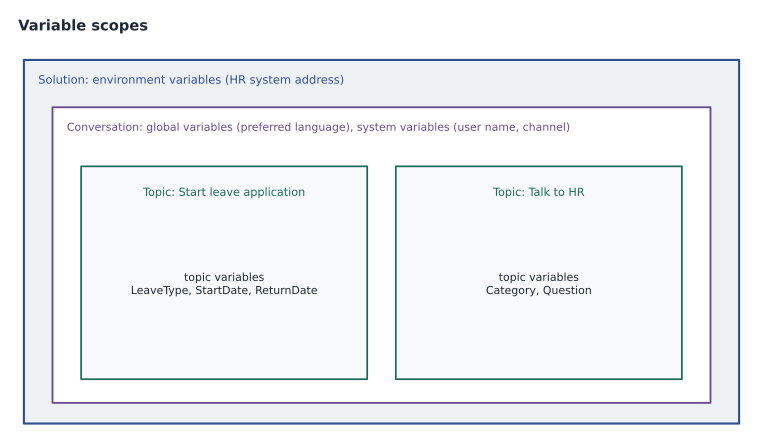
Topic variables can also be marked to receive values from other topics or return values to other topics, which makes a topic behave like a small function: one topic collects and validates a date, another uses it. And under generative orchestration, a topic's input variables can be filled by the planner from the conversation, with descriptions telling the planner what each input means, so an employee who already said "starting March 3" is not asked for the date again.
Power Fx in topics
Conditions and variable values can use Power Fx, the same low-code formula language used in Power Apps. Formulas let a topic calculate, compare, format and test values without code. Yusra used a formula to calculate days of service from the employee's start date, returned by the HR system, and a condition to check eligibility.
DateDiff(Topic.ServiceStartDate, Today(), TimeUnit.Days) >= 90If(IsBlank(Topic.LeaveType), "your leave", Lower(Topic.LeaveType) & " leave")Formulas keep business rules visible in the topic, where testers and auditors can read them. When a rule becomes complicated or is shared by several agents, it is often better placed in a tool or a workflow, where it can be tested once and reused.
Worked problem
Designing the Start leave application topic
HR requires: leave type, start date, expected return date, and whether the employee wants a top-up payment; eligibility of at least 90 days' service; and a confirmation before submitting. Outline the topic.
Show solution
- Trigger: "The agent chooses", with the description "Starts a leave application for the signed-in employee when they say they want to apply."
- Call a tool to get the signed-in employee's service start date; calculate days of service with Power Fx.
- Condition: if fewer than 90 days, explain the rule, cite the policy and offer Talk to HR, then end the topic.
- Question nodes for leave type, start date, return date and top-up choice, each stored in a topic variable.
- Show a summary card and ask for confirmation; on yes, call Create leave case and send the case number; on no, offer to change an answer.
Answer: A topic with one eligibility check, four questions, a confirmation and one tool call. Every application now follows the same path, which is what HR and its auditors wanted.
Testing topics
Test topics in the test pane, which shows each node as it runs and the value of every variable. Try the expected path, then the edges: an employee with 89 days of service, a return date before the start date, a cancelled confirmation, and a tool that returns an error. Check that the topic triggers when it should and not otherwise; under generative orchestration, a topic with a vague description may be chosen for questions it was never meant to handle. Bram asked Yusra to keep a short test script for each topic in the solution's documentation, so that anyone changing the topic later could rerun the same checks.
Topics in the generative era
With generative orchestration, makers sometimes ask whether topics still matter. The answer at Quillfield was yes, for a narrower set of jobs. Generative orchestration made dozens of small question topics unnecessary: questions like "How do I apply for jury duty leave?" were answered directly from the policy with a citation. What remained were topics where HR needed control. Bram summarized the difference for the steering group as "the model decides how to help; topics decide how we do business." Under generative orchestration, a topic's description should therefore be precise about when the topic applies, so the planner reaches for it only when the business process is really needed, and the topic's inputs should have descriptions so the planner can fill them from what the user has already said.
Topics can also contain generative steps. A generative answers node inside a topic searches knowledge at that point in the path, which lets a topic answer a policy question in the middle of a fixed procedure, for example explaining the top-up payment policy just before asking whether the employee wants it. And topics can call other topics, so a common step, such as confirming the employee's identity details, can be written once and reused. Microsoft's December 2026 update to the AB-620 skills outline removes topics as a separate exam objective, reflecting the new agent experience, but topics remain part of the generally available classic experience that most production agents use as of November 2026.
Worked problem
Reducing a topic sprawl
An older Quillfield agent built with classic orchestration has 48 topics, most of which answer one question each from a fixed message. Maintaining them takes hours every time a policy changes. What should Yusra propose?
Show solution
- Switch the agent to generative orchestration and connect the policy documents as knowledge.
- Retire topics whose only job is to answer a question that the policy already answers; test that knowledge answers them correctly with citations.
- Keep topics that run procedures, apply rules or collect required information, and improve their descriptions.
- Keep and edit the system topics.
Answer: The agent dropped to nine topics. Policy updates now flow through the documents, and the remaining topics are the ones HR actually needs to control.
Common mistakes
MistakeBuilding a topic for every question.
InsteadUse knowledge for variable answers; reserve topics for fixed procedures and rules.
MistakeLeaving system topics at their defaults.
InsteadEdit greeting, escalation and error topics so they fit your agent and organization.
MistakeUsing global variables for everything.
InsteadPrefer topic variables; use global only for values every topic truly needs.
MistakeHard-coding a system address in a topic.
InsteadUse an environment variable so each environment points at the right system.
Summary and key terms
- A topic is a designed conversation path with a trigger and nodes; use topics where steps, order and rules must not vary.
- Under generative orchestration topics are usually triggered by "The agent chooses" using their descriptions; classic orchestration uses trigger phrases.
- System topics handle greeting, fallback, errors, escalation and ending conversations, and should be adapted.
- Nodes send messages, ask questions, branch, manage variables and topics, and call tools.
- Variables have scopes (topic, global, system, environment); Power Fx calculates and tests their values.
- Topic
- A designed piece of conversation with a trigger and a path of nodes.
- Trigger
- What starts a topic, such as the planner choosing it, a phrase match or an event.
- Trigger phrase
- An example sentence used by classic orchestration to match a message to a topic.
- System topic
- A built-in topic for standard moments such as greeting, errors and escalation.
- Node
- A step in a topic, such as a message, question, condition or tool call.
- Global variable
- A variable available in every topic for the whole conversation.
- Environment variable
- A solution setting whose value differs between environments.
Practice problems
Work each problem on paper first, then reveal the answer to check.
When should a conversation be a topic rather than left to knowledge?
Show answer
When it must follow fixed steps in a fixed order, collect required information or apply a rule every time.
What does "The agent chooses" mean as a trigger?
Show answer
The planner starts the topic when the conversation matches the topic's name and description.
Why use an environment variable for the HR system address?
Show answer
So the same solution points at the test system in test and the live system in production without editing the agent.
Lesson quiz · 5 questions
Score 60% or more to complete this lesson.
Create a free account to save your progress, take quizzes and earn a certificate.