
MSBA-240 · Lesson 12 of 12 · 21 min
Case study: an HR policy agent
▶ Video coming soon A video version of this lesson is on the way.
This lesson brings the course together in one case. You will follow the complete plan for Quillfield's HR Leave Assistant, from the first request to the launch review, and then work through a second, similar agent yourself. Each section corresponds to a lesson in the course; together they form a planning template you can reuse for any Copilot Studio agent. The HR agent launched to all Quillfield employees on September 21, 2026, after a four-week pilot with 30 employees and four HR advisers.
1. The opportunity
HR advisers answered about 40 leave questions a month, each taking about fifteen minutes, and the answers were not always consistent across advisers. Employees often waited days for routine answers. The four questions from lesson 1 gave clear results. The information existed but was hard to find and partly outdated; a conversation was needed because answers depended on each employee's situation; Microsoft 365 Copilot alone could not start a leave case or guarantee answers came only from current policy; and the value, about seven adviser hours a month plus faster answers, justified a small build. The pattern was mainly question and answer, with one task (starting a leave case) and a human approval step.
2. Environments and solution
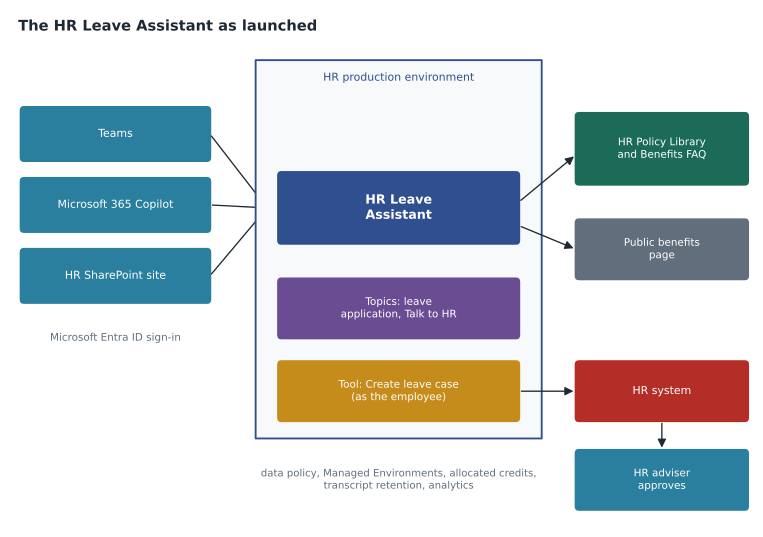
The agent was built in a solution with the publisher prefix "qib" in a development environment, tested in a test environment restricted to the project team and HR testers, and deployed to a production environment through a pipeline. Managed Environments was on in all three. The production data policy allowed SharePoint, Dataverse, Office 365 Users and the HR system's connector as business connectors and blocked consumer services. An environment variable held the HR system's address, and a connection reference pointed the Create leave case tool at the right connection in each environment. Yusra was the agent owner with a trained backup maker; Thomasina Gauthier-Nkemelu, the HR policy lead, was business owner.
3. Instructions and orchestration
The agent used generative orchestration in the classic experience. The instructions stated its role, told it to answer only from the HR Policy Library with citations, to say so when policy was silent and offer HR, to start a leave case only after confirmation, to discuss only the signed-in employee's own leave, never to give medical advice, and to respond with care to distress. General knowledge and web search were off; content moderation was high. Every tool, topic and knowledge source had a description saying what it does, when to use it and when not to.
4. Knowledge
Knowledge came from the HR Policy Library and Benefits FAQ in SharePoint, searched as the signed-in employee, after HR archived superseded versions and added "at a glance" summaries. One public government page covered public benefits, with a description limiting it to those questions. A knowledge maintenance plan gave each source an owner and a review date, and every policy change triggered a rerun of the relevant test questions. Before launch, the 36-question set scored 33 correct, with the remaining three being genuine gaps that became new FAQ entries.
5. Topics, entities and variables
Two custom topics handled what must not vary. Start leave application checked eligibility (at least 90 days of service, calculated with Power Fx from the service start date returned by the HR system), collected leave type, start date, return date and the top-up choice with entities and proactive slot filling, validated the dates, showed a confirmation card and called the tool. Talk to HR gave contacts and hours and could open a question case carrying the employee's last message. System topics were edited: the greeting disclosed that the agent is automated, Escalate redirected to Talk to HR, and On Error offered to email HR the details if the HR system failed. A closed list entity for leave types used synonyms collected from the HR mailbox.
6. Channels and authentication
The agent was published to Microsoft Teams, Microsoft 365 Copilot and the HR SharePoint site, approved in the Microsoft 365 admin center for all employees. User authentication was Authenticate with Microsoft, with sign-in at the start of the conversation. The Create leave case tool used each employee's own credentials, so the HR system enforced "own cases only". Conditional Access for HR applications required multifactor sign-in, and disabled accounts lost access automatically. A separate, public candidate benefits agent was planned for recruiting, with public content only and no tools.
7. Licensing and cost
Hamish's estimate was about 2,760 billable Copilot Credits a month, with conversations by the roughly 200 Microsoft 365 Copilot licensed employees largely included. Capacity came from a capacity pack shared across Quillfield's agents, with an allocation to the HR production environment, an alert at 80 percent and a monthly review. The development environment used pay-as-you-go with a small limit. In the first full month the agent used 2,410 billable credits, close to the estimate.
| Measure | Target in the brief | First month after launch |
|---|---|---|
| Resolution without HR follow-up | 70 percent | 74 percent |
| Satisfaction | 4 out of 5 or better | 4.3 |
| Privacy incidents | None | None |
| Billable credits | About 2,760 | 2,410 |
| Adviser time on leave questions | About 7 hours saved | About 8 hours saved |
8. Responsible AI
Wendell's harms list had nine entries. The design responses included grounding with citations and stated conditions for entitlement answers; user identity and own-records-only tools for privacy; reviewed wording for bereavement, illness and urgent-help paths; disclosure in the greeting, the catalogue and an "about this assistant" page; minimal data collection, including removal of a free-text reason field; and human approval of every leave case. The pre-launch review found two gaps, poor French results for one policy and an untested mobile escalation path, both fixed before launch. Transcripts were visible only to the agent and business owners, with retention aligned to Quillfield's HR records schedule.
9. Conversation design and operations
After the pilot, Yusra shortened replies, removed cheerful openers from sensitive paths, rewrote refusals as next steps, made confirmations state what happens next, and rewrote escalation to say who replies, how and when, with a case reference. Each month she reviews the ten lowest-rated conversations, abandoned conversations and "I don't know" answers, sorts causes into content, design or tool problems, and fixes the most common; Thomasina owns the content fixes. Changes go through development and test before a pipeline deployment, and the responsible AI review is repeated for any new tool or audience.
HR Leave Assistant - launch checklist (all items: owner, done Y/N)
[Y] Agent brief signed by HR, IT and compliance
[Y] Solution with publisher prefix; dev, test, prod environments
[Y] Data policy and Managed Environments on in all three
[Y] Instructions reviewed; general knowledge and web search off
[Y] Knowledge cleaned, owners and review dates recorded
[Y] Topics tested with scripts; system topics edited
[Y] Authentication: Microsoft sign-in; tool acts as user
[Y] Credits allocated to prod; alert at 80 percent
[Y] Harms list mitigated; responsible AI review passed
[Y] Tested in Teams, Copilot, SharePoint, mobile, French
[Y] Escalation path tested end to end
[Y] Monitoring and monthly review scheduled
Your turn: a benefits enrolment agent
Quillfield's benefits administrator wants a second agent for the annual benefits enrolment period. Employees would ask about plan options, costs and deadlines, and the agent would let them record their choices, which today they submit on a paper form. The benefits guide is a 40-page document in SharePoint; plan costs are in a Dataverse table updated each year; choices must be recorded in the benefits system, which has an API. The enrolment window is three weeks long, and usage will be heavy during it and near zero otherwise. About half of employees have Microsoft 365 Copilot licences. Use the steps below to plan it before reading the model plan.
Worked problem
Planning the benefits enrolment agent
Produce a short plan covering the decision to build, environments, knowledge, topics and entities, channels and identity, licensing, and responsible AI for the benefits enrolment agent.
Show solution
- Decision: a conversation is needed because choices depend on each employee's family and plan; recording choices requires an action; build in Copilot Studio as a question-and-answer plus task agent.
- Environments: reuse the HR development, test and production environments and the same solution pattern, with a separate agent and its own allocation so enrolment demand cannot affect the leave agent.
- Knowledge: the benefits guide in SharePoint (split into sections with "at a glance" summaries) and the plan costs table in Dataverse with clear column descriptions; general knowledge off.
- Topics and entities: a Record my choices topic with a closed list entity for plans, Boolean entities for dependants' coverage, validation against the enrolment deadline, a confirmation card and a tool call to the benefits system; Talk to benefits for escalation.
- Channels and identity: Teams, Microsoft 365 Copilot and the HR SharePoint site; Authenticate with Microsoft; the tool records choices as the signed-in employee only.
- Licensing: estimate credits for the three-week peak; use the shared pack with a temporary pay-as-you-go overflow and a monthly limit so enrolment is never blocked.
- Responsible AI: cost answers cite the table and state the conditions; the agent never recommends a plan for a person's health situation; choices are confirmed and a benefits administrator reviews unusual changes; disclose automation and deadlines clearly.
Answer: A Copilot Studio agent in the existing HR environments, grounded in the benefits guide and plan costs table, with one designed topic to record choices through a user-identity tool, published to internal channels with Microsoft sign-in, funded by the shared pack plus capped pay-as-you-go overflow for the peak, and reviewed for fairness, privacy and over-reliance before the enrolment window opens.
Reflection questions
Before moving on, consider how the plan would change in three variations. If the agent served retired former employees who have no Microsoft 365 accounts, which channel and authentication would you choose, and what would happen to SharePoint knowledge? If the benefits system had no API, could a computer-using agent fill in its forms, and how would that affect licensing and risk? And if enrolment questions arrived in five languages, what would you need to test? Each answer touches several lessons at once, which is the point: planning an agent is a set of connected decisions, and the brief is where you make them together.
What the pilot changed
The four-week pilot produced more change than any planning session. Pilot users asked about leave combinations the policies handled poorly, such as parental leave followed directly by vacation, which led HR to add an FAQ entry. They used the agent mostly on phones in the morning, which shortened replies and simplified cards. They trusted escalation only after it carried a case reference. And they asked questions the agent was never meant to answer, such as payroll deductions, which led to a clearer greeting and a redirect to the payroll team. Two of the pilot's HR advisers became the agent's most useful testers, because they knew which questions employees really asked and which answers would cause trouble later.
The pilot also tested the operating model. When HR changed the bereavement policy during the pilot, the update path was exercised for real: Thomasina updated the document, Yusra reran the bereavement questions, found one stale FAQ entry, and the fix went through development, test and a pipeline deployment in two days. Bram counted that as the pilot's most important result, because it proved the agent could be kept right after launch, not only made right before it.
Worked problem
Checking the case study arithmetic
The brief targeted 70 percent resolution of 40 monthly questions at 15 minutes each. In the first month the agent resolved 74 percent of 42 leave questions. How many adviser hours did that save?
Show solution
- Resolved by the agent: 74 percent of 42 = 31.08, about 31 questions.
- Time saved: 31 x 15 minutes = 465 minutes.
- Convert: 465 / 60 = 7.75 hours, about 8 hours.
Answer: About 8 adviser hours, matching the results table. Small differences from the brief came from slightly more questions and a slightly higher resolution rate.
Reusing the template
The planning template from this case is the agent brief from lesson 1 grown into a full plan: one section per decision area, each with an owner and a status. Quillfield now asks every agent proposal to fill it in before any build starts, and the steering group reviews the completed plan in a thirty-minute meeting. The template does not slow good ideas down; it speeds them up, because the questions that used to surface in the third week of a build, such as who owns the knowledge, how users sign in and what happens at peak load, are answered on the first day. It also gives compliance and IT a predictable place to look for the information they need, which made Wendell and the Microsoft 365 administrator far quicker to approve the second and third agents than the first.
Common mistakes
MistakePlanning each area separately.
InsteadAudience, identity, knowledge, channels and cost depend on each other; decide them together in the brief.
MistakeTreating launch as the end.
InsteadPlan monitoring, monthly reviews and owners before launch.
MistakeReusing an agent for a peak workload without a capacity plan.
InsteadEstimate the peak and add overflow so the agent is not blocked when it matters most.
MistakeCopying the first agent's design without asking what differs.
InsteadReuse the template, but answer every question again for the new audience and data.
Summary and key terms
- A complete agent plan covers opportunity, environments, instructions, knowledge, topics, channels, identity, cost, responsible AI and operations.
- The HR Leave Assistant met its targets by grounding answers in cleaned policy, designing the fixed process as a topic and acting as the user.
- Results were measured against the brief: resolution, satisfaction, incidents, credits and time saved.
- The same template applies to new agents, but every decision must be revisited for the new audience, data and workload.
- Launch checklists and monthly reviews keep an agent trustworthy after go-live.
- Launch checklist
- A list of items, each with an owner and status, that must be complete before an agent goes live.
- Pilot
- A limited release to a small group to find problems before full launch.
- Steering group
- The sponsors and owners who approve an agent's plan, launch and changes.
- Overflow capacity
- Pay-as-you-go billing used when demand exceeds prepaid credits.
Practice problems
Work each problem on paper first, then reveal the answer to check.
Why did the HR agent use a topic for leave applications but knowledge for policy questions?
Show answer
The application must follow fixed steps, rules and a confirmation every time; policy answers vary with the policy and come from knowledge.
How did the design make "never disclose another employee's leave" a technical control?
Show answer
The tool runs as the signed-in employee, so the HR system only allows access to their own cases.
What capacity approach suits a three-week enrolment peak?
Show answer
A shared prepaid pack for base demand plus capped pay-as-you-go overflow so the agent is not blocked.
Lesson quiz · 5 questions
Score 60% or more to complete this lesson.
Create a free account to save your progress, take quizzes and earn a certificate.