
MSBA-240 · Lesson 4 of 12 · 22 min
Knowledge sources
▶ Video coming soon A video version of this lesson is on the way.
The HR Policy Library at Quillfield was a SharePoint site with forty-two documents: leave policies, the benefits guide, the employee handbook, forms, and, as Yusra discovered, three versions of the bereavement policy, one of them from 2019. "The agent will read all of these," she told the HR policy lead, Thomasina Gauthier-Nkemelu. "If an old version is in the library, the agent can quote it." Thomasina spent a morning archiving superseded documents to a separate site the agent could not see. It was, Bram said later, the most valuable morning of the whole project.
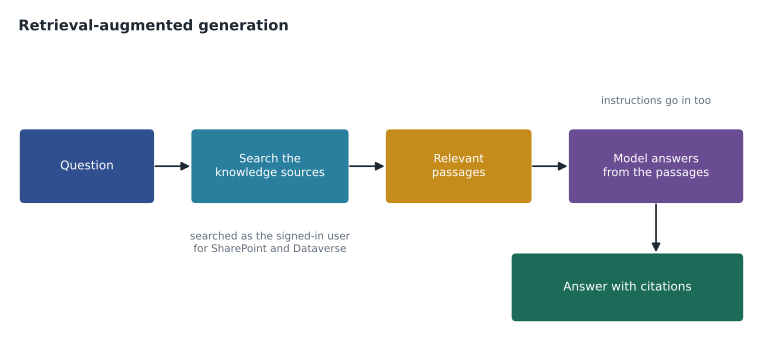
Knowledge is what lets an agent answer with your organization's facts instead of the model's general impressions. When an agent uses knowledge, it searches the configured sources for passages relevant to the question, passes those passages to the model together with the question and instructions, and asks the model to answer from them, usually with citations. This pattern is called retrieval-augmented generation, or RAG, and choosing, preparing and securing the sources is a core planning skill.
Kinds of knowledge source
Copilot Studio agents can draw on several kinds of source, and one agent can combine many. Public websites can be added by address; the agent searches them through Bing, so they suit public information that the organization does not own. SharePoint sites, libraries and folders are the most common internal source; searches respect the signed-in user's permissions, so each person sees answers only from content they are allowed to open. Uploaded files are stored with the agent, which is simple but means someone must re-upload them when the original changes. Dataverse tables let an agent answer from structured business data. Copilot connectors (previously called Microsoft Graph connectors) bring content from other systems, such as ServiceNow knowledge articles or file shares, into the Microsoft 365 index. Enterprise data services such as Azure AI Search indexes, and in 2026 the Microsoft IQ family (Work IQ, Foundry IQ and Fabric IQ), give access to larger or specialist bodies of data.
| Source | Good for | Watch out for |
|---|---|---|
| Public website | Public facts the organization points to | Content you do not control; search results may change |
| SharePoint | Internal policies and documents | Old versions, oversharing, permission gaps |
| Uploaded files | Small, stable reference material | Copies go stale when the original changes |
| Dataverse | Structured business records | Table permissions and column-level security |
| Copilot connectors | Content from other systems in the Microsoft 365 index | Connector setup and permission mapping |
| Enterprise search and IQ services | Large or specialist data collections | Cost, design and ownership by data teams |
Authentication and permission-trimmed answers
Whether an internal source can be used depends on how users sign in. SharePoint, Dataverse and Copilot connector knowledge is searched as the signed-in user, so the agent needs user authentication with Microsoft Entra ID (lesson 8). An agent with no authentication can use public websites and uploaded files, but cannot search SharePoint on a user's behalf. Permission trimming is a strength and a risk at the same time. It is a strength because the agent never reveals a document the person could not open anyway. It is a risk because any oversharing in SharePoint, such as a salary spreadsheet shared with "Everyone except external users", becomes something the agent can find and summarize in seconds. Before connecting SharePoint, check the permissions on every site the agent will search; tools such as SharePoint Advanced Management help find overshared content.
Worked problem
A permission surprise in testing
While testing, Hamish asks the HR agent "What is the pay range for brokers?" and gets an answer quoting an internal compensation document. Hamish is not in HR. What happened and what should be done?
Show solution
- The agent searched SharePoint as Hamish and found the document, so Hamish already had permission to open it.
- The agent did not break security; it exposed an existing oversharing problem.
- Fix the permissions on the document and site, then review the rest of the HR site for similar sharing before launch.
Answer: The compensation document was shared too widely. HR restricted it to the compensation team, and Yusra added "pay ranges" to the test set so the gap would be caught if it reopened.
Preparing content for an agent
Agents answer best from content that is current, single-version, well structured and written in plain language. Good preparation includes removing or archiving superseded versions, giving documents clear titles and headings (the search uses them), splitting very long documents into sections with descriptive headings, putting key facts in text rather than in images or scanned pages, and recording an owner and review date for each source. Tables are useful but should have header rows. FAQ-style documents work especially well, because each question and answer forms a natural passage. Thomasina added a short "at a glance" section to the top of each leave policy, listing the entitlement, eligibility and how to apply, and the quality of the agent's answers improved noticeably.
| Content habit | Effect on answers |
|---|---|
| One current version per policy | No conflicting citations |
| Descriptive headings | Search finds the right section |
| Facts in text, not images | Passages can be found and quoted |
| "At a glance" summaries | Short, accurate answers to common questions |
| Named owner and review date | Someone keeps the source current |
Describing and scoping knowledge
Each knowledge source has a name and a description, and under generative orchestration the planner uses them to decide which sources to search for a question. A description such as "Quillfield HR policies: leave, benefits, conduct and the employee handbook. Use for questions about employment policies." helps the planner choose correctly when an agent has several sources. You can also scope a source tightly, for example to one SharePoint library rather than the whole site, so that unrelated content is never searched. For agents with many sources, Bram recommended grouping them by purpose and making the descriptions mutually exclusive, so the planner rarely has to guess between two sources that both claim to cover the same thing.
Citations and "I don't know"
Generated answers from knowledge include citations that link to the source passages, which serve two purposes. Users can check an answer and read more, and makers can see during testing exactly which passage produced an answer. Instructions should require citations for policy answers. Just as important is telling the agent what to do when knowledge does not answer the question. Without guidance, a model may fill the gap with something plausible. With an instruction such as "If the policies do not answer the question, say so and offer to connect the employee with HR", the agent admits the gap, and the gap becomes a signal that content is missing. Yusra reviewed the unanswered questions every week in the analytics and sent Thomasina a list; three new FAQ entries came out of the first month.
Public information and official sources
Some leave questions depend on public rules rather than Quillfield policy. For example, federal Employment Insurance maternity and parental benefits are set by the Government of Canada, and job-protected leave depends on provincial employment standards such as Saskatchewan's. Yusra added the official Government of Canada benefits page as a public website source with a description saying to use it only for government benefit questions, and an instruction to say that government rules can change and to link to the official page. Quillfield's own top-up policy stayed in SharePoint.
Public website sources are useful for official pages like these, but they should be few and specific. Pointing an agent at a whole government site or a busy news site invites answers from pages nobody reviewed. Where the public information is critical, some teams prefer to summarize it in an internal document they own and review, and link to the official page from that document.
Keeping knowledge current
Knowledge is not a one-time setting. SharePoint sources reflect changes as the content is re-indexed, so a corrected policy flows through without touching the agent; uploaded files do not, and must be replaced. A knowledge maintenance plan names the owner of each source, the review cycle, and what happens when a policy changes, for instance: the policy lead updates the document, notifies the agent owner, and the agent owner runs the relevant test questions again. When HR changed the bereavement policy during the pilot in September, Thomasina updated the document and the agent quoted the new rule within a day; the test set caught one answer that still mentioned the old three-day limit, because a forgotten FAQ entry repeated it.
Worked problem
Choosing sources for an underwriting agent
Underwriting wants an agent for its 600-page guidelines (a PDF in SharePoint updated quarterly), a list of approved insurers (a Dataverse table) and the insurance regulator's public bulletins. How should Yusra set up knowledge?
Show solution
- Split the guidelines into chapters with headings in a SharePoint library owned by the underwriting lead; keep them in SharePoint rather than uploading, so quarterly updates flow through.
- Add the approved insurers table from Dataverse, with a description saying it lists insurers currently approved for placement.
- Add only the regulator's bulletin page as a public website source, described for regulatory notices.
- Require authentication so SharePoint and Dataverse are searched with each underwriter's permissions.
Answer: Three sources with clear, non-overlapping descriptions, kept current by their owners, searched with each user's permissions.
Structured data as knowledge
Not every question is answered by a document. "Which insurers are approved for marine cargo?" is a question about rows in a table, not a paragraph in a policy. When a Dataverse table is added as knowledge, the agent can find and summarize records from it, using the table and column names and descriptions to understand what the data means. This works best when tables have clear display names, columns have descriptions written in business language (not "cr4f2_flg"), and the table holds data people are allowed to see. Dataverse security roles and, where set, column-level security still apply, so the agent cannot reveal fields a user cannot read. For questions that need calculation or exact filtering across many records, a tool that runs a defined query is usually more reliable than knowledge search, because it returns exactly the records that match.
Judging knowledge quality before launch
The quickest way to judge whether knowledge is ready is a short question set: thirty or forty real questions gathered from the people who answer them today, each with the expected answer and the source it should come from. Thomasina collected the HR team's most common leave questions from the shared mailbox, removed personal details, and wrote the expected answer beside each. Yusra ran them against the agent and marked each result as correct, partly correct, wrong or "said it did not know." The first run scored 24 correct out of 36. Most failures traced back to content, not configuration: two policies said different things about part-time employees, and one form had its instructions only in a scanned image. After Thomasina fixed the content, the same question set scored 33 out of 36, and the remaining three were questions the policies genuinely did not answer, which became new FAQ entries.
Worked problem
Reading a question-set result
A question set of 40 leave questions produces 28 correct answers, 4 partly correct, 3 wrong and 5 "I don't know" answers. What share is fully correct, and what should the team look at first?
Show solution
- Fully correct: 28 of 40 = 70 percent.
- Look first at the 3 wrong answers, because a confident wrong answer does more harm than an honest "I don't know."
- Then check whether the 5 unanswered questions are genuine content gaps, and add content for the common ones.
Answer: 70 percent fully correct. Investigate the three wrong answers first (usually conflicting or outdated content), then fill the content gaps behind the unanswered ones.
Common mistakes
MistakeConnecting a SharePoint site full of old versions.
InsteadArchive superseded content where the agent cannot see it before connecting.
MistakeAssuming permission trimming makes oversharing harmless.
InsteadThe agent finds whatever the user can open; fix oversharing first.
MistakeUploading files that change often.
InsteadUse SharePoint or another live source so updates flow through.
MistakeLetting the agent guess when knowledge is silent.
InsteadInstruct it to say so and offer a human; treat gaps as content to add.
Summary and key terms
- Knowledge grounds answers in your content through retrieval-augmented generation, with citations.
- Sources include public websites, SharePoint, uploaded files, Dataverse, Copilot connectors and enterprise search and IQ services.
- Internal sources are searched as the signed-in user, so answers are permission-trimmed and oversharing becomes visible.
- Prepare content: one current version, clear headings, facts in text, summaries and a named owner.
- Describe each source clearly, require citations, handle "I don't know" and keep a maintenance plan.
- Knowledge source
- Content an agent can search to ground its answers.
- Retrieval-augmented generation (RAG)
- Searching for relevant passages first and asking the model to answer from them.
- Permission trimming
- Showing a user only results from content they are allowed to open.
- Copilot connector
- A connector that brings content from another system into the Microsoft 365 index; formerly a Graph connector.
- Citation
- A link in an answer to the passage it came from.
- Knowledge maintenance plan
- The owners, review cycle and update steps that keep an agent's sources current.
Practice problems
Work each problem on paper first, then reveal the answer to check.
Why can't an agent without user authentication search SharePoint for a user?
Show answer
SharePoint knowledge is searched as the signed-in user, so the agent needs that identity to apply permissions.
What is the risk of uploading a policy file instead of linking SharePoint?
Show answer
The uploaded copy does not update when the policy changes, so the agent can quote an outdated version.
What should an agent do when its knowledge does not answer a question?
Show answer
Say it does not know and offer a person or next step, rather than guessing.
Lesson quiz · 5 questions
Score 60% or more to complete this lesson.
Create a free account to save your progress, take quizzes and earn a certificate.