
MSBA-240 · Lesson 2 of 12 · 21 min
Copilot Studio and its environments
▶ Video coming soon A video version of this lesson is on the way.
Yusra's first agent, a test bot she had made months earlier to answer questions about the office parking rules, lived in the Power Platform default environment, next to dozens of personal apps and flows that colleagues had built over the years. When Bram asked where the HR Leave Assistant would be built, she said "the same place, I suppose." Bram had a saying for that answer, picked up in his years as a consultant: the default environment is where good ideas go to become unsupported production systems. They spent the next session designing environments before they built anything.
Copilot Studio is part of Microsoft Power Platform. Every agent belongs to an environment, and the environment decides where the agent's data is stored, which connectors and data policies apply, who can build and who can use, how capacity is allocated, and how the agent moves from development to production. Understanding environments is therefore not an administrator's side topic; it is part of planning an agent solution, and the AB-620 exam treats it that way.
Where you meet Copilot Studio
Makers open Copilot Studio in a browser. They can also reach a lighter Copilot Studio experience inside Microsoft Teams, and Microsoft 365 Copilot users can create simpler agents in Agent Builder, which shares some of the same underlying platform. When you open the full web experience you choose an environment at the top of the page; everything you then create (agents, topics, tools, knowledge settings) is stored in that environment's Microsoft Dataverse database as solution components. That is why an agent can be exported, imported, versioned in a solution and deployed through pipelines like any other Power Platform component.
Quillfield's tenant was created in Canada, so its Power Platform environments are created in the Canada region by default, keeping agent definitions and conversation transcripts stored in Canadian datacentres. Some generative features process data in other regions unless an administrator restricts data movement across geographies; Bram recorded that setting in the plan for Wendell.
Types of environment
Power Platform offers several environment types, and each suits a different stage of an agent's life. The default environment is created automatically for every tenant and every licensed user can build in it. It is useful for personal productivity and learning, but it is a poor home for business-critical agents because everyone has access, it cannot be deleted, and it tends to fill with abandoned experiments. A developer environment is a personal environment for one maker to build and test freely. A sandbox environment is a non-production environment for a team, used for development and testing, and it can be reset or copied. A production environment is meant for solutions people rely on; it has stronger protections against accidental deletion and should be changed only through a deployment process. Trial environments expire and suit short evaluations.
| Environment type | Typical use for agents | Notes |
|---|---|---|
| Default | Personal experiments and learning | Everyone in the tenant can build; avoid for business agents |
| Developer | One maker's private build space | Free for makers; good for prototypes |
| Sandbox | Team development and testing | Can be reset or copied; not for live users |
| Production | Agents people rely on | Change through pipelines, not by hand |
| Trial | Short evaluations | Expires unless converted |
Designing an environment strategy
Bram proposed the pattern that most organizations adopt for agents: development, test and production, with one environment for each, all with Dataverse. Yusra builds in development. When a version is ready, it is moved through a solution to test, where HR advisers try it with a fixed set of test questions. When test passes, the same solution is deployed to production, where employees use it. Nobody edits the production agent directly. The benefit is that what employees use is always a version someone tested, and a bad change can be rolled back by redeploying the previous solution version.
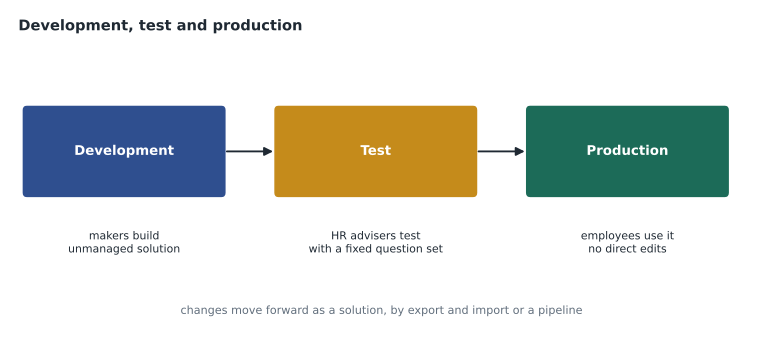
The strategy also decides who can do what in each environment. In development, Yusra and one other maker hold the Environment Maker role, which lets them create agents and other resources. In test and production, makers do not hold build rights at all; a deployment service account or a pipeline moves the solution. Administrators hold the System Administrator role in each environment. Security groups can restrict an environment to named people, so the test environment is visible only to the project team and the HR testers. These are ordinary Power Platform settings, but they are the difference between an agent anyone can quietly change and one that changes only on purpose.
Worked problem
Choosing environments for two agents
Quillfield plans two agents: the HR Leave Assistant for all 380 employees, and a quick prototype Hamish wants to try for summarizing weekly operations reports for himself. Where should each live?
Show solution
- The HR Leave Assistant is a business agent used by everyone, handling personal information. It needs development, test and production environments with controlled access and solution-based deployment.
- Hamish's prototype serves one person and is exploratory. A developer environment, or Agent Builder in Microsoft 365 Copilot, is enough.
- If the prototype becomes useful to the whole operations team, it is rebuilt or moved into a solution and taken through the same path.
Answer: Development, test and production environments for the HR agent; a developer environment (or Agent Builder) for Hamish's prototype, promoted only if it earns a wider audience.
Managed Environments and governance
Managed Environments is a set of governance features that administrators turn on per environment in the Power Platform admin center. It adds controls that matter for agents: limits on how widely makers can share an agent, data policies enforced with more detail, weekly usage insights sent to administrators, a solution checker that can block poor-quality solutions from being imported, IP firewall and other security settings, and the ability to require that production changes come through pipelines. Microsoft also uses Managed Environments as the place for several Copilot Studio governance settings. Bram recommended turning it on for test and production and for development as well, so that sharing limits applied from the start.
Data policies (long called data loss prevention, or DLP, policies in Power Platform) group connectors into business, non-business and blocked categories. A data policy decides which connectors an agent may use as tools, whether an agent may use public website knowledge, whether makers may publish to certain channels, and whether agents may use features such as web search. Bram's rule of thumb applies here: a data policy is the cheapest control you will ever implement, because it stops a whole class of mistakes before anyone makes them. At Quillfield, the production data policy places SharePoint, Dataverse and the HR system's connector in the business group and blocks consumer social media connectors outright.
| Control | Set in | What it protects against |
|---|---|---|
| Environment security group | Power Platform admin center | Unknown people building or using agents in an environment |
| Security roles (Environment Maker, System Administrator) | Environment settings | Makers changing test or production directly |
| Data policies | Power Platform admin center | Agents connecting to unapproved services or channels |
| Managed Environments sharing limits | Power Platform admin center | An agent being shared with the whole company by accident |
| Pipelines | Pipelines host environment | Untested changes reaching production |
Capacity and billing per environment
Copilot Studio usage is measured in Copilot Credits, which lesson 9 covers in detail. Credits from prepaid capacity packs are bought for the tenant and then allocated to environments by an administrator in the Power Platform admin center, or an environment is linked to an Azure subscription through a billing policy so that it is billed pay-as-you-go. This means the environment design is also a cost design. If the HR agent and a marketing agent share an environment, a busy marketing campaign could exhaust credits the HR agent depends on. Separate production environments, each with its own allocation or billing policy, keep one agent's demand from starving another.
Two authoring experiences
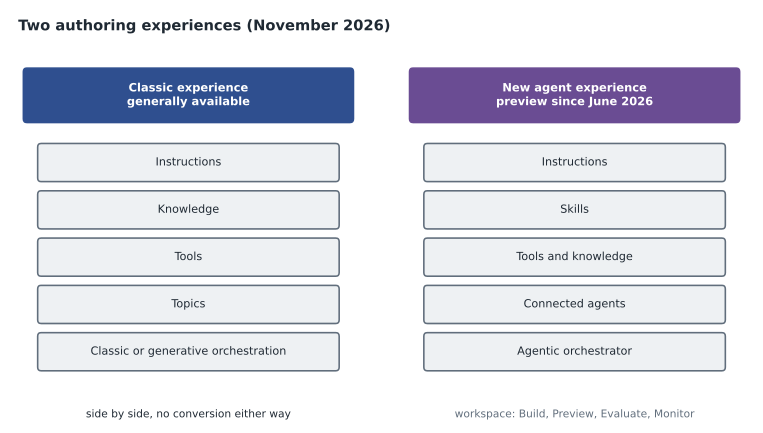
As of November 2026, Copilot Studio offers two ways to author agents, and you need to recognize both. The classic experience, generally available for several years, builds agents from instructions, knowledge, tools and topics (designed conversation paths), with a choice between classic orchestration and generative orchestration. At its Build conference in June 2026, Microsoft introduced a new agent experience, in preview, in which makers describe an agent's capabilities and the platform's orchestrator decides at run time how to combine skills (reusable instruction modules), tools, knowledge and connected agents. The new experience reorganizes the workspace into Build, Preview, Evaluate and Monitor areas. The two experiences run side by side, and an agent built in one cannot be converted to the other.
For planning purposes, the choice is practical. Production agents that need tightly designed conversation paths, such as collecting specific information in a set order, still suit the classic experience and its topics, which lessons 5 and 6 cover. Agents that mostly reason over knowledge and tools can be prototyped in the new experience while it is in preview, with the usual caution about preview features in production. The AB-620 exam's skills outline updated for December 18, 2026 reflects the new direction: it removes "configure topics" as an exam objective and adds skills, workflows, memory and model selection. Yusra chose the classic experience for the HR Leave Assistant because HR needed a fixed, auditable path for starting a leave case, and planned to revisit the new experience when it became generally available.
Solutions from the first day
One habit saves more trouble than any other: create a solution in the development environment before you create the agent, and set it as the preferred solution so that everything you build lands inside it. A solution has a publisher with a prefix (Quillfield used "qib") that is added to the names of components, which makes it obvious later which tables, variables and flows belong to Quillfield's agents. Agents built outside a solution end up in the environment's default solution and have to be gathered up later, often missing a flow or an environment variable on the way. The full application lifecycle, including environment variables and pipelines, is a topic of its own in the next course; for now the rule is simply: solution first, agent second.
Ownership, sharing and connections
An agent in Copilot Studio has an owner, the maker who created it, and can be shared with co-authors who may edit it and with users who may only chat with it. These are different permissions and should be treated differently. In development, Yusra shared the HR agent for editing with one backup maker, so the project never depended on a single person being available. She did not share it for use with the whole company there; employees met the agent only in production, through the channels HR approved. Bram added the owner and backup maker to the agent brief, along with the HR policy lead as business owner, because an agent with no named owner becomes nobody's problem the first time it gives a wrong answer.
Agents that use tools also depend on connections: the stored sign-in that a connector uses to reach a service such as the HR system or SharePoint. Inside a solution, connections are represented by connection references, which point to a real connection in each environment. That indirection is what lets the same solution use a development HR system in development and the live HR system in production without anyone editing the agent. When the solution is imported into a new environment, an administrator maps each connection reference to a connection there. A common failure in a first deployment is a connection reference left unmapped, so the agent imports successfully but its tool fails the first time an employee tries to start a leave case.
Worked problem
Planning ownership for the HR agent
Yusra is the only person who has edited the HR agent. She is going on three weeks of holiday the week after launch. What should be in place before she leaves?
Show solution
- Share the development agent for editing with a trained backup maker.
- Record the business owner (the HR policy lead) who decides what the agent should say.
- Make sure deployment to production runs through the pipeline, so the backup maker can ship a fix without production rights.
- Write down where the connection references point in each environment.
Answer: A backup maker with edit rights in development, a named business owner, a pipeline the backup can run, and documented connections. With those in place, a policy change during the holiday can be handled without anyone touching production by hand.
Common mistakes
MistakeBuilding a company-wide agent in the default environment.
InsteadUse dedicated development, test and production environments with controlled access.
MistakeEditing the production agent directly to fix a typo.
InsteadFix it in development and deploy the solution; production changes only through deployment.
MistakeLetting several busy agents share one environment's credits.
InsteadSeparate production environments or allocations so one agent cannot starve another.
MistakeCreating the agent first and the solution later.
InsteadCreate a solution with a publisher prefix first and build inside it.
Summary and key terms
- Every agent belongs to a Power Platform environment, which sets its data location, policies, access, capacity and lifecycle.
- Use development, test and production environments for business agents and keep the default environment for experiments.
- Managed Environments, data policies, security groups and roles control who builds, who uses and what agents may connect to.
- Credits are allocated to environments or billed through a billing policy, so environment design is also cost design.
- Copilot Studio has a classic experience with topics and a new agent experience (preview since June 2026) built on skills and an agentic orchestrator.
- Environment
- A Power Platform container for apps, flows, agents and data, with its own security, policies and capacity.
- Dataverse
- The Power Platform database where agent definitions and related data are stored.
- Managed Environments
- A set of premium governance features for Power Platform environments.
- Data policy
- A rule grouping connectors into business, non-business and blocked categories for an environment.
- Solution
- A package of components that moves between environments and carries versions.
- Publisher prefix
- A short code added to the names of components in a solution to show who owns them.
Practice problems
Work each problem on paper first, then reveal the answer to check.
Why is the default environment a poor home for a company-wide agent?
Show answer
Everyone can build there, it cannot be deleted and it fills with unmanaged experiments; there is no controlled path to production.
What does a data policy decide for an agent?
Show answer
Which connectors it may use as tools and which features or channels makers may use, by grouping connectors as business, non-business or blocked.
Name the two Copilot Studio authoring experiences as of November 2026.
Show answer
The classic experience (instructions, knowledge, tools, topics) and the new agent experience in preview (skills and an agentic orchestrator).
Lesson quiz · 5 questions
Score 60% or more to complete this lesson.
Create a free account to save your progress, take quizzes and earn a certificate.