
MSBA-211 · Lesson 7 of 12 · 20 min
Local administrator password solution
▶ Video coming soon A video version of this lesson is on the way.
In the second week of October a branch technician called Ama from the West Branch office. A laptop had lost its connection to Wi-Fi after a driver update, nobody could sign in with a work account because the laptop was offline, and the technician needed local administrator rights to roll the driver back. Years earlier the answer would have been a shared local administrator password, the same on every laptop, written in a notebook at each branch. Corvallin had stopped doing that when it moved to the cloud in 2022, but it had not put anything better in its place. Ama had to walk the technician through a reset over the phone. The next day she started the project this lesson describes.
The problem LAPS solves
Every Windows device has local accounts that exist only on that device. One of them usually has administrator rights. If every device shares the same local administrator password, one stolen password unlocks every device, and an attacker who gets administrator rights on one laptop can move to the others. The Local Administrator Password Solution (LAPS) fixes this by giving each device its own random local administrator password, changing it regularly and storing it securely in the directory, where authorized people can look it up when they need it.
Windows LAPS is built into Windows 11 and supported versions of Windows 10 and Windows Server, so there is nothing to install. It can back up passwords to Microsoft Entra ID or to on-premises Active Directory. Corvallin's devices are Entra joined, so Entra ID is the only option that makes sense. An older, separately installed product called legacy Microsoft LAPS worked only with Active Directory and is no longer the recommended approach.
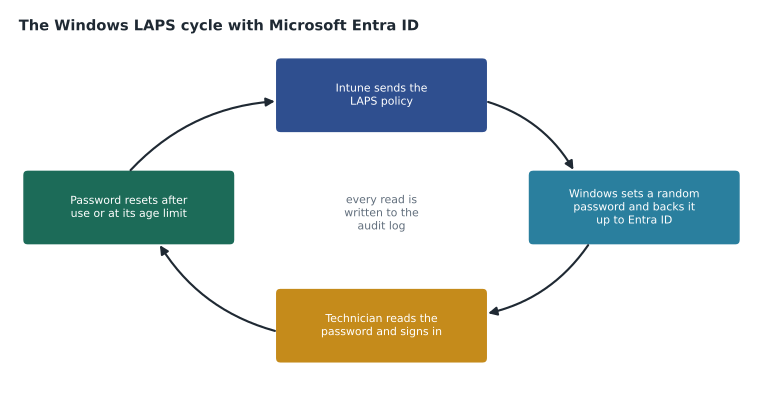
Turning it on
Two switches are needed, and forgetting the first is the most common reason LAPS fails. In the Microsoft Entra admin center, the device settings include Enable Microsoft Entra Local Administrator Password Solution (LAPS). It must be set to Yes, or devices will be refused when they try to back up their passwords. Then, in the Intune admin center, a LAPS policy is created under Endpoint security, in the account protection area, and assigned to devices.
| LAPS policy setting | Corvallin's choice | Notes |
|---|---|---|
| Backup directory | Microsoft Entra ID only | Active Directory is for hybrid or domain-joined devices |
| Password age | 30 days | For Entra ID backup the minimum is 7 days |
| Password complexity | Large and small letters, numbers and special characters | Newer Windows versions also offer passphrases built from words |
| Password length | 20 characters | Long random passwords are read from the portal, not memorized |
| Administrator account | A managed account created by the policy | See automatic account management below |
| Post-authentication actions | Reset the password and sign the account out | Triggered after the account is used |
| Post-authentication reset delay | 8 hours | Gives the technician time to finish the job |
Which account does LAPS manage?
LAPS manages one local account per device. By default it is the built-in Administrator account, identified by its well-known security identifier rather than its name, so renaming the account does not hide it from LAPS. Organizations can name a different local account instead, but then that account has to exist on every device, which used to mean creating it with a script.
Windows 11 version 24H2 added automatic account management: the LAPS policy itself can create the managed account, choose its name, add a random suffix to the name so attackers can't guess it, and keep the account enabled or disabled. Because all of Corvallin's laptops ran 24H2 or later after the deployment project, Ama used it. The policy creates an account with a Corvallin prefix and a random suffix, keeps it enabled and leaves the built-in Administrator account disabled, as Windows does by default.
Ama also checked the other half of the story: who else had administrator rights. The Autopilot profile from the deployment project had made users standard users, so nurses and schedulers could not install software or change system settings. A Local user group membership policy, also in the account protection area of Endpoint security, can add or replace the members of local groups such as Administrators. Ama used it to make sure the Administrators group on every laptop contained only the LAPS-managed account and the Entra roles that Windows adds for device administrators, and nothing left over from earlier troubleshooting.
Worked problem
Checking local administrators before and after
Ama ran a report of local Administrators group members across the 520 laptops before applying the group membership policy. She found 31 laptops with an extra member: 22 had a former technician's account, 6 had the user's own account and 3 had an unknown local account. What should she do before replacing the group membership, and why?
Show solution
- Find out why the 6 users had admin rights; two used an old dictation app that needed elevation.
- Investigate the 3 unknown local accounts as a possible security incident before removing them.
- Plan for the dictation users, for example by updating the app or packaging it so it installs without user elevation.
- Then apply the policy, which removes every unexpected member at once.
Answer: Investigate first, fix the legitimate needs, then apply the policy. The 3 unknown accounts turned out to be left by a reseller's imaging tool years before, but they were treated as suspicious until proven otherwise.
Reading a password
When a technician needs the password, an authorized administrator opens the device in the Intune admin center and chooses Local admin password, or opens the device in the Entra admin center. The page shows the account name, the password and when it will next rotate. Reading a password needs a specific permission, which built-in roles such as Intune Administrator and Cloud Device Administrator hold, and which can be added to custom roles. Every read is written to the Entra ID audit log, with who read which device's password and when.
Ama gave the permission to herself and her two technicians through their PIM-eligible roles, so reading a password required an activation and left a record in two logs. Branch technicians, who did occasional hands-on work, could ask the help desk to read a password to them over the phone. Because the post-authentication action resets the password eight hours after it is used, a password read out for one job stops working the same day.
| Step | Who | Where |
|---|---|---|
| Activate the eligible role | Help desk technician | Privileged Identity Management |
| Read the password | Help desk technician | Intune admin center, device, Local admin password |
| Sign in locally with the managed account | Branch technician | At the laptop |
| Password resets and the account is signed out | Windows | Automatically, 8 hours after first use |
| Review password reads monthly | Ama | Entra ID audit log |
Rotating on demand
Intune also has a Rotate local admin password remote action, which tells the device to create a new password at its next check-in and back it up. It is useful after a password has been shared more widely than intended, for example read out to a vendor, or as part of an incident response. Rotation needs the device to be online, so the old password keeps working until the device checks in.
Worked problem
How long can an old password still work?
A help desk technician reads a laptop's password to a vendor at 10 a.m. on Tuesday, and the vendor signs in at 10:15. The post-authentication action resets the password 8 hours after use. At 11 a.m. Ama decides the vendor should not have had it and starts a rotation, but the laptop is in a bag with no network until 3 p.m. When does the vendor's password stop working at the latest?
Show solution
- The post-authentication reset would happen 8 hours after 10:15, at 6:15 p.m.
- The rotation reaches the laptop when it next checks in, at about 3 p.m.
- The earlier of the two events changes the password.
Answer: At about 3 p.m., when the laptop comes online and processes the rotation. If it had stayed offline all day, the post-authentication reset would still change the password at 6:15 p.m., but only if the laptop was running then; either change is backed up to Entra ID when the device next connects.
Recovering a device that is offline
LAPS is designed for exactly the West Branch case: a device that can't reach the network and can't accept a cloud sign-in. Because the current password is already in Entra ID, the help desk can read it even while the device is offline. The technician signs in locally, fixes the driver, the laptop reconnects and backs up its next password. If the device has been offline so long that its password was due to rotate, it simply keeps the last password until it can back up a new one, so the password in Entra ID still matches.
Where LAPS fits with other privilege tools
LAPS deals with the device's own administrator account. It doesn't help a user who needs to run one particular installer with elevated rights. For that, Intune offers Endpoint Privilege Management, which lets standard users elevate specific approved files, with rules and support approvals, and records every elevation. After Microsoft's July 2026 licensing change, Endpoint Privilege Management is reported as part of Microsoft 365 E5 rather than E3, so Corvallin would need to license it separately. Ama noted it for the dictation-app users and moved on.
The MD-102 exam groups LAPS with Windows Hello for Business and local group membership under identity and compliance, and lists rotating local administrator passwords as a remote action. Expect questions that combine them, such as which two switches are needed for LAPS with Entra ID, where passwords are read, and what happens after the managed account is used.
Rolling LAPS out
Ama rolled LAPS out in the usual rings. The IT ring of six laptops went first, and she checked in the Entra admin center that each device showed a backed-up password and a next rotation date. The pilot of 20 devices followed, then everyone. On each device, the LAPS event log under Applications and Services Logs, Microsoft, Windows, LAPS records each password change and backup, which helped with the two pilot laptops that showed no password: both had been offline since the policy was assigned and backed up their passwords as soon as they reconnected.
She also wrote a short monthly check: export the audit log entries for password reads, compare them with help desk tickets, and investigate any read without a ticket. In the first month there were seven reads and seven tickets. The point of the check was less about catching misuse than about making sure everyone knew reads were watched.
| Check | Where | Frequency |
|---|---|---|
| Every device has a backed-up password | Entra admin center or Intune device page | After rollout, then in the Monday report |
| Password reads match tickets | Entra ID audit log | Monthly |
| Administrators group has no unexpected members | Local user group membership policy status | Monthly |
| LAPS errors on devices | LAPS event log, collected with diagnostics | When a device shows no password |
LAPS and the help desk script
The phone call that started this lesson ended differently a month later. When another branch laptop lost its network in November, the technician called the help desk, the help desk technician activated her role, read the password from the device page and read it out, the branch technician signed in with the managed account and rolled back the driver, and the password reset itself that evening. The call took 11 minutes, and nobody on the team had ever known the password before or knew it afterwards.
Common mistakes
MistakeCreating the Intune LAPS policy without turning on LAPS in Entra ID device settings.
InsteadTurn on Microsoft Entra LAPS first; otherwise devices can't back up their passwords.
MistakeKeeping one shared local administrator password because it is convenient.
InsteadGive each device its own rotating password with Windows LAPS and read it when needed.
MistakeAssuming renaming the built-in Administrator account hides it.
InsteadLAPS and attackers identify the account by its well-known identifier. Use automatic account management for a randomized name.
MistakeExpecting a rotation to take effect on an offline device immediately.
InsteadRotation happens when the device next checks in; the old password works until then.
Summary and key terms
- Windows LAPS gives each device its own random, rotating local administrator password, backed up to Entra ID or Active Directory.
- LAPS with Entra ID needs LAPS turned on in Entra device settings and an Intune LAPS policy under Endpoint security.
- Windows 11 24H2 automatic account management can create, name and randomize the managed account.
- Passwords are read in the Intune or Entra admin center by authorized roles, and each read is audited.
- Post-authentication actions and the Rotate local admin password action limit how long a used password stays valid.
- Windows LAPS
- The built-in Windows feature that manages and backs up a unique local administrator password per device.
- Backup directory
- Where LAPS stores the password: Microsoft Entra ID or Active Directory.
- Post-authentication action
- What LAPS does after the managed account is used, such as resetting the password and signing out.
- Automatic account management
- A Windows 11 24H2 LAPS feature that creates and manages the local account itself.
- Local user group membership policy
- An Intune policy that adds or replaces members of local groups such as Administrators.
- Endpoint Privilege Management
- An Intune capability that lets standard users elevate approved files under rules.
Practice problems
Work each problem on paper first, then reveal the answer to check.
Which two switches are needed for Windows LAPS with Entra ID?
Show answer
Enable Microsoft Entra LAPS in Entra device settings, and assign an Intune LAPS policy.
What is the minimum password age when passwords are backed up to Entra ID?
Show answer
7 days.
Where is a password read recorded?
Show answer
In the Microsoft Entra ID audit log.
Lesson quiz · 5 questions
Score 60% or more to complete this lesson.
Create a free account to save your progress, take quizzes and earn a certificate.