
MSBA-211 · Lesson 1 of 12 · 19 min
Intune architecture and the admin center
▶ Video coming soon A video version of this lesson is on the way.
By the autumn of 2026 every Windows laptop at Corvallin Home Care was Microsoft Entra joined and enrolled in Microsoft Intune. Ama Owusu-Pratt, who leads the help desk and owns the agency's endpoints, had spent the spring moving the last Windows 10 machines to Windows 11 with Windows Autopilot. Enrollment, though, was only the start. The board had made device management the second phase of Corvallin's Zero Trust roadmap, and it had attached a condition to the Microsoft 365 Copilot pilot planned for spring 2027: before anyone got Copilot, every device that could open client records had to be managed, compliant and checked by Conditional Access.
Ines Duvernay-Sato, the IT manager, gave Ama the job of turning Intune from a place where devices were listed into a system that actually governed them. Teodor Klimaszewski, the Microsoft 365 administrator, would handle the identity side, and Dr. Marguerite Ostrander-Bey, the clinical director, asked to be kept close to anything that touched staff phones. This course follows Ama's project from September to November 2026. It begins where she began: with what Intune is, how it is built and how the admin center is organized.
What Intune is
Microsoft Intune is a cloud service for managing endpoints: laptops, desktops, phones, tablets and some specialty devices. It does two related jobs. Mobile device management (MDM) manages the whole device: Intune can push settings to it, require a PIN, encrypt it, install apps and wipe it. Mobile application management (MAM) manages only the organization's apps and data, on a device that may not be managed at all. MAM is what lets a nurse read work email in Outlook on her own phone while Intune protects the email and leaves her photos and personal apps alone. Lesson 12 returns to that choice in detail.
Intune is part of a larger family of Microsoft products that share data. Microsoft Entra ID holds the identities and devices and runs Conditional Access. Microsoft Defender for Endpoint reports device risk. Microsoft Purview applies data protection. Windows Autopilot, which Corvallin used for deployment, is configured inside Intune. When administrators talk about Microsoft Intune today they usually mean all of this endpoint work, which Microsoft once called Microsoft Endpoint Manager. That umbrella name is retired, and the documentation and the admin center now simply say Intune.
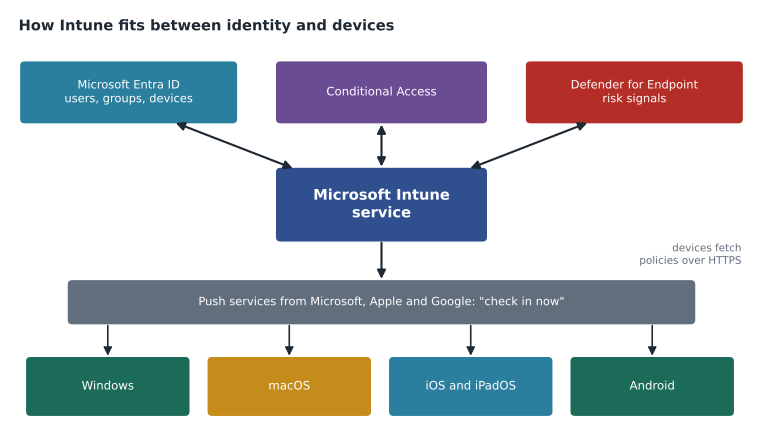
How devices and the service talk
Intune does not hold a permanent connection open to each device. Instead, each managed device checks in with the service on a schedule and asks whether anything has changed. Windows and the mobile platforms check in roughly every eight hours once they are settled. Right after enrollment they check in much more often, so a new device picks up its policies within minutes. When an administrator assigns a new policy or starts a remote action, Intune sends a small notification through the platform's push service, which is the Windows Push Notification Services for Windows, the Apple Push Notification service for Apple devices and Firebase Cloud Messaging for Android. The notification carries no policy; it only tells the device to check in now.
That design explains a lot of help desk calls. A change does not reach a device that is turned off, asleep or offline. A device that cannot reach the push service, for example on a hotel network that blocks it, will still pick up the change at its next scheduled check-in. And a user who wants a change right away can press Sync in the Company Portal app or in Settings, which forces a check-in.
| Component | What it does | Where you meet it |
|---|---|---|
| Windows MDM client | Built into Windows; applies configuration profiles, compliance settings and many simple apps through the MDM channel | Settings, Accounts, Access work or school; the MDM diagnostic report |
| Intune Management Extension | An agent Intune installs on Windows devices for Win32 apps, PowerShell scripts, Remediations and some reporting | A Windows service; its logs are in the IntuneManagementExtension folder under ProgramData |
| Company Portal app | The user-facing app for enrolling personal devices, installing available apps and checking compliance | Microsoft Store, App Store and Google Play |
| Microsoft Authenticator and Company Portal on mobile | Broker apps that handle sign-in and, on Android, device registration for app protection | Phones and tablets |
| Push notification services | Wake devices so they check in early | Run by Microsoft, Apple and Google; need outbound network access |
Licensing
Every user or device that Intune manages needs a licence. Corvallin's are typical. Office staff and managers have Microsoft 365 E3, and home-care staff have Microsoft 365 F3. Both include Microsoft Intune Plan 1, which is the core service: enrollment, configuration, compliance, app management and app protection. A licence assigned to a user covers the devices that person enrolls, up to the device limits covered in lesson 2.
Beyond Plan 1, Microsoft sells advanced capabilities that used to be grouped as the Intune Suite: Remote Help for screen sharing with users, Advanced Analytics with device query and anomaly detection, Endpoint Privilege Management for controlled admin rights, Enterprise App Management for a catalog of prepackaged apps, Microsoft Cloud PKI for certificates, and Microsoft Tunnel for MAM. In December 2025 Microsoft announced that, from July 1, 2026, many of these would be included in Microsoft 365 suites rather than sold only as add-ons. Partner summaries of the change list Intune Plan 2, Remote Help and Advanced Analytics as additions to E3, and the full set, including Endpoint Privilege Management, Enterprise App Management and Cloud PKI, as part of E5. Existing customers were to be notified in the Microsoft 365 admin center and see the features by August 2026.
Ama checked the tenant rather than trusting summaries. Licensing applies per user, so a feature that comes with E3 covers the 120 E3 users but not the 340 F3 users. She wrote that down as a planning rule: anything built on Remote Help or Advanced Analytics would at first apply only to devices used by E3-licensed staff, and anything that needed E5 would need a business case.
Worked problem
Counting licences before a rollout
Corvallin has 120 E3 users and 340 F3 users. Ama wants to pilot device query, part of Advanced Analytics, on the laptops of the 18 schedulers and the 6 IT staff, all of whom have E3. Are any extra licences needed for the pilot, and what would she need before extending it to the home-care laptops?
Show solution
- Check the pilot users: 18 + 6 = 24 people, all with E3.
- From July 2026, Advanced Analytics is reported as included with E3, so the pilot needs no extra licences once the feature appears in the tenant.
- The home-care laptops are used by F3 users, which does not include the feature.
Answer: The pilot needs no new licences, but extending it to home-care laptops would mean buying the capability for F3 users or limiting it to E3 devices. Ama confirmed the feature had appeared under Tenant administration before planning the pilot.
The Intune admin center
Administrators work in the Microsoft Intune admin center, at intune.microsoft.com. Its left-hand menu is worth learning well, because the exam and daily work both assume you can find things quickly.
| Area | What lives there |
|---|---|
| Home and Dashboard | Service health, tenant status and summary tiles for devices, apps and compliance |
| Devices | All devices, enrollment, configuration profiles, compliance policies, scripts and remediations, update policies, device groups and filters, platform-specific settings for Windows, macOS, iOS and Android |
| Apps | App deployment, app protection and app configuration policies, app selective wipe |
| Endpoint security | Antivirus, disk encryption, firewall, account protection, attack surface reduction, endpoint detection and response, and Endpoint Privilege Management |
| Reports | Device compliance, configuration, app and update reports, Endpoint analytics, Intune data warehouse and export |
| Users and Groups | Shortcuts to Entra ID users and groups, so you can check membership without leaving Intune |
| Tenant administration | Roles, scope tags, multi-admin approval, connectors and tokens, audit logs, the Intune add-ons page and tenant status |
| Troubleshooting and support | A per-user view of devices, policies, apps and enrollment failures; support requests |
Two features save time. The Devices blade has an overview for each platform, so Ama can open Windows and see every Windows profile, compliance policy and update policy in one place. And every device record has a single page showing its owner, hardware, compliance state, assigned policies, installed apps and recent remote actions. When a nurse calls the help desk, that device page is usually the first thing Ama opens.
Roles: who can do what
Two separate permission systems apply. In Microsoft Entra ID, the Intune Administrator role gives full control over Intune, and a Global Administrator can do everything as well. Inside Intune, Intune roles grant narrower permissions: Help Desk Operator can run remote actions and view devices, Read Only Operator can view, Policy and Profile Manager can manage configuration and compliance, Application Manager manages apps, and Endpoint Security Manager manages security policies. Custom roles combine individual permissions. Lesson 6 adds scope tags, which limit a role to a subset of devices and policies.
At Corvallin, the identity work in phase 1 had already put administrator roles under Privileged Identity Management. Ama is eligible for the Intune Administrator role for up to eight hours at a time and activates it when she needs to change tenant-wide settings. For everyday help desk work, she and her two technicians hold Intune's Help Desk Operator role permanently, because resetting a passcode or syncing a device should not need an elevation.
The service changes every month
Intune is updated continuously. Microsoft releases a feature update most months, named by year and month, so the November 2026 release is 2611, and publishes smaller weekly changes between them. The What's new in Microsoft Intune page and the In development page on Microsoft Learn list what has shipped and what is coming, and Message center posts in the Microsoft 365 admin center announce changes that need action, such as a retiring enrollment method. Corvallin already had a Monday routine for reviewing Message center posts; Ama added an Intune tag to it so endpoint changes would not be missed.
This pace matters for study as well as for work. The MD-102 exam, now titled Managing and Securing Microsoft 365 Endpoints by using Intune, lists its skills as of October 27, 2026 and groups them into five areas, including a newer one on automation, monitoring and reporting. Expect menus and feature names to have moved by the time you read this, and expect the exam to follow Microsoft Learn rather than any older book.
Ama's starting inventory
Before changing anything, Ama exported the device list from the admin center and sorted it in a spreadsheet. It became the reference for the whole project.
| Device group | Count | Ownership | State in September 2026 |
|---|---|---|---|
| Windows laptops and desktops | About 520 | Corporate | Entra joined and enrolled through Autopilot; few policies beyond the deployment basics |
| Macs | 9 | Corporate | Communications and finance staff; not enrolled |
| iPhones | 74 | Corporate | Managers, schedulers and on-call coordinators; bought from a carrier, not enrolled |
| Android phones | 260 | Corporate | Samsung phones carried by home-care staff for the VisitWise app; a basic setup done by hand at each branch |
| Android tablets | 6 | Corporate | Sign-in tablets at branch reception desks |
| Personal phones | About 150 | Personal | Staff reading Outlook and Teams on their own phones with no protection beyond sign-in |
The Windows fleet was in good shape. Everything else was not. The Macs, iPhones and Android phones were outside management altogether, so Intune knew nothing about them, and the 150 personal phones were reaching client information with only a password and multifactor authentication standing in the way. Ama drew a simple plan on the whiteboard: enroll everything the agency owns, give each platform a baseline configuration, write compliance rules, tie those rules to Conditional Access, and only then decide how to handle personal phones. The rest of this course follows that order.
Common mistakes
MistakeExpecting a new policy to reach every device instantly.
InsteadDevices pick up changes when they check in. A push notification speeds this up, but offline or asleep devices wait for their next check-in.
MistakeAssuming every Intune Suite capability is now included for every user.
InsteadThe July 2026 packaging change added capabilities to particular Microsoft 365 suites. Licensing is per user, so check which plans include which features.
MistakeGiving help desk staff the Intune Administrator role so they can wipe phones.
InsteadUse Intune roles such as Help Desk Operator for everyday tasks and keep the Entra Intune Administrator role for occasional, approved elevation.
MistakeUsing MDM and MAM as two names for the same thing.
InsteadMDM manages the whole device. MAM protects the organization's apps and data and can work on unmanaged personal devices.
Summary and key terms
- Intune is Microsoft's cloud service for managing devices (MDM) and protecting apps and data (MAM).
- Devices check in on a schedule; push notifications from Microsoft, Apple and Google prompt an early check-in.
- Microsoft 365 E3 and F3 include Intune Plan 1. From July 2026 Microsoft added several advanced capabilities to Microsoft 365 suites, with more in E5 than E3.
- The Intune admin center at intune.microsoft.com groups work into Devices, Apps, Endpoint security, Reports and Tenant administration.
- Entra roles such as Intune Administrator give broad control; Intune roles such as Help Desk Operator give narrower, safer permissions.
- Mobile device management (MDM)
- Managing a whole device: its settings, security, apps and the ability to wipe it.
- Mobile application management (MAM)
- Protecting an organization's apps and data, on managed or unmanaged devices.
- Check-in
- A device contacting the Intune service to fetch new policies and report its state.
- Intune Management Extension
- The Windows agent that runs Win32 apps, PowerShell scripts and Remediations.
- Intune Plan 1
- The core Intune licence included with Microsoft 365 E3, E5, F1 and F3 and Business Premium.
- Intune role
- A set of Intune permissions, such as Help Desk Operator, assigned to administrators.
Practice problems
Work each problem on paper first, then reveal the answer to check.
A laptop was off all weekend when Ama assigned a new profile. When will it get the profile?
Show answer
When it next starts and checks in with Intune, usually within minutes of coming online.
Which agent runs PowerShell scripts and Remediations on Windows?
Show answer
The Intune Management Extension.
Why did Ama give her technicians Help Desk Operator rather than Intune Administrator?
Show answer
It allows the everyday remote actions they need without the power to change tenant-wide settings.
Lesson quiz · 5 questions
Score 60% or more to complete this lesson.
Create a free account to save your progress, take quizzes and earn a certificate.