
MSBA-211 · Lesson 3 of 12 · 18 min
Enrolling macOS, iOS and Android devices
▶ Video coming soon A video version of this lesson is on the way.
Windows was the easy part. The rest of Corvallin's devices had never been enrolled at all: 9 Macs, 74 corporate iPhones, 260 Samsung phones carried by home-care staff and 6 reception tablets. Each platform has its own enrollment methods, its own prerequisites and its own idea of what "corporate" means, so Ama spent the second and third weeks of September setting up the connections Intune needs before a single phone could enroll.
Apple prerequisites: the push certificate and Apple Business Manager
Every Apple device that Intune manages, whether Mac, iPhone or iPad, is reached through Apple's push service. Intune needs an Apple MDM push certificate to use it. An administrator creates a request in the Intune admin center, uploads it to Apple's push certificates portal while signed in with an Apple account, and brings the certificate back into Intune. The certificate lasts one year and must be renewed with the same Apple account that created it. If it is allowed to expire, or replaced with a new certificate from a different account, Apple devices can no longer be reached and must be enrolled again, which for 340 devices would be a very bad week.
Ama created the certificate with a shared, organization-owned Apple account whose credentials sit in the IT password vault, not with her personal account, and put two renewal reminders in the IT calendar: one 30 days before expiry and one at 14 days. It is one of the most common causes of an Apple management outage, and one of the easiest to prevent.
Corporate Apple devices are best enrolled through Apple Business Manager, Apple's portal for organizations. Devices bought from Apple or from participating resellers and carriers are assigned to the organization's account automatically, by serial number. Apple Business Manager is linked to Intune with an enrollment program token, which also has to be renewed each year. Devices assigned to Intune in Apple Business Manager then use Automated Device Enrollment (ADE): when the device is turned on for the first time, or after a wipe, it contacts Apple, learns that it belongs to Corvallin and enrolls in Intune during Setup Assistant. The user cannot skip it, and a supervised device gives Intune more control than a personally enrolled one.
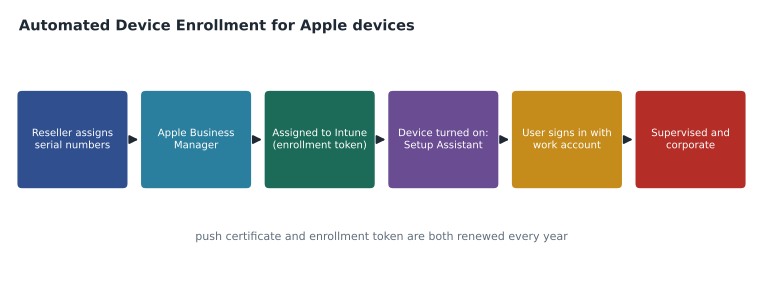
Enrollment profiles for Apple devices
In Intune, an enrollment profile for ADE controls what happens during setup. The main choices are whether the device is enrolled with user affinity, so it belongs to a person, or without it, for shared devices; how the user authenticates; which Setup Assistant screens appear; and whether the device can remove its management profile. For iPhones and iPads with user affinity, Microsoft recommends Setup Assistant with modern authentication, which asks for the Entra ID work account during setup and supports multifactor authentication. Locking the enrollment means the user can't remove the management profile from Settings.
Corvallin's 74 iPhones had been bought on a carrier contract. Ama asked the carrier whether it could add them to Apple Business Manager; it could, using Corvallin's customer number, and the serial numbers appeared in the portal a few days later. Phones bought outside such a program can be added with Apple Configurator, which prepares a device by connecting it to a Mac, but they get a 30-day window in which the user can release them from management. Because the iPhones were already in use, each one had to be erased to enroll through ADE. Ama ran the erasures branch by branch over two weeks, backed up nothing to iCloud on purpose, and had each manager's phone ready within an hour, because work email, Teams and VisitWise all live in the cloud.
The 9 Macs, bought directly from Apple, were already in Apple Business Manager. They enrolled through ADE with a separate macOS profile. For Macs, Intune also supports Platform single sign-on, which links the Mac's local account to the Entra ID account so people sign in once. Ama noted it as a later improvement.
Personal Apple devices
For personal iPhones and iPads, Intune supports two approaches. Account-driven user enrollment keeps work and personal data separate: the user adds a work account in Settings, under VPN and Device Management, and the device creates a separate, encrypted volume for work apps and data. Intune can manage only that part of the device and cannot see personal apps, wipe the whole phone or collect the device's serial number. It requires iOS or iPadOS 15 or later. Older user enrollment with Company Portal, based on a profile, has been deprecated and is no longer available for new enrollments; Microsoft recommends account-driven user enrollment instead. Personal devices can also be fully enrolled through the Company Portal, or through a web-based device enrollment, but that gives the organization more control than most people want on their own phone.
Many organizations decide, as Corvallin did in lesson 12, that personal phones should not be enrolled at all and should use app protection policies instead.
| Apple method | Ownership | Requirements | What Intune gets |
|---|---|---|---|
| Automated Device Enrollment | Corporate | Apple Business Manager, enrollment program token, push certificate | Supervised device, enrollment the user can't skip, full management |
| Apple Configurator | Corporate | A Mac with Apple Configurator, physical access | Like ADE, with a 30-day window in which the user can release the device |
| Account-driven user enrollment | Personal | iOS or iPadOS 15 or later, push certificate | A separate managed volume; no full wipe, no serial number |
| Device enrollment with Company Portal or web enrollment | Personal | Push certificate | Full device management of a personal device |
Android Enterprise
Android devices are managed through Android Enterprise, Google's framework for business use. The first prerequisite is to link Intune to managed Google Play, which is done once in the admin center by signing in with an organization-controlled account. That link lets Intune deploy apps from Google Play and create work profiles. The older Android device administrator method is gone: Intune ended support for it on devices with access to Google Mobile Services on December 31, 2024. Anything still enrolled that way needs moving to Android Enterprise.
Android Enterprise has several enrollment types, and choosing the right one is a frequent exam question.
| Android Enterprise type | Ownership | What it is for |
|---|---|---|
| Fully managed | Corporate | One person's work phone with no personal side; Intune manages the whole device |
| Dedicated | Corporate | Kiosks, shared and single-purpose devices; optionally with shared device mode so workers sign in and out |
| Corporate-owned with a work profile | Corporate | A company phone that also allows personal use; Intune manages the device and the work profile, and personal apps stay separate |
| Personally owned with a work profile | Personal | A staff member's own phone; Intune manages only the work profile |
| AOSP | Corporate | Devices without Google services, such as some headsets and rugged scanners |
Corporate Android devices are enrolled at first start-up, or after a factory reset, using one of several provisioning methods: scanning a QR code shown in the enrollment profile, typing a token, tapping an NFC tag, or zero-touch enrollment. Samsung Knox Mobile Enrollment does for Samsung devices what Apple Business Manager does for Apple: a reseller uploads the devices to Samsung's portal, and they enroll in Intune automatically when turned on. Google zero-touch enrollment does the same for many other manufacturers.
Choosing types for Corvallin's Android devices
The 260 Samsung phones were the most important devices in the project. Home-care staff use them to open VisitWise, record visits, read care plans and call the office. Dr. Ostrander-Bey was clear that they were clinical tools, not perks, and that staff should not use them for personal browsing or social media. That pointed to fully managed rather than a work profile. The phones had been bought from a Samsung reseller, which agreed to upload their identifiers to Knox Mobile Enrollment, and Ama created a Knox profile that sends each phone to Intune's fully managed enrollment.
The 6 reception tablets show a sign-in screen for visitors and a branch directory. They needed dedicated enrollment with a kiosk app called Managed Home Screen, which locks the tablet to a few approved apps. Because nobody signs in to them, Ama used a dedicated profile without user affinity.
Worked problem
Planning the Samsung rollout
Each branch can spare a home-care worker's phone for about 30 minutes, the time a factory reset and Knox enrollment takes with setup checks. Ama wants to re-enroll 260 phones, with two technicians who can each handle 6 phones at once in a 30-minute cycle. How many hours of technician time does that take, and why does it matter that the phones are reset rather than enrolled in place?
Show solution
- Phones per cycle: 2 technicians x 6 = 12.
- Cycles needed: 260 / 12 = 21.7, so 22 cycles.
- Time: 22 x 30 minutes = 660 minutes = 11 hours, spread across visits to five offices.
- Fully managed enrollment happens only during first setup, so an in-use phone must be factory reset first.
Answer: About 11 hours of hands-on time plus travel. Because the reset erases the phone, Ama asked staff to confirm their visit notes had synced to VisitWise before handing the phone over.
Enrollment restrictions for mobile platforms
The device platform restrictions from lesson 2 apply to mobile platforms too. Ama allowed iOS and Android Enterprise corporate enrollment, blocked personally owned devices from full enrollment on every platform and set a minimum operating system version for each. She did not block personal phones from using work apps, because app protection policies, covered in lesson 12, don't need enrollment and are not affected by enrollment restrictions.
Checking enrollment on phones
On a corporate iPhone, Settings shows a VPN and Device Management entry naming the organization, and the Company Portal or Intune app shows the device as compliant or not. On a fully managed Android phone, the Intune app is installed during setup and takes the role of the Company Portal. In the admin center, each device record shows its enrollment type, which is the quickest way to confirm a phone went in as fully managed rather than as a personally owned work profile.
By early October, all 74 iPhones, 9 Macs, 260 Samsung phones and 6 tablets were enrolled. The enrollment types matched the plan on all but three Samsung phones, which had been set up with a personal Google account before Knox could reach them. They were reset and enrolled again.
What users see during Automated Device Enrollment
For the managers receiving their erased iPhones, the experience mattered as much as the settings. After choosing a language and connecting to Wi-Fi, the phone showed a Remote Management screen naming Corvallin Home Care, then asked for the work account and password and a multifactor approval. Setup then continued with only the screens the enrollment profile left visible, and the Company Portal installed itself. Ama hid screens that added nothing at work, such as Apple Pay setup, and kept Face ID and passcode setup visible because the compliance policy needed a passcode anyway. She tested the whole flow on two spare phones before the first manager's erasure and timed it at about 12 minutes.
Macs behave in a similar way during ADE, with two differences worth knowing. FileVault, the Mac's disk encryption, can be required by policy and its personal recovery key escrowed to Intune, so the help desk can unlock a Mac whose user forgets the password. And Intune can create a managed local administrator account on Macs enrolled through ADE, with a password that Intune rotates, which does for Macs what Windows LAPS does for Windows in lesson 7.
| Corporate enrollment service | Devices | Linked to Intune with |
|---|---|---|
| Apple Business Manager with ADE | iPhone, iPad, Mac, Apple TV | Enrollment program token, renewed yearly |
| Samsung Knox Mobile Enrollment | Samsung phones and tablets | A Knox profile pointing to Intune's Android Enterprise enrollment |
| Google zero-touch enrollment | Many Android makers | A zero-touch configuration linked to Intune |
| QR code, token or NFC | Any Android Enterprise device | An enrollment profile in Intune |
Common mistakes
MistakeRenewing the Apple MDM push certificate with a different Apple account.
InsteadRenew it with the same Apple account that created it, or every Apple device has to re-enroll.
MistakeEnrolling clinical phones with a personally owned work profile.
InsteadCorporate phones are enrolled as fully managed, dedicated or corporate-owned with a work profile. Personal work profile is for staff-owned phones.
MistakeExpecting Android device administrator to keep working.
InsteadIntune ended support for it on devices with Google Mobile Services at the end of 2024; use Android Enterprise.
MistakeAdding carrier-bought iPhones with Apple Configurator when the carrier participates in Apple Business Manager.
InsteadAsk the carrier or reseller to assign the devices, so they get ADE without the 30-day removal window.
Summary and key terms
- Apple management needs an MDM push certificate, renewed yearly with the same Apple account.
- Apple Business Manager and Automated Device Enrollment enroll corporate Apple devices during setup as supervised devices.
- Account-driven user enrollment separates work and personal data on personal iPhones; profile-based user enrollment with Company Portal is deprecated.
- Android Enterprise offers fully managed, dedicated, corporate-owned work profile, personally owned work profile and AOSP types; device administrator is no longer supported.
- Knox Mobile Enrollment and Google zero-touch enrollment enroll corporate Android devices automatically at first start-up.
- Apple MDM push certificate
- The certificate that lets Intune reach Apple devices through Apple's push service.
- Apple Business Manager
- Apple's portal where organizations own devices and assign them to an MDM service.
- Automated Device Enrollment (ADE)
- Apple's method for enrolling organization-owned devices during setup.
- Account-driven user enrollment
- Enrollment of a personal Apple device that manages only a separate work volume.
- Fully managed
- An Android Enterprise corporate device with no personal side.
- Knox Mobile Enrollment
- Samsung's service for enrolling corporate Samsung devices automatically.
Practice problems
Work each problem on paper first, then reveal the answer to check.
What happens if the Apple MDM push certificate expires?
Show answer
Intune can no longer reach Apple devices, and they must be enrolled again once a certificate is in place.
Which Android type suits a reception tablet locked to a sign-in app?
Show answer
Dedicated, with Managed Home Screen as the kiosk app.
Why did the Samsung phones need a factory reset?
Show answer
Fully managed enrollment happens only during first setup.
Lesson quiz · 5 questions
Score 60% or more to complete this lesson.
Create a free account to save your progress, take quizzes and earn a certificate.