
MSBA-169 · Lesson 5 of 12 · 22 min
Domain review: collaboration features
▶ Video coming soon A video version of this lesson is on the way.
Friday, April 16, was collaboration day, the third area of the outline at 10 to 15 in 100. This is the part of GitHub Owen used every day: he opened issues for corrections, reviewed text in pull requests and answered readers in Discussions. His baseline practice score here was perfect, so Priya changed the format. Instead of reviewing, she asked him to teach each topic back to her in two sentences while she played a sceptical new hire, Lena, asking "but why not just use the other thing?" Every place he stumbled went into his notes.
Issues, pull requests and discussions
GitHub has three main places for conversation, and the exam tests whether you can choose between them. An issue tracks a unit of work: a bug, a correction, a task or an idea that someone will act on, with assignees, labels, a milestone and an open or closed state. A pull request proposes a specific change to the code or text, with the diff, reviews, comments on individual lines and status checks, and it ends by being merged or closed. A discussion is an open conversation that is not a unit of work: questions and answers, announcements, ideas still being shaped, or community chat. Discussions can have categories, polls, and a marked answer, and a discussion can be turned into an issue once it becomes actionable, or an issue into a discussion if it turns out not to be one.
| Use | Issue | Pull request | Discussion |
|---|---|---|---|
| Purpose | Track work to be done | Propose and review a change | Open conversation |
| Has a diff | No | Yes | No |
| Ends with | Closed as completed or not planned | Merged or closed | Answered, or simply quiet |
| Assignees, labels, milestones | Yes | Yes | Labels and categories only |
| Example at Tidewater | Wrong tide time on page 41 | The commit that fixes page 41 | Which trail should the 4th edition add? |
The sceptical question from "Lena" that tripped Owen was why a reader's question about winter parking at a trailhead should not be an issue. His answer, after a pause, was the right one: nobody needs to change anything yet, so it is a question for Discussions, where other readers can answer it too. If the answer reveals that the guidebook is wrong, someone opens an issue from the discussion.
Discussions are organized into categories, which a maintainer sets up: Announcements, where only maintainers can start threads; Q&A, where one reply can be marked as the answer; Ideas; Polls; Show and tell; and General. Discussions can be enabled for a single repository or for a whole organization, using a repository the organization chooses as the source. A maintainer can pin important discussions, lock heated ones, and use labels to sort them. Because discussions have no assignees and no open or closed state in the issue sense, they do not clutter the list of work to be done, which is exactly why they exist.
Linking pull requests to issues
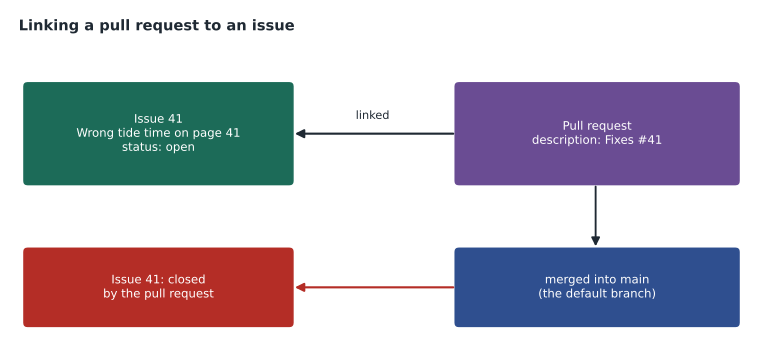
A pull request can be linked to the issue it resolves, so that merging the pull request closes the issue automatically. The link is made with a keyword in the pull request description, or in a commit message on the default branch, followed by the issue number: close, closes, closed, fix, fixes, fixed, resolve, resolves or resolved. Writing "Fixes #41" in the description links issue 41; when the pull request merges into the default branch, issue 41 closes and shows which pull request closed it. Links can also be added by hand from the Development section of the pull request or issue sidebar. A plain mention such as "see #41" creates a cross-reference but does not close anything.
Worked problem
Will the issue close?
Three pull requests are merged. Pull request A into main says "Resolves #52". Pull request B into a release branch says "Fixes #53". Pull request C into main says "Related to #54". Which issues close automatically?
Show solution
- A uses a closing keyword and merges into the default branch: issue 52 closes.
- B uses a closing keyword, but merges into a branch that is not the default: issue 53 stays open.
- C has no closing keyword, only a reference: issue 54 stays open but shows the link.
Answer: Only issue 52 closes automatically.
Templates, filters and assignments
Templates make collaboration consistent. Issue templates and issue forms, stored in .github/ISSUE_TEMPLATE, give contributors a choice of report types with prompts or required fields; a config.yml file can turn off blank issues and link elsewhere, such as to Discussions for questions. A pull request template, pull_request_template.md, pre-fills every new pull request description with a checklist. Tidewater's correction form asks for the guidebook, page, current wording and proposed wording, and the pull request template asks whether the change affects a printed edition.
Finding things is the other half. Issue and pull request lists accept filters in a search box, and the exam expects you to recognize the common ones.
| Filter | Finds |
|---|---|
| is:issue is:open | Open issues |
| is:pr is:merged | Merged pull requests |
| assignee:@me | Items assigned to you |
| author:malik-osei | Items opened by Malik |
| label:correction | Items with the correction label |
| milestone:"Coastal 3rd edition" | Items in a milestone |
| review-requested:@me | Pull requests waiting for your review |
| no:assignee | Items with nobody assigned |
Assignees are the people responsible for an issue or pull request; up to ten can be assigned, and assigning someone tells them and everyone else who is doing it. Reviewers are requested on pull requests, individually or as a team, and CODEOWNERS can request them automatically. Labels group and filter work, and milestones group it towards a date. Lesson 7 returns to labels, milestones and saved replies as project management tools.
Pull request reviews in brief
Reviews are where collaboration on a change happens, and several exam questions test their vocabulary. A pull request can start as a draft, which signals that it is not ready and cannot be merged until it is marked ready for review. A reviewer can leave a review in one of three states: Comment, general feedback without a decision; Approve, agreement that the change can merge; or Request changes, which asks the author to change something before merging. Reviewers can comment on single lines or ranges, and can write a suggestion, a proposed edit the author can commit with one click. Branch protection or rulesets can require a number of approvals, approval from code owners, passing status checks and resolved conversations before merging.
| Review action | Effect |
|---|---|
| Comment | Feedback only; no decision |
| Approve | Counts towards required approvals |
| Request changes | Blocks merging under protection until it is dismissed or the reviewer approves |
| Suggestion | An edit the author can commit directly from the review |
| Re-request review | Asks a reviewer to look again after new commits |
When a pull request is ready, GitHub offers up to three merge methods, each of which the repository can allow or disallow. A merge commit keeps every commit from the branch and adds a commit that joins the histories. Squash and merge combines the branch's commits into one commit on the base branch, which keeps main tidy. Rebase and merge replays each commit onto the base branch without a merge commit. Tidewater allows only squash merging on trail-notes, so each correction appears as one commit with the pull request title as its message.
Worked problem
Can it merge yet?
Main on trail-notes requires one approval from a code owner and a passing validate-data check. Pull request 88 has an approval from Dmitri, who is not a code owner for that file, a request for changes from Grace, who is, and a passing check. Can Owen merge?
Show solution
- The check passes, so that requirement is met.
- Dmitri's approval does not count as code owner approval for this file.
- Grace's request for changes is still outstanding.
- Owen must make the change Grace asked for and ask her to review again.
Answer: No. It needs a code owner's approval, and Grace's request for changes must be resolved first.
Notifications
Notifications decide what reaches you, and the outline asks you to explain and configure them. You are notified when you participate in a conversation, by commenting, being assigned or being mentioned, and when you watch a repository. Watching has levels: Participating and @mentions, the default, notifies you only about conversations you are part of; All activity notifies you about everything; Ignore silences the repository; and Custom chooses event types, such as issues, pull requests, releases, discussions or security alerts. You can also subscribe to a single issue or pull request without watching the whole repository.
| Owen wants to | Setting |
|---|---|
| Hear about every new release of trailcheck but nothing else | Watch, Custom, Releases only |
| Stop hearing about a noisy repository | Watch, Ignore |
| Follow one long issue he is not part of | Subscribe to that issue |
| Hear only when he is mentioned or involved | Watch, Participating and @mentions |
Notifications can be tuned for a whole account too. In the account's notification settings, a person chooses whether watched repositories, participation, reviews, Actions results and security alerts arrive on the web, by email, on GitHub Mobile, or not at all, and can route email for an organization to a work address.
Notifications arrive in the notification inbox on GitHub.com and, depending on your settings, by email and in GitHub Mobile. The inbox can be filtered, for example by reason such as review requested or mentioned, and items can be marked done, saved for later or unsubscribed. Owen's habit was to clear review requests first each morning, because a waiting review blocks someone else.
Worked problem
Counting notifications
Owen watches trailcheck on All activity. In a day there are 12 new issue comments, 3 new pull requests, 1 release and 2 security alerts. If he switches to Custom with only releases and security alerts, how many of those events would still notify him?
Show solution
- All activity notifies him about all of them: 12 + 3 + 1 + 2 = 18.
- Custom with releases and security alerts keeps only 1 + 2 = 3.
- Conversations he takes part in, or where he is mentioned, notify him anyway, so the true number may be a little higher.
Answer: 3 of the 18, plus any conversations he is part of.
Gists, wikis and GitHub Pages
The outline groups three ways of sharing documentation and snippets. A gist is a small repository for sharing a file or a few files, such as a snippet, a note or a configuration example. Gists can be public, listed and searchable, or secret, unlisted, which means anyone with the link can still see them, so secret is not private. Gists have history and can be forked and cloned. A wiki is a set of documentation pages attached to a repository, edited in the browser or as a separate Git repository; it suits informal or evolving documentation. GitHub Pages publishes a static website from a repository, from a branch or through a GitHub Actions workflow, at an address such as tidewater-guides.github.io/trailcheck or a custom domain. Wikis are available on public repositories on every plan and on private repositories on paid plans; Pages likewise.
| Need | Best fit |
|---|---|
| Share one configuration snippet with a contractor | A gist |
| Living how-to pages for contributors, edited often | A wiki |
| A public website with its own address | GitHub Pages |
| Documentation that is reviewed like code | A docs folder in the repository |
TrailCheck itself is a GitHub Pages site, built by a workflow whenever main changes. The contributor how-to pages for open-trail-report live in its wiki, because volunteers edit them often and they do not need review. Rosa uses secret gists to share sample configuration with other publishers, knowing that anyone who has the link can read them, so nothing confidential goes in one.
What Owen stumbled on
The teach-back produced three notes. He had forgotten that closing keywords only work when merging into the default branch. He was unsure whether a secret gist is private; it is not. And he could not immediately say how to receive only releases from a repository; the answer is Custom watching. Each became a flash card for the weekend.
Common mistakes
MistakeOpening an issue for a question that needs no action.
InsteadUse Discussions; convert to an issue if action becomes necessary.
MistakeWriting "see #41" and expecting the issue to close.
InsteadUse a closing keyword such as Fixes #41 and merge into the default branch.
MistakeTreating a secret gist as private.
InsteadSecret gists are unlisted; anyone with the link can view them.
MistakeWatching everything and drowning in notifications.
InsteadUse Participating and @mentions, Custom events, or subscribe to single threads.
Summary and key terms
- Issues track work, pull requests propose and review changes, and discussions hold open conversation.
- Closing keywords such as Fixes #41 link a pull request to an issue and close it when merged into the default branch.
- Issue templates, issue forms and pull request templates make contributions consistent; filters find work quickly.
- Assignees own work, reviewers review it, and labels and milestones group it.
- Notifications come from participating and watching; watch levels are participating, all activity, ignore and custom.
- Gists share snippets (secret means unlisted), wikis hold editable pages, and Pages publishes a website.
- Discussion
- An open conversation in a repository that is not a unit of work.
- Closing keyword
- A word such as fixes or resolves that links a pull request to an issue and closes it on merge.
- Issue form
- An issue template with structured, optionally required fields.
- Watching
- Choosing which activity in a repository sends you notifications.
- Notification inbox
- The page on GitHub.com that collects your notifications.
- Gist
- A small repository for sharing snippets or files, public or secret.
- GitHub Pages
- Static website hosting published from a repository.
Practice problems
Work each problem on paper first, then reveal the answer to check.
A reader asks whether dogs are allowed on a trail. Issue or discussion?
Show answer
A discussion, unless the answer shows the guidebook needs changing.
Name three closing keywords.
Show answer
Any of close, closes, closed, fix, fixes, fixed, resolve, resolves, resolved.
Which watch setting notifies you about releases only?
Show answer
Custom, with only releases selected.
Lesson quiz · 5 questions
Score 60% or more to complete this lesson.
Create a free account to save your progress, take quizzes and earn a certificate.