
MSBA-169 · Lesson 2 of 12 · 23 min
Exam format and question styles
▶ Video coming soon A video version of this lesson is on the way.
On Tuesday, April 13, Owen arrived with the confirmation email from his booking and a list of questions about the exam itself: how long it lasts, what the questions look like, what happens if his internet connection drops, and what he is allowed to have on his desk. "Nobody should lose marks to the format," Priya said. "If you know exactly what the next two hours look like, all your attention goes on the questions." This lesson covers how GH-900 is delivered, the styles of question it can use, how scoring and retakes work, and the free tools that let a candidate rehearse the experience before the day.
The facts of the exam
The certification page and the study guide give the facts that matter, and Owen copied them into a table at the front of his notes. He checked them again on the morning he booked, because Microsoft updates these pages, and he planned to check once more the week before the exam.
| Item | GH-900 |
|---|---|
| Level | Beginner (a fundamentals exam) |
| Time to answer | 100 minutes |
| Delivery | Proctored, scheduled through Pearson VUE |
| Languages | English, Spanish, Portuguese (Brazil), Korean and Japanese |
| Passing score | 700 on a scaled score |
| Question styles | Mostly multiple choice and multiple select; interactive items may appear |
| Renewal | None needed; the certification does not expire |
| Price | Set by the country or region where the exam is taken |
| Retakes | After 24 hours the first time; then 14 days between attempts, up to 5 in 12 months |
The exam does not publish a fixed number of questions, and the number can vary between forms. That is normal for Microsoft exams. What matters for pacing is the time, 100 minutes, and the habit of checking progress at fixed points rather than worrying about how many items are left.
Booking and accounts
GitHub certifications are now scheduled through Microsoft Learn, which hands the booking to Pearson VUE, the company that delivers the exam. Candidates sign in with a Microsoft account, and the certification page strongly recommends a personal Microsoft account rather than a work or school one. Exam records are linked to the account used, and a candidate who leaves an organization can lose access to a work account and with it the record. Owen used his personal account, even though Tidewater was paying, and Rosa reimbursed the fee through the training budget.
The price depends on the country where the exam is taken, so Owen saw his in Canadian dollars at checkout, with sales tax added for New Brunswick. Rosa recorded it in the training budget as the amount on the receipt.
Candidates choose either a test centre, an approved room with Pearson VUE staff, or online proctoring, called OnVUE, from home or an office. Owen chose online, because the nearest centre was a long drive and he had a quiet spare room. Each option has its own rules, set out in the Pearson VUE confirmation, and both require a valid government-issued photo ID whose name matches the booking exactly.
| Test centre | Online (OnVUE) | |
|---|---|---|
| Location | Approved centre with on-site staff | Home or office, private room |
| Equipment | Provided by the centre | Own computer with webcam, microphone and stable internet; system test beforehand |
| Check-in | At the front desk with ID | Online, about 30 minutes before, with photos of ID and the room |
| Desk | Locker for belongings | Clear desk; no notes, phones or second screens |
| Risk to plan for | Travel time and weather | Connection, noise and interruptions |
What happens during the exam
An exam appointment is longer than the answering time. Microsoft calls the whole appointment seat time: it includes reading the instructions, accepting the candidate agreement, which forbids sharing exam content, answering the questions, and the optional chance to leave comments on items at the end. For GH-900 the answering time is 100 minutes, so Owen blocked two and a half hours in his calendar, starting with online check-in at 8:30.
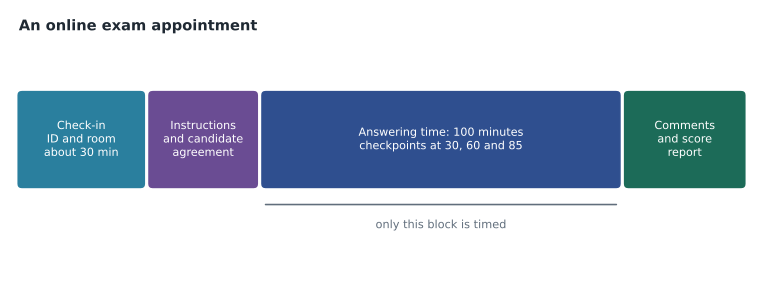
Questions appear one at a time. Candidates can mark a question for review and come back to it from a review screen, which lists every question and shows which are answered, unanswered or marked. Some exams have sections that close when you move on; the interface says so before you leave one, and once a section is closed you cannot return to it. Unscheduled breaks are possible, but the clock keeps running, and you cannot return to questions you viewed before the break. Owen's rule was simple: no breaks, and answer every question before using the review screen.
Question styles
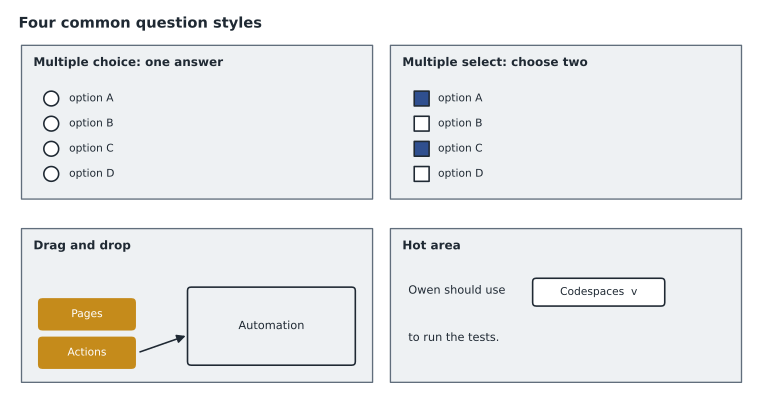
Microsoft does not say in advance exactly which styles a given exam uses, but the exam sandbox shows all of them, and GH-900 uses mainly the first two below. The study guide also notes that an exam may include interactive components. Knowing how each style is scored and laid out avoids silly losses, such as choosing one answer when the question asks for two.
| Style | What you do | Watch for |
|---|---|---|
| Multiple choice | Choose the single best answer from several | Two options that are both partly true; pick the one that fully answers |
| Multiple select | Choose two or more answers | The stem says how many to choose: "Choose two" |
| Drag and drop | Move items into boxes, such as features into categories | Each item may be used once, more than once, or not at all; the instructions say which |
| Build list | Put steps in order | Some listed steps may not belong in the answer |
| Hot area | Choose options from drop-downs inside a sentence, table or image | Each drop-down is a separate decision |
| Active screen | Change settings on a picture of an interface | Only the controls that matter respond |
| Case study | Read a scenario, then answer several questions about it | Read the questions first, then scan the scenario for the facts each needs |
Each question is written with one stem, the question itself, and several options. Wrong options, called distractors, are designed to be plausible: they are usually real GitHub features that are right for a different situation. That is why the review lessons spend so much time on differences between similar features. A candidate who knows only that "discussions exist" will hesitate between issues and discussions; one who knows that discussions are for open conversation and issues for tracked work will not.
Worked problem
Reading a multiple-select stem
A question reads: "A team wants to keep a free, public documentation website for an open source project, published from files in its repository. Which two features could it use? Each correct answer presents a complete solution. Choose two." The options are GitHub Pages, a repository wiki, a secret gist and GitHub Packages. How should Owen approach it?
Show solution
- Note the instruction: choose two, and each correct answer alone is a complete solution.
- GitHub Pages publishes a website from repository files: a complete solution.
- A wiki gives a public repository documentation pages that anyone can read: also a complete solution, though not a separate website.
- A secret gist is unlisted and is not documentation for a project; GitHub Packages hosts software packages, not documentation.
- Select exactly two: Pages and the wiki.
Answer: GitHub Pages and a repository wiki. The phrase "each correct answer presents a complete solution" means each option must work on its own.
How scoring works
The score is reported on a scale up to 1,000, and 700 or more passes. Because the score is scaled, it is not a simple percentage, and different questions can carry different weight. Microsoft does not take marks away for wrong answers, so an unanswered question can only cost you. The practical rules follow directly: answer every question, even with a guess; when a multiple-select question asks for two, choose two; and never leave a hot area drop-down blank. On some styles, a question with several parts may earn partial credit, but you should not count on it.
After the exam, the candidate sees a pass or fail result straight away and receives a score report showing performance in each area, as a bar rather than a score. Owen planned to keep the report whatever happened, because a failing report is the best study guide for a retake: it shows exactly which areas were weakest.
Retakes
Microsoft's retake policy applies to GH-900. After a first failed attempt, a candidate must wait 24 hours before trying again. After that, there must be 14 days between attempts, with no more than five attempts in the 12 months after the first. A candidate who passes cannot retake the exam. Each retake is paid for, unless the candidate has a voucher that includes one. Owen did the arithmetic in case he needed it.
Worked problem
The earliest retake dates
If Owen failed on Wednesday, April 28, 2027, at 9:00 in the morning, when could he take his second and third attempts at the earliest?
Show solution
- Second attempt: at least 24 hours after the first, so from 9:00 on Thursday, April 29.
- Third attempt: at least 14 days after the second. If the second were on April 29, add 14 days.
- April has 30 days, so April 29 plus 14 days is May 13.
- Pearson VUE availability decides the actual dates; these are the earliest the policy allows.
Answer: Second attempt from April 29; third attempt from May 13, if the second were taken on April 29.
The practice assessment and the sandbox
Two free tools let a candidate rehearse. The practice assessment, linked from the certification page, is a set of sample questions in the exam's style. After each question it can show the correct answer, an explanation and a link to the documentation. It does not predict a score precisely, and the real exam's questions are different, but it is the best available check of readiness and of question style. The exam sandbox, at aka.ms/examdemo, is a demonstration of the exam interface with every question style, the marking and review screen, and the timer. It has no real content; its purpose is to make the interface familiar.
Owen planned to take the practice assessment twice: once on Wednesday, April 14, as a baseline, and again on Friday, April 23, after the domain reviews. Between the two, he would use the explanations, not just the scores. Priya suggested he also click through the sandbox once on the day before the exam, so the screens would look familiar when it counted.
Pacing without a question count
Because the number of questions is not published, Owen paced himself by time rather than by question. He planned to read the first screen to see the total, then set three checkpoints: about a third of the questions answered by minute 30, two thirds by minute 60, and all of them by minute 85, leaving 15 minutes for the review screen. If he fell behind at a checkpoint, he would answer the current question with his best choice, mark it, and move on more briskly, rather than spend three minutes on one item.
Worked problem
Checkpoints for a sample form
Suppose the first screen shows 60 questions. With all questions to be answered by minute 85, how long is the average per question, and where should Owen be at minutes 30 and 60?
Show solution
- Time per question: 85 minutes for 60 questions.
- \[\frac{85}{60} \approx 1.42 \text{ minutes, about 1 minute 25 seconds}\]
- Questions by minute 30: 30 divided by 1.42 is about 21.
- Questions by minute 60: 60 divided by 1.42 is about 42.
- The remaining 15 minutes go to marked questions on the review screen.
Answer: About 1 minute 25 seconds a question: roughly question 21 at minute 30 and question 42 at minute 60. The count of 60 is only an example; the real number varies.
Accommodations and language
Candidates who use assistive technology, need extra time, or need any change to the exam experience can request an accommodation before booking, through Microsoft's accommodations page. Requests take time to approve, so they should be made early. Candidates taking the exam in a language that is not their first, where their own language is not offered, can request 30 extra minutes. Rosa mentioned that Tidewater's partner publisher had a French-speaking editor who planned to take GH-900 later in the year, and French is not one of the offered languages, so the extra time would apply to her.
Online exam rules
For online delivery, the room must be private, with the door closed and no one else entering. The desk must be clear of papers, notes, books, phones and second monitors; a glass of water in a clear container is usually allowed. The webcam must stay on, and the candidate must stay in view and should not read questions aloud or look away from the screen for long, because the proctor watches throughout and may end the exam for a breach. Pearson VUE's system test checks the computer, camera, microphone and connection beforehand, and corporate laptops sometimes fail because of security software, so Owen ran the test on his own laptop a week early.
Common mistakes
MistakeBooking with a work or school Microsoft account.
InsteadUse a personal Microsoft account so the record stays with you.
MistakeChoosing one answer when the stem says "Choose two".
InsteadRead the instruction line and select exactly the number asked for.
MistakeLeaving hard questions blank to save time.
InsteadAnswer everything; mark it for review if unsure. Blanks cannot score.
MistakeRunning the OnVUE system test for the first time on exam morning.
InsteadTest the computer and connection days before.
Summary and key terms
- GH-900 gives 100 minutes of answering time, is proctored through Pearson VUE at a test centre or online, and is offered in five languages.
- The pass mark is 700 on a scaled score; there is no penalty for wrong answers, so answer every question.
- Questions are mostly multiple choice and multiple select; the exam may include interactive styles such as drag and drop or hot area.
- Seat time includes check-in, instructions and the candidate agreement as well as answering time.
- Retakes: 24 hours after the first failure, then 14 days between attempts, up to five in 12 months.
- The free practice assessment and exam sandbox let you rehearse the questions and the interface.
- Seat time
- The whole exam appointment, including check-in, instructions and comments as well as answering time.
- OnVUE
- Pearson VUE's online proctored delivery, taken from home or an office.
- Stem
- The question itself, including any instruction such as "Choose two".
- Distractor
- A plausible wrong option, often a real feature that fits a different situation.
- Review screen
- The exam screen listing answered, unanswered and marked questions.
- Exam sandbox
- A demonstration of the exam interface with no real content, at aka.ms/examdemo.
- Accommodation
- An approved change to the exam experience, such as extra time, requested before booking.
Practice problems
Work each problem on paper first, then reveal the answer to check.
How long is the answering time for GH-900?
Show answer
100 minutes.
Is there a penalty for a wrong answer?
Show answer
No, so every question should be answered.
After a second failed attempt, how long must a candidate wait?
Show answer
14 days.
Lesson quiz · 5 questions
Score 60% or more to complete this lesson.
Create a free account to save your progress, take quizzes and earn a certificate.