
MSBA-169 · Lesson 4 of 12 · 22 min
Domain review: repositories
▶ Video coming soon A video version of this lesson is on the way.
On Thursday, April 15, the session moved to the second area of the outline, working with GitHub repositories, worth 10 to 15 in 100 of the exam. Owen had created and looked after repositories all winter, so most of it felt familiar. His dots were on two skills: repository insights and metrics, which he had rarely opened, and the difference between a template repository and a fork, which he could explain but still hesitated over under time pressure. Priya brought up the trailcheck repository on the meeting room screen and used it as the example for everything.
Creating a repository
A new repository needs an owner, which is a personal account or an organization, a name, and a visibility. Public repositories can be seen by anyone; private ones only by people given access; and organizations on Enterprise plans can also make internal repositories, visible to all members of the enterprise. The creation page offers to add a README, a .gitignore file and a licence at the start, which saves a commit later. A repository can also be created from a template, imported from another version control system, or created by forking.
| Starting point | What you get | History | Link to the original |
|---|---|---|---|
| Empty or with a README | A new repository with only what you add | New | None |
| From a template repository | A copy of the template's files and folders | New, starting with one commit | Shows "generated from" the template, but no ongoing connection |
| Fork | A copy under another account, with all branches by default | The full history | Connected: can open pull requests back to the original and sync updates |
| Import | A repository from another system | Converted history | None |
The difference between a template and a fork is a favourite exam distinction. A template repository is for starting new projects from the same structure; the new repository has a fresh history and no ongoing link, so changes are not meant to flow back. A fork is for contributing to, or building on, an existing project; it keeps the history and the connection, so the fork can propose changes back by pull request and pull in updates from the original. Tidewater made its style-guide repository a template so that each new guidebook starts with the same folders, front matter and checks.
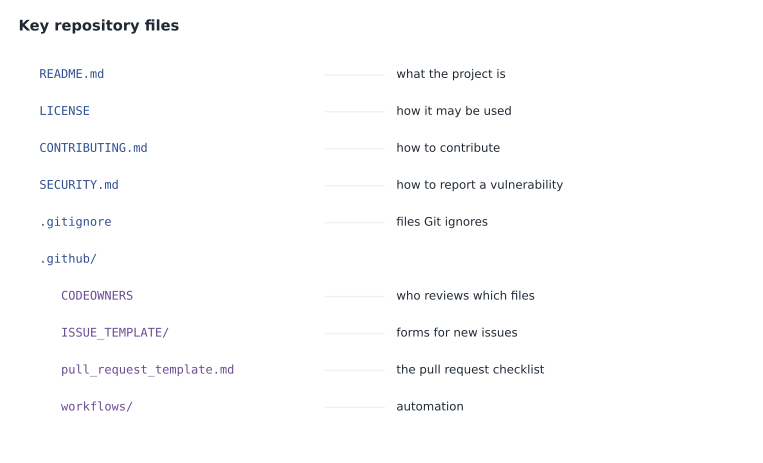
The key repository files
The outline names five files explicitly: README, LICENSE, CONTRIBUTING, CODEOWNERS and SECURITY. Each answers a different question that a visitor or contributor has, and GitHub treats each one specially when it finds it.
| File | Answers | What GitHub does with it |
|---|---|---|
| README.md | What is this project and how do I start? | Shows it on the repository's front page |
| LICENSE | What may I do with this work? | Detects the licence and shows its name and a summary |
| CONTRIBUTING.md | How do I contribute? | Links to it when someone opens an issue or pull request |
| CODEOWNERS | Who must review changes to which files? | Requests reviews from the owners automatically |
| SECURITY.md | How do I report a vulnerability privately? | Links to it from the repository's Security tab |
Two details are worth remembering. CODEOWNERS can live in the root, in a docs folder or in the .github folder, and its patterns work like .gitignore patterns, with the last matching line winning. And a repository with no LICENSE file is not open source by default: copyright law reserves all rights to the author, so others may view it on GitHub but have no permission to reuse it. The other community health files, such as CODE_OF_CONDUCT.md, SUPPORT.md and issue templates, were covered in MSBA-161 lesson 5 and appear in lesson 9 of this review.
Worked problem
Which file fixes the problem?
Three complaints reach the trailcheck maintainers. A volunteer found a weakness in the report form and did not know whom to tell privately. A teacher wants to reuse the trail-data format in a school project and asks whether that is allowed. Pull requests that change the data folder keep merging without Malik seeing them. Which file answers each?
Show solution
- Reporting a weakness privately: SECURITY.md, which explains the private reporting route.
- Permission to reuse: LICENSE, which states what others may do.
- Automatic review of the data folder: CODEOWNERS, with a line assigning data/ to Malik.
- With branch protection requiring code owner review, those pull requests cannot merge without his approval.
Answer: SECURITY.md, LICENSE and CODEOWNERS respectively.
Adding and managing files
Files can be added by pushing commits from Git or GitHub Desktop, or directly in the browser: GitHub lets you create a file, upload files by dragging them in, edit a file in the web editor, and rename, move or delete it, each as a commit with a message. Browser edits on a protected branch offer to create a new branch and pull request instead. Large binary files fit poorly in Git, which stores every version in full; Git Large File Storage keeps pointers in the repository and the files themselves elsewhere, and GitHub blocks individual files over 100 MB unless they use it. For releases, GitHub Releases attach packaged files to a tag, which is how TrailCheck publishes its printable trail-map bundle.
Branches are managed in the repository too. The default branch is what visitors see and what pull requests target unless they choose otherwise; an admin can rename it, and GitHub redirects links and updates open pull requests. Old branches can be deleted after merging, automatically if the repository setting is on, and restored from the pull request page if deleted by mistake.
Insights, metrics and stars
This was Owen's weakest skill in the area, so Priya opened the Insights tab of trailcheck and went through it page by page. Insights shows activity and health without any setup.
| Insights page | Shows | Useful for |
|---|---|---|
| Pulse | A summary of recent pull requests, issues and commits over a chosen period | A quick weekly status |
| Contributors | Commits by each contributor over time | Seeing who works on the project and when |
| Community standards | Which recommended files the repository has | Checking public project health |
| Traffic | Views, unique visitors, clones and referring sites over 14 days | Understanding interest in a public project |
| Commits and code frequency | Commits per week; lines added and removed | Spotting busy and quiet periods |
| Dependency graph | The packages a project uses and which projects use it | Dependency insight and Dependabot alerts |
| Network and forks | Branches and forks and how they relate | Following work in forks |
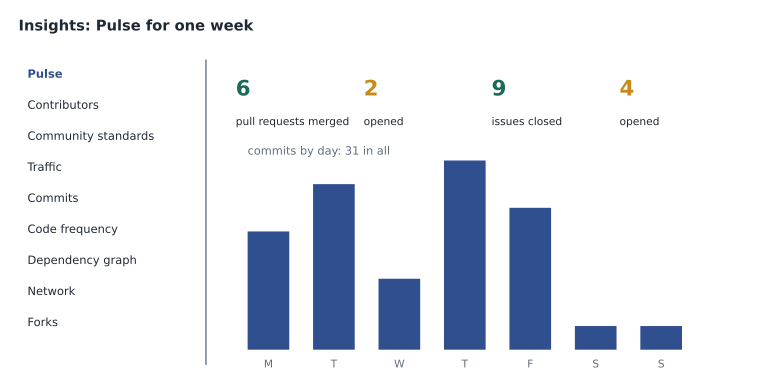
Not everyone can see every page. Pulse, contributors and commit graphs are visible to anyone who can read the repository, so on a public repository anyone can look. Traffic is restricted to people with write access, because it reveals how a project is used. The dependency graph needs to be enabled for private repositories, and on public repositories it is on by default. Exam questions occasionally ask why a person cannot see a page, and the answer is usually their role, not a missing feature.
Organizations with GitHub Team or Enterprise can also see organization-level insights and, on Enterprise plans, metrics dashboards for Copilot and other features. The outline mentions dependency insights, which for an organization summarize the dependencies across its repositories and any known vulnerabilities in them.
Stars are a way for people to bookmark a repository and show appreciation. The star count is a rough signal of interest, and starred repositories appear in the person's own list for later. Starring is different from watching, which controls notifications, covered in lesson 5. Neither gives access or permissions.
Worked problem
Reading a Pulse summary
The trailcheck Pulse for the week of April 5 shows 6 pull requests merged and 2 opened, 9 issues closed and 4 opened, and 31 commits to main from 4 authors. What does that say about the backlog?
Show solution
- Pull requests: 2 opened against 6 merged, so the open pull request count fell by 4.
- Issues: 4 opened against 9 closed, so the open issue count fell by 5.
- Commits per author on average: 31 divided by 4 is about 7.75.
- More work was finished than started in the week.
Answer: The backlog shrank: 4 fewer open pull requests and 5 fewer open issues, with about 8 commits per author.
Repository settings worth recognizing
The repository Settings tab is visible only to people with the Admin role, and a foundations candidate should recognize what lives there rather than every option. General holds the name, the default branch, template status, the features to show (issues, wiki, discussions, projects), the merge buttons to allow, whether to delete branches automatically after merging, and the "danger zone" with visibility changes, transfer, archive and delete. Collaborators and teams grants access. Branches and Rules hold branch protection rules and rulesets. Actions, Webhooks, Pages, Environments and Secrets and variables configure automation and publishing. Code security turns on the dependency graph, Dependabot and secret scanning features.
| Settings area | Typical exam scenario |
|---|---|
| General: features | Turn on Discussions or turn off the wiki for a repository |
| General: pull requests | Allow only squash merging; delete head branches automatically |
| General: danger zone | Change visibility, transfer, archive or delete |
| Collaborators and teams | Give a team Write access |
| Branches and Rules | Require a review before merging to main |
| Pages | Publish a site from a branch or with a workflow |
| Code security | Turn on Dependabot alerts or push protection |
Turning features on and off per repository matters more than it sounds. A repository can hide Issues if the team tracks work elsewhere, hide the wiki if documentation lives in a docs folder, and show Discussions for community questions. Questions sometimes describe a missing tab, such as "contributors cannot find Discussions", where the answer is that an admin has to enable the feature in General settings.
Worked problem
Owen's two dot skills, revisited
At the end of the session Priya asked Owen two quick questions from his dot list. First: a partner publisher wants its own copy of trail-notes to propose corrections back to Tidewater. Template or fork? Second: Grace wants to know how many people looked at the TrailCheck repository last fortnight and where they came from. Which page?
Show solution
- Proposing changes back needs the connection and shared history: a fork.
- A template would give a fresh copy with no way to send pull requests back to the original.
- Visitor numbers and referring sites for the last 14 days are on the Traffic page of Insights.
- Traffic is visible only to people with write access to the repository, and Grace's editors team has write access to trail-notes but not to trailcheck, so Priya or Dmitri would pull the figures for her.
Answer: A fork for the partner publisher, and the Insights Traffic page for Grace.
Maintaining a repository
Maintenance questions ask what good practice looks like over time. A healthy repository has a current README and licence, a clear contributing guide, labels and templates that make triage easy, branch protection on main, and automated checks. Stale branches are deleted after merging. Issues that will never be done are closed with a reason, as not planned, rather than left open. Dependencies are kept up to date with Dependabot. Topics and a description make the repository easy to find. A repository that is finished but still useful can be archived, which makes it read-only, keeps it visible, and tells visitors it is no longer maintained; it can be unarchived later. Deleting is permanent after a short restore window and breaks every link, so archiving is the usual choice for old projects.
| Need | Action |
|---|---|
| A project is finished but people still use it | Archive it |
| A repository should move to the organization | Transfer it; GitHub redirects old links |
| The name no longer fits | Rename it; GitHub redirects the old name |
| New projects should start with the same structure | Mark it as a template repository |
| Visitors cannot find it | Add a description and topics |
Tidewater archived the second-edition guide repository when the third edition started, so readers who had bookmarked old corrections could still read them. MSBA-161 lesson 12 covered the transfer of Malik's open-trail-report repository into the organization, which kept its stars, issues and history and redirected the old address.
Common mistakes
MistakeUsing a fork to start a new project from a standard layout.
InsteadUse a template repository; a fork is for contributing to an existing project.
MistakeAssuming a public repository without a licence is free to reuse.
InsteadWithout a licence, all rights are reserved.
MistakeConfusing starring with watching.
InsteadStars bookmark and show interest; watching controls notifications.
MistakeDeleting an old repository that others still read.
InsteadArchive it, which keeps it visible and read-only.
Summary and key terms
- A repository has an owner, a name and a visibility: public, private, or internal on Enterprise.
- A template gives a fresh copy with new history and no link; a fork keeps history and can send pull requests back.
- README, LICENSE, CONTRIBUTING, CODEOWNERS and SECURITY each answer a different contributor question.
- Files can be added and edited in the browser or pushed with Git; large files use Git LFS and releases attach files to tags.
- Insights shows Pulse, contributors, community standards, traffic, commit activity and the dependency graph.
- Good maintenance includes protection, templates, labels, deleting merged branches, and archiving rather than deleting.
- Template repository
- A repository others can copy to start a new project with a fresh history.
- Fork
- A copy of a repository under another account that keeps its history and connection.
- Insights
- The repository tab showing activity, contributors, traffic and dependencies.
- Pulse
- An Insights summary of recent pull requests, issues and commits.
- Star
- A bookmark that also shows interest in a repository.
- Archive
- To make a repository read-only and mark it as no longer maintained.
- Git Large File Storage
- An extension that stores large files outside the repository and keeps pointers in it.
Practice problems
Work each problem on paper first, then reveal the answer to check.
Which file tells visitors how to report a vulnerability privately?
Show answer
SECURITY.md.
What is the main difference between a template repository and a fork?
Show answer
A template starts a new project with fresh history and no link; a fork keeps history and can propose changes back.
Which Insights page gives a quick weekly summary of activity?
Show answer
Pulse.
Lesson quiz · 5 questions
Score 60% or more to complete this lesson.
Create a free account to save your progress, take quizzes and earn a certificate.