
MSBA-169 · Lesson 1 of 12 · 20 min
What the GitHub Foundations exam covers
▶ Video coming soon A video version of this lesson is on the way.
On Monday, April 12, 2027, Owen Tremblay booked a small meeting room at the Tidewater Trail Guides office in Moncton for twelve lunchtime sessions in a row. His GitHub Foundations exam, Exam GH-900, was booked for 9:00 in the morning on Wednesday, April 28, to be taken online from home. He had finished both earlier courses: Git and GitHub Foundations in the autumn and winter, and GitHub Collaboration, Security and Administration Basics in March and early April. Priya Nair, the team's Git lead, agreed to run the sessions with him, and Rosa Delgado, who administers Tidewater's GitHub organization, offered to take the security and administration review. "You already know most of this," Priya told him. "The next two weeks are about knowing it in the way the exam asks, finding the gaps, and walking in calm."
This course is that readiness sprint. The first two lessons explain what the exam covers and how it is delivered. Lessons 3 to 9 review the seven areas of the exam one at a time, linking each skill back to the lessons where it was first taught. Lesson 10 collects the mistakes candidates make most often, lesson 11 builds a study plan from the exam weights and Owen's own results, and lesson 12 is a final review with an exam-day checklist. Each lesson ends with practice questions in the exam's styles.
Who the exam is for
GitHub Foundations is the entry-level GitHub certification. Microsoft, which now delivers GitHub's certifications through Microsoft Learn, describes it as a beginner exam for anyone who uses GitHub: developers, but also people who never write code, such as project managers, technical writers, designers, students and administrators. That suits Owen, a guidebook editor whose daily GitHub work is reviewing text in pull requests and keeping the corrections board tidy. There are no formal prerequisites. The exam expects foundational knowledge of GitHub's core features: what they are for, when to use each one, and how the pieces fit together, rather than deep command-line skill.
The certification does not expire and does not need renewing, unlike Microsoft's associate and expert certifications. Once Owen passes, the credential stays on his Microsoft Learn profile. The other GitHub certifications, on GitHub Actions, GitHub Administration, GitHub Advanced Security and GitHub Copilot, build on the same foundation, and several other Tidewater programs list this course's two predecessors as their starting point.
The skills outline
Every Microsoft exam has a published study guide with a skills outline: the list of what can be tested, grouped into areas, each with a weight. The GH-900 outline was revised substantially in January 2026: new objectives were added, some were removed, and the rest were reworded. That matters for anyone using older study material, because questions on removed topics will not appear, and topics added in 2026, such as passkeys, Enterprise Managed Users and Copilot agents, can. The first rule of exam preparation, Priya said, is to study from the current outline and to check its date before booking.
| Area | Weight (parts in 100) | Main topics | Where it was taught |
|---|---|---|---|
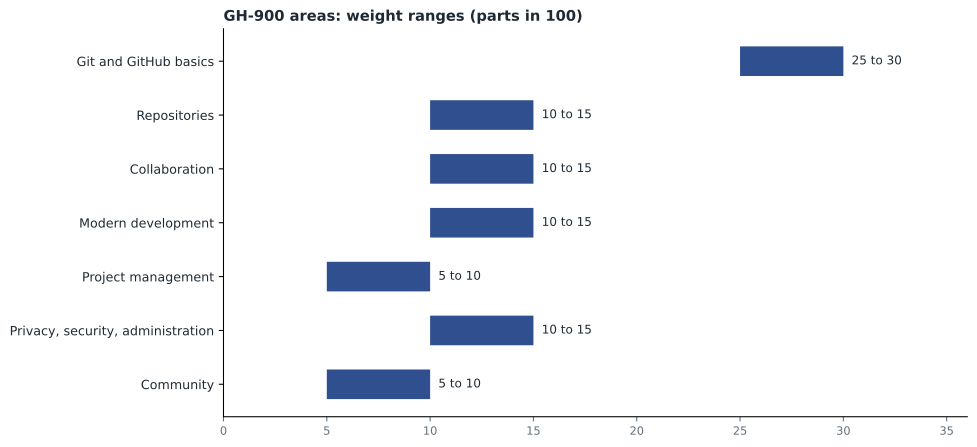
| 1. Git and GitHub basics | 25 to 30 | Version control, Git versus GitHub, repositories, commits and branches, accounts and organizations, GitHub Flow, Markdown, GitHub Desktop and Mobile | MSBA-160 lessons 1 to 4 and 6 |
| 2. Working with repositories | 10 to 15 | Key repository files, templates, adding and managing files, insights and stars, maintenance | MSBA-160 lesson 5, MSBA-161 lessons 4 and 5 |
| 3. Collaboration | 10 to 15 | Issues, pull requests and discussions, linking, templates and filters, notifications, gists, wikis and Pages | MSBA-160 lessons 6, 7 and 11 |
| 4. Modern development | 10 to 15 | GitHub Actions, GitHub Copilot and its plans, Codespaces and dev containers, github.dev | MSBA-160 lessons 10 and 11 |
| 5. Project management | 5 to 10 | GitHub Projects and layouts, labels, milestones, workflows, saved replies, insights | MSBA-160 lessons 7 and 8 |
| 6. Privacy, security and administration | 10 to 15 | 2FA and passkeys, permissions and roles, Enterprise Managed Users, Copilot policy, visibility, branch protection, organization settings | MSBA-161 lessons 1 to 3 and 7 to 10 |
| 7. The GitHub community | 5 to 10 | Open source and GitHub Sponsors, following, the Marketplace, inner source, forks and templates, discoverability | MSBA-160 lesson 9, MSBA-161 lessons 6, 11 and 12 |
Reading the weights
The weights are ranges because each exam form is drawn from a larger pool of questions, so the exact share of each area varies a little from one candidate to the next. A range of 25 to 30 means that, on any form, between a quarter and nearly a third of the questions come from that area. The ranges do not add up to exactly 100 at either end: the lowest values total 75 and the highest 105. Using the middle of each range gives a sensible working figure.
Worked problem
Turning the weights into shares
Owen wants one number for each area so he can divide his study time. Use the middle of each range and scale so the shares add to 100.
Show solution
- Midpoints: 27.5, 12.5, 12.5, 12.5, 7.5, 12.5 and 7.5.
- \[27.5 + 4 \times 12.5 + 2 \times 7.5 = 27.5 + 50 + 15 = 92.5\]
- Scale each midpoint by 100 divided by 92.5, which is about 1.081.
- Git and GitHub basics: 27.5 times 1.081 is about 29.7.
- Each 12.5 area: about 13.5. Each 7.5 area: about 8.1.
- Check: 29.7 + 4 times 13.5 + 2 times 8.1 = 29.7 + 54.0 + 16.2 = 99.9, which is 100 after rounding.
Answer: About 30 in 100 for Git and GitHub basics, about 13.5 for each of the four middle areas, and about 8 for project management and for community.
Weights tell you where the questions are, not where your gaps are. Owen's weakest area, he suspected, was modern development, because Tidewater does not use Codespaces and he had only watched Priya use Copilot. It carries about a seventh of the exam. Lesson 11 combines the weights with his own practice results to decide how many of his remaining study hours each area deserves.
What "foundational" means on this exam
A foundations exam tests recognition and judgement more than procedure. Typical questions describe a situation and ask which feature fits it, what a setting does, who can do something, or what happens next. They rarely ask for exact command syntax or the location of a button that moves between interface updates. Owen tested this against the outline's wording: it uses verbs such as describe, explain, identify, differentiate and recognize much more than configure. When it does say configure, as with Projects or notifications, the question is usually about what the options are and which one fits a need.
| Outline verb | What a question usually asks | Example |
|---|---|---|
| Describe, explain | What something is or why it exists | What problem does version control solve? |
| Differentiate | How two similar things differ | Git versus GitHub; a fork versus a template |
| Identify, recognize | Which feature or file fits a situation | Which file tells contributors how to report a vulnerability? |
| Use, configure | Which option achieves a goal | Which Projects layout shows items on a timeline? |
That shapes how to study. Reading the documentation from end to end is slow and covers far more than the exam. Working through each line of the outline and asking, "Could I explain this to Grace in two sentences, and could I tell it apart from the thing it is most often confused with?" covers exactly what the exam covers. Owen made that his test for every topic in the review lessons.
Generally available features and previews
The study guide notes that most questions cover features that are generally available, meaning released for everyone and supported. Features in public preview can appear when they are widely used. GitHub releases features quickly, and Copilot in particular changes month to month, so an exam question may describe a feature slightly differently from what Owen sees on screen. The safe approach is to learn what each feature is for and how it is offered, which changes slowly, rather than the details of its interface, which change often.
Mapping the outline to what Owen already knows
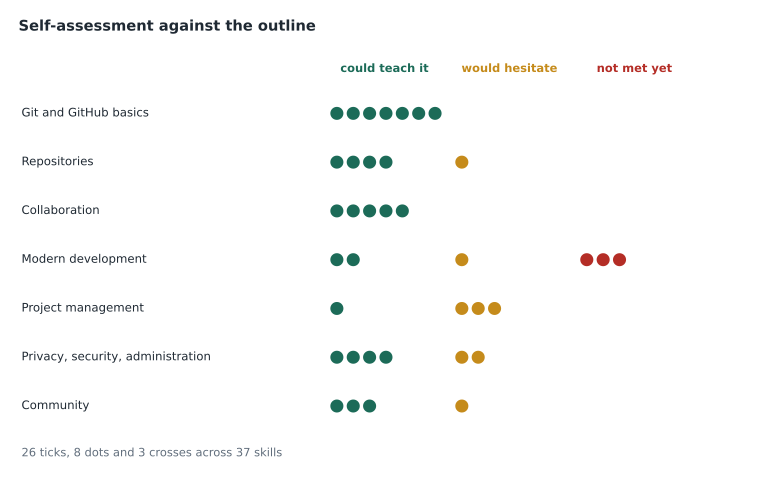
Priya asked Owen to go through the outline line by line and mark each skill with one of three symbols: a tick for "I could teach it", a dot for "I recognize it but would hesitate", and a cross for "I have not met this". It took twenty minutes and produced a useful map. Most of Git and GitHub basics and almost all of collaboration were ticks. Repositories and privacy, security and administration were mostly ticks with a few dots, such as repository insights and Enterprise Managed Users. Modern development had three crosses: dev container customization, Copilot agents, and the differences between Copilot plans. Project management had dots on project insights and built-in workflows.
Worked problem
Counting the gaps
Owen's self-assessment covers 37 outline skills: 26 ticks, 8 dots and 3 crosses. What share of the outline does he already know well, and how many skills need work?
Show solution
- Skills needing work: 8 + 3 = 11.
- Known well: 26 of 37.
- \[\frac{26}{37} \approx 0.70\]
- So about 70 in 100 of the outline is secure, and 11 skills need study.
Answer: About 70 in 100 of the outline is secure; 11 skills, about 30 in 100, need work.
A self-assessment is a starting point, not a measurement. People tend to overrate topics they have used often and underrate ones they learned recently. That is why lesson 2 adds an outside check, Microsoft's free practice assessment, and why Owen kept an error log from the first practice question onwards.
Study sources that match the exam
The study guide links to free resources, and Owen listed the ones he would use. The Microsoft Learn learning path for GitHub Foundations follows the outline closely. GitHub Docs explains each feature authoritatively and is the place to settle any disagreement between sources. The practice assessment on the certification page gives sample questions in the exam's style, with explanations and links. Microsoft's exam sandbox shows the exam interface so the format holds no surprises. Third-party courses and question banks vary in quality and can be out of date, especially after the January 2026 revision, so Owen decided to use only official sources for this sprint, plus his own notes from the two earlier courses.
| Source | Best for | Caution |
|---|---|---|
| Study guide and skills outline | Knowing exactly what is tested | Check the outline date |
| Microsoft Learn path | Structured review of each area | Modules can lag behind new features |
| GitHub Docs | Accurate detail on any feature | Covers far more than the exam |
| Practice assessment | Question style and finding gaps | A small sample, not the real exam |
| Exam sandbox | Learning the interface | Contains no real content |
| Course notes | Owen's own examples from Tidewater | Written before the January 2026 outline in places |
Setting a target
The pass mark is 700 on a scale that runs to 1,000. Scores are scaled, so 700 is not 70 correct answers out of 100, and questions can be worth different amounts. Owen asked what score he should aim for in practice. Priya's advice was to aim for a comfortable margin rather than for the pass mark: consistently answering about 80 in 100 practice questions correctly, across every area, before the exam. A margin absorbs a bad day, an unlucky mix of questions, and the difference between practice and real questions. More important than the overall figure is that no area is far below the others, because a weak area that carries 13 or 14 in 100 of the exam can sink a strong performance elsewhere.
Common mistakes
MistakeStudying from material written before the January 2026 outline.
InsteadCheck the date of the skills outline and use sources that match it.
MistakeTreating the weights as exact percentages of the exam.
InsteadRead them as ranges; use the midpoints as working figures.
MistakeMemorizing interface steps and button locations.
InsteadLearn what each feature is for and how it differs from similar features.
MistakeAiming for exactly the pass mark in practice.
InsteadAim for a margin, about 80 in 100 in every area.
Summary and key terms
- GH-900, GitHub Foundations, is a beginner exam for anyone who uses GitHub, developer or not, and it does not need renewing.
- The January 2026 skills outline has seven areas; Git and GitHub basics carries 25 to 30 in 100 and the others 5 to 15 each.
- Weights are ranges; their midpoints, scaled to 100, give about 30 for basics, 13.5 for each middle area and 8 for the two smallest.
- Questions test recognition and judgement: what a feature is for, how it differs from a similar one, and which fits a situation.
- A tick, dot and cross self-assessment against the outline turns into a study list.
- Official sources, the study guide, Microsoft Learn, GitHub Docs, the practice assessment and the sandbox, match the exam best.
- Skills outline
- The published list of what an exam can test, grouped into weighted areas.
- Study guide
- Microsoft's page for an exam with its skills outline and links to resources.
- Weight
- The range of the exam, in parts in 100, drawn from an area.
- Generally available
- Released to everyone and fully supported, as opposed to in preview.
- Practice assessment
- Microsoft's free set of sample questions in the exam's style.
- Scaled score
- A score converted to a common scale, here up to 1,000, with 700 to pass.
Practice problems
Work each problem on paper first, then reveal the answer to check.
Which area of GH-900 carries the most weight?
Show answer
Git and GitHub basics, at 25 to 30 in 100.
Why are the weights given as ranges?
Show answer
Each exam form draws from a larger pool, so the share of each area varies a little.
What should you check before trusting a study resource for GH-900?
Show answer
That it matches the current skills outline, revised in January 2026.
Lesson quiz · 5 questions
Score 60% or more to complete this lesson.
Create a free account to save your progress, take quizzes and earn a certificate.