
MSBA-160 · Lesson 8 of 12 · 22 min
GitHub Projects
▶ Video coming soon A video version of this lesson is on the way.
By late January Tidewater had issues in three repositories: corrections in trail-notes, website work in trailcheck and format changes in the public trail-report repository. Grace's question at the eighth session, on January 25, was simple: "Where do I see everything that has to happen before the spring guide ships, in one place, with dates?" The answer was GitHub Projects, a planning tool that pulls issues and pull requests from any number of repositories into one flexible view, with fields and layouts the team designs for itself.
What a project is
A project in GitHub Projects is an adaptable spreadsheet, board and roadmap that stays in step with the issues and pull requests in it. A project belongs to an organization or to a personal account, not to a single repository, so it can hold items from many repositories. When an issue in a project changes, for example when it is closed or relabelled, the project shows the change immediately, and changing an item's fields in the project updates the issue. Projects can also hold draft issues, quick notes that live only in the project until someone converts them into real issues in a chosen repository.
Older GitHub documentation mentions "classic" projects, which were simple boards attached to repositories. GitHub retired them in 2024 and moved existing boards to the current Projects experience, so the exam and this course describe only the current version.
Creating a project and adding items
Rosa created an organization project called Spring 2027 release, starting from a blank project; GitHub also offers templates such as a team planning board, a feature release plan and a bug tracker. The project was linked to the three repositories so it appeared on each repository's Projects tab. Items can be added by pasting an issue or pull request address, by typing # in the project and searching, by choosing the project from an issue's sidebar, in bulk from a repository, or automatically with a workflow, as described below.
Fields
Every item in a project has fields. Some come from the issue or pull request itself: title, assignees, labels, milestone, repository, linked pull requests and reviewers. Others are custom fields that exist only in the project, which is what makes Projects flexible. The Status field, a single-select field with options such as Todo, In progress and Done, is created automatically. Teams add others to suit their work.
| Custom field type | Holds | Spring 2027 release example |
|---|---|---|
| Single select | One choice from a list | Status; Work type (correction, new text, website) |
| Text | Free notes | Source checked by |
| Number | A count or estimate | Estimated hours |
| Date | A calendar date | Target date |
| Iteration | A repeating block of time | Two-week cycles starting February 1 |
An iteration field divides time into repeating blocks, such as two-week cycles, and lets the team plan which items belong to the current, next or a later iteration. GitHub can add breaks between iterations for holidays. Owen set two-week iterations starting Monday, February 1, 2027, so the cycles would end on February 14 and 28, March 14 and 28, and April 11.
Worked problem
Counting iterations
The spring guide must be at the printer by Friday, April 9, 2027. Iterations are two weeks long, starting Monday, February 1. How many full iterations fit before the printer date, and when does the last full one end?
Show solution
- Each iteration lasts 14 days, so iterations start on February 1, February 15, March 1, March 15 and March 29.
- The iteration starting March 29 would end on April 11, which is after April 9, so it is not a full iteration before the printer date.
- The iteration starting March 15 ends on Sunday, March 28.
- Counting February 1, February 15, March 1 and March 15 gives 4 full iterations.
Answer: Four full iterations fit, and the last ends on March 28. The final week and a half before April 9 becomes a buffer for proofs.
Layouts and views
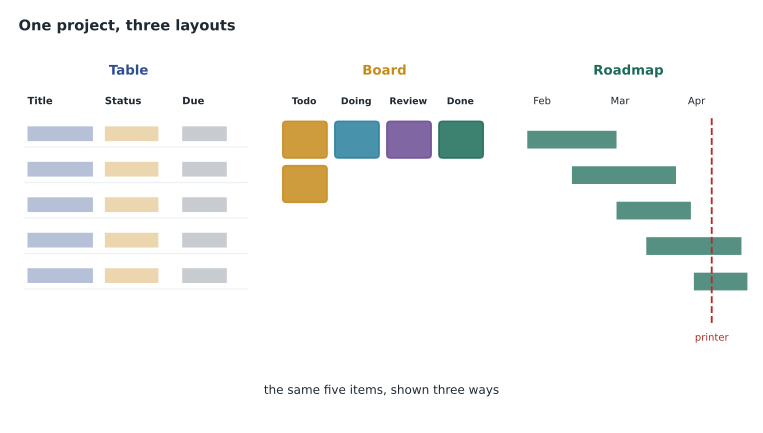
A project can show its items in three layouts. The table layout is a spreadsheet with one row per item and a column per field, good for reviewing and editing many items quickly. The board layout shows cards in columns, usually one per Status option, and dragging a card to another column changes its status, which suits daily stand-ups. The roadmap layout places items on a timeline using a date or iteration field, which suits planning and showing stakeholders what will happen when.
A view is a saved combination of a layout with particular filters, sorting, grouping and visible fields. A project can have many views, shown as tabs, and each can be shared by link. Grace had a roadmap view of everything in the release; Owen had a board view filtered to assignee:@me; Priya had a table view grouped by repository and sorted by target date. Views can group by a field, such as grouping the table by Work type, slice by a field, which adds a side panel to switch quickly between values such as each assignee, and show sums of number fields, such as the total estimated hours in each group.
| Layout | Best for | Who at Tidewater |
|---|---|---|
| Table | Editing fields on many items; sorting and grouping | Priya planning the website work |
| Board | Moving work through stages day to day | Owen and the editors |
| Roadmap | Seeing work against dates and iterations | Grace reporting to the owners |
Filtering
Project views use the same kind of filter language as issue search. assignee:@me shows your items; status:"In progress" shows items in that status; label:safety filters by label; repo:tidewater-guides/trailcheck limits to one repository; iteration:@current shows the current iteration; and is:open hides closed items. Filters combine, and a minus sign excludes. A view saves its filter, so each person can keep the view that answers their own daily question.
Built-in workflows and automation
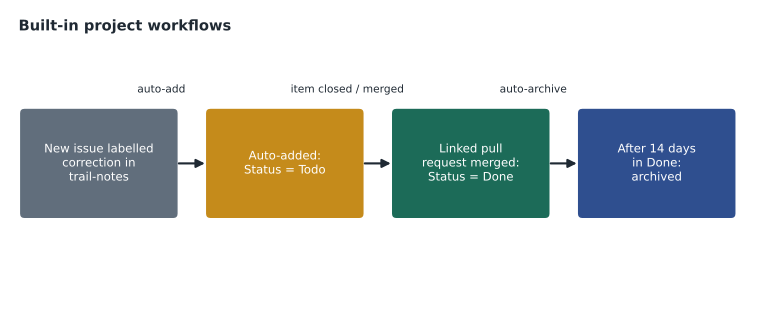
Projects include built-in workflows that keep the project tidy without anyone remembering to do it. Common ones set an item's Status to Done when its issue is closed or its pull request is merged, set Status to Todo when an item is added, and auto-add new issues and pull requests from a linked repository that match a filter, such as every new issue labelled correction. Another can auto-archive items that have been done for a while, so the board stays readable. Workflows are switched on and configured in the project's settings. For anything more complex, GitHub Actions and the GraphQL API can update projects, which the GitHub Actions course covers.
| Built-in workflow | What it does in Spring 2027 release |
|---|---|
| Item added to project | Sets Status to Todo |
| Item closed | Sets Status to Done |
| Pull request merged | Sets Status to Done |
| Auto-add to project | Adds every new trail-notes issue labelled correction |
| Auto-archive items | Archives items that have been Done for 14 days |
Insights and status updates
Project insights turn fields into charts. The current chart shows items grouped by a field right now, such as items per status or per assignee, and a historical chart shows how a count changed over time, such as open and completed items across the release. Charts are configured with the same filters as views. Status updates let a project owner post a short dated summary with an overall status such as on track, at risk or off track, a start date and a target date, so anyone visiting the project sees the latest state without reading every item.
Worked problem
Reading a project chart
On February 26, the insights chart for Spring 2027 release, grouped by Status, shows Todo 18, In progress 9, In review 5 and Done 32. What fraction of the items is done, and what does the In review number suggest?
Show solution
- The total is 18 + 9 + 5 + 32 = 64 items.
- The done fraction is 32 divided by 64, which is 0.5, so half the items are done.
- Five items are waiting in review. If that number keeps growing while In progress shrinks, reviewers are becoming the bottleneck.
- Grace can filter the board to status:"In review" to see which items need her attention.
Answer: Half the 64 items are done. The 5 items in review are worth watching, because review is where the guidebook work tends to queue.
Setting up the release project, step by step
Priya and Owen built the Spring 2027 release project together in about forty minutes, and Owen wrote the steps down so the editors could repeat them for the autumn guide. First, create the project in the organization and give it a clear name and a short description explaining what it tracks. Second, add the custom fields the team actually needs, and no more: Work type, Target date, Estimated hours and a two-week Iteration. Third, turn on the built-in workflows for added, closed and merged items, and an auto-add workflow for each repository. Fourth, add the existing items, by pasting the milestone's issues and filtering each repository for open work. Fifth, create the views, one per person or question, and name each view after what it shows rather than who uses it, such as My board, Release roadmap and Website by date. Finally, set the project's visibility and roles, and write a short README for the project, which appears on its overview, explaining how items get in and who decides priorities.
Once a project works well, it can be saved as a project template for the organization, so the next release starts with the same fields, views and workflows already in place. A project can also be copied, and projects can be closed when finished, which keeps them readable but removes them from active lists. Projects are available on GitHub Mobile, where people can view items and change fields, and through the gh command-line tool and the API for scripted updates.
Worked problem
Estimating the load in one iteration
Owen's board for the iteration starting February 15 holds 7 items with Estimated hours of 2, 3, 5, 1, 8, 4 and 3. The editors have about 30 hours available in that iteration. Does the plan fit, and what does the view show?
Show solution
- Adding the estimates gives 2 + 3 + 5 + 1 + 8 + 4 + 3 = 26 hours.
- A view grouped by iteration with the sum turned on for Estimated hours would show 26 for that iteration.
- 26 hours is less than the 30 available, leaving 4 hours of slack for surprises such as reader corrections.
- If an urgent safety correction of more than 4 hours arrives, something should move to the next iteration.
Answer: The plan fits: 26 of about 30 hours, with 4 hours spare. The field sum in the view shows the total without a calculator.
Projects, milestones and labels together
Owen asked why the team needed milestones from lesson 7 if Projects could hold dates. Priya explained that they work at different levels. Labels describe what an item is. A milestone belongs to one repository and groups the items for one release of that repository, with a simple progress bar. A project spans repositories and adds custom fields, multiple views, automation and charts. Tidewater used all three: the correction label for what an item is, a milestone in trail-notes for the book edition, and the Spring 2027 release project to see the book, the website and the trail-report format together.
| Tool | Scope | Strength |
|---|---|---|
| Labels | One repository (or set organization-wide by default) | Describe the kind of item |
| Milestones | One repository | Group items for a release and show progress |
| Projects | Any number of repositories | Custom fields, views, automation and charts |
Permissions and visibility
A project has its own visibility, public or private, separate from the repositories whose items it shows. People can only see items from repositories they have access to, so a public project never reveals private issues to the public; those items appear as hidden. Organization owners and project admins can give people or teams roles on a project: read, write or admin. Rosa made the project private, gave the editors and the web team write access, and gave the company owners read access so they could follow progress.
Common mistakes
MistakeThinking a project belongs to one repository.
InsteadProjects belong to an organization or user and can hold items from many repositories.
MistakeMoving cards by hand when an issue is closed.
InsteadTurn on the built-in workflow that sets Status to Done on close.
MistakeMaking one view try to serve everyone.
InsteadCreate several saved views, each answering one person's question.
MistakeAssuming a public project exposes private issues.
InsteadViewers see only items from repositories they can access.
Summary and key terms
- GitHub Projects is a table, board and roadmap that stays in step with issues and pull requests from many repositories.
- Custom fields include single select, text, number, date and iteration.
- Views save a layout with filters, sorting, grouping, slicing and field sums.
- Built-in workflows set status automatically, auto-add matching items and auto-archive finished ones.
- Insights charts show current and historical counts; status updates summarize progress.
- Labels describe items, milestones group a repository's release, and projects plan across repositories.
- Project
- A planning tool that holds issues, pull requests and drafts from many repositories.
- Draft issue
- An item that exists only in a project until converted into an issue.
- Custom field
- A field defined in the project, such as a date or iteration.
- Iteration field
- A field that divides time into repeating blocks for planning.
- View
- A saved layout with filters, sorting and grouping.
- Built-in workflow
- Automation in a project that updates items when events happen.
- Insights
- Charts that summarize project items by field, now or over time.
Practice problems
Work each problem on paper first, then reveal the answer to check.
Which layout places items on a timeline?
Show answer
The roadmap layout.
Which built-in workflow adds new matching issues from a repository to a project?
Show answer
Auto-add to project.
What is a draft issue?
Show answer
An item that lives only in the project until it is converted into an issue in a repository.
Lesson quiz · 5 questions
Score 60% or more to complete this lesson.
Create a free account to save your progress, take quizzes and earn a certificate.