
MSBA-160 · Lesson 1 of 12 · 22 min
Why version control
▶ Video coming soon A video version of this lesson is on the way.
On Monday, November 16, 2026, Priya Nair booked the boardroom at Tidewater Trail Guides in Moncton for the first of what she called the Git lunches. Tidewater is a small employee-owned publisher of hiking and paddling guidebooks, and it also runs TrailCheck, a free website where hikers can see which trails are muddy, washed out or closed. Priya is one of three people on the technical team. For years the guidebook text had lived in a shared drive, in files with names such as coastal-hikes-FINAL-v3-Grace-edits.docx, and the website had lived on Priya's laptop and one server. That had worked until October, when two editors overwrote each other's changes to the same chapter and nobody could say which version had gone to the printer. The owners agreed that the guidebook text and the website would both move into Git and GitHub over the winter, and Priya was asked to teach everyone who would touch them.
Owen Tremblay, a guidebook editor who had never written a line of code, was the first to arrive. He was moving into a new content operations role and had decided to sit the GitHub Foundations exam, GH-900, online in March 2027. "I need to understand this well enough to explain it to the authors," he said, "and I would like the certificate to show I am not just guessing." Priya told him the course would follow the same order as the questions people actually ask: why bother, how Git records work, how teams share it on GitHub, and how a real project moves from a first commit to a published release.
What a version control system does
A version control system records changes to a set of files over time, so that you can see what changed, who changed it, when and why, and so that you can go back to any earlier state. It is sometimes called source control, because it grew up around program source code, but it works for any files that people edit: guidebook chapters written in Markdown, website pages, configuration files, data tables saved as text, and documentation of every kind.
Without version control, people usually invent their own system. They copy a folder and add a date to its name, email attachments back and forth, or keep a file called notes-old. Each of these is a weak version control system. It depends on everyone following the same habits, it fills the disk with near-duplicates, and it cannot answer the most useful questions: what exactly changed between these two copies, who made that change, and what was the reason.
A real version control system answers those questions automatically. It keeps a history of snapshots of the project. Each snapshot records the full state of the tracked files at one moment, together with the name of the person who made it, the time and a short message explaining the change. Because the system knows every snapshot, it can show the exact lines that differ between any two of them, restore a file that was deleted by mistake, and combine work that several people did at the same time.
| Question people ask | Shared drive with copies | Version control |
|---|---|---|
| What changed since last week? | Open both files and compare by eye | Show the exact lines added and removed |
| Who made this change, and why? | Ask around, check email | Each change records an author, a time and a message |
| Can we get back the version from the printer? | Only if someone saved a copy | Return to any recorded snapshot |
| Can two people work on the same chapter at once? | Risky: the last save wins | Work separately, then combine the changes |
| Is this the latest version? | Guess from file names and dates | One shared history shows the current state |
The problems it solves
Priya listed four problems that version control solves, and asked Owen to match each to something that had gone wrong at Tidewater.
Lost work. When two people save over the same file, one person's changes disappear. A version control system never silently overwrites recorded work. If two people change the same lines, it stops and asks a person to decide, which is called a conflict. Owen remembered the October overwrite: an author's new section on the Fundy Trail had vanished because an editor saved an older copy over it.
No trail of decisions. Editors need to know why a sentence changed, especially in a guidebook where a wrong distance or a missing warning about tides can put readers at risk. Every recorded change carries a message, and on GitHub it can be linked to the discussion that led to it. Grace Achterberg, the managing editor, cared about this more than anything else. "When a reader writes to say a route description is wrong, I want to see who changed it and what they were looking at."
Fear of experimenting. When there is only one copy, people are reluctant to try a big rewrite in case they cannot get back. Version control makes it cheap to try something in a separate line of work, called a branch, and throw it away if it does not work.
Working together. Several authors, editors and the web team all touch the same material. Version control lets each person work on their own copy and combine the results in a controlled way, with a review step before changes reach the main version.
Centralized and distributed systems
There are two broad designs. In a centralized system, such as the older Subversion, there is one central server that holds the history. People check out a working copy, make changes and send them back to the server. If the server is unreachable, most operations stop, and the history exists in only one place.
In a distributed system, such as Git, every person who works on the project has a complete copy of the history on their own computer. Most operations, such as recording a change, viewing history or creating a branch, happen locally and quickly, with no network needed. People share their changes by sending and receiving them between copies. In practice, teams still choose one shared copy, usually hosted on a service such as GitHub, as the place everyone agrees is the official version, but every laptop also holds a full backup of the project's history.
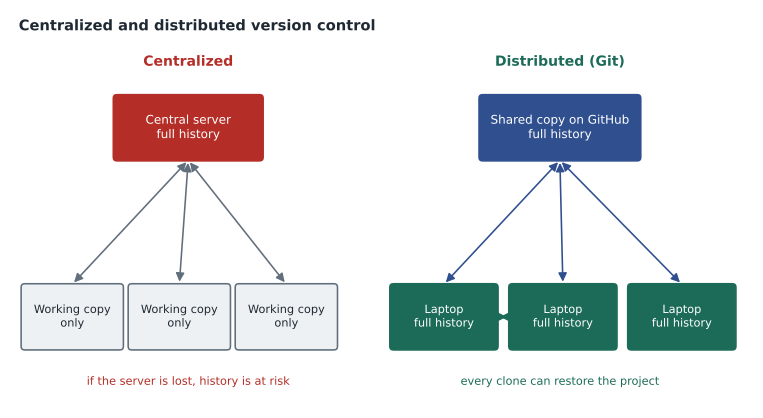
| Feature | Centralized (for example Subversion) | Distributed (Git) |
|---|---|---|
| Where the full history lives | On the central server only | In every copy, plus the shared hosted copy |
| Recording a change without a network | Usually not possible | Yes, changes are recorded locally first |
| Speed of viewing history | Depends on the server connection | Fast, because the history is local |
| Effect of losing the server | History may be lost | Any full copy can restore it |
| Branching | Possible, but often heavier | Cheap and routine |
Git and GitHub are not the same thing
The GH-900 exam expects you to keep a clear line between Git and GitHub, and Owen admitted that until that morning he had thought they were one product.
Git is free, open-source version control software. It was created in 2005 by Linus Torvalds for the development of the Linux kernel, and it is now maintained by a community of volunteers. Git runs on your own computer. It keeps the history of a project in a hidden folder inside the project, and you use it through commands typed in a terminal or through a graphical program. Git works perfectly well without GitHub or any internet connection.
GitHub is a cloud platform, owned by Microsoft since 2018, that hosts Git repositories and adds the tools people need to work together around them. On top of storing copies of repositories, GitHub provides a website for browsing code and history, pull requests for proposing and reviewing changes, issues and discussions for planning and conversation, GitHub Projects for tracking work, GitHub Actions for automation, GitHub Pages for publishing websites, GitHub Codespaces for cloud development environments, GitHub Copilot as an AI coding assistant, and security and administration features for organizations.
Other services also host Git repositories, such as GitLab and Bitbucket, and a team can move a Git repository from one to another because the history itself belongs to Git. The collaboration features, such as issues and pull request discussions, belong to the hosting platform.
| Git | GitHub | |
|---|---|---|
| What it is | Version control software | A hosting and collaboration platform |
| Where it runs | On your own computer | In the cloud, used through a browser, apps and Git |
| Cost | Free and open source | Free plan plus paid plans for teams and enterprises |
| Works offline | Yes | No, it is an online service |
| Main jobs | Record snapshots, branch, merge, track history | Host repositories, review changes, plan work, automate, publish |
A first look at the vocabulary
Priya wrote the words the course would use on the whiteboard. Each one gets its own lesson later, but she wanted Owen to hear them together once.
A repository, often shortened to repo, is a project folder that Git tracks, together with its full history. A commit is one recorded snapshot, with an author, a time, a message and a unique identifier. A branch is a named line of development that lets work go on in parallel. Merging combines the changes from one branch into another. A remote is another copy of the repository, such as the one on GitHub, that you send changes to and receive changes from. A clone is a full copy of a repository, including its history, made from a remote. A pull request is GitHub's way of proposing that the changes on one branch be merged into another, with a place for review and discussion.
What belongs under version control
Version control works best with files that are mostly text, because Git can show line-by-line differences and combine changes in text files. Program code, Markdown documents, website pages, configuration files and data saved as CSV or JSON all suit it well. Tidewater's guidebook chapters were being converted from word-processor files to Markdown, a plain-text format with simple marks for headings and lists, precisely so that changes would be visible line by line.
Large binary files, such as high-resolution photographs, video or design files, can be stored in Git, but Git cannot show what changed inside them, and many large versions make the repository slow to copy. Teams often keep those in a separate store or use an extension such as Git Large File Storage. Some things should never go into a repository at all: passwords, private keys, access tokens and other secrets, personal information that does not need to be there, and files that a program generates automatically and can rebuild, such as temporary build output.
| Usually tracked | Handle with care | Keep out |
|---|---|---|
| Source code | Large photos and video | Passwords and access tokens |
| Markdown chapters and documentation | Design files and other binaries | Private keys and certificates |
| Website pages and style sheets | Big data exports | Personal information not needed by the project |
| Small text data files (CSV, JSON) | Files that change on every build | Generated output that can be rebuilt |
Worked problem
Choosing what Tidewater should track
The web team listed the contents of the TrailCheck folder: the website pages and style sheets, a CSV file of trail reports, 4 gigabytes of original trail photos, a text file holding the password for the mapping service, and a folder of pages that a build tool generates from the source every time the site is published. Which should go into the Git repository?
Show solution
- The website pages, style sheets and the CSV of trail reports are text files that people edit, so they belong in the repository.
- The 4 gigabytes of original photos are large binary files. Put resized web images in the repository if the site needs them, and keep the originals in the photo archive or in large file storage.
- The mapping password is a secret. It must stay out of the repository and be stored in the hosting platform's secret store or a password manager.
- The generated pages can be rebuilt from the source, so they are left out and listed in an ignore file, which lesson 5 covers.
Answer: Track the pages, style sheets and trail report data; keep originals of the photos elsewhere; never commit the password; ignore the generated pages.
How Git fits with the tools people already use
Owen asked whether everyone would have to learn terminal commands. Priya's answer was no. People can use Git in several ways, and the exam expects you to know when each one fits.
The command line. Typing git commands in a terminal gives full control and is how most documentation describes Git. Developers on the web team would use it daily. GitHub Desktop is a free graphical application for Windows and macOS that handles the common tasks, such as cloning, committing, branching, pushing and opening pull requests, with buttons instead of commands. It suits people who want to work with files on their own computer without learning the terminal. The GitHub website lets you edit files, commit, create branches and open pull requests entirely in a browser, which suits small text changes. GitHub Mobile is an app for phones and tablets that is useful for keeping up with notifications, reviewing and commenting on pull requests and issues, and merging approved work while away from a desk, but it is not meant for writing much content. Many code editors, such as Visual Studio Code, also have Git built in.
| Tool | Best for | Who at Tidewater |
|---|---|---|
| Command line | Every Git feature, scripting, troubleshooting | Priya and the web team |
| GitHub Desktop | Everyday local work without commands | Authors and editors working on chapters |
| GitHub website | Quick edits, reviews, issues and settings | Everyone |
| GitHub Mobile | Notifications, review comments, quick approvals on the go | Grace, reviewing while travelling to trailheads |
| Editor with Git built in | Writing and committing in one place | Developers and technical writers |
Where this course is going
The rest of the course follows the work at Tidewater over the winter. Lessons 2 and 3 cover Git itself: commits, history, branches and merging. Lessons 4 and 5 move to GitHub accounts, repositories and the standard files that every good repository has. Lessons 6 to 8 cover collaboration: pull requests and review, issues and discussions, and GitHub Projects. Lesson 9 covers forks and open source contribution. Lesson 10 covers Codespaces and the web editor, and lesson 11 gives a first look at GitHub Pages, GitHub Actions and GitHub Copilot. Lesson 12 is a case study that takes the spring guide and the new TrailCheck site from the first commit to a published release.
MSBA-161 continues with organizations, permissions, branch protection, community files and security features, and MSBA-169 reviews every domain of the GH-900 exam. Microsoft's study guide for GH-900, in its January 2026 version, divides the exam into seven areas, and the largest by far is Git and GitHub basics, at 25 to 30 parts in 100 of the questions. This course covers that area in depth.
Common mistakes
MistakeTreating Git and GitHub as the same product.
InsteadGit is version control software on your computer; GitHub is a cloud platform that hosts Git repositories and adds collaboration tools.
MistakeThinking version control is only for programmers.
InsteadAny text that people edit together, such as documentation or guidebook chapters, benefits from history and review.
MistakeAssuming the hosted copy is the only copy of the history.
InsteadIn Git every clone holds the full history, so a laptop can restore a lost repository.
MistakeCommitting passwords "just for now".
InsteadSecrets stay out of repositories entirely, because history keeps them even after the file is changed.
Summary and key terms
- A version control system records snapshots of files over time with an author, time and message for each change.
- It prevents lost work, keeps a trail of decisions, makes experiments safe and lets people work in parallel.
- Centralized systems keep history on one server; distributed systems such as Git give every copy the full history.
- Git is open-source version control software; GitHub is a Microsoft-owned cloud platform that hosts Git repositories and adds collaboration, automation and publishing tools.
- Text files suit version control best; large binaries need care; secrets never belong in a repository.
- People can use Git through the command line, GitHub Desktop, the GitHub website, GitHub Mobile or an editor with Git built in.
- Version control system
- Software that records changes to files over time so earlier states can be recovered and compared.
- Distributed version control
- A design in which every copy of a repository holds the complete history.
- Git
- Free, open-source distributed version control software.
- GitHub
- A cloud platform for hosting Git repositories and collaborating around them.
- Repository
- A project folder tracked by Git, together with its history.
- Commit
- A recorded snapshot of the tracked files, with author, time and message.
- Conflict
- A situation where two changes affect the same lines and a person must decide the result.
Practice problems
Work each problem on paper first, then reveal the answer to check.
Name two questions a version control system can answer that a folder of dated copies cannot answer reliably.
Show answer
Exactly which lines changed between two versions, and who made a change and why.
Does Git need an internet connection to record a commit?
Show answer
No. Commits are recorded in the local repository; a network is needed only to share them.
Which tool would suit an editor who reviews pull requests while travelling?
Show answer
GitHub Mobile, which handles notifications, review comments and approvals.
Lesson quiz · 5 questions
Score 60% or more to complete this lesson.
Create a free account to save your progress, take quizzes and earn a certificate.