
MSBA-160 · Lesson 6 of 12 · 21 min
Pull requests and code review
▶ Video coming soon A video version of this lesson is on the way.
The sixth Git lunch fell on January 11, 2027, after the holiday break. Over the break the team had used GitHub for real, and Grace had a complaint. "I got forty notification emails and I still could not tell which changes were waiting for me," she said. Priya took that as the lesson's starting point. Most of the collaboration on GitHub happens in pull requests, and once people understand how a pull request moves from opened to merged, the notifications start to make sense.
What a pull request is
A pull request, usually shortened to PR, is a proposal to merge the changes on one branch into another branch, together with a page for discussing and reviewing them. The branch with the changes is called the head or compare branch; the branch that will receive them, usually main, is the base branch. The name comes from asking the maintainers to pull your changes in. A pull request is a GitHub feature, not a Git one: Git can merge branches on its own, but it has no place for comments, approvals or automated checks.
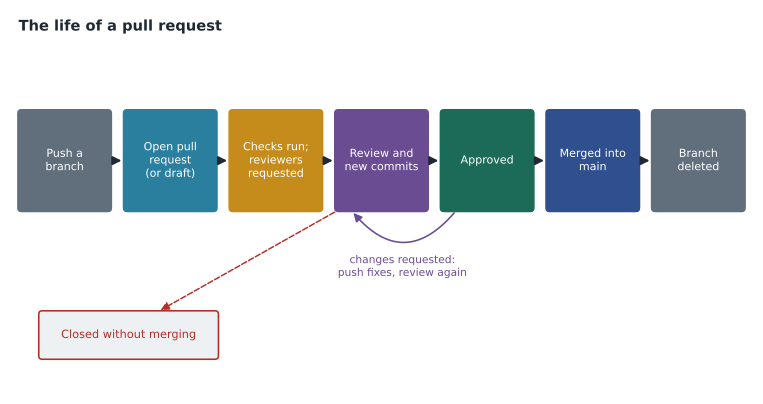
Opening a pull request does not merge anything. It creates a conversation around the changes. Everyone with access can read the description, see every changed line, leave comments on particular lines, suggest edits, and approve or ask for changes. Automated checks, such as tests or a spelling check, can run on every update. Only when the people responsible are satisfied is the pull request merged, at which point the base branch gains the changes and the pull request is closed. A pull request can also be closed without merging, which keeps the discussion on record.
Opening a pull request
After Owen pushed his branch fix-ferry-table, GitHub showed a yellow banner on the repository page offering to compare and open a pull request. He could also have used the Pull requests tab, the New pull request button, GitHub Desktop's Create Pull Request button or GitHub Mobile. On the form he chose the base branch (main) and the compare branch (his), and wrote a title and a description.
A good description saves the reviewer time. It says what changed and why, how it was checked, and anything the reviewer should look at closely. If the pull request finishes an issue, the description can say so with a closing keyword such as Closes #31, Fixes #31 or Resolves #31; when the pull request is merged into the default branch, GitHub closes issue 31 automatically. Repositories can provide a pull request template, a Markdown file that pre-fills the description box with headings and a checklist.
## What changed
Updated the Deer Island ferry timetable in chapter 2 to the winter 2027 schedule.

## Why
The operator changed departure times on January 4. Reader email in #31.

## How I checked
Compared every row with the operator's published timetable.

Closes #31
On the form Owen also requested reviewers, assigned himself, added a label and linked the pull request to the guidebook project board. If a pull request is not ready for review yet, it can be opened as a draft pull request, which shows the work to others and can run checks but cannot be merged until it is marked ready for review. Priya encouraged drafts for long pieces of work, such as Owen's chapter 4 rewrite, so that people could see progress and comment early.
| Part of the pull request form | What it is for |
|---|---|
| Base and compare branches | Which branch receives the changes and which branch has them |
| Title and description | What changed, why and how it was checked |
| Reviewers | People or teams asked to review; code owners are added automatically |
| Assignees | Who is responsible for getting the pull request finished |
| Labels | Categories such as bug, content or website |
| Projects and milestone | Where the work is tracked and which release it belongs to |
| Draft option | Share early work that cannot be merged yet |
The tabs of a pull request
Every pull request page has four main tabs. Conversation holds the description, comments, review summaries, linked issues, the timeline of events and, at the bottom, the merge box with the status of checks and reviews. Commits lists the commits on the branch. Checks shows automated workflows that ran, such as tests from GitHub Actions. Files changed shows the diff of every changed file, side by side or in one column, and is where reviewers do most of their work.
Reviewing a pull request
A review is a structured response to a pull request. On the Files changed tab, a reviewer reads the diff and can click any line to leave a comment on it. For small fixes, a reviewer can write a suggested change: a proposed replacement for the line that the author can accept with one click, which creates a commit. Comments are collected as a pending review, and when the reviewer has finished they submit the review with one of three outcomes.
| Review outcome | Meaning | Effect |
|---|---|---|
| Comment | General feedback without a decision | Does not approve or block |
| Approve | The reviewer is satisfied the changes can merge | Counts toward any required approvals |
| Request changes | The reviewer wants changes before merging | Can block merging until resolved or dismissed |
The author responds by replying to comments, pushing new commits to the same branch, which update the pull request automatically, and marking conversations as resolved. Reviewers can then re-review. Grace liked the suggested changes feature most: she could fix a misplaced comma in a chapter without asking Owen to do it, and the history still recorded who made each change.
Worked problem
Reading the merge box
Owen's pull request has these statuses at the bottom of the Conversation tab: one required check passed; Priya commented; Grace requested changes on the ferry times; no conflicts with main. The repository requires one approval. Can it be merged, and what must happen first?
Show solution
- Checks have passed and there are no conflicts, so those requirements are met.
- Priya's review was a comment, which neither approves nor blocks.
- Grace requested changes, so there is no approval yet, and her request blocks the merge.
- Owen must fix the ferry times, push the new commit, and ask Grace to review again. Her approval would give the one required approval.
Answer: Not yet. Owen pushes a fix, Grace re-reviews and approves, and then the merge button becomes available.
What makes a good review
Priya gave the team a short list. Review the change, not the person. Keep pull requests small, because a reviewer can check two hundred lines carefully but will skim two thousand. Start with the description to understand the goal, then read the diff. Ask questions rather than issue orders, and say clearly which comments are required and which are optional. Use suggestions for small wording fixes. Approve when the change is good enough, not when it is perfect. For authors: reply to every comment, explain your reasoning when you disagree, and thank people. For the guidebook, Grace added one rule of her own: any change to distances, times, tide information or warnings needs a source in the description.
| Helpful review comment | Less helpful version |
|---|---|
| The operator's site says 7:15, not 7:30. Could you check? | Wrong. |
| Optional: this sentence might read better split in two. | Rewrite this. |
| Suggested change: "Allow 50 minutes for the return." | This time is off. |
| Could we add a note that the trail floods at high tide? | Missing stuff. |
Merging and cleaning up
When the requirements are met, someone with write access merges the pull request using one of the three methods from lesson 3: a merge commit, squash and merge, or rebase and merge. Repository settings decide which methods are allowed. Tidewater chose squash and merge for trail-notes, so that each pull request becomes one tidy commit on main with the pull request number in its message. After merging, GitHub offers a button to delete the branch, and repositories can delete merged branches automatically.
Two more features help busy teams. Auto-merge lets the author ask GitHub to merge the pull request automatically as soon as all requirements are met, which saves waiting for the last check. A merge queue, used by larger teams, lines up approved pull requests and tests each one against the latest main before merging, so that two changes that each passed on their own do not break main together.
Mistakes still get through review sometimes. A merged pull request page has a Revert button, which creates a new branch and a new pull request that reverses the merged changes, using git revert behind the scenes. The revert goes through the same review as any other change, and the history records both the original merge and its reversal, so nobody loses track of what happened. In December a wrong closure notice was merged into TrailCheck, and Priya reverted it from her phone in under two minutes.
Protecting main
Pull requests are only a safeguard if people cannot bypass them by pushing straight to main. Branch protection rules and rulesets, set in the repository or organization settings, can require pull requests before merging, require a number of approvals, require code owner review, require checks to pass, block force pushes and prevent the branch from being deleted. Rosa set rules on main in trail-notes: a pull request is required, one approval is required, the editors' code owner review is required for chapters, and the spelling check must pass. MSBA-161 lesson 3 covers rules in detail.
Reviewing away from the desk
Grace spends several days a month at trailheads checking routes, so she does many reviews on GitHub Mobile. The app shows her review requests in its inbox, displays the diff of each changed file, and lets her comment on a line, approve or request changes, and merge an approved pull request when the checks are green. What it does not do well is long reading, so for a full chapter she waits until she is back at a desk. Owen, who prefers to see the files on his own computer, uses GitHub Desktop: it shows the pull requests for the current repository and can check out a pull request's branch with one click, so he can preview a chapter exactly as it will be merged before approving it.
Reviews also happen through other tools. Visual Studio Code, with the GitHub Pull Requests extension, lets developers review and comment without leaving the editor, and the GitHub command-line tool, gh, can list, check out and review pull requests from a terminal. Whatever the tool, the review is stored on GitHub in the same place, so everyone sees the same conversation.
Worked problem
Writing the squash commit
Owen's pull request #34 has five commits: Update ferry table, fix typo, oops wrong row, Grace's suggestion, and final check. The repository uses squash and merge. What should the single commit on main look like?
Show solution
- Squash and merge combines all five commits into one new commit on main.
- GitHub proposes a message made from the pull request title and number, followed by the list of the original commit messages.
- The list of small fix-up messages adds noise, so Owen edits the body down to one useful sentence.
- He keeps the pull request number in the title so the commit links back to the full discussion.
Answer: One commit titled Update Deer Island ferry timetable for winter 2027 (#34), with a short body saying the times were checked against the operator's schedule.
Pull requests and notifications
Back to Grace's forty emails. GitHub sends a notification when you are asked to review, mentioned, assigned, or when something you are participating in or watching changes. The notifications inbox on the website, reached from the bell icon, groups them and lets you filter by reason, such as review requested or mentioned, mark them done, and save some for later. The Pull requests page also has filters, such as Review requests, which lists exactly the pull requests waiting for you. Grace switched her repository watch settings from all activity to participating and mentions, set email for review requests only, and used the Review requests filter each morning. The forty emails dropped to five.
Common mistakes
MistakeThinking that opening a pull request merges the change.
InsteadA pull request proposes a merge; it merges only when someone completes it.
MistakeOpening one huge pull request for weeks of work.
InsteadKeep pull requests small, and use drafts to share long work early.
MistakeCreating a new pull request to respond to review comments.
InsteadPush new commits to the same branch; the pull request updates.
MistakeWriting Closes 31 without the hash sign.
InsteadUse a closing keyword followed by #31 so GitHub links and closes the issue.
Summary and key terms
- A pull request proposes merging a head branch into a base branch, with a place for discussion, review and checks.
- Descriptions explain what, why and how it was checked; closing keywords such as Closes #31 close linked issues on merge.
- Draft pull requests share early work that cannot be merged yet.
- Reviewers comment on lines, suggest changes, and submit a review that comments, approves or requests changes.
- Merging uses a merge commit, squash or rebase; auto-merge and merge queues help busy teams.
- Branch protection and rulesets require pull requests, approvals and checks before changes reach main.
- Pull request
- A proposal to merge one branch into another, with discussion and review.
- Base branch
- The branch that receives the changes, usually main.
- Draft pull request
- A pull request marked as not ready for review, which cannot be merged.
- Suggested change
- A reviewer's proposed replacement for lines that the author can commit with one click.
- Closing keyword
- A word such as Closes or Fixes followed by an issue number that closes the issue on merge.
- Auto-merge
- A setting that merges a pull request automatically once all requirements are met.
- Branch protection rule
- A setting that enforces requirements, such as reviews and checks, on a branch.
Practice problems
Work each problem on paper first, then reveal the answer to check.
Which review outcome can block a merge?
Show answer
Request changes.
How does an author respond to review comments with new changes?
Show answer
By pushing new commits to the same branch, which updates the pull request.
Which tab of a pull request shows the diff of every changed file?
Show answer
Files changed.
Lesson quiz · 5 questions
Score 60% or more to complete this lesson.
Create a free account to save your progress, take quizzes and earn a certificate.