
MSBA-141 · Lesson 4 of 12 · 21 min
Number sequences and parameters
▶ Video coming soon A video version of this lesson is on the way.
In the old Cobalt Ridge system, purchase order numbers came from a counter in a table that Desmond reset by hand each January, and vendor invoice voucher numbers came from a paper log on a clerk's desk. Thandeka described one memorable audit in which the external auditors spent two days chasing a gap in the voucher numbers that turned out to be a page torn from the log. She wanted to know exactly how the new system would number things, and who could change it. Annelise opened the Number sequences page and said that this lesson, together with parameters, was where the system's behaviour was really set.
What a number sequence does
A number sequence generates readable, unique identifiers for master records, such as customer and vendor accounts, and for documents and transactions, such as purchase orders, sales orders, journals, vouchers and invoices. Every place in the application that needs an automatic identifier has a number sequence reference, a slot that must be connected to a number sequence before the feature works. If a reference has no sequence, users see an error such as a message that the number sequence is not set up, the moment they try to create a record. Many first-week support calls on a new project are exactly that.
Number sequences are maintained under Organization administration, Number sequences. Each sequence has a code, a name, a scope, a segment format, and settings for the smallest and largest numbers, the next number, whether it is continuous, whether it is manual, and whether users can change the generated number to a lower or higher value.
Scope
The scope says where a sequence applies. Shared sequences are used across all legal entities, which suits data that is shared, such as products or global address book parties. Company and legal entity scopes create a sequence that belongs to one company, which is the usual choice for documents and vouchers, so that CRCA and CRUS each number their own purchase orders. Operating unit scope creates a sequence for one operating unit, such as a department, and fiscal calendar period scope can restart numbering each period, which some countries require for certain documents. Each number sequence reference lists the scopes it supports, so not every option is available everywhere.
Segments and format
The format of the generated identifier is built from segments. A constant segment is fixed text, such as PO- or VINV. An alphanumeric segment is the counter itself, written with number signs, where each # is one digit; ###### allows up to 999,999. Scope segments insert the value of the scope, such as the company identifier, the operating unit or the fiscal period. The format line on the page shows the result as you build it.
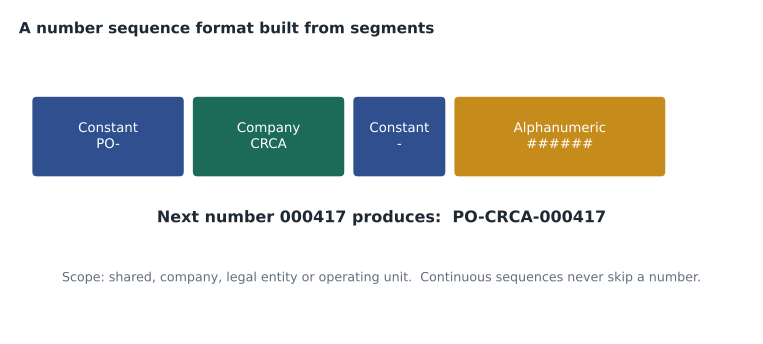
Including the company in the format is a matter of taste. It makes identifiers unique across the whole group, which helps when documents from several legal entities appear in one report or one email inbox, at the cost of longer numbers. Cobalt Ridge decided to include the company on purchase orders, sales orders and vendor invoices, which travel outside the company, and leave it off internal journals.
Worked problem
Sizing a sequence
CRCA expects about 9,000 purchase orders a year and wants a format that will not run out for at least 50 years. Is a four-digit alphanumeric segment enough? What about six digits?
Show solution
- Fifty years at 9,000 a year needs 9,000 x 50 = 450,000 numbers.
- Four digits allow at most 9,999 numbers, enough for about one year.
- Six digits allow up to 999,999, which is more than double the 450,000 needed.
Answer: Six digits. Four would run out in about a year; six covers more than a century at the expected volume.
Continuous and non-continuous sequences
A continuous number sequence never skips a number. If a user starts a document and abandons it, the number is returned to a status list and reused, and the system keeps track of numbers that are reserved but not yet used. This matters where law or policy forbids gaps, as with some tax invoices and vouchers in certain countries. Continuity has a cost: the system must lock and track numbers, which adds processing overhead and can slow high-volume processes. A non-continuous sequence simply hands out the next number, and an abandoned document leaves a gap.
Thandeka's instinct was to make everything continuous, after the torn-page audit. Annelise explained the trade-off and suggested a rule: continuous only where a regulation or a documented audit requirement demands it, and non-continuous everywhere else, especially for high-volume records such as inventory transactions. For continuous sequences, a cleanup process can be run to release numbers that were reserved by sessions that ended without using them.
Preallocation is a performance setting for non-continuous sequences: the server reserves a block of numbers in memory, say ten at a time, so it does not have to go to the database for each one. Preallocation can produce gaps and numbers out of order across servers, so it is unsuitable where strict order matters.
| Setting | What it does | Use it when |
|---|---|---|
| Continuous | Never skips a number; reuses abandoned numbers | Law or audit forbids gaps |
| Manual | The user types the identifier | Numbers come from an outside source, such as a supplier |
| To a lower or higher number | Lets users overwrite the generated number | Rarely; it weakens control |
| Preallocation | Reserves blocks of numbers in memory | High-volume, non-continuous sequences |
| Stopped | Blocks the sequence from issuing numbers | A sequence has been replaced |
Generating number sequences
Setting up hundreds of sequences by hand would take days. The Generate function on the Number sequences page runs a wizard that creates sequences for every reference that does not yet have one, for the scopes you choose, using default formats. It is normally run once when a legal entity is set up, after which the team adjusts the formats that matter, such as customer-facing documents. Generated sequences are named with codes that are not always friendly, so many projects rename or recreate the important ones to follow a naming convention.
The Cobalt Ridge convention was simple: the code starts with the legal entity, then the document, for example CRCA_PO or CRUS_VINV, and the name says the same thing in words. That way, anyone looking at the list could tell which sequence was which without opening it.
Connecting sequences through parameters
Number sequence references live on parameters pages. Every module has one: General ledger parameters, Accounts payable parameters, Accounts receivable parameters, Procurement and sourcing parameters, Inventory and warehouse management parameters, Production control parameters, and many more. Each parameters page has a Number sequences tab listing the references for that module and the sequence connected to each. You can also see the same connections from the other side, on the References FastTab of a number sequence.
Worked problem
Fixing a missing sequence
A buyer in CRUS gets an error when creating a purchase requisition saying the number sequence has not been set up. What should the administrator do?
Show solution
- Switch the company picker to CRUS.
- Open Procurement and sourcing parameters and select the Number sequences tab.
- Find the purchase requisition reference and see that its sequence code is blank.
- Select or create a CRUS-scoped sequence, for example CRUS_PREQ with format PR-CRUS-######, and save.
- Ask the buyer to try again.
Answer: Connect a sequence to the purchase requisition reference in the module's parameters for the right legal entity.
Parameters beyond numbering
Parameters pages hold far more than number sequences. They are where each module's behaviour is switched on and shaped. Accounts payable parameters, for example, decide whether invoices must match purchase orders and receipts before posting, how tolerances work, whether invoice totals are checked and which default posting profile is used. General ledger parameters control things such as whether vouchers can be reused and how exchange rate differences post. Inventory parameters decide, among many things, whether physical negative inventory is allowed.
Most parameters are company-specific: each legal entity has its own values, so CRCA and CRUS can work differently where they need to. Some are shared. Because parameters drive so much behaviour, Annelise recorded every parameter decision in the configuration log with the reason, and she warned against the common practice of clicking through every option to see what happens in a sandbox that others are testing in. A parameter changed casually in a shared test environment can make a tester's process fail for no apparent reason.
Some parameters are effectively permanent once transactions exist. Changing the inventory model or certain ledger options after go-live can be impossible or require special procedures. The functional consultant's job is to know which choices are reversible and to get the irreversible ones right before production.
Journal names and voucher series
Journals have their own numbering layer. Every journal in Finance, such as the general journal or the vendor invoice journal, is created from a journal name, a setup record that decides the journal type, default offset accounts, approval options and the voucher series, which is simply a number sequence used for the vouchers inside journals of that name. Thandeka planned separate journal names for accruals, payroll imports and intercompany entries, each with its own voucher series, so that a voucher number would tell an auditor at a glance what kind of entry it was. This is a common pattern: the voucher series becomes part of the audit trail.
Journal names also decide whether a journal must be approved before posting and which workflow applies, which connects this lesson to lesson 6. When a journal name requires workflow approval, users cannot post a journal of that name until it has been approved, regardless of their security roles.
Number sequence groups
Some documents can use different sequences for different groups of customers or vendors. A number sequence group is a set of alternative sequences that can be assigned to a customer or vendor; when a document such as a free text invoice is created for that party, the sequence from the group is used instead of the default. Cobalt Ridge did not need this at first, but CRMX might, because some Mexican customers would need invoices numbered in a separate series. The feature is configured in the module parameters and on the party's account, and the Finance courses show it in practice.
Monitoring and controlling sequences
The Number sequences page shows, for each sequence, the next number and how many numbers remain before the largest value is reached, and a periodic check can warn when a sequence is close to running out. For continuous sequences, the status list shows numbers that are reserved but not used, with the session that reserved them, which helps investigate apparent gaps. Changes to sequences are themselves sensitive: someone who can reset a next number can create duplicate document numbers or hide activity. Access to the Number sequences page therefore belongs to a small administrative role, and changes are worth tracking with database logging, a feature that records changes to selected tables and fields for audit.
A worked design for Cobalt Ridge
By the end of the session, the team had agreed a numbering design for the most visible documents, written into the configuration log for both legal entities. Each design line gave the reference, the code, the format, the scope and the continuity choice, with the reason. Customer and vendor accounts would be shared across the group so that a party had the same account number in every company, which made group reporting easier. Purchase orders, sales orders and invoices would be company-scoped with the company in the format. General journal vouchers would be company-scoped and continuous, because the auditors asked for gap-free vouchers. Inventory transaction identifiers, which run into hundreds of thousands a year, would be non-continuous with preallocation.
| Reference | Code | Format | Scope | Continuous |
|---|---|---|---|---|
| Vendor account | GRP_VEND | V###### | Shared | No |
| Purchase order | CRCA_PO | PO-CRCA-###### | Legal entity | No |
| Vendor invoice voucher | CRCA_VINV | VINV-CRCA-###### | Legal entity | Yes |
| General journal voucher | CRCA_GJ | GJ-CRCA-####### | Legal entity | Yes |
| Inventory transaction | CRCA_INVT | IT########## | Legal entity | No, with preallocation |
Number sequences for developers
Desmond asked how a custom feature gets a number sequence. In X++, a developer adds a new reference to an existing module's number sequence setup in code, so that it appears on the module's parameters page and can be connected like any standard reference. The developer course covers the classes involved. The functional rule is the same: no hard-coded counters in custom tables, because a counter in code bypasses the scope, continuity and security that number sequences provide.
Reviewing the setup before go-live
Kiri added a checklist item for the cutover plan. Before go-live, someone would print the list of number sequences for each legal entity, confirm that every reference used by the tested processes had a sequence, check that next numbers in production started where the business wanted them to, for instance above the last number used in the old system so that documents could not be confused, and confirm continuity settings with Thandeka and the auditors. It took an afternoon, and it removed a whole category of go-live problems.
Common mistakes
MistakeMaking every number sequence continuous to be safe.
InsteadUse continuous sequences only where regulation or audit requires it; they add overhead.
MistakeForgetting to switch legal entities before connecting company-scoped sequences.
InsteadParameters are company-specific; set them in each legal entity.
MistakeUsing a four-digit counter for a high-volume document.
InsteadSize the alphanumeric segment for decades of expected volume.
MistakeHard-coding counters in custom code.
InsteadAdd a number sequence reference so the sequence is configurable and scoped.
Summary and key terms
- Number sequences generate identifiers for master records and documents through number sequence references.
- Scopes include shared, company or legal entity, operating unit and fiscal calendar period.
- Formats combine constant, alphanumeric and scope segments.
- Continuous sequences never skip numbers but add overhead; preallocation speeds non-continuous sequences.
- Parameters pages, mostly company-specific, connect sequences and set each module's behaviour.
- Number sequence
- A configured generator of identifiers with a scope, format and settings.
- Number sequence reference
- A slot for an identifier in a module that must be linked to a number sequence.
- Segment
- A part of a number sequence format, such as constant text, the counter or the company.
- Continuous sequence
- A sequence that never skips numbers and reuses abandoned ones.
- Parameters page
- The page where a module's settings and number sequence references are maintained.
Practice problems
Work each problem on paper first, then reveal the answer to check.
What does the alphanumeric segment ##### allow?
Show answer
Up to five digits, a maximum of 99,999.
Where do you connect a number sequence to the vendor invoice voucher reference?
Show answer
On the Number sequences tab of Accounts payable parameters, in the right legal entity.
Why might preallocation be unsuitable for invoices?
Show answer
It can cause gaps and out-of-order numbers.
Lesson quiz · 5 questions
Score 60% or more to complete this lesson.
Create a free account to save your progress, take quizzes and earn a certificate.