
MSAZ-289 · Lesson 5 of 12 · 21 min
Review: secure environments
▶ Video coming soon A video version of this lesson is on the way.
Security is the group where Walt scored lowest on the diagnostic, 7 of 13, and it is worth 20 to 25 parts in 100. His study plan gives it the largest share of hours. This review covers the three parts of the group in the study guide: authentication and authorization, security for data at rest and in transit, and compliance controls for sensitive data. MSAZ-281 taught each topic in depth; this lesson collects the decisions the exam asks about and the distinctions that separate right answers from distractors.
Authentication: who can connect
Azure SQL Database and Managed Instance support Microsoft Entra authentication and SQL authentication. Entra authentication brings multifactor authentication, Conditional Access, central account disabling and managed identities for applications. Each logical server or managed instance has one Microsoft Entra administrator, which can be a user or a group; using a group, such as Harrow & Finch's sg-dba-admins, means admins can change without changing the server. Microsoft Entra-only authentication turns SQL authentication off entirely, including the server's SQL administrator login. Questions that say 'ensure that only Entra identities can connect' or 'disable SQL authentication' are about Entra-only authentication.
SQL Server on Azure VMs supports Windows authentication through the domain, SQL authentication, and Microsoft Entra authentication from SQL Server 2022 onward, which needs the instance to be connected through Azure Arc or registered with the SQL IaaS Agent extension. Managed Instance also supports Windows authentication for Entra principals through Kerberos, for applications that cannot change their connection method. A typical exam trap is offering Entra authentication for SQL Server 2019 on a VM; it is not available before 2022.
Applications should use managed identities rather than stored passwords. A system-assigned managed identity belongs to one resource, such as an App Service app, and is deleted with it; a user-assigned managed identity is a separate resource that several services can share. In the database, CREATE USER ... FROM EXTERNAL PROVIDER creates a user for an Entra user, group, service principal or managed identity. In Azure SQL Database these are contained database users, so no login exists in master and the user moves with the database.
Authorization: what they can do
Permissions in SQL Server and Azure SQL follow a hierarchy of securables: server, database, schema, object. A permission granted at a higher scope applies to everything below it, and DENY overrides GRANT at any level, except for members of sysadmin or the database owner. REVOKE removes a GRANT or a DENY; it does not forbid anything. The principle of least privilege means granting the smallest permission at the narrowest scope that lets the task succeed, preferably to a role rather than to individual users. GRANT EXECUTE ON SCHEMA::api to a role, with ownership chaining letting the procedures read their tables, is the classic least-privilege design for an application that only calls stored procedures.
Fixed database roles are convenient and broad: db_datareader can read every table, db_datawriter can change every table, db_owner can do anything in the database. Questions that say 'only the Sales schema' or 'only these three tables' reject the fixed roles. Azure SQL Database has its own server roles in master, with names that start with ##MS_, such as ##MS_ServerStateReader for reading server-state DMVs without broader rights; Managed Instance and SQL Server have the usual fixed server roles and also the ##MS_ roles since SQL Server 2022.
Troubleshooting questions describe a failed connection or a denied query and ask for the cause. Login failed for user errors that mention a state number point to causes such as a wrong password, a disabled login, a missing user in the target database or a wrong default database. 'The server was not found' points to a network or firewall problem, not a permission. A user that exists but cannot read a table usually lacks a grant, has a DENY through a role, or is reading through a view whose ownership chain is broken. An orphaned user, created by restoring a database to another server, has no matching login and is fixed by mapping it to one or by using contained users.
| Symptom | Likely cause | Check |
|---|---|---|
| Cannot reach the server at all | Firewall, private endpoint or DNS | Server firewall rules, public network access, name resolution |
| Login failed, Entra-only enabled | A SQL login was used | Use an Entra identity |
| Login works, database access fails | No user in the database | CREATE USER, or connect to the right database |
| Query denied on one table only | Missing grant or a DENY through a role | sys.fn_my_permissions, role memberships |
| Restored database, users cannot sign in | Orphaned users | ALTER USER WITH LOGIN, or contained users |
Data at rest and in transit
Transparent data encryption encrypts data and log files at rest and is on by default for new Azure SQL databases. The protector that encrypts the database encryption key can be service-managed or customer-managed. A customer-managed protector is a key in Azure Key Vault or Managed HSM that the customer controls and can rotate or revoke; the vault must have soft delete and purge protection enabled, and the server's identity needs get, wrap key and unwrap key permissions. Revoking access makes the databases inaccessible, which is exactly what some contracts require. TDE protects files and backups; it does not hide data from anyone who can query it.
Encryption in transit uses TLS. Azure SQL Database and Managed Instance let the administrator set a minimum TLS version, and 1.2 is the usual answer when a question asks to reject older clients. Clients should validate the server certificate rather than trust it blindly. Object-level encryption, sometimes called cell-level encryption, uses T-SQL functions such as ENCRYPTBYKEY with symmetric keys protected by certificates in the database; it encrypts chosen values, but the keys live in the database, so a DBA with access can decrypt them.
Always Encrypted encrypts chosen columns on the client side, so the database engine and anyone administering it see only ciphertext. Column master keys are kept outside the database, in Azure Key Vault or a certificate store, and the client driver encrypts and decrypts. Deterministic encryption always produces the same ciphertext for the same value, so it supports equality lookups, joins and grouping, but it reveals which rows share a value. Randomized encryption is stronger and supports no comparisons without an enclave. Always Encrypted with secure enclaves lets the engine run richer operations, such as range comparisons and LIKE, inside a protected memory area. In Azure SQL Database, VBS enclaves are available without attestation, and Intel SGX enclaves on DC-series hardware require Microsoft Azure Attestation and reach end of support on October 31, 2027.
Network access
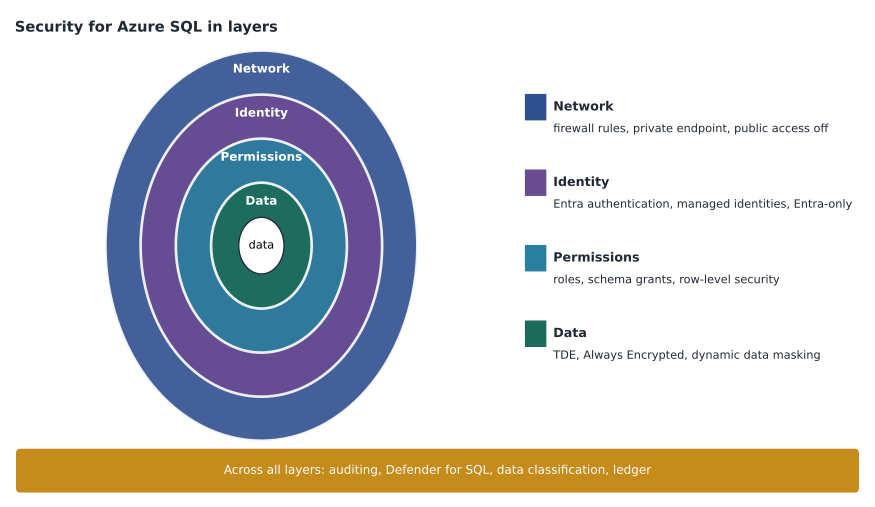
Server-level firewall rules in Azure SQL Database allow ranges of public IP addresses to reach every database on the logical server, and are stored in master. Database-level rules apply to one database, are stored in that database and move with it in geo-replication; they are created with T-SQL only. The setting 'Allow Azure services and resources to access this server' allows any Azure resource, including other customers', and is a common wrong answer when a question asks for least access. A service endpoint lets traffic from a chosen subnet reach the server over the Azure backbone, but the server still has a public endpoint. A private endpoint gives the server a private IP address in a virtual network; combined with denying public network access, it removes the public path completely. Managed Instance lives in its own subnet and is private by design, with an optional public endpoint on port 3342.
Compliance controls
Data discovery and classification labels columns with an information type and a sensitivity label, and the labels appear in audit records when sensitive columns are queried. Auditing in Azure SQL Database can be set at the server level, which covers all current and future databases, or at the database level; destinations are a storage account, a Log Analytics workspace or Event Hubs. Managed Instance uses SQL Server audit syntax with a server audit and audit specifications, writing to storage or Azure Monitor. Microsoft Defender for SQL adds vulnerability assessment and alerts on threats such as SQL injection and unusual access patterns.
Change tracking records which rows changed, without the old values, for synchronization; change data capture records the changed data itself in change tables, for auditing or feeding other systems. Dynamic data masking hides values in query results for users without the UNMASK permission, with masks such as partial, email or default; it does not encrypt the data and can be worked around by inference, so it is not a security boundary against a determined user. Row-level security filters rows with a predicate function bound to a security policy: a filter predicate hides rows, a block predicate prevents writes that would violate the rule. Ledger makes tables tamper-evident: updatable ledger tables keep history, append-only ledger tables allow only inserts, and database digests stored in immutable storage let auditors verify that nothing was altered.
Reading security questions
Security questions often hide the deciding word in the requirement. 'Prevent' and 'ensure that no one' call for a control that cannot be bypassed, such as Always Encrypted, Entra-only authentication or a DENY, rather than one that only hides or warns, such as masking or an alert. 'Detect' and 'be notified' call for auditing, Defender for SQL or alerts, not prevention. 'Minimize administrative effort' favours built-in, managed options such as service-managed TDE, Entra groups and server-level auditing over per-database or per-user work. 'Least privilege' rules out db_owner, sysadmin and broad fixed roles in nearly every case.
Walt's diagnostic misses in security came mostly from two places: confusing what masking and encryption protect against, and choosing a database-level setting where a server-level one covered future databases. Elena gives him a short drill for both. For each feature in the group, he writes one sentence that starts 'This protects against' and one that starts 'This does not protect against'. Masking, for instance, protects against casual viewing in applications and does not protect against users who can run their own queries. Writing the second sentence is the part that fixes the misses.
Hands-on tasks for security
Every bullet in this group can be practised in a sandbox subscription in a few minutes: set an Entra admin group, turn on Entra-only authentication and watch a SQL login fail, create a user from a managed identity, grant and deny on a schema, turn on server-level auditing to a Log Analytics workspace, add a dynamic data mask, write a row-level security policy, and create a ledger table and verify its digest. Walt schedules these for the January weeks of his plan, two or three tasks a session.
Worked problem
Choosing the control
The Finch Rewards database stores members' phone numbers. Customer-service agents must see only the last four digits, the analytics team must not be able to read the full numbers even with direct queries, and the DBA team must be able to prove that the points history has not been altered. Which three controls fit?
Show solution
- Agents need to see only the last four digits. Dynamic data masking with a partial mask does that for users without the UNMASK permission.
- The analytics team must not read the full numbers even with direct queries. Masking can be worked around by inference, so it fails this requirement on its own.
- Always Encrypted on the phone column, with the column master key available only to the agents' application through its managed identity, keeps the column as ciphertext for everyone else, including analytics and DBAs.
- The agents' application decrypts the value and shows only the last four digits in its screens.
- Tamper evidence for the points history calls for a ledger table, with database digests stored in immutable storage.
Answer: Always Encrypted on the phone column, with the agents' application showing only the last four digits, and a ledger table for the points history. Dynamic data masking alone meets the agents' need but fails the analytics requirement.
Common mistakes
MistakeRevoking a GRANT forbids the action.
InsteadREVOKE removes a grant or deny; only DENY forbids.
MistakeDynamic data masking encrypts sensitive columns.
InsteadMasking changes how results are shown; the data is stored in clear text and can be inferred.
MistakeTDE hides data from administrators who can query it.
InsteadTDE protects files and backups; use Always Encrypted to keep data from administrators.
MistakeA service endpoint removes the server's public endpoint.
InsteadOnly a private endpoint with public network access denied removes the public path.
MistakeEntra authentication works on any SQL Server version on a VM.
InsteadIt needs SQL Server 2022 or later, connected through Arc or the SQL IaaS Agent extension.
Summary and key terms
- Use Entra authentication with a group as Entra admin, Entra-only to disable SQL logins, and managed identities for applications.
- Grant the smallest permission at the narrowest scope to roles; DENY overrides GRANT; fixed roles are broad.
- TDE (service- or customer-managed), minimum TLS 1.2, object-level encryption and Always Encrypted protect data at different points; enclaves add rich queries on encrypted data.
- Server-level and database-level firewall rules, service endpoints and private endpoints control network access; Managed Instance is private by design.
- Classification, auditing, Defender for SQL, change tracking, CDC, masking, row-level security and ledger meet compliance needs.
- Entra-only authentication
- A setting that disables SQL authentication on a server or instance, allowing only Microsoft Entra identities.
- Least privilege
- Granting only the permissions a task needs, at the narrowest scope.
- Customer-managed key
- A TDE protector held in Azure Key Vault or Managed HSM under the customer's control.
- Deterministic encryption
- Always Encrypted mode that gives the same ciphertext for the same value, allowing equality comparisons.
- Private endpoint
- A private IP address in a virtual network for a service, allowing access without a public path.
- Block predicate
- A row-level security rule that prevents writes violating a policy.
Practice problems
Work each problem on paper first, then reveal the answer to check.
What does Microsoft Entra-only authentication do to the server's SQL administrator login?
Show answer
It disables it along with all other SQL logins.
Which Always Encrypted type supports equality lookups without an enclave?
Show answer
Deterministic encryption.
What two Key Vault settings are required for a customer-managed TDE protector?
Show answer
Soft delete and purge protection.
Where are database-level firewall rules stored, and how are they created?
Show answer
In the database itself, created with T-SQL.
Which feature records only which rows changed, without old values?
Show answer
Change tracking.
Lesson quiz · 5 questions
Score 60% or more to complete this lesson.
Create a free account to save your progress, take quizzes and earn a certificate.