
MSAZ-130 · Lesson 8 of 12 · 19 min
Hybrid identity
▶ Video coming soon A video version of this lesson is on the way.
Theo Marchand had a confession at the November 23, 2026 session. In 2021, when Harrow & Finch first moved email to Microsoft 365, he had installed a synchronization tool on a spare server in the head office server room, accepted most of the defaults and left it running. "It just works," he said. "Passwords change on a store PC, and they change in Microsoft 365 a couple of minutes later. I honestly don't know which options I picked." Sunil Rao nodded. "That server is now one of the most important machines in the company," he said. "If someone took it over, they could change any identity we have. Let's find out exactly what it does."
Most organizations that have used Windows networks for years live in this situation, called hybrid identity: users and groups are managed in an on-premises directory, usually Active Directory Domain Services, and also exist in Microsoft Entra ID so they can sign in to cloud services. This lesson explains how the two are connected, the three ways users can authenticate, and the security points that come with each choice.
Why hybrid identity exists
Few organizations can move every application and device to the cloud at once. Harrow & Finch's store PCs are joined to its AD DS domain and get their settings from Group Policy; the warehouse system's vendor application authenticates against AD DS; and file shares at head office use AD DS groups for permissions. At the same time, everyone uses Microsoft 365 and, increasingly, Azure. Hybrid identity gives each person one identity that works in both places, with one user name and, usually, one password, rather than separate on-premises and cloud accounts that drift apart.
In most hybrid designs, the on-premises directory is the source of authority for synchronized users. Accounts are created, changed and disabled in AD DS, and those changes flow to Microsoft Entra ID. An administrator who edits a synchronized user's name directly in the cloud will see the change overwritten at the next synchronization. Cloud-only accounts, such as emergency access accounts, are managed in Microsoft Entra ID itself.
Synchronization tools
Microsoft provides two tools for synchronizing identities from AD DS to Microsoft Entra ID. Microsoft Entra Connect Sync, the older and more fully featured tool, is installed on a Windows Server in the organization's network. It reads users, groups, contacts and, if configured, devices from AD DS, applies rules about which objects and attributes to include, and writes them to Microsoft Entra ID on a regular cycle, every 30 minutes by default. It supports complex setups, such as several forests, detailed attribute rules and device writeback.
Microsoft Entra Cloud Sync is a newer approach in which the synchronization engine runs in the Microsoft cloud and the organization installs only lightweight provisioning agents on servers in its network. Several agents can run for high availability, and there is less to maintain on premises. Cloud Sync suits many common scenarios, including organizations with disconnected forests after mergers, and Microsoft has been extending it over time; for some advanced needs, Connect Sync is still required. Choosing between them depends on the features the organization needs, which Microsoft documents in a comparison on Microsoft Learn.
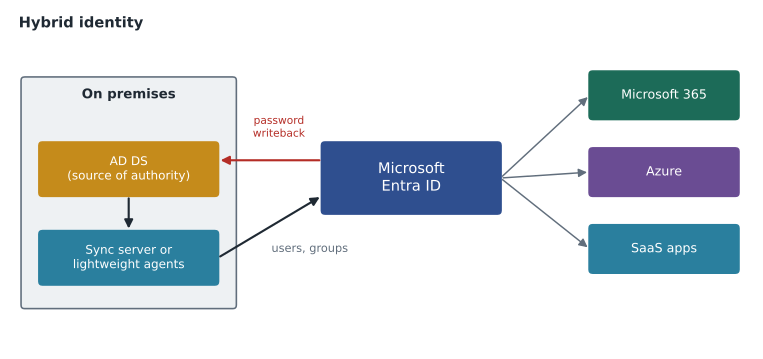
Synchronization does not have to include everything. Administrators can filter by organizational unit, group or attribute, so that service accounts, test accounts and disabled users stay out of the cloud. When Ama and Theo opened the configuration of the 2021 server, they found that every organizational unit was included, which is why the 140 accounts of former employees from lesson 6 had all been copied to the cloud. They also found a scoped service account for the tool with broad permissions in AD DS, which is normal for the tool but makes the server itself a high-value target.
Three ways to authenticate in a hybrid setup
Synchronizing accounts is only half of hybrid identity. The other half is deciding where users' passwords are checked when they sign in to cloud services. Microsoft Entra ID supports three methods, and the SC-900 outline expects you to recognize each.
Password hash synchronization (PHS) synchronizes a hash of each user's password hash from AD DS to Microsoft Entra ID. The password itself is never sent, and what is sent is a further hashed and salted value, not the original AD DS hash in a form that can be reused. When a user signs in to Microsoft 365, Microsoft Entra ID checks the password itself, in the cloud. PHS is the simplest method, needs no extra servers beyond the sync tool, keeps cloud sign-in working even if the on-premises network is down and lets Microsoft Entra ID Protection detect leaked credentials by comparing hashes against credentials found in breaches. Microsoft recommends enabling PHS, even when another method is used, as a backup.
Pass-through authentication (PTA) sends sign-in requests from Microsoft Entra ID to lightweight agents running on servers in the organization's network, which check the password against AD DS directly. No password hashes are stored in the cloud. PTA suits organizations whose policies require passwords to be checked only on premises, or that need on-premises account states, such as sign-in hours, to apply immediately. Its drawback is dependence on those agents and on AD DS being reachable: if they are all unavailable, cloud sign-in fails unless a backup method is in place.
Federation hands authentication to a separate on-premises system, traditionally Active Directory Federation Services (AD FS), as described in lesson 6. Microsoft Entra ID redirects the user to the federation server, which authenticates them and returns a token. Federation supports requirements that the other methods cannot, such as certain smart card scenarios or third-party MFA on premises, but it requires the most infrastructure: federation servers, proxies, certificates and high availability. Many organizations have moved from federation to PHS or PTA to reduce that burden and the attack surface it creates.
| Method | Where the password is checked | Extra infrastructure | Main advantages | Main considerations |
|---|---|---|---|---|
| Password hash sync | In Microsoft Entra ID | None beyond the sync tool | Simple, resilient, enables leaked-credential detection | A hash of the hash is stored in the cloud |
| Pass-through authentication | Against AD DS, through on-premises agents | Lightweight agents | No hashes in the cloud; on-premises account rules apply | Depends on agents and AD DS being reachable |
| Federation (such as AD FS) | By the on-premises federation service | Federation servers, proxies, certificates | Supports special requirements | Most complex; more to secure and keep running |
Seamless single sign-on and password writeback
Two features make hybrid identity smoother for users. Seamless single sign-on lets users on domain-joined PCs inside the corporate network sign in to cloud apps without typing their password again, by using their existing Windows sign-in. It works with PHS and PTA. Devices that are Microsoft Entra joined or hybrid joined also get single sign-on through a primary refresh token, which is now the more common way users experience seamless sign-in.
Password writeback sends password changes made in the cloud back to AD DS. It allows self-service password reset (SSPR), covered in lesson 9, to work for synchronized users: a store manager who forgets her password can reset it from a browser, after proving her identity with registered methods, and the new password is written back to AD DS so it works on store PCs too. Without writeback, a synchronized user's password can only be changed on premises, which means a call to the service desk.
Securing the hybrid connection
Hybrid identity creates a path between on premises and the cloud, and attackers look for that path. If an attacker controls an AD DS domain controller or the server running the sync tool, they may be able to create or change identities that flow into Microsoft Entra ID. Microsoft therefore recommends treating sync servers like domain controllers: as tier 0 assets with tightly limited administrative access, current updates and close monitoring. Equally, the most powerful cloud roles should not be held by synchronized accounts; Microsoft recommends cloud-only accounts for Global Administrators and other highly privileged roles, so that a compromise of the on-premises directory does not hand over the cloud tenant.
Ama turned the session into a short plan for Theo and the server team. Move the sync tool's configuration review and server hardening to the first week of December; filter out former employees, service accounts and test users; keep password hash synchronization, which was already on, and make sure leaked-credential detection is enabled; turn on password writeback ahead of the SSPR rollout; and replace the three synchronized Global Administrator accounts with cloud-only administrator accounts. Sunil approved the plan and asked Renata Kowal to add the sync server to the list of systems protected by Microsoft Defender for Identity, a product covered in MSAZ-131.
Before the filtering change, Ama wanted to know how many objects would drop out of scope. She described the planned rules in a short script and ran it against a sample export.
sample = [
    {"name": "store14.manager", "ou": "Stores", "enabled": True,  "type": "user"},
    {"name": "jdoe.left2022",   "ou": "Stores", "enabled": False, "type": "user"},
    {"name": "svc.backup",      "ou": "Service Accounts", "enabled": True, "type": "user"},
    {"name": "test.user7",      "ou": "Test", "enabled": True,  "type": "user"},
    {"name": "finance.staff",   "ou": "Head Office", "enabled": True, "type": "user"},
    {"name": "GG-Store-Managers", "ou": "Groups", "enabled": True, "type": "group"},
]
excluded_ous = {"Service Accounts", "Test"}
def in_scope(obj):
    if obj["ou"] in excluded_ous:
        return False
    if obj["type"] == "user" and not obj["enabled"]:
        return False
    return True

for obj in sample:
    print(f"{obj['name']:20s} {'sync' if in_scope(obj) else 'exclude'}")
kept = sum(in_scope(o) for o in sample)
print("Objects kept:", kept, "of", len(sample))store14.manager sync jdoe.left2022 exclude svc.backup exclude test.user7 exclude finance.staff sync GG-Store-Managers sync Objects kept: 3 of 6
What this code does
Applies a sync scope filter to sample on-premises directory objects, deciding which ones Microsoft Entra Connect should copy to the cloud. Disabled accounts, service accounts and test accounts are excluded, while real staff accounts and groups are synced. Keeping the sync scope narrow reduces risk in the cloud directory.
Planning the move away from on-premises dependencies
Hybrid identity is often a long stage rather than a permanent state. As applications move to the cloud and new laptops are Microsoft Entra joined instead of domain joined, the number of things that need AD DS falls. Microsoft describes a gradual path: keep synchronization in place, move authentication to the cloud with password hash synchronization, move device management from Group Policy to Microsoft Intune, replace applications that need Kerberos or LDAP, and eventually create new users directly in the cloud from HR. Some organizations will always keep a small on-premises footprint, for example for factory or warehouse systems, but the direction is clear.
Renata Kowal asked Theo to note, for each Skylight workload, whether it still needed AD DS and why. The list was short but important: store PCs through Group Policy, the warehouse vendor application through Kerberos, and head office file shares through AD DS groups. Each item had a planned replacement or a decision to keep it. The file shares would move to Azure Files with identity-based access, the store PCs would be replaced with Entra joined devices during the 2027 refresh, and the warehouse application would stay on AD DS, or move to Microsoft Entra Domain Services, until the vendor released a newer version.
Worked problem
Choosing an authentication method
Renata described three organizations at a cloud user group meeting. Organization A wants the simplest setup and wants cloud sign-in to keep working if its head office internet link fails. Organization B's policy says passwords may only be validated by its own domain controllers. Organization C must keep using a third-party smart card system that integrates only with its on-premises federation servers. Which hybrid authentication method fits each?
Show solution
- Organization A: password hash synchronization, because authentication happens in the cloud and needs no on-premises components at sign-in time.
- Organization B: pass-through authentication, because passwords are validated against AD DS through on-premises agents.
- Organization C: federation, such as AD FS, because its special requirement depends on the on-premises federation system.
- All three should consider enabling password hash synchronization as a backup where their policies allow it.
Answer: A: PHS. B: PTA. C: federation, with PHS as a backup where permitted.
Common mistakes
MistakeBelieving password hash synchronization sends passwords to the cloud.
InsteadPHS sends a salted hash of the password hash, never the password itself.
MistakeEditing synchronized users directly in Microsoft Entra ID.
InsteadFor synchronized users, AD DS is the source of authority; changes are overwritten at the next sync.
MistakeLeaving the sync server with ordinary server protections.
InsteadTreat it like a domain controller: tier 0, tightly controlled and closely monitored.
MistakeGiving synchronized accounts the Global Administrator role.
InsteadUse cloud-only accounts for the most privileged roles.
Summary and key terms
- Hybrid identity gives users one identity across an on-premises directory such as AD DS and Microsoft Entra ID, with AD DS usually the source of authority.
- Microsoft Entra Connect Sync runs on a server on premises, while Microsoft Entra Cloud Sync runs in the cloud with lightweight agents.
- Users authenticate with password hash synchronization, pass-through authentication or federation such as AD FS; Microsoft recommends PHS, at least as a backup.
- Seamless SSO and password writeback improve the user experience, and sync servers should be protected as tier 0 assets, with cloud-only accounts for the most privileged roles.
- Hybrid identity
- One identity for users across an on-premises directory and Microsoft Entra ID.
- Source of authority
- The directory where an object is managed and from which changes flow.
- Microsoft Entra Connect Sync
- A synchronization tool installed on a Windows Server on premises.
- Microsoft Entra Cloud Sync
- A synchronization service run from the cloud using lightweight on-premises agents.
- Password hash synchronization
- Synchronizing a salted hash of password hashes so Microsoft Entra ID can authenticate users in the cloud.
- Pass-through authentication
- Validating cloud sign-ins against AD DS through on-premises agents.
- Password writeback
- Writing password changes made in the cloud back to the on-premises directory.
Practice problems
Work each problem on paper first, then reveal the answer to check.
With pass-through authentication, where is the password validated?
Show answer
Against on-premises AD DS, through lightweight agents.
Which hybrid method allows ID Protection to detect leaked credentials?
Show answer
Password hash synchronization.
Why should Global Administrators use cloud-only accounts?
Show answer
So that a compromise of the on-premises directory cannot be used to take over the cloud tenant.
Lesson quiz · 5 questions
Score 60% or more to complete this lesson.
Create a free account to save your progress, take quizzes and earn a certificate.