
MSAZ-130 · Lesson 12 of 12 · 18 min
Privileged Identity Management and ID Protection
▶ Video coming soon A video version of this lesson is on the way.
The last study session of 2026, on December 14, began with a question Sunil Rao had been saving. "Suppose an attacker steals Theo's password tomorrow, and Theo is a Global Administrator," he said. "MFA should stop them, but suppose it doesn't, because they phish his session in real time. What do they get?" Ama Boateng answered without hesitation: "Everything. They could create accounts, change Conditional Access, read anyone's mail." Sunil nodded. "So two more questions," he said. "Why does Theo hold that power all day, every day, when he uses it twice a week? And how would we know his sign-in was suspicious before the attacker did any damage?"
Those two questions lead to the final pair of capabilities in the SC-900 Entra domain. Microsoft Entra Privileged Identity Management (PIM) controls when powerful roles are active. Microsoft Entra ID Protection detects and responds to risky sign-ins and compromised accounts. This lesson covers both and ends by drawing the course together.
The problem with standing privilege
In most organizations, administrators hold their roles permanently. That is called standing privilege. It is convenient, but it means the most powerful accounts are always the most valuable targets: an attacker who gains control of one at any moment gets its full power. Ama's November review found that even after reducing the number of Global Administrators to three, those three accounts held the role around the clock, along with 14 other people holding narrower but still powerful roles such as Exchange Administrator, Security Administrator and Owner on Azure subscriptions.
The Zero Trust principle of least privilege, from lesson 2, includes just-in-time access: privileges should be active only when needed. PIM is Microsoft's tool for putting that into practice for Microsoft Entra roles, Azure resource roles and membership or ownership of groups.
How Privileged Identity Management works
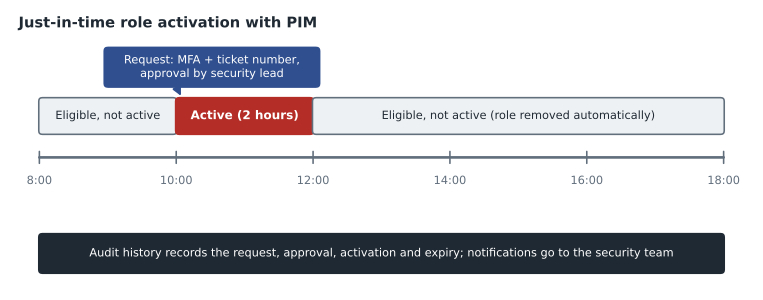
PIM separates having the right to a role from using it. An eligible assignment means a person can activate the role when they need it, but does not hold it until they do. An active assignment means the role is in effect. With PIM, administrators are made eligible rather than permanently active. When Theo needs to change a Conditional Access policy, he opens PIM, selects the role, and requests activation for a limited period, such as two hours. When the period ends, the role is removed automatically.
Each role can have activation settings that add controls at the moment of use. Activation can require MFA, or a specific authentication strength, even if the user already signed in. It can require a justification, such as a change ticket number. It can require approval from designated approvers before the role becomes active, which suits the most sensitive roles. It can limit the maximum activation duration. PIM sends notifications when roles are activated, so other administrators and the security team know what is happening, and it keeps an audit history of every assignment and activation.
Assignments themselves can be time-bound: an eligible assignment for a contractor can end on the last day of the contract, so it does not need to be removed by hand. PIM also supports access reviews of privileged roles, described in lesson 11, to confirm periodically that each eligible person still needs the role. PIM for Groups extends the same just-in-time model to membership or ownership of groups, which is useful when access to several resources is granted through one group.
| Setting | What it does | Harrow & Finch choice for Global Administrator |
|---|---|---|
| Eligible assignment | Person may activate the role when needed | Three named administrators eligible, none permanently active |
| Maximum activation duration | Limits how long the role stays active | Two hours |
| Require MFA or authentication strength | Re-verifies the person at activation | Phishing-resistant MFA |
| Require justification | Records why the role is needed | Change ticket number |
| Require approval | Approver must agree before activation | Approval by Sunil or Renata |
| Notifications and audit | Alerts and records each activation | Email to the security team; logs sent to monitoring |
PIM requires Microsoft Entra ID P2 or Microsoft Entra ID Governance licences for the people who use it, as the Microsoft Entra licensing page describes. Harrow & Finch decided to buy P2 licences for its administrators and security staff first, a small number of people with a large effect on risk.
Emergency access accounts
PIM and Conditional Access both depend on things that could, in rare cases, fail: an approver might be unavailable, a policy might be misconfigured or an MFA service might have an outage. Microsoft recommends keeping two or more emergency access accounts: cloud-only accounts that hold the Global Administrator role permanently, are protected with strong phishing-resistant credentials stored securely, are excluded from policies that could lock them out, and are monitored so that any sign-in raises an immediate alert. They are not for daily use. Ama's plan stored the security keys for the two accounts in separate safes at head office and the Brandon distribution centre.
Microsoft Entra ID Protection
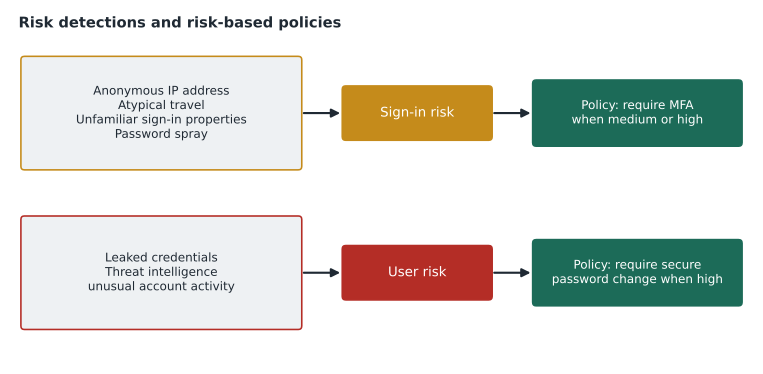
Even with MFA and PIM, accounts can still be attacked, and some attacks will partly succeed. Microsoft Entra ID Protection uses Microsoft's view of billions of sign-ins a day, along with threat intelligence, to detect signs that a sign-in or an account may be compromised. It assigns two kinds of risk. Sign-in risk is the probability that a particular authentication request was not made by the account's owner. User risk is the probability that the account itself has been compromised, based on accumulated evidence. Risk levels are low, medium or high.
ID Protection detects many kinds of risk. Some are calculated in real time during sign-in and some are found later, offline, after analysis. Common detections include leaked credentials, where a user's password has been found in a breach dump, which relies on password hash synchronization for hybrid users; sign-ins from anonymous IP addresses, such as anonymizing networks; atypical travel, two sign-ins from places too far apart to travel between in the time available; unfamiliar sign-in properties compared with the user's history; sign-ins from malicious IP addresses; signs of password spray attacks; and indications from Microsoft Entra threat intelligence that the activity matches known attacker patterns.
Atypical travel is easy to illustrate. Ama took two sign-ins from the October incident: the store manager's real sign-in from her store and the attacker's sign-in from overseas forty minutes later. A short calculation showed why the pattern was suspicious.
import math

def km_between(lat1, lon1, lat2, lon2):
    r = 6371.0
    p1, p2 = math.radians(lat1), math.radians(lat2)
    dp, dl = math.radians(lat2 - lat1), math.radians(lon2 - lon1)
    a = math.sin(dp / 2) ** 2 + math.cos(p1) * math.cos(p2) * math.sin(dl / 2) ** 2
    return 2 * r * math.asin(math.sqrt(a))

store = (49.90, -97.14)   # the store manager's city (approximate)
remote = (44.43, 26.10)                     # the attacker's sign-in location (approximate)
minutes_apart = 40
d = km_between(*store, *remote)
speed = d / (minutes_apart / 60)
print(f"Distance: {d:,.0f} km in {minutes_apart} minutes")
print(f"Implied speed: {speed:,.0f} km per hour")
print("Atypical travel" if speed > 1000 else "Plausible")Distance: 8,177 km in 40 minutes Implied speed: 12,266 km per hour Atypical travel
What this code does
Calculates the distance between the locations of two sign-ins for the same account and the speed someone would need to travel between them in the time that passed. The implied speed is thousands of kilometres per hour, far faster than any flight, so the sign-ins are flagged as atypical travel. ID Protection uses this kind of signal to detect compromised accounts.
An implied speed of more than ten thousand kilometres an hour is not possible for a person, so one of the two sign-ins could not have been the store manager. Real detection is more sophisticated, learning each user's normal patterns and allowing for VPNs and known locations, but the principle is the same.
Responding to risk
Detecting risk is only useful if something happens. ID Protection's risk levels can be used as conditions in risk-based Conditional Access policies, which require a P2 licence. Microsoft's common recommendations are to require MFA when sign-in risk is medium or high, so a legitimate user can prove themselves and continue while an attacker is stopped, and to require a secure password change when user risk is high, which also resets the account's risk once completed with MFA. For the most sensitive accounts, organizations may choose to block risky sign-ins instead. When users complete these steps, they self-remediate, clearing the risk without waiting for the service desk.
Administrators can also review the risky users, risky sign-ins and risk detections reports, confirm that an account was compromised or dismiss a false positive, and investigate further. ID Protection signals flow into Microsoft's security operations tools, such as Microsoft Defender XDR and Microsoft Sentinel, covered in MSAZ-131, so that a risky sign-in can be connected with what happened afterwards on devices and in email. Applying the October incident, the attacker's sign-in would likely have been flagged with an unfamiliar location and atypical travel, raising sign-in risk; a policy requiring MFA for medium risk would have stopped them; and the leaked password, once discovered, would have raised user risk and forced a secure password change.
Workload identities have risk too
Risk is not limited to people. Service principals can also be compromised, for example if a client secret leaks in a code repository. With the Microsoft Entra Workload ID licence, ID Protection can detect risk for workload identities, such as suspicious sign-ins or leaked credentials for an application, and Conditional Access can block risky workload identities. Ama added the 97 service principals from lesson 7 to the review list, starting with those that had long-lived secrets and broad permissions.
PIM and ID Protection also reinforce each other. If an eligible administrator's account shows high user risk, a policy can block activation until the risk is resolved, so a compromised account cannot quietly turn on powerful roles.
Worked problem
PIM or ID Protection?
Sunil gave Ama four scenarios to sort: (1) a Security Administrator should hold the role only while handling an incident, with a ticket number recorded; (2) a payroll clerk's password appears in a public breach dump; (3) a contractor's Exchange Administrator eligibility should end on March 31, 2027; (4) a sign-in to a finance account comes from an anonymizing network at 3 a.m. Which capability handles each?
Show solution
- Scenario 1 is just-in-time activation with justification: Privileged Identity Management.
- Scenario 2 is a leaked credentials detection that raises user risk: ID Protection, with a policy requiring a secure password change.
- Scenario 3 is a time-bound eligible assignment: Privileged Identity Management.
- Scenario 4 is an anonymous IP address detection that raises sign-in risk: ID Protection, with a policy requiring MFA or blocking.
Answer: PIM; ID Protection; PIM; ID Protection.
Bringing the course together
Over six weeks, Ama's study sessions had turned an incident into a plan. The shared responsibility model showed that identity and data were Harrow & Finch's own responsibility. Defence in depth and Zero Trust gave the strategy. Encryption, hashing and signing explained the tools beneath it, and governance, risk and compliance gave it accountability and evidence. Authentication, authorization, identity providers, directories and federation explained how identity works; Microsoft Entra ID, its identity types and hybrid identity described what Harrow & Finch actually had. Strong authentication methods, Conditional Access, identity governance, PIM and ID Protection were the controls the company would put in place, starting in January 2027.
Renata Kowal presented the identity roadmap to the Skylight steering group on December 16, 2026. Dana Whitcombe approved the P2 licences for administrators and the security team and asked for ID Governance licences in the 2027 budget. Ama booked her SC-900 exam for February 2027 and started MSAZ-131, where the course moves from identity to Microsoft's security and compliance solutions: Defender, Sentinel and Purview.
Common mistakes
MistakeLeaving administrators permanently active in powerful roles.
InsteadMake them eligible in PIM and activate roles just in time, with MFA, justification and, for the most sensitive, approval.
MistakeConfusing sign-in risk and user risk.
InsteadSign-in risk is about one authentication attempt; user risk is about whether the account itself is compromised.
MistakeHaving no emergency access accounts.
InsteadKeep at least two cloud-only, closely monitored break-glass accounts excluded from lockout-prone policies.
MistakeExpecting ID Protection to act on its own.
InsteadUse risk-based Conditional Access policies so detected risk leads to MFA, a password change or a block.
Summary and key terms
- Privileged Identity Management replaces standing privilege with just-in-time access: people are eligible for roles and activate them for limited periods, with MFA, justification, approval, notifications and audit history, and assignments can be time-bound and reviewed.
- PIM covers Microsoft Entra roles, Azure roles and groups, and requires P2 or ID Governance licences.
- Emergency access accounts keep a way in if controls fail.
- Microsoft Entra ID Protection calculates sign-in risk and user risk from detections such as leaked credentials, anonymous IP addresses and atypical travel, and risk-based Conditional Access policies respond with MFA, secure password changes or blocks.
- Privileged Identity Management
- A Microsoft Entra service that provides just-in-time, time-bound and audited privileged access.
- Eligible assignment
- A role assignment that a person must activate before it takes effect.
- Activation
- Turning on an eligible role for a limited time, optionally with MFA, justification and approval.
- Emergency access account
- A cloud-only, highly protected account kept for regaining access if normal methods fail.
- Sign-in risk
- The probability that a specific sign-in was not made by the account owner.
- User risk
- The probability that an account has been compromised.
- Leaked credentials
- A detection that a user's credentials have been found in a breach or public dump.
Practice problems
Work each problem on paper first, then reveal the answer to check.
What is the difference between an eligible and an active role assignment in PIM?
Show answer
An eligible assignment must be activated before it takes effect; an active assignment is in effect.
Which risk type does a leaked credentials detection raise?
Show answer
User risk.
What does Microsoft commonly recommend when user risk is high?
Show answer
Require a secure password change, with MFA.
Lesson quiz · 5 questions
Score 60% or more to complete this lesson.
Create a free account to save your progress, take quizzes and earn a certificate.