
MSAZ-130 · Lesson 7 of 12 · 18 min
Microsoft Entra ID and identity types
▶ Video coming soon A video version of this lesson is on the way.
On November 18, 2026, Ama Boateng exported a list of every object in Harrow & Finch's Microsoft Entra tenant to a spreadsheet. She expected about a thousand users. She found 1,094 member users, 61 guest users she could not account for, 212 devices, 486 groups, and something she had never looked at before: 97 "enterprise applications" and a handful of "managed identities". Sunil Rao looked over her shoulder. "Now you see why the exam calls it identity types," he said. "People are only part of the picture. Every app that signs in, every device that's registered and every guest from a supplier is an identity we're responsible for."
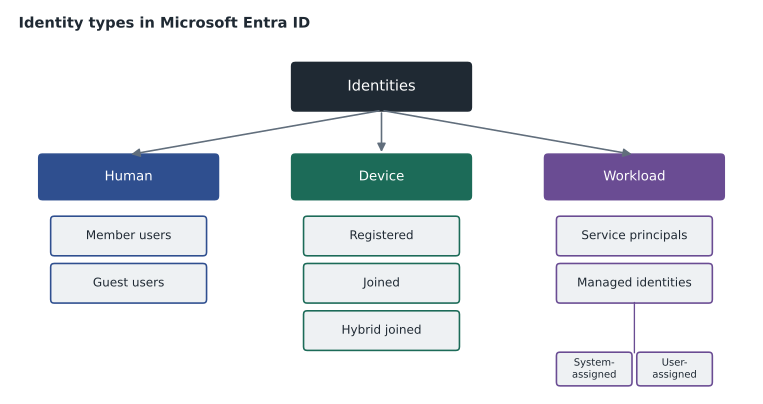
This lesson describes Microsoft Entra ID, the cloud identity service at the centre of Microsoft's identity products, and the types of identities it manages: users, external users, devices, groups and workload identities. It also introduces the wider Microsoft Entra family of products, several of which are covered later in this course.
What Microsoft Entra ID is
Microsoft Entra ID, formerly Azure Active Directory, is Microsoft's cloud-based identity and access management service. It provides the directory of users, groups and devices for an organization; authenticates them; issues tokens to applications; and enforces access rules such as MFA and Conditional Access. Every Microsoft 365 and Azure customer has Microsoft Entra ID, because those services use it to sign people in. That is why Harrow & Finch already had a tenant full of objects before Project Skylight began.
Each organization's instance of Microsoft Entra ID is called a tenant: a dedicated, isolated instance with its own users, groups, applications and settings, identified by a tenant ID and at least one domain name, such as the company's own domain. A tenant is a security boundary: administrators of one tenant cannot manage another, and objects in one tenant are not visible in another unless the organizations deliberately set up collaboration. Azure subscriptions trust exactly one tenant for authentication, which links Azure RBAC from MSAZ-101 to the identities in Entra ID.
Microsoft Entra ID comes in editions. Free is included with Microsoft cloud subscriptions and provides user and group management, single sign-on, self-service password change and security defaults, a preconfigured set of basic protections such as requiring MFA registration. Microsoft Entra ID P1 adds features such as Conditional Access, dynamic groups, hybrid identity features and self-service password reset with writeback to on-premises directories. Microsoft Entra ID P2 adds Microsoft Entra ID Protection and Privileged Identity Management. Microsoft Entra ID Governance adds advanced identity governance such as lifecycle workflows and the fuller access review and entitlement features. Licensing changes over time, so the current Microsoft Entra licensing page is the place to check before planning purchases.
| Edition | Examples of what it adds | Covered in |
|---|---|---|
| Free | Users, groups, SSO, security defaults | This lesson |
| P1 | Conditional Access, dynamic groups, hybrid features, SSPR with writeback | Lessons 8 to 10 |
| P2 | ID Protection, Privileged Identity Management | Lesson 12 |
| ID Governance | Lifecycle workflows, advanced access reviews and entitlement management | Lesson 11 |
The Microsoft Entra family
Microsoft Entra is the name of a family of identity and network access products, of which Microsoft Entra ID is the core. The family has changed over time, but several members appear in the SC-900 outline or are useful to recognize. Microsoft Entra ID Governance manages the identity life cycle and access reviews. Microsoft Entra ID Protection detects identity risks such as leaked credentials. Microsoft Entra External ID handles identities for people outside the organization, including partners and customers. Microsoft Entra Verified ID issues and checks digital credentials, such as proof of employment, based on open standards. Microsoft Entra Internet Access and Microsoft Entra Private Access, together called Global Secure Access, apply identity-based controls to network traffic, replacing some uses of traditional VPNs. Microsoft Entra Workload ID adds features for protecting application and service identities.
Human identities: members and guests
The most familiar identities are users. In Microsoft Entra ID, users are either members or guests. Member users normally belong to the organization: employees and, sometimes, long-term contractors. They can be cloud-only, created directly in Microsoft Entra ID, or synchronized from an on-premises directory such as Active Directory Domain Services, which is how almost all of Harrow & Finch's 1,094 member accounts arrived. Lesson 8 explains synchronization.
Guest users represent people from outside the organization who need access to its resources, such as a supplier's sales representative who joins a Teams channel or a consultant who edits a SharePoint site. Guests are created through B2B collaboration, part of Microsoft Entra External ID. The guest signs in with their own identity, from their own organization's Entra tenant, a Microsoft account or another supported provider, so the inviting organization does not manage their password. Guests have limited default permissions in the directory, and access to resources is granted explicitly. Ama's 61 unexplained guests turned out to be mostly suppliers invited to Teams meetings over the years; lesson 11 shows how access reviews keep such lists under control.
Microsoft Entra External ID also supports customer identity and access management, for applications used by the public. A retailer's loyalty app, for example, can let customers create accounts with an email address or social account in a separate external tenant, apart from the workforce tenant. Hana Sato, who leads the planned Finch Rewards rebuild, made a note to evaluate this for 2027 rather than keeping customer accounts in the app's own database.
Groups
Groups collect identities so that access can be granted to many at once, which is essential for manageable authorization. Microsoft Entra ID has security groups, used to grant access to resources and apps, and Microsoft 365 groups, which also provide a shared mailbox, calendar, files and Teams workspace for collaboration. Group membership can be assigned, where administrators add members manually, or dynamic, where rules based on user or device attributes add and remove members automatically. A dynamic rule such as "department equals Store Operations" keeps a group accurate as people join, move and leave. Dynamic groups require a P1 licence.
Device identities
Devices also have identities in Microsoft Entra ID, which lets access decisions use device information as a signal, as in the Zero Trust examples in lesson 2. There are three ways a device can be connected. Microsoft Entra registered devices are usually personal devices, such as a store manager's own phone, registered so the organization can apply some policies while the user keeps a personal account on the device. Microsoft Entra joined devices are company-owned and sign in directly with organizational accounts, without an on-premises domain; they are typical for new cloud-managed laptops. Microsoft Entra hybrid joined devices are joined to an on-premises AD DS domain and also registered with Microsoft Entra ID, which suits organizations that still rely on Group Policy. Devices are typically managed with Microsoft Intune, which reports whether each device is compliant with the organization's rules.
| Device state | Typical device | Signs in with | Harrow & Finch example |
|---|---|---|---|
| Entra registered | Personal phone or tablet | A personal account, adding a work account | Store managers' own phones for schedules |
| Entra joined | Company-owned, cloud-managed laptop | An organizational account | New head office laptops from 2027 |
| Entra hybrid joined | Company PC joined to AD DS | An organizational account from AD DS | Existing head office and store PCs |
Workload identities
The SC-900 outline specifically mentions workload identities, which are identities used by software rather than people: applications, services, scripts and automation. Workloads often need to sign in to other services, for example when StockLine reads from a storage account or a nightly job copies sales data to a reporting database. Giving them their own identities, instead of borrowing a person's account or embedding a password in code, makes their access visible, controllable and reviewable.
In Microsoft Entra ID, an application registration defines an application, its permissions and how it signs in. In each tenant where the application is used, it is represented by a service principal, the identity that is actually granted permissions and that signs in. The 97 enterprise applications Ama found were service principals: some for Microsoft services, some for SaaS tools staff had connected over the years and a few for internal scripts. Applications can authenticate with a client secret, which is like a password, or a certificate, which is stronger; both must be protected and rotated before they expire.
Managed identities are a special kind of service principal for Azure resources, and they solve the credential problem neatly: Azure creates and manages the identity and its credentials automatically, so no secret is stored in code or configuration at all. A system-assigned managed identity is tied to one resource, such as a virtual machine or an App Service app, and is deleted when the resource is deleted. A user-assigned managed identity is created as its own resource and can be attached to several resources. When Theo Marchand moved StockLine's file export job to Azure, he gave the virtual machine a system-assigned managed identity and granted it access to the storage account, removing a storage key that had been sitting in a configuration file for years.
Ama summarized her inventory with a short script, the kind she would rerun every quarter. Its main job was to point out identities that needed an owner or a review.
identities = [
    ("member", "synced", 1094), ("guest", "B2B", 61),
    ("device", "hybrid joined", 188), ("device", "registered", 24),
    ("service principal", "SaaS and internal apps", 97), ("managed identity", "system-assigned", 6),
    ("managed identity", "user-assigned", 1),
]
total = sum(n for _, _, n in identities)
print("Total identities:", total)
non_human = sum(n for kind, _, n in identities if kind in ("service principal", "managed identity", "device"))
print("Non-human identities:", non_human, "or about", round(non_human / total * 100), "in every 100")
for kind, detail, n in identities:
    flag = "  <- review" if kind in ("guest", "service principal") else ""
print(f"{kind:18s} {detail:24s} {n:5d}{flag}")Total identities: 1471 Non-human identities: 316 or about 21 in every 100 member synced 1094 guest B2B 61 <- review device hybrid joined 188 device registered 24 service principal SaaS and internal apps 97 <- review managed identity system-assigned 6 managed identity user-assigned 1
What this code does
Counts the identities in the tenant by type, such as members, guests, devices, service principals and managed identities, and works out how many are non-human. It marks guests and service principals for review because they are often forgotten. The total shows that a large share of identities are not people.
Nearly a third of the identities in the tenant were not people at all. Many organizations are surprised by that share when they first count, and attackers know it: a forgotten application with broad permissions and a long-lived secret can be as valuable as an administrator's password, and nobody notices it signing in at night.
Administrative units
Large tenants often need to delegate administration. Administrative units group users, groups or devices so that a role can be assigned for just that unit. Harrow & Finch planned one administrative unit per region of stores, so that regional IT coordinators could reset passwords for store staff in their region without being able to touch head office accounts. It is least privilege applied to administration itself.
Worked problem
Choosing an identity type
Four requests reached the security team in November: (1) a Cedarline Lumber sales representative needs to edit a shared price list in SharePoint; (2) a new Azure Function must read files from a storage account; (3) the service desk wants all store managers in one group automatically, based on job title; (4) a SaaS scheduling tool needs to read users' calendars through Microsoft Graph. What kind of identity or object fits each?
Show solution
- Request 1: an external person with their own company account, so a guest user through B2B collaboration.
- Request 2: an Azure resource needing access without a stored secret, so a managed identity, likely system-assigned.
- Request 3: a group whose membership follows an attribute, so a dynamic security group (P1).
- Request 4: a third-party application, represented by a service principal with consented permissions.
Answer: Guest user; managed identity; dynamic group; service principal.
Common mistakes
MistakeThinking Microsoft Entra ID only manages people.
InsteadIt also manages devices, groups and workload identities such as service principals and managed identities.
MistakeCreating guests by making new accounts and passwords for partners.
InsteadUse B2B collaboration so guests sign in with their own identities.
MistakeStoring a secret in code for an Azure resource to reach another service.
InsteadUse a managed identity so Azure handles the credential.
MistakeMixing up system-assigned and user-assigned managed identities.
InsteadSystem-assigned belongs to one resource and is deleted with it; user-assigned is a separate resource that can be shared.
Summary and key terms
- Microsoft Entra ID is Microsoft's cloud identity and access management service, provided per organization as an isolated tenant and offered in Free, P1, P2 and ID Governance editions.
- It is the core of the wider Microsoft Entra family.
- It manages member and guest users, security and Microsoft 365 groups with assigned or dynamic membership, and devices that are registered, joined or hybrid joined.
- Workload identities let software sign in: applications are represented by service principals, and managed identities give Azure resources identities whose credentials Azure manages automatically.
- Tenant
- An organization's dedicated, isolated instance of Microsoft Entra ID.
- Guest user
- An external person invited through B2B collaboration who signs in with their own identity.
- Dynamic group
- A group whose membership is set by rules based on attributes.
- Workload identity
- An identity used by an application, service or script rather than a person.
- Service principal
- The identity of an application in a tenant, to which permissions are granted.
- Managed identity
- An identity for an Azure resource whose credentials Azure creates and rotates automatically.
- Security defaults
- Basic preconfigured protections, such as MFA registration, available in every tenant.
Practice problems
Work each problem on paper first, then reveal the answer to check.
What is a tenant in Microsoft Entra ID?
Show answer
An organization's dedicated, isolated instance of the service, with its own users, groups, apps and settings.
Which kind of managed identity is deleted automatically when its resource is deleted?
Show answer
A system-assigned managed identity.
Which device state suits a store manager's personal phone?
Show answer
Microsoft Entra registered.
Lesson quiz · 5 questions
Score 60% or more to complete this lesson.
Create a free account to save your progress, take quizzes and earn a certificate.