
MSAZ-130 · Lesson 5 of 12 · 19 min
Authentication and authorization
▶ Video coming soon A video version of this lesson is on the way.
Grace Oduya, the store operations director, came to the November 12 study session with a practical complaint. Store managers had too many sign-ins: one for email, one for StockLine, one for the scheduling system, one for the vendor's warehouse portal, and a shared account on each till. "Half of them write the passwords on a card in the back office," she said. "Can't the new system just know who they are?" Sunil Rao smiled. "That's exactly the question this week," he said. "There are two different things hiding in it: proving who someone is, and deciding what they're allowed to do once we know."
Those two things are authentication and authorization, often shortened to AuthN and AuthZ. They are the foundation of every identity system, and the SC-900 outline lists both in its identity concepts section, together with the idea of identity as the primary security perimeter. This lesson explains each one, how they work together and why mixing them up causes security problems.
Identity as the primary security perimeter
Lesson 2 explained why the network boundary no longer marks the edge of an organization's security. Employees reach Microsoft 365 from home, store managers check schedules on phones and suppliers log in to portals from their own offices. What every one of those connections has in common is an identity: a user account, a device identity or an application identity that asks for access. That is why identity is now described as the primary security perimeter. Controlling identities, how they prove themselves and what they can reach, is the most important way to control access to an organization's resources.
An identity can belong to several kinds of things. Users are people: employees, contractors, partners or customers. Devices such as laptops, phones and store tablets can have identities that show they are known and managed. Applications and services have identities too, so that an app can sign in to a database or call another service without a person typing a password. Lesson 7 looks at the kinds of identities Microsoft Entra supports.
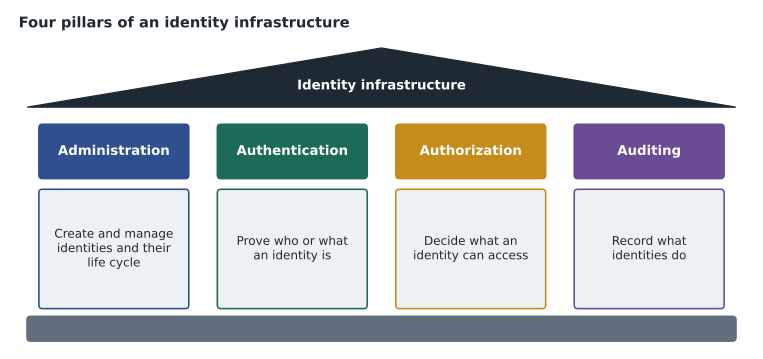
Microsoft describes four pillars of an identity infrastructure. Administration covers creating and managing identities, including their life cycle. Authentication covers how an identity proves who it is. Authorization covers what an authenticated identity can access. Auditing covers tracking what identities do, so that problems can be detected and actions can be proven. Strong identity security needs all four; most attacks succeed through gaps in one of them.
Authentication: proving who you are
Authentication is the process of proving that someone or something is who it claims to be. A user claims an identity by entering a user name, then proves it by presenting one or more credentials. If the proof is accepted, the identity is authenticated. Authentication always comes before authorization: the system needs to know who is asking before it can decide what to allow.
Credentials come in three broad categories, often called factors. Something you know is a secret such as a password or PIN. Something you have is a physical item, such as a phone running an authenticator app, a security key or a smart card. Something you are is a biometric characteristic, such as a fingerprint or face. A password is the most common factor and the weakest on its own, because it can be guessed, reused, phished or leaked in another company's breach. The October incident at Harrow & Finch showed exactly that.
Multifactor authentication (MFA) requires two or more factors from different categories. A password plus a code from an app on a registered phone is MFA; two passwords are not, because both are something you know. MFA is powerful because an attacker who steals a password still needs the second factor, which is much harder to obtain remotely. Microsoft has reported that MFA blocks the overwhelming majority of account compromise attacks. Lesson 9 covers the methods Microsoft Entra supports, including passwordless options that remove passwords entirely.
| Factor | Examples | Main weakness |
|---|---|---|
| Something you know | Password, PIN, answers to questions | Can be guessed, phished, reused or leaked |
| Something you have | Authenticator app on a phone, security key, smart card | Can be lost or stolen; some methods can be intercepted |
| Something you are | Fingerprint, face, iris | Cannot be changed if compromised; usually unlocks a local key |
Authorization: deciding what is allowed
Authorization is the process of deciding what an authenticated identity is allowed to do. Once Grace's store managers have proved who they are, authorization decides whether a manager can approve a refund in StockLine, view another store's sales, read the payroll folder or change a till's settings. Authorization is expressed as permissions, sometimes called rights or privileges, attached to identities directly or, more commonly, through groups and roles.
A simple way to remember the difference: authentication asks who are you? and authorization asks what can you do? A hotel offers a good comparison. Showing identification at the front desk is authentication. The key card you receive, which opens your own room and the gym but not other guests' rooms, is authorization. Losing control of either causes problems: someone who can pass for you gets your access, and someone whose card opens every door has far more access than they need.
Several models are used to organize authorization. In role-based access control (RBAC), permissions are grouped into roles that match job functions, such as store manager, payroll clerk or database administrator, and people are given roles rather than individual permissions. RBAC makes access easier to understand and review: to know what a store manager can do, you look at the role, not at hundreds of individual settings. In attribute-based access control (ABAC), decisions also use attributes, such as a user's department, a resource's sensitivity label or the time of day. Most modern systems combine the two.
Roles in Microsoft Entra and in Azure
Microsoft uses RBAC in two related places, and the SC-900 outline expects you to know both. Microsoft Entra roles control administrative permissions over Microsoft Entra itself and over Microsoft 365 services: for example, who can create users, reset passwords, manage Conditional Access or administer Exchange Online. Built-in examples include Global Administrator, User Administrator, Helpdesk Administrator, Security Administrator and Global Reader. Organizations can also create custom roles with a chosen set of permissions.
Azure role-based access control (Azure RBAC), covered in MSAZ-101, controls access to Azure resources such as subscriptions, resource groups, virtual machines and storage accounts. A role assignment combines three things: a security principal (a user, group, service principal or managed identity), a role definition such as Owner, Contributor or Reader, and a scope such as a subscription or resource group. Microsoft Entra roles and Azure roles are separate systems: being a Global Administrator does not by default give access to Azure resources, and being an Owner of a subscription does not let you manage users in Microsoft Entra.
| Microsoft Entra roles | Azure RBAC roles | |
|---|---|---|
| Controls | Microsoft Entra and Microsoft 365 administration | Azure resources |
| Examples | Global Administrator, User Administrator, Helpdesk Administrator | Owner, Contributor, Reader, Virtual Machine Contributor |
| Scope | The tenant, or an administrative unit | Management group, subscription, resource group or resource |
| Harrow & Finch use | Service desk resets passwords with Helpdesk Administrator | Theo manages StockLine VMs as Contributor on its resource group |
Least privilege in practice
Least privilege, the Zero Trust principle from lesson 2, is put into practice through authorization. When Ama reviewed Harrow & Finch's Microsoft Entra roles in November, she found nine accounts with the Global Administrator role, the most powerful role in the tenant. Several belonged to people who only needed to reset passwords or manage Teams. Microsoft recommends keeping Global Administrators to a small number, generally fewer than five, while still having more than one so the organization cannot be locked out. Ama's recommendation was to reduce the list to three named administrators plus two emergency access accounts, and to give everyone else the narrower roles their jobs needed. Lesson 12 shows how Privileged Identity Management makes even those three assignments temporary.
Ama also wrote a short script to show the service desk how an RBAC check works. Roles hold permissions, users hold roles, and a request is allowed only if one of the user's roles includes the permission needed.
roles = {
    "Store Manager": {"stockline.refund.approve", "stockline.sales.view_own_store", "schedule.edit"},
    "Store Associate": {"stockline.sale.ring", "schedule.view"},
    "Payroll Clerk": {"payroll.read", "payroll.edit"},
    "Helpdesk Administrator": {"user.password.reset"},
}
assignments = {
    "maria.store14": ["Store Manager"],
    "jake.store14": ["Store Associate"],
    "ben.servicedesk": ["Helpdesk Administrator"],
}
def authorized(user, permission):
    return any(permission in roles[r] for r in assignments.get(user, []))

checks = [("maria.store14", "stockline.refund.approve"),
          ("jake.store14", "stockline.refund.approve"),
          ("ben.servicedesk", "user.password.reset"),
          ("ben.servicedesk", "payroll.read")]
for user, perm in checks:
print(f"{user:18s} {perm:28s} {'allowed' if authorized(user, perm) else 'denied'}")maria.store14 stockline.refund.approve allowed jake.store14 stockline.refund.approve denied ben.servicedesk user.password.reset allowed ben.servicedesk payroll.read denied
What this code does
Checks whether each user may perform an action under role-based access control: users are assigned roles, roles carry permissions, and an action is allowed only if one of the user's roles includes it. The output shows actions allowed or denied, such as a store associate being denied refund approval. Each role gives just the access the job needs.
How sign-in actually happens: tokens
In modern systems, the application a user wants to reach often does not check the password itself. Instead, it relies on an identity provider, a trusted service that authenticates the user and then issues a security token, a digitally signed package of information about the user, such as their identity, groups and how they authenticated. The application checks the token's signature and uses its contents to make authorization decisions. Standard protocols define how this exchange works: OpenID Connect for signing users in, OAuth 2.0 for granting an application permission to call an API on a user's behalf, and SAML for single sign-on, especially with older business applications. Lesson 6 explains identity providers in more depth.
Tokens are what make single sign-on (SSO) possible. When Grace's store managers sign in once to Microsoft Entra, they receive tokens that let them open email, Teams, StockLine and the scheduling system without signing in again, because each application trusts the same identity provider. SSO is more convenient, and it is also more secure: there are fewer passwords to steal, one place to enforce MFA and Conditional Access, and one place to disable access when someone leaves.
Auditing: the fourth pillar
Authentication and authorization decide what happens; auditing records it. Microsoft Entra ID keeps sign-in logs, which show who signed in, when, from where, with which method and whether Conditional Access applied, and audit logs, which record changes such as new users, role assignments and policy edits. During the October investigation, the sign-in logs were what showed Ama the overseas sign-in and the audit trail of the new mailbox rule. Logs are kept for a limited time that depends on licensing, so organizations that need longer history usually send them to a Log Analytics workspace or a security tool such as Microsoft Sentinel, covered in MSAZ-131.
Worked problem
Authentication or authorization?
The service desk logged four tickets on November 11: (1) a cashier cannot sign in because she forgot her password; (2) a store manager signs in successfully but gets an access-denied message when opening another store's sales report; (3) a new hire is asked for a code from his phone after entering his password; (4) a contractor can read files in the HR folder that he should not see. Which ones are authentication issues and which are authorization issues?
Show solution
- Ticket 1: she cannot prove who she is, so it is an authentication issue.
- Ticket 2: she is authenticated, but the system correctly denies a permission she does not have, so it is authorization working as designed.
- Ticket 3: the second factor is part of proving identity, so it is authentication.
- Ticket 4: he has permissions he should not have, so it is an authorization problem, and a least privilege failure.
Answer: Authentication: 1 and 3. Authorization: 2 and 4, with ticket 4 needing urgent correction.
Grace left the session with a clearer picture of what to ask for. Store managers would sign in once with their own accounts and MFA, rather than sharing till accounts, and their access to StockLine, schedules and reports would come from a Store Manager role that the security team could review. The shared till accounts would be replaced during the store device project planned for 2027.
Common mistakes
MistakeUsing authentication and authorization as if they mean the same thing.
InsteadAuthentication proves identity; authorization decides what that identity may do.
MistakeCounting two passwords as MFA.
InsteadMFA needs factors from different categories, such as something you know and something you have.
MistakeAssuming a Global Administrator controls all Azure resources by default.
InsteadMicrosoft Entra roles and Azure RBAC roles are separate; Azure access needs Azure role assignments.
MistakeGranting broad roles to save time.
InsteadGive the narrowest role that fits the job, and review assignments regularly.
Summary and key terms
- Identity is now the primary security perimeter, because users, devices and apps reach resources from anywhere.
- Authentication proves who someone is using factors they know, have or are, and MFA combines factors from different categories.
- Authorization decides what an authenticated identity can do, often through role-based access control.
- Microsoft Entra roles govern administration of Entra and Microsoft 365, while Azure RBAC governs Azure resources.
- Identity providers issue signed tokens using protocols such as OpenID Connect, OAuth 2.0 and SAML, which enable single sign-on.
- Authentication (AuthN)
- Proving that a user, device or app is who or what it claims to be.
- Authorization (AuthZ)
- Deciding what an authenticated identity is allowed to access or do.
- Multifactor authentication
- Authentication using two or more factors from different categories.
- Role-based access control
- Granting permissions through roles that match job functions.
- Security token
- A signed package of claims about an identity, issued by an identity provider.
- Single sign-on
- Signing in once to reach many applications that trust the same identity provider.
Practice problems
Work each problem on paper first, then reveal the answer to check.
Which comes first, authentication or authorization?
Show answer
Authentication; the system must know who is asking before deciding what to allow.
A password and a PIN together: is that MFA?
Show answer
No. Both are something you know.
Which kind of role would let someone reset users' passwords in Microsoft Entra?
Show answer
A Microsoft Entra role such as Helpdesk Administrator or User Administrator.
Lesson quiz · 5 questions
Score 60% or more to complete this lesson.
Create a free account to save your progress, take quizzes and earn a certificate.