
MSAZ-130 · Lesson 2 of 12 · 19 min
Zero Trust
▶ Video coming soon A video version of this lesson is on the way.
At the second study session, on November 3, 2026, Sunil Rao brought a printout of the store network diagram from 2019. It showed the head office server room in the middle, a firewall around it, and lines running out to 23 stores and two distribution centres over private links and a VPN. "This is how we used to think about security," he told Ama Boateng. "Inside the line is trusted, outside is not. If you were on the store network, you could reach almost anything." Then he crossed out the firewall with a red marker. "The store manager whose password was stolen in October wasn't attacked inside the line. She was attacked in her browser, at home, on a Sunday. The line didn't matter."
That conversation is the starting point for Zero Trust, the security model that appears throughout the SC-900 outline and shapes most of Microsoft's identity and security products. This lesson explains what Zero Trust is, its three guiding principles, the areas it applies to, and how Harrow & Finch began to use it when planning the identity work for Project Skylight.
Why the perimeter model stopped working
For decades, many organizations protected their systems like a castle with a moat. A strong boundary, usually a firewall, separated the trusted internal network from the untrusted internet. People and devices inside the boundary were trusted, often with broad access, and anyone outside had to come in through a VPN or another controlled gate. This model made sense when almost everything an organization used lived in its own building, and when staff worked at desks connected to that building's network.
Three changes broke that model. First, applications and data moved to cloud services such as Microsoft 365 and Azure, which are reached over the internet, not from inside the company network. Second, people began working from home, from stores, from customer sites and from phones, so the edge of the network was no longer where the work happened. Third, attackers learned that once they were inside the perimeter, through a stolen password, an infected laptop or a compromised supplier, the trust given to everything inside made it easy to move from system to system. That kind of movement, called lateral movement, is a common feature of serious breaches.
Harrow & Finch had all three changes. Its email and documents were already in Microsoft 365, its office staff worked from home two days a week, and store managers used personal phones to check schedules. The old diagram no longer described where the company's data actually lived or how people reached it.
Never trust, always verify
Zero Trust replaces "trust the network" with a simpler idea: never trust, always verify. No user, device or connection is trusted simply because of where it comes from. Every request to reach a resource is checked, using all the information available, before access is granted, and access is limited to what is needed. Microsoft summarizes Zero Trust with three guiding principles.
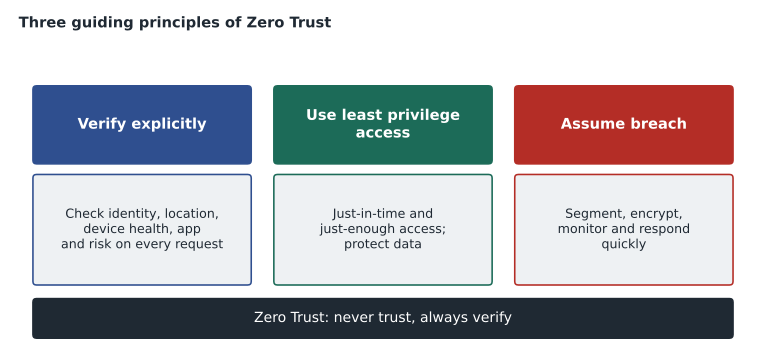
Verify explicitly. Always authenticate and authorize based on all available signals: who the user is, where they are signing in from, which device they are using and whether it is healthy, which application or data they want, and whether anything about the request looks unusual. A password alone is one signal; a password plus a second factor from a registered phone, on a company laptop that meets security requirements, signing in from a usual location, is much stronger evidence.
Use least privilege access. Give people and systems only the access they need, only for as long as they need it. That includes just-in-time access, where administrative rights are activated for a short period when needed rather than held permanently, and just-enough access, where permissions match the task rather than being broad by default. Least privilege also applies to data, through classification and protection that follow the information wherever it goes.
Assume breach. Design as if an attacker is already inside, or soon will be. That means limiting how far any single compromise can spread, by segmenting networks and access, encrypting data end to end, and using monitoring and analytics to spot unusual behaviour quickly. Assume breach is not pessimism; it is the recognition that prevention will sometimes fail, so detection and containment matter just as much.
Ama tested herself by applying the principles to the October incident. Verify explicitly would have asked for more than a password from an unfamiliar country on an unfamiliar device. Least privilege would have limited what the store manager's account could reach, although a mailbox is normally hers to read. Assume breach would have meant alerts on the unusual sign-in and on the new mail-forwarding rule the attacker created, so the team would have known within minutes, not a day later when a supplier phoned.
Where Zero Trust applies
Zero Trust is not a single product. It is a way of designing security across an organization. Microsoft describes several foundational areas, sometimes called pillars, where the principles are applied. They are worth knowing as a set, because exam questions often describe a control and ask which area it belongs to.
| Area | What Zero Trust asks | Harrow & Finch example |
|---|---|---|
| Identities | Verify every user and workload identity with strong authentication | MFA for every account, starting with administrators |
| Devices | Check device health and compliance before granting access | Store tablets must be managed and up to date to open StockLine |
| Applications | Control which apps are used and what they can access | Block unapproved file-sharing apps on company laptops |
| Data | Classify, label and protect data wherever it goes | Label payroll files as confidential and encrypt them |
| Infrastructure | Harden servers and cloud resources and monitor them | Close remote desktop to the internet on StockLine VMs |
| Networks | Segment networks and encrypt traffic; do not trust location alone | Separate the till network from the office network in stores |
In Microsoft's design, an access decision is made by a policy engine that receives signals from these areas and applies the organization's rules. In Microsoft Entra, the main policy engine for sign-ins is Conditional Access, which is covered in lesson 10. Signals include the user and their group memberships, the location and IP address, the device and its compliance state from Microsoft Intune, the application being accessed and a real-time risk assessment from Microsoft Entra ID Protection. The result can be to allow access, to allow it with conditions such as MFA, or to block it.
A simple access decision in code
Ama wrote a short Python function to make the idea concrete. It is not how Microsoft Entra works internally, but it captures the logic of combining signals rather than trusting any single one. Each request carries a few facts, and the function returns one of three outcomes.
def decide(request):
    # Illustrative Zero Trust style decision using several signals.
    if request["risk"] == "high":
        return "block"
    if request["app"] == "payroll" and not request["device_compliant"]:
        return "block"
    needs_mfa = (request["location"] != "known"
                 or request["risk"] == "medium"
                 or request["app"] in ("payroll", "admin portal"))
    if needs_mfa and not request["mfa_done"]:
        return "require MFA"
    return "allow"

requests = [
    {"who": "store manager, home laptop", "location": "known", "device_compliant": True,
     "app": "email", "risk": "low", "mfa_done": False},
    {"who": "sign-in from abroad", "location": "unfamiliar", "device_compliant": False,
     "app": "email", "risk": "medium", "mfa_done": False},
    {"who": "payroll clerk, personal tablet", "location": "known", "device_compliant": False,
     "app": "payroll", "risk": "low", "mfa_done": True},
    {"who": "attacker with leaked password", "location": "unfamiliar", "device_compliant": False,
     "app": "email", "risk": "high", "mfa_done": False},
]
for r in requests:
print(f"{r['who']:32s} -> {decide(r)}")store manager, home laptop -> allow sign-in from abroad -> require MFA payroll clerk, personal tablet -> block attacker with leaked password -> block
What this code does
Makes an illustrative Zero Trust access decision for several sign-in requests by checking signals such as sign-in risk, the app being opened, whether the device is compliant and whether the location is familiar. Each request is allowed, asked for MFA, or blocked. The examples show that a valid password alone is not enough when other signals look wrong.
The October sign-in from abroad would have been asked for MFA, which the attacker could not provide. A sign-in with a password already known to be leaked would have been blocked outright. Meanwhile, the store manager reading email at home on a known laptop gets straight in, which matters: Zero Trust is meant to make good access easy and bad access hard, not to make everyone's day harder.
Zero Trust is a journey
No organization becomes Zero Trust in a single project. Microsoft and other security bodies describe it as a journey with stages, from a starting point where trust is based mostly on the network, through stages where identities and devices are verified, to a mature state where every access decision uses rich signals and automated responses. Government guidance in both countries uses similar language: the Canadian Centre for Cyber Security has published guidance on moving toward Zero Trust, and federal departments are expected to adopt its principles.
Sunil asked Ama to draft a realistic order of work for Harrow & Finch. Her draft put identity first, because the October incident showed it was the weakest layer and because Microsoft Entra already held every user's account through Microsoft 365. Devices came second, so that access to sensitive applications could depend on a managed, healthy device. Data protection, network segmentation in the stores and better monitoring followed. Renata reviewed the plan with the Skylight team and agreed to start the identity work in December 2026, with the first Conditional Access policies planned for January 2027.
Zero Trust and the user experience
Sunil was careful to present Zero Trust to the steering group as an improvement for staff, not only a restriction. Because access decisions use several signals, the system can be relaxed when the evidence is strong and strict when it is weak. A head office employee on a managed laptop in the office might sign in once in the morning and not see another prompt all day, while the same account signing in from an unfamiliar country at 3 a.m. faces a much higher bar. Under the old model, everyone was treated the same: either everyone typed passwords constantly, or nobody was challenged at all.
Ama noted a second benefit. When access depends on identity and device rather than location, people can work from a store, a supplier's office or home in the same way, without a VPN for every task. That flexibility was one of the reasons Grace Oduya supported the plan: store managers would finally be able to check schedules safely from their phones.
Worked problem
Matching controls to the three principles
The Skylight team proposed four changes: (1) store staff can open StockLine only from managed tablets that meet update rules; (2) the IT administrators lose their permanent Global Administrator role and request it for up to four hours when needed; (3) sign-in logs are sent to a monitoring tool that alerts on new mail-forwarding rules; (4) a sign-in from a new country requires MFA. Which Zero Trust principle does each change mainly apply?
Show solution
- Change 1 checks the device as a signal before granting access: verify explicitly.
- Change 2 limits standing administrative rights to just-in-time use: use least privilege access.
- Change 3 expects that some attacks will get through and watches for signs of them: assume breach.
- Change 4 uses location as a signal and asks for stronger proof: verify explicitly.
Answer: Verify explicitly; least privilege; assume breach; verify explicitly.
Common misunderstandings
Zero Trust is sometimes misread as "trust nobody", as if staff are treated as suspects. That is not the intent. It means trust is never assumed from location alone; it is earned for each request with evidence, and most requests from legitimate users on healthy devices pass without friction. It is also sometimes misread as "get rid of firewalls and VPNs". Network controls remain useful layers in defence in depth; they simply stop being the only thing that decides whether access is allowed.
Another misunderstanding is that Zero Trust is something you buy. Products such as Microsoft Entra Conditional Access, Microsoft Intune and Microsoft Defender help put the principles into practice, but the decisions about who needs what access, which data matters most and which risks are acceptable belong to the organization. As Sunil put it to the Skylight steering group, "The tools enforce our rules. Someone still has to write good rules."
Common mistakes
MistakeBelieving Zero Trust means users are distrusted personally.
InsteadIt means no request is trusted automatically because of its network location; each is verified with evidence.
MistakeThinking Zero Trust removes the need for network security.
InsteadNetwork segmentation and encryption are still part of Zero Trust; they are just not the only basis for trust.
MistakeTreating Zero Trust as a product you install.
InsteadIt is a strategy applied across identities, devices, apps, data, infrastructure and networks, supported by products.
MistakeConfusing least privilege with assume breach.
InsteadLeast privilege limits access in advance; assume breach plans for detection and containment when something gets through.
Summary and key terms
- Zero Trust replaces trust based on network location with the rule never trust, always verify.
- Its three principles are verify explicitly using all available signals, use least privilege access including just-in-time and just-enough access, and assume breach by limiting the blast radius and monitoring for attacks.
- The principles apply across identities, devices, applications, data, infrastructure and networks, and in Microsoft Entra, Conditional Access acts as the policy engine for sign-in decisions.
- Zero Trust
- A security model in which no request is trusted by default; each is verified using all available signals.
- Verify explicitly
- Authenticate and authorize every request using signals such as identity, location, device health and risk.
- Least privilege
- Granting only the access needed, only for as long as it is needed.
- Just-in-time access
- Privileged access that is activated for a limited time when required, rather than held permanently.
- Assume breach
- Designing as if an attacker is already present: segment, encrypt and monitor to limit damage.
- Lateral movement
- An attacker moving from one compromised system or account to others inside an organization.
Practice problems
Work each problem on paper first, then reveal the answer to check.
What is the short phrase that sums up Zero Trust?
Show answer
Never trust, always verify.
Which Zero Trust principle does just-in-time administrative access support?
Show answer
Use least privilege access.
Name three signals a Zero Trust policy engine might use for a sign-in.
Show answer
Any three of: the user and groups, location or IP address, device and its compliance, the application, and sign-in or user risk.
Lesson quiz · 5 questions
Score 60% or more to complete this lesson.
Create a free account to save your progress, take quizzes and earn a certificate.