
JS-250 · Lesson 8 of 12 · 31 min
Service workers
▶ Video coming soon A video version of this lesson is on the way.
On Thursday, September 14, the course turns from speed to reliability. The church hall where volunteers check in has Wi-Fi that works most of the time, drops for a minute or two several times a morning and is painfully slow when sixty volunteers arrive at once. The kitchen's Wi-Fi does much the same to Rosa's order board. Faster pages help, but a page that needs the network to open at all will still fail when the network is gone. The tool that changes that is the service worker, and this lesson explains how it works before lesson 9 uses it to make the portal and the board work offline.
What a service worker is
A service worker is a JavaScript file that the browser runs separately from any page, in the background, for a particular site. Once installed, it sits between that site's pages and the network. Every request a controlled page makes, for its HTML, its scripts, its images or its API data, goes first to the service worker's fetch event, and the service worker decides how to answer it: from the network, from a cache it manages, or with a response it builds itself.
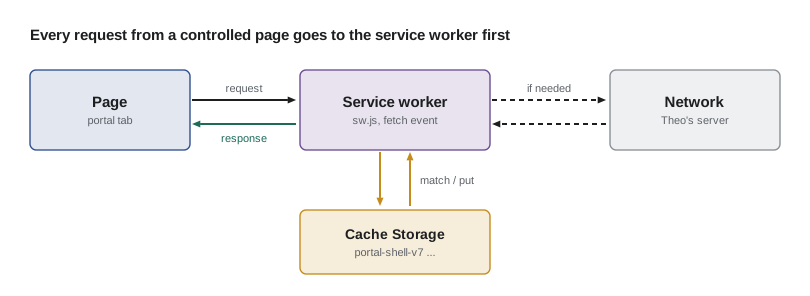
- It is event-driven. The browser starts it when there is an event to handle, such as a fetch or a push message, and stops it when it is idle. It cannot keep state in variables between events; anything lasting goes in Cache Storage or IndexedDB.
- It has no DOM. It cannot touch the page directly. It talks to pages with postMessage and controls them only through their requests.
- It needs a secure context. Service workers work only on HTTPS pages, or on localhost during development, because something that can rewrite every response must not be installable by an attacker on the network.
- It has a scope. A service worker controls the pages under the path it is served from, by default. The portal's worker at /volunteer/sw.js controls /volunteer/ and everything below it, but not the public site.
Gareth stresses one more point before any code. A service worker is powerful enough to break a site for every returning visitor at once, for example by serving a broken page from its cache forever. The studio's rules for service workers, which this lesson builds up, are mostly about making sure that can never happen.
The lifecycle
A service worker goes through a fixed sequence of states. Understanding them explains almost every confusing thing service workers do, such as why a new version does not take effect when the page is reloaded.
| State | What happens | Typical code |
|---|---|---|
| Registration | A page calls navigator.serviceWorker.register() with the worker's URL | In the page, after it has loaded |
| Installing | The browser downloads the script and fires install | Download and cache the files the app needs to start (precaching) |
| Waiting | Installed, but an older worker still controls open pages | Nothing; or ask the page to offer a reload |
| Activating | The old worker is gone; activate fires | Delete caches from older versions |
| Activated | The worker handles fetch events for pages it controls | Answer requests with a caching strategy |
| Redundant | Replaced by a newer worker, or installation failed | Nothing |
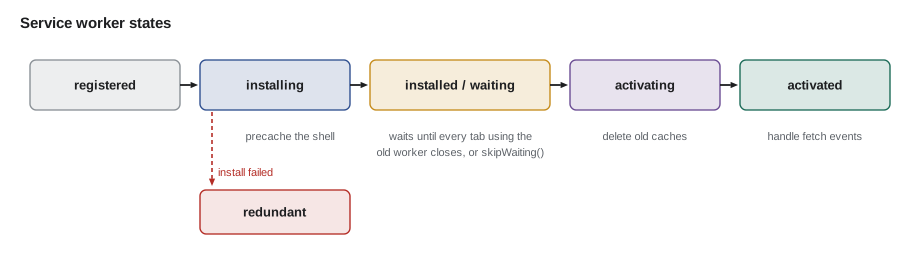
The waiting state is the one that surprises people. When Mira changes the worker and deploys it, a visitor's browser notices the new file on their next visit, installs it and then makes it wait, because the old worker is still controlling the open tab. The new version takes over only when every tab using the old one has been closed, not merely reloaded, because a reload keeps the tab open for a moment. This is deliberate: two versions of a worker must never control the same app at once, or the pages and caches could get out of step. A worker can skip the wait by calling self.skipWaiting(), which the studio does only together with a prompt that reloads the page.
Mira models the lifecycle with two tabs open, to see exactly when an update takes effect.
// A model of service worker updates with several tabs open.
function makeSite() {
  const s = { active: null, waiting: null, tabs: new Map() };
  s.deploy = (version) => {
    if (![...s.tabs.values()].includes(s.active)) {
      const before = s.active;
      s.active = version;
      return `${version} installed and activated at once (${before ? 'no tab uses ' + before : 'no older version'})`;
    }
    s.waiting = version;
    return `${version} installed; waiting while ${[...s.tabs.values()].filter((v) => v === s.active).length} tab(s) use ${s.active}`;
  };
  s.open = (tab) => { s.tabs.set(tab, s.active); return `${tab} opened, controlled by ${s.active}`; };
  s.close = (tab) => {
    s.tabs.delete(tab);
    if (s.waiting && ![...s.tabs.values()].includes(s.active)) {
      s.active = s.waiting; s.waiting = null;
      return `${tab} closed; ${s.active} activates`;
    }
    return `${tab} closed`;
  };
  s.skipWaiting = () => { s.active = s.waiting; s.waiting = null; for (const t of s.tabs.keys()) s.tabs.set(t, s.active); return `skipWaiting: ${s.active} takes over all tabs`; };
  return s;
}

const site = makeSite();
console.log(site.deploy('v1'));
console.log(site.open('tab A'));
console.log(site.open('tab B'));
console.log(site.deploy('v2'));
console.log(site.close('tab A'));
console.log(site.open('tab C'), '(new tabs still get the active version)');
console.log(site.close('tab B'));
console.log(site.close('tab C'));
console.log(site.open('tab D'));
console.log(site.deploy('v3'));
console.log(site.skipWaiting());v1 installed and activated at once (no older version) tab A opened, controlled by v1 tab B opened, controlled by v1 v2 installed; waiting while 2 tab(s) use v1 tab A closed tab C opened, controlled by v1 (new tabs still get the active version) tab B closed tab C closed; v2 activates tab D opened, controlled by v2 v3 installed; waiting while 1 tab(s) use v2 skipWaiting: v3 takes over all tabs
What this code does
The model keeps one active version, at most one waiting version and a map of open tabs with the version controlling each. A new version waits until no tab is controlled by the active one, and even a tab opened during the wait is controlled by the old version, which is why the update to v2 happens only when the last of tabs A, B and C closes. skipWaiting() ends the wait at once and moves every tab to the new version, which is why it must be paired with reloading those tabs.
Registering a worker
Registration is a few lines in the page. The studio registers after the page has finished loading, so the worker's own downloads never compete with the first visit's important requests, and it checks for support first so that older browsers simply carry on without one.
// In the volunteer portal's main module.
if ('serviceWorker' in navigator) {
  window.addEventListener('load', async () => {
    try {
      const reg = await navigator.serviceWorker.register('/volunteer/sw.js', { scope: '/volunteer/' });
      reg.addEventListener('updatefound', () => {
        const worker = reg.installing;
        worker.addEventListener('statechange', () => {
          // A new version is waiting and a previous one controls this page: offer a reload.
          if (worker.state === 'installed' && navigator.serviceWorker.controller) showUpdateBanner(worker);
        });
      });
    } catch (err) {
      reportError(err);   // the portal still works without a service worker
    }
  });
}
What this code does
The feature check means browsers without service workers skip the whole block and the portal works exactly as before. Registration happens after the load event so that the worker's precaching does not slow the first visit. The updatefound and statechange listeners detect a new version that has installed while an older one controls the page, so the portal can show a banner offering to reload into the new version.
Theo adds one rule on the server: the worker script itself is served with Cache-Control: no-cache. Browsers check for a new worker at least once a day anyway, but they would otherwise respect a long lifetime on the worker's own file for that check, and a stuck worker is the hardest kind of bug to fix remotely.
Cache Storage
A service worker keeps responses in Cache Storage, a set of named caches, each mapping requests to responses. It is separate from the HTTP cache from lesson 6 and entirely under the site's control: nothing expires from it unless the site deletes it, which is both its strength and the main way service workers go wrong. The studio names each cache with a version, such as portal-shell-v7, so that a new worker can tell its own caches from old ones and delete the old ones on activate.
// sw.js: precache the portal's shell on install, clean up on activate.
const VERSION = 'v7';
const SHELL_CACHE = `portal-shell-${VERSION}`;
const SHELL = [
  '/volunteer/',
  '/volunteer/assets/index-3b91c4.js',
  '/volunteer/assets/index-77a0d2.css',
  '/volunteer/offline.html',
];

self.addEventListener('install', (event) => {
  event.waitUntil((async () => {
    const cache = await caches.open(SHELL_CACHE);
    await cache.addAll(SHELL);            // fails, and so does the install, if any file fails
  })());
});

self.addEventListener('activate', (event) => {
  event.waitUntil((async () => {
    for (const name of await caches.keys()) {
      if (name.startsWith('portal-') && !name.endsWith(VERSION)) await caches.delete(name);
    }
    await self.clients.claim();           // control pages that are already open
  })());
});
What this code does
On install the worker opens a cache named for its version and adds the files the portal needs to start, and waitUntil() keeps the install open until that has finished, so a failed download fails the whole install instead of leaving a half-filled cache. On activate it deletes every portal cache whose name does not end with its own version, then claims open pages. The file list is generated by the build from the hashed file names, so it changes whenever the portal does.
The build writes that file list, called the precache manifest, from the output of Vite, with a hash for each file. When a new version is deployed, the worker only needs to download the files whose hashes changed. Mira writes the comparison the studio's build step uses to report what a release will download for returning volunteers.
// Compare two precache manifests (url -> content hash) to see what an update downloads and deletes.
const v6 = {
  '/volunteer/': 'a1', '/volunteer/assets/index-3b91c4.js': '3b91c4', '/volunteer/assets/plan-0c22f9.js': '0c22f9',
  '/volunteer/assets/index-77a0d2.css': '77a0d2', '/volunteer/offline.html': 'e5',
};
const v7 = {
  '/volunteer/': 'a2', '/volunteer/assets/index-3b91c4.js': '3b91c4', '/volunteer/assets/plan-5d10ab.js': '5d10ab',
  '/volunteer/assets/index-77a0d2.css': '77a0d2', '/volunteer/offline.html': 'e5', '/volunteer/assets/checkin-91f3e0.js': '91f3e0',
};

function diff(oldM, newM) {
  const fetch = [], keep = [], remove = [];
  for (const [url, hash] of Object.entries(newM)) (oldM[url] === hash ? keep : fetch).push(url);
  for (const url of Object.keys(oldM)) if (!(url in newM)) remove.push(url);
  return { fetch, keep, remove };
}

const d = diff(v6, v7);
for (const [k, list] of Object.entries(d)) console.log(`${k.padEnd(6)} ${list.length}: ${list.join(', ')}`);fetch 3: /volunteer/, /volunteer/assets/plan-5d10ab.js, /volunteer/assets/checkin-91f3e0.js keep 3: /volunteer/assets/index-3b91c4.js, /volunteer/assets/index-77a0d2.css, /volunteer/offline.html remove 1: /volunteer/assets/plan-0c22f9.js
What this code does
Every URL in the new manifest is either kept, if the old manifest has the same hash for it, or fetched, if it is new or its hash changed. URLs that appear only in the old manifest are removed. Because the build puts hashes in file names, a changed script appears as a new URL to fetch and its old name as one to remove, while the HTML at /volunteer/ keeps its URL but gets a new hash.
Caching strategies
The fetch event is where a service worker earns its keep. For each request, it chooses a strategy: a rule for when to use the cache and when to use the network. Different kinds of request need different strategies, and choosing them is most of the design work.
| Strategy | How it answers | Good for | Risk |
|---|---|---|---|
| Cache first | From the cache if present, otherwise the network (and cache the result) | Hashed assets, fonts, icons | Serving something stale forever if names are not hashed |
| Network first | From the network; from the cache only if the network fails or is too slow | HTML pages, data that must be current | Slow when the network is slow, unless there is a timeout |
| Stale-while-revalidate | From the cache at once, while fetching a fresh copy for next time | Data that may be a little out of date: news, the menu | Visitors see the previous version once |
| Network only | Always the network | Sign-in, payments, anything personal or one-off | Fails offline (by design) |
| Cache only | Always the cache | The precached app shell and offline page | Must be precached first |
Mira builds a simulation to compare the three main strategies under three network conditions. The network and the cache are fakes with fixed delays, so the output is the same on every run, but the logic is the same as the real worker's.
// Compare strategies with a fake network (online, slow, offline) and a fake cache.
function makeWorld(network) {
  const cache = new Map([['/volunteer/api/shifts', { body: 'shifts as of 07:50', ms: 5 }]]);
  const net = {
    online: { ok: true, ms: 120 }, slow: { ok: true, ms: 4000 }, offline: { ok: false, ms: 3000 },
  }[network];
  return {
    fromCache: (url) => cache.get(url) ?? null,
    fromNetwork: (url) => (net.ok ? { body: 'shifts as of 08:15', ms: net.ms } : { error: true, ms: net.ms }),
    store: (url, r) => cache.set(url, { ...r, ms: 5 }),
  };
}

const strategies = {
  'cache first': (w, url) => {
    const c = w.fromCache(url);
    if (c) return { ...c, from: 'cache' };
    const n = w.fromNetwork(url);
    return n.error ? { body: 'offline page', ms: n.ms, from: 'fallback' } : { ...n, from: 'network' };
  },
  'network first (3 s timeout)': (w, url) => {
    const n = w.fromNetwork(url);
    if (!n.error && n.ms <= 3000) { w.store(url, n); return { ...n, from: 'network' }; }
    const c = w.fromCache(url);
    return c ? { body: c.body, ms: Math.min(n.ms, 3000) + c.ms, from: 'cache after network failed' } : { body: 'offline page', ms: 3000, from: 'fallback' };
  },
  'stale-while-revalidate': (w, url) => {
    const c = w.fromCache(url);
    const n = w.fromNetwork(url);
    if (!n.error) w.store(url, n);      // in the background
    if (c) return { ...c, from: 'cache (updating in background)' };
    return n.error ? { body: 'offline page', ms: n.ms, from: 'fallback' } : { ...n, from: 'network' };
  },
};

for (const network of ['online', 'slow', 'offline']) {
  console.log(`-- network ${network}`);
  for (const [name, strategy] of Object.entries(strategies)) {
    const r = strategy(makeWorld(network), '/volunteer/api/shifts');
    console.log(`${name.padEnd(28)} ${String(r.ms).padStart(4)} ms  "${r.body}"  from ${r.from}`);
  }
}-- network online cache first 5 ms "shifts as of 07:50" from cache network first (3 s timeout) 120 ms "shifts as of 08:15" from network stale-while-revalidate 5 ms "shifts as of 07:50" from cache (updating in background) -- network slow cache first 5 ms "shifts as of 07:50" from cache network first (3 s timeout) 3005 ms "shifts as of 07:50" from cache after network failed stale-while-revalidate 5 ms "shifts as of 07:50" from cache (updating in background) -- network offline cache first 5 ms "shifts as of 07:50" from cache network first (3 s timeout) 3005 ms "shifts as of 07:50" from cache after network failed stale-while-revalidate 5 ms "shifts as of 07:50" from cache (updating in background)
What this code does
Each strategy is a function that asks a fake cache and a fake network for the shift list, and each network condition is a fresh world with one stored copy from 07:50. Cache first and stale-while-revalidate answer in 5 ms in every condition but may show the older list, while network first shows the newest list when the network works and waits up to its 3 s timeout before falling back. The slow network is the interesting case: network first waits the full timeout and then shows the cached list anyway.
The simulation makes the trade-off concrete. For the portal's own scripts and styles, which have hashed names, cache first is safe and makes every visit after the first open instantly. For the shift list, Lucy would rather volunteers saw a list a few minutes old instantly than wait at the church hall door, so it uses stale-while-revalidate with a clear 'last updated' time on the screen. For the HTML of each page, network first with a short timeout gives fresh pages when the network is good and the cached shell when it is not. And sign-in never touches the cache at all.
A fetch handler
The real worker puts those decisions in one fetch handler that routes each request to its strategy. Mira keeps it short and explicit, and Gareth adds the studio's safety rules as comments, because these are the lines that decide whether a mistake can strand every returning visitor.
const RUNTIME_CACHE = `portal-runtime-${VERSION}`;

self.addEventListener('fetch', (event) => {
  const { request } = event;
  const url = new URL(request.url);
  if (request.method !== 'GET' || url.origin !== location.origin) return;   // let the browser handle it
  if (url.pathname.startsWith('/volunteer/api/auth/')) return;              // never cache sign-in

  if (url.pathname.startsWith('/volunteer/assets/')) {
    event.respondWith(cacheFirst(request));                                 // hashed: safe to keep
  } else if (url.pathname === '/volunteer/api/shifts') {
    event.respondWith(staleWhileRevalidate(event, request));
  } else if (request.mode === 'navigate') {
    event.respondWith(networkFirst(request, 3000));
  }
});

async function cacheFirst(request) {
  return (await caches.match(request)) ?? fetch(request);
}

async function staleWhileRevalidate(event, request) {
  const cache = await caches.open(RUNTIME_CACHE);
  const cached = await cache.match(request);
  const update = fetch(request).then((response) => {
    if (response.ok) cache.put(request, response.clone());
    return response;
  });
  event.waitUntil(update.catch(() => {}));     // keep the worker alive until the update is stored
  return cached ?? update;
}

async function networkFirst(request, timeoutMs) {
  try {
    return await fetch(request, { signal: AbortSignal.timeout(timeoutMs) });
  } catch {
    return (await caches.match(request)) ?? caches.match('/volunteer/offline.html');
  }
}
What this code does
The handler ignores anything that is not a same-origin GET and returns without calling respondWith() for sign-in, which leaves those requests to the browser as if there were no worker. Hashed assets use cache first, the shift list uses stale-while-revalidate with waitUntil() so the background update can finish, and page navigations use network first with a three-second timeout before falling back to the cached page or the offline page. response.clone() is needed because a response body can be read only once.
Runtime caches need limits, or they grow without end. The portal's runtime cache holds the shift list and a few small API responses, so Mira keeps at most 50 entries and removes the least recently used one when it is full. Cache Storage has no built-in expiry, so the worker keeps track itself.
// A least-recently-used limit for a runtime cache, using a Map's insertion order.
function lru(limit) {
  const map = new Map();
  return {
    get(key) {
      if (!map.has(key)) return undefined;
      const value = map.get(key);
      map.delete(key); map.set(key, value);      // move to the most recently used end
      return value;
    },
    put(key, value) {
      map.delete(key);
      map.set(key, value);
      if (map.size > limit) map.delete(map.keys().next().value);   // the first key is the least recent
    },
    keys: () => [...map.keys()],
  };
}

const cache = lru(3);
cache.put('/api/shifts?day=mon', 'Mon');
cache.put('/api/shifts?day=wed', 'Wed');
cache.put('/api/shifts?day=fri', 'Fri');
cache.get('/api/shifts?day=mon');                // Monday is used again
cache.put('/api/shifts?day=sat', 'Sat');         // the cache is full: Wednesday goes
console.log(cache.keys().join(' '));/api/shifts?day=fri /api/shifts?day=mon /api/shifts?day=sat
What this code does
A Map remembers the order in which keys were inserted, so deleting and re-inserting a key on every use keeps the most recently used key at the end. When the map grows beyond its limit, the first key is the least recently used and is removed. In the real worker the same bookkeeping is stored in IndexedDB alongside Cache Storage, because the worker's variables do not survive between events.
Worked problem
How many tabs must close
On a hamper drive Saturday, the church hall's two check-in tablets each have the portal open in one tab, controlled by worker v6. Mira deploys v7 at 08:00, and the portal asks the browser to check for a new worker every 15 minutes, so by 08:15 v7 has installed and is waiting on both tablets. Tablet 1 is reloaded at 08:20, tablet 2's tab is closed at 09:30 and reopened at 09:31, and tablet 1's tab is closed at 12:00 and reopened at 12:01. When does v7 control each tablet, and why does the reload at 08:20 not count?
Show solution
- By 08:15 each tablet, a separate browser with its own service worker registration, has v7 installed and waiting behind its open v6 tab.
- At 08:20, reloading tablet 1 does not close its tab, so v6 stays in control there.
- At 09:30, tablet 2's only tab closes, so v7 activates on tablet 2, and the tab reopened at 09:31 is controlled by v7.
- At 12:00, tablet 1's tab closes, so v7 activates on tablet 1, and the tab reopened at 12:01 uses v7.
Answer: Tablet 2 moves to v7 at 09:30 and tablet 1 at 12:00. A reload keeps the tab open, so it never ends the wait, which is why the studio adds an update banner that calls skipWaiting() and reloads.
Common mistakes
MistakeCaching unhashed files with cache first.
InsteadUse cache first only for files whose names change with their content; use network first or stale-while-revalidate for the rest.
MistakeCaching sign-in, payment or personal responses.
InsteadLeave them to the network; return from the fetch handler without calling respondWith().
MistakeForgetting to delete old caches.
InsteadName caches with a version and delete other versions on activate.
MistakeLetting runtime caches grow without limit.
InsteadKeep a maximum number of entries and remove the least recently used.
MistakeServing the worker script with a long cache lifetime.
InsteadServe sw.js with no-cache so browsers always see a new version.
Summary and key terms
- A service worker is a script the browser runs in the background for a site, on HTTPS, controlling the pages in its scope and handling their requests in its fetch event.
- It has no DOM and no lasting variables, so it keeps data in Cache Storage and IndexedDB.
- Its lifecycle runs from registration through installing (precaching), waiting, activating (cleaning up old caches) to activated; a new version waits until every tab using the old one has closed, unless skipWaiting() is called, which should come with a reload.
- Cache Storage is fully under the site's control and never expires by itself.
- The main strategies are cache first, network first, stale-while-revalidate, network only and cache only, chosen per kind of request.
- A precache manifest of hashed files lets updates download only what changed, and runtime caches need limits.
- Service worker
- A background script that intercepts a site's requests and can answer them from caches or the network.
- Scope
- The set of pages a service worker controls, by default the path it is served from and below.
- Precaching
- Downloading and storing the files an app needs, during the service worker's install event.
- Waiting
- The state of a new service worker that has installed while an older version still controls open pages.
- skipWaiting()
- A call that makes a waiting service worker activate at once.
- Cache Storage
- A set of named request-to-response caches managed by the site, used by service workers.
- Stale-while-revalidate
- Answering from the cache at once while fetching a fresh copy for next time.
- Precache manifest
- The list of URLs and content hashes a service worker precaches, generated by the build.
Practice problems
Work each problem on paper first, then reveal the answer to check.
Why does a new service worker not take control when the page is reloaded?
Show answer
A reload keeps the tab open, so the old worker still controls a page, and the new one waits until every such tab has closed.
Why must sign-in requests bypass the service worker's cache?
Show answer
They carry personal, one-time data that must never be stored or replayed from a cache.
Which strategy suits the portal's hashed JavaScript files, and why is it safe?
Show answer
Cache first, because a changed file gets a new name, so a cached file can never be out of date.
Why does the worker call event.waitUntil() for the stale-while-revalidate update?
Show answer
So the browser does not stop the worker before the fresh response has been stored in the cache.
Try it yourself
Stale-while-revalidate
Complete swr(cached, network) where cached is the stored body or null, and network is the network's body or null when offline. Return an object with show (the body to show now) and store (the body to save for next time, or null).
Show the cached body if there is one, otherwise the network body, otherwise the string 'offline page'. Store the network body whenever there is one.
function swr(cached, network) {
  return { show: network, store: null };
}

console.log(JSON.stringify(swr('list at 07:50', 'list at 08:15')));
console.log(JSON.stringify(swr(null, 'list at 08:15')));
console.log(JSON.stringify(swr('list at 07:50', null)));
console.log(JSON.stringify(swr(null, null)));
Try it yourself
Old caches to delete
Complete toDelete(names, prefix, version) so that it returns the cache names that start with prefix but do not end with - followed by version.
Caches that belong to other apps, which do not start with the prefix, must be left alone.
function toDelete(names, prefix, version) {
  return [];
}

const names = ['portal-shell-v6', 'portal-runtime-v6', 'portal-shell-v7', 'portal-runtime-v7', 'board-shell-v3', 'portal-shell-v17'];
console.log(JSON.stringify(toDelete(names, 'portal-', 'v7')));
Lesson quiz · 5 questions
Score 60% or more to complete this lesson.
Create a free account to save your progress, take quizzes and earn a certificate.