
JS-250 · Lesson 5 of 12 · 28 min
Code splitting and lazy loading
▶ Video coming soon A video version of this lesson is on the way.
On Tuesday, September 5, the day after Labour Day, Gareth opens the session with a number from the baseline: 1,320 kB of JavaScript on the home page, and a volunteer portal whose shift list blocks the main thread for more than a second on the phone profile. Images were the biggest bytes, he says, but scripts are the most expensive bytes. Today's lesson is about sending less JavaScript, sending it later, and making sure the scripts a page does need never stand in the way of the content.
Why a kilobyte of script costs more
A JPEG and a script of the same size take the same time to download. After that they part company. An image is decoded, often on another thread, and drawn. A script must be parsed, compiled and run, and running it happens on the main thread, the same thread that handles taps and draws the page. On a mid-range phone the processor can be several times slower than a developer's laptop, so a script that runs in 100 ms on the laptop can take 400 ms or more on the phone, and for all of that time the page cannot respond.
| Step | Images | Scripts |
|---|---|---|
| Download | Same cost per byte | Same cost per byte |
| Prepare | Decode, often off the main thread | Parse and compile, partly on the main thread |
| Use | Draw | Run on the main thread, often building more of the page |
| Blocks the page? | No, unless it is the LCP element | Yes, while it runs; some scripts also block HTML parsing |
The home page's scripts show all of these costs. The slideshow script, 310 kB, includes a full animation library to fade between three photos, which CSS can do on its own. The calendar script, 420 kB, builds a full year of cooking classes, although the home page shows only the next three. And the donation widget from the payment service, 590 kB, loads on every page of the site, although only the Donate page uses it.
Scripts that block the parser
When the HTML parser meets an ordinary script element, it stops. It must download the script, if it is external, and run it before parsing the rest of the page, because the script might change the document with document.write. A script in the head of the page therefore delays everything after it, including the discovery of the photos further down. Two attributes change that, and modules behave like the second.
| Script | Downloads | Runs | Blocks parsing? | Order kept? |
|---|---|---|---|---|
| <script src> | At once | As soon as it arrives | Yes, until it has run | Yes |
| <script async src> | In parallel with parsing | As soon as it arrives | Only while it runs | No |
| <script defer src> | In parallel with parsing | After parsing, before DOMContentLoaded | No | Yes |
| <script type="module" src> | In parallel, with its imports | Like defer, after parsing | No | Yes |
| <script type="module" async src> | In parallel, with its imports | As soon as it and its imports arrive | Only while it runs | No |
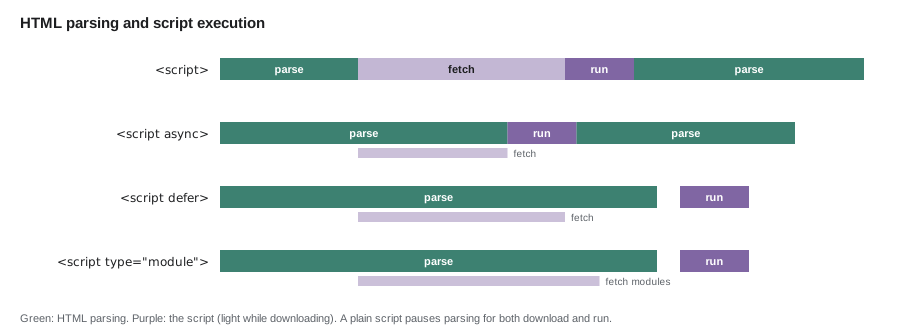
Mira writes a small model of the rules to check the home page's order. Each script has an arrival time on the phone profile, and the model works out when the parser can finish and when each script runs.
// A model of when scripts run. Times are ms after the HTML arrived; parsing alone takes 300 ms.
const PARSE_MS = 300;
const scripts = [
  { name: 'slideshow.js', kind: 'blocking', at: 50, arrives: 1600, runMs: 140 },
  { name: 'analytics.js', kind: 'async', at: 60, arrives: 900, runMs: 40 },
  { name: 'calendar.js', kind: 'defer', at: 70, arrives: 2100, runMs: 680 },
  { name: 'portal-link.js', kind: 'module', at: 80, arrives: 700, runMs: 20 },
];

let clock = 0, parsed = 0;
const runs = [];
// The parser reaches each blocking script at its position and waits for it.
for (const s of scripts.filter((s) => s.kind === 'blocking')) {
  clock = Math.max(clock + (s.at - parsed), s.arrives);
  runs.push([s.name, clock]);
  clock += s.runMs;
  parsed = s.at;
}
const parseEnd = clock + (PARSE_MS - parsed);
// async scripts run when they arrive; deferred and module scripts run after parsing, in order.
for (const s of scripts.filter((s) => s.kind === 'async')) runs.push([s.name, s.arrives]);
let t = parseEnd;
for (const s of scripts.filter((s) => s.kind === 'defer' || s.kind === 'module')) {
  t = Math.max(t, s.arrives);
  runs.push([s.name, t]);
  t += s.runMs;
}
console.log('parsing finished at', parseEnd, 'ms');
for (const [name, at] of runs.sort((a, b) => a[1] - b[1])) console.log(`${String(at).padStart(5)} ms  ${name}`);
console.log('DOMContentLoaded at', t, 'ms');parsing finished at 1990 ms 900 ms analytics.js 1600 ms slideshow.js 2100 ms calendar.js 2780 ms portal-link.js DOMContentLoaded at 2800 ms
What this code does
The parser is modelled as reading the page at a steady rate and stopping at each blocking script until it has arrived and run. The async script runs whenever it arrives, even in the middle of parsing, while deferred and module scripts wait for parsing to finish and then run in document order. The blocking slideshow script holds parsing until 1,740 ms, so moving it to defer would let the parser finish more than a second earlier.
The fix for the Food Hub's own scripts is simple: every script gets defer or is a module, and the slideshow script is removed altogether in favour of the first photo as a plain img element, which the browser can find in the HTML at once. That one change removes the third wave of requests from lesson 2's waterfall and is the biggest single improvement to the home page's resource load delay.
Resource hints
Sometimes the browser cannot see a resource it will need until late: a font referred to from the CSS, a photo set by a script, or a request to another server. Resource hints are link elements in the head that tell the browser about such things early.
| Hint | What it does | Use it for |
|---|---|---|
| preconnect | Opens a connection (DNS, TCP, TLS) to another origin early | An origin the page will certainly use soon, such as the payment service on the Donate page |
| dns-prefetch | Looks up the name only | Origins that might be used, as a cheap fallback |
| preload | Downloads a specific file now, at high priority | The LCP image if it is set from CSS, the heading font |
| modulepreload | Downloads a module and its imports and prepares them | The module the page will import first |
| prefetch | Downloads a file at low priority for a later page | The next page a visitor is likely to open |
<head>
  <meta charset="utf-8">
  <title>Riverside Community Food Hub</title>
  <link rel="preload" href="/fonts/merriweather-latin-700.woff2" as="font" type="font/woff2" crossorigin>
  <link rel="stylesheet" href="/css/site-4f1c2a.css">
  <link rel="modulepreload" href="/js/home-91be07.js">
  <script type="module" src="/js/home-91be07.js"></script>
</head>
What this code does
The heading font is preloaded so it starts downloading as soon as the head is read instead of after the CSS has been parsed; fonts need the crossorigin attribute even on the same origin. The stylesheet comes next, and the page's single module is both hinted with modulepreload and loaded with a module script, which does not block parsing. The first photo needs no hint, because it is a plain img element the parser finds immediately.
Gareth's warning about hints is that every preload competes with everything else for the same connection. Preloading five files is the same as giving none of them priority. The studio's rule is at most one or two preloads per page, each for something that is certainly needed for the first screen and otherwise discovered late.
Chromium-based browsers also support the Speculation Rules API, a script element with the type speculationrules that lists pages to prefetch, or even to render in the background, when the visitor is likely to open them. A rule can say, for example, that any link to a recipe should be prefetched when the visitor holds a pointer over it or starts to tap it. Firefox and Safari do not support it yet and simply ignore the element, so it is a safe extra for visitors whose browsers use it rather than something the page depends on.
Splitting a bundle
The volunteer portal is a React application built with Vite. When Mira set it up in JS-220, the build produced one JavaScript file for the whole application: the shift list, the hamper drive plan, the profile page, the sign-in screens and every library they use. A volunteer who opens the portal to check one shift downloads, parses and compiles all of it. Code splitting breaks the bundle into pieces so that each page downloads only what it needs.
The tool for splitting is the dynamic import() expression. A static import at the top of a module is included in the same bundle. A call to import('./pages/plan.js') returns a promise for the module and tells the bundler to put that module, and anything only it uses, in a separate file that is downloaded when the call runs. Code used by more than one split piece goes into a shared chunk so it is downloaded once. Gareth demonstrates with esbuild, the bundler inside Vite's development server, on a cut-down copy of the portal.
$ cat src/main.js
// src/main.js: the portal's entry point. Each page is loaded only when its route is visited.
import { formatDate } from './lib/format.js';

const routes = {
  '/volunteer/shifts': () => import('./pages/shifts.js'),
  '/volunteer/plan': () => import('./pages/plan.js'),
  '/volunteer/profile': () => import('./pages/profile.js'),
};

export async function show(path) {
  const page = await routes[path]();
  return page.render(formatDate(new Date(2028, 8, 5)));
}
$ node build.mjs
dist/main-M57IT72G.js             329 B (gzip 232 B)  from main.js
dist/chunks/shifts-WFE2HXFN.js    306 B (gzip 246 B)  from pages/shifts.js
dist/chunks/plan-QTQIMEMQ.js      207 B (gzip 191 B)  from pages/plan.js
dist/chunks/chunk-XUISI5MB.js     149 B (gzip 139 B)  from lib/dates.js
dist/chunks/profile-SNZQOUNN.js   118 B (gzip 131 B)  from pages/profile.js
dist/chunks/chunk-B4Y3G73H.js     167 B (gzip 153 B)  from lib/format.js
What this code does
The entry file loads each page with import(), so the bundler makes a separate file for each page and a chunk for each library module that more than one page uses. The output lists every file with its size before and after gzip and the source modules inside it. Only the main file and the format chunk it imports are needed at start-up; a volunteer who opens the plan page downloads the plan chunk and the dates chunk, and nothing from the profile page.
In the real portal the same idea is used through React's lazy() function and React Router's route modules, as JS-220 showed. The result for the portal's first screen, the shift list, is that its JavaScript drops from 412 kB to 118 kB after gzip, because the hamper drive plan, the profile page and the charting library used only on the season summary no longer load with it.
Mira checks her understanding of where each module ends up with a small model of the bundler's rule: a module goes in an entry's own file if only that entry reaches it, and in a shared chunk if several do.
// Which entry points reach each module? Modules reached by several go to a shared chunk.
const graph = {
  'main.js': ['lib/format.js'],
  'pages/shifts.js': ['lib/format.js', 'lib/dates.js'],
  'pages/plan.js': ['lib/dates.js', 'lib/overlap.js'],
  'pages/profile.js': ['lib/format.js', 'lib/avatar.js'],
  'lib/overlap.js': ['lib/dates.js'],
};
const entries = ['main.js', 'pages/shifts.js', 'pages/plan.js', 'pages/profile.js'];

function reach(entry, seen = new Set()) {
  if (seen.has(entry)) return seen;
  seen.add(entry);
  for (const dep of graph[entry] ?? []) reach(dep, seen);
  return seen;
}

const reachedBy = new Map();
for (const e of entries) for (const m of reach(e)) {
  if (m === e) continue;
  reachedBy.set(m, [...(reachedBy.get(m) ?? []), e]);
}
for (const [m, by] of [...reachedBy].sort()) {
  console.log(`${m.padEnd(16)} ${by.length > 1 ? 'shared chunk' : 'inside ' + by[0]}  (${by.join(', ')})`);
}lib/avatar.js inside pages/profile.js (pages/profile.js) lib/dates.js shared chunk (pages/shifts.js, pages/plan.js) lib/format.js shared chunk (main.js, pages/shifts.js, pages/profile.js) lib/overlap.js inside pages/plan.js (pages/plan.js)
What this code does
reach() walks the import graph from an entry and collects every module it can reach, using a Set so that a module imported twice is visited once. The loop then records, for every module, which entries reach it. Modules reached by one entry are bundled with it, and modules reached by several become shared chunks, which is the rule esbuild applied in the build above.
Splitting has a cost of its own. Each piece is a separate request, and a piece that is needed immediately but split off adds a round trip before it can run. The goal is not the smallest pieces possible but a first screen that loads only what it needs, with the rest arriving in parallel or when it is used.
Loading on demand
Some code is needed only when a visitor does something. The home page's cooking class calendar is further down the page and shows only the next three classes until someone taps 'See all classes'. The donation form matters only on the Donate page, and even there only once someone chooses an amount. Loading such code on demand keeps it off the first screen entirely.
Mira writes the pattern the site will use: a loader that calls import() the first time it is needed and returns the same promise every time after, so that two quick taps do not download the module twice.
// A loader that imports a module once, on first use. Here a fake import stands in for import().
let downloads = 0;
const fakeImport = (name) => new Promise((resolve) => {
  downloads++;
  setTimeout(() => resolve({ render: (n) => `${name}: showing ${n} classes` }), 50);
});

function once(load) {
  let promise = null;
  return () => (promise ??= load());
}

const loadCalendar = once(() => fakeImport('calendar'));

// Two quick taps on 'See all classes', then a third later.
const first = loadCalendar().then((m) => m.render(42));
const second = loadCalendar().then((m) => m.render(42));
console.log('downloads started:', downloads);
console.log(await first);
console.log(await second);
console.log((await loadCalendar()).render(3));
console.log('downloads in total:', downloads);downloads started: 1 calendar: showing 42 classes calendar: showing 42 classes calendar: showing 3 classes downloads in total: 1
What this code does
once() keeps the promise from the first call and the ??= operator assigns it only if nothing is stored yet, so every later call returns the same promise. Both quick taps therefore wait for a single download, and a later call gets the already resolved module at once. In the real page the load function is () => import('./calendar.js'), which the bundler turns into a separate file.
Third-party widgets get the same treatment through a facade: a lightweight stand-in that looks like the widget and is replaced by the real thing when the visitor interacts with it. On the Donate page, the amount buttons are plain HTML. When a visitor taps one, the page preconnects to the payment service, loads its script and opens its form with the amount filled in. The 590 kB script and its connections now load for people who are about to donate, rather than for every visitor to every page.
// donate.js: load the payment widget only when someone starts to donate.
const buttons = document.querySelectorAll('[data-amount]');
let widget;

async function openPayment(amount) {
  widget ??= import('./payment-widget.js');   // wraps the payment service's script
  const { open } = await widget;
  open({ amount, currency: document.documentElement.dataset.currency });
}

for (const button of buttons) {
  // Warm up the connection on the first sign of intent, before the tap completes.
  button.addEventListener('pointerdown', () => {
    const link = Object.assign(document.createElement('link'), { rel: 'preconnect', href: 'https://pay.giveright.example' });
    document.head.append(link);
  }, { once: true });
  button.addEventListener('click', () => openPayment(Number(button.dataset.amount)));
}
What this code does
The page starts with plain buttons that carry the amount in a data attribute and no payment code at all. The first pointerdown adds a preconnect hint so the connection to the payment service is being opened while the finger is still on the screen, and the click imports the wrapper module, which loads the service's script. The import is stored in a variable so a second tap reuses it.
Removing code you do not need
The cheapest JavaScript is the JavaScript that is never sent. Bundlers remove exported functions that nothing imports, a process called tree shaking, but only when the code is written in a way they can analyse: ES module imports and exports, and no side effects at the top level of a module. Mira finds three easy wins in the portal by looking at the bundle analyser's map of what each file contains.
- A date library used for two functions. The portal imported a whole date and time library to format dates. The built-in Intl.DateTimeFormat does the same job with no download at all.
- Icons imported as a set. Importing the icon set's index pulled in every icon. Importing the six icons by path keeps only those.
- Code for old browsers. The build still produced extra code for browsers that do not support modern JavaScript. Raising the build target to the browsers the studio supports removed it.
Worked problem
What the first screen costs
Before splitting, the portal's shift list loads a single 412 kB gzip bundle. After splitting, it loads a 74 kB main file, a 31 kB shared chunk and a 13 kB shift list chunk. On the phone profile the scripts are compiled and run at about 1 ms per 2 kB of gzip size. Roughly how much main-thread time is saved, and how much download time at 1.6 megabits per second?
Show solution
- After splitting, the first screen loads 74 + 31 + 13 = 118 kB.
- Saved bytes: 412 − 118 = 294 kB.
- Main-thread time saved: 294 ÷ 2 = 147 ms.
- Download time saved: 294 × 8 = 2,352 kilobits, and 2,352 ÷ 1,600 ≈ 1.5 seconds.
Answer: About 1.5 seconds of download and about 147 ms of main-thread work are saved on the first screen.
Common mistakes
MistakePutting ordinary script elements in the head.
InsteadUse defer or type="module", or move scripts to the end of the body.
MistakePreloading many files.
InsteadPreload only one or two files that the first screen certainly needs and that are discovered late.
MistakeSplitting the first screen's code into many small files.
InsteadSplit by route and by interaction; keep what the first screen needs together.
MistakeLoading third-party widgets on every page.
InsteadLoad them only on the pages that use them, ideally behind a facade.
MistakeImporting a whole library for one function.
InsteadUse built-in features such as Intl, import specific modules, and check the bundle analyser.
Summary and key terms
- JavaScript costs more than its download: it is parsed, compiled and run on the main thread, which is slow on phones.
- Ordinary scripts block HTML parsing; async scripts run when they arrive, and defer and module scripts run in order after parsing.
- Resource hints, preconnect, dns-prefetch, preload, modulepreload and prefetch, tell the browser early about resources it will find late, and should be used sparingly.
- The Speculation Rules API prefetches or prerenders likely next pages in Chromium browsers.
- Dynamic import() splits code so pages load only what they need, with shared chunks for common code.
- Load rarely used code on demand, once, and put heavy third-party widgets behind a facade.
- Tree shaking and built-in APIs remove code entirely.
- Main thread
- The browser thread that runs JavaScript and handles input and rendering for a page.
- Parser-blocking script
- A classic script without async or defer, which stops HTML parsing until it has downloaded and run.
- defer
- A script attribute that downloads in parallel and runs the script after parsing, in document order.
- Resource hint
- A link element such as preconnect or preload that tells the browser early about something it will need.
- Code splitting
- Breaking a JavaScript bundle into pieces that load separately, usually by route or interaction.
- Dynamic import
- The import() expression, which loads a module on demand and returns a promise for it.
- Facade
- A lightweight stand-in for a heavy widget, replaced by the real widget when the visitor interacts.
- Tree shaking
- A bundler step that removes exported code nothing imports.
Practice problems
Work each problem on paper first, then reveal the answer to check.
Why does a classic script in the head delay the first photo even though the photo is in the HTML?
Show answer
The parser stops at the script until it has downloaded and run, so it has not yet reached the img element and cannot request the photo.
What is the difference between async and defer?
Show answer
Both download in parallel; async runs as soon as it arrives in any order, while defer runs after parsing, in document order.
When is preconnect better than preload?
Show answer
When the page will use another origin soon but the exact file is not known yet, such as the payment service on the Donate page.
Why does the portal's build put lib/dates.js in a shared chunk?
Show answer
Both the shift list and the plan page import it, so a shared chunk lets it be downloaded once and reused.
Try it yourself
Load once
Complete once(load) so that it returns a function. The first time that function is called, it calls load() and returns its result. Every later call returns the same result without calling load() again.
The program counts how many times the loader runs.
function once(load) {
  return () => load();
}

let calls = 0;
const getCalendar = once(() => { calls++; return Promise.resolve('calendar module'); });
const a = getCalendar();
const b = getCalendar();
console.log(a === b, calls);
console.log(await getCalendar(), calls);Lesson quiz · 5 questions
Score 60% or more to complete this lesson.
Create a free account to save your progress, take quizzes and earn a certificate.