
JS-102 · Lesson 8 of 12 · 30 min
Errors and exception handling
▶ Video coming soon A video version of this lesson is on the way.
The pantry's donation form is the first part of Mira's code that strangers will use. During the hamper drive, volunteers at the front door will type donations into it on a shared tablet, quickly, in the cold, with boxes stacking up behind them. Some will type twelve as 12, some as "12 ", some as "twelve". Somebody will leave the donor's name blank. A test run on the old version showed what happens then: one bad entry stopped the whole script, and the twenty good entries after it were never saved.
The session planned for Thursday, December 10 is about making code fail well. Gareth's principle is that errors are not embarrassing accidents to be hidden; they are information. "A good program notices when something is wrong, says exactly what, and keeps everything else safe," he says. JavaScript Programming I introduced try, catch and throw for reading numbers safely. This lesson builds the full picture: the kinds of error, the error objects JavaScript creates, finally, custom error classes, error causes, and how to decide between throwing an error and returning a result.
Three kinds of problem
It helps to separate three kinds of problem, because each is found and fixed differently. A syntax error means the code is not valid JavaScript, such as a missing bracket. The engine finds it while reading the file, before anything runs, and nothing in that file runs at all. A runtime error happens while the program is running, when an operation cannot be carried out, such as calling something that is not a function. A logic error is code that runs without complaint but gives the wrong answer, such as adding when you meant to multiply. Logic errors are the hardest, because nothing announces them; tests and careful checking find them.
This lesson is mostly about runtime errors, which JavaScript calls exceptions. When one happens, the engine creates an error object, stops the current function and looks for code that has said it will handle the problem. If it finds none, the program stops and the error is reported in the console. Your job is to decide where problems can be handled sensibly and to put handlers there.
Built-in error types
JavaScript has several built-in error types, all based on the general Error type. Knowing what each one means makes error messages much quicker to understand.
| Type | Usually means | Example that causes it |
|---|---|---|
| ReferenceError | A name that does not exist, or a let or const used too early | console.log(totl) |
| TypeError | An operation on the wrong kind of value | undefined.length, or calling a number |
| RangeError | A number outside the allowed range | (5).toFixed(200), or new Array(-1) |
| SyntaxError | Invalid code, or invalid text given to a parser | JSON.parse('{ bad }') |
| URIError | A badly formed web address passed to a decoding function | decodeURIComponent('%') |
| AggregateError | Several errors reported together | Promise.any when every promise fails |
| Error | A general problem, often thrown by your own code | throw new Error('Out of stock') |
Every error object has a name, which is the type, such as TypeError, and a message describing what went wrong. Most engines add a stack property, a text trace of the function calls that were active when the error happened, which the browser's console and Node.js show to help you find the line. The code below triggers three different errors on purpose and catches each one so that the program can carry on.
const attempts = [
  () => null.length,
  () => (12.5).toFixed(500),
  () => JSON.parse('{ donor: Lakeside }'),
];

for (const attempt of attempts) {
  try {
    attempt();
  } catch (err) {
    console.log(err.name, '-', err instanceof Error);
  }
}
console.log('Still running');TypeError - true RangeError - true SyntaxError - true Still running
What this code does
Each arrow function in the array does something that cannot work: reading a property of null, asking for 500 decimal places, and parsing text that is not valid JSON. The try block runs each one and the catch block receives the error object, printing its type and confirming that every kind is a form of Error. Because every error was caught, the loop finishes and the last line still prints.
The examples print err.name rather than the whole error, and later ones print err.message too. Browsers and Node.js word some built-in messages differently, and printing the whole object shows a stack trace whose format varies, so for checked output this course sticks to the name and to messages you write yourself.
try, catch and finally
A try statement has up to three parts. The try block holds code that might throw. The catch block runs only if something in the try block throws, and receives the error as its parameter. The finally block runs afterwards in every case: after the try block succeeds, after the catch block handles an error, and even if the try or catch block returns early. finally is the place for clean-up that must always happen, such as closing a file, hiding a loading message or recording that an attempt was made.
function saveDonation(entry) {
  console.log(`Saving ${entry.donor}...`);
  try {
    if (!Number.isInteger(entry.boxes)) {
      throw new TypeError(`boxes must be a whole number, got ${entry.boxes}`);
    }
    console.log('Saved');
    return true;
  } catch (err) {
    console.log(`Not saved: ${err.message}`);
    return false;
  } finally {
    console.log('Form cleared');
  }
}

console.log(saveDonation({ donor: 'Lakeside Grocers', boxes: 12 }));
console.log(saveDonation({ donor: 'St. Mark School', boxes: 'twelve' }));Saving Lakeside Grocers... Saved Form cleared true Saving St. Mark School... Not saved: boxes must be a whole number, got twelve Form cleared false
What this code does
For the first donation the check passes, so the try block prints Saved and returns true. For the second, the check throws a TypeError, the catch block prints the message and returns false. In both cases the finally block runs before the function actually returns, which is why Form cleared appears before each result.
The order of the output is worth studying. Even though the try block says return true, the finally block still runs before the value reaches the caller. That guarantee is what makes finally reliable for clean-up. Avoid putting a return statement inside finally itself, though; it would replace whatever the try or catch block returned and hide errors.
If you do not need the error object, ES2019 lets you leave out the parameter: catch { ... }. This is handy when any failure means the same thing, such as "use the default settings".
Throwing your own errors
The throw statement raises an exception from your own code. You can throw any value, but always throw an Error object or one of its subtypes, created with new and given a clear message. Error objects carry a name and a stack trace, and code that catches them can rely on err.message existing. Throwing a plain string, as in throw 'bad input', loses all of that.
A good message says what was expected and what was received, in words a person can act on. "Invalid input" is unhelpful. "boxes must be a whole number from 1 to 500, got 1200" tells the volunteer at the tablet exactly what to fix, and tells the developer reading a log exactly what happened. Choose the error type to match the problem: TypeError for a value of the wrong kind, RangeError for a number out of range, and Error, or your own type, for broken rules of the program.
function parseBoxes(text) {
  const trimmed = String(text).trim();
  if (trimmed === '') throw new Error('boxes is required');
  const n = Number(trimmed);
  if (!Number.isInteger(n)) throw new TypeError(`boxes must be a whole number, got "${trimmed}"`);
  if (n < 1 || n > 500) throw new RangeError(`boxes must be from 1 to 500, got ${n}`);
  return n;
}

for (const typed of ['12 ', 'twelve', '1200', '', '7']) {
  try {
    console.log('OK', parseBoxes(typed));
  } catch (err) {
    console.log(`${err.name}: ${err.message}`);
  }
}OK 12 TypeError: boxes must be a whole number, got "twelve" RangeError: boxes must be from 1 to 500, got 1200 Error: boxes is required OK 7
What this code does
parseBoxes trims the text, converts it to a number and throws a different kind of error for each way it can be wrong. The loop tries five typed values, printing the number when it is good and the error's type and message when it is not. One bad entry no longer stops the others, because each attempt is wrapped in its own try block.
Throwing makes parseBoxes simple to use correctly. Its return value is always a valid number, so code that calls it never needs to check for strange values; if parseBoxes returns at all, the number is good. The decision about what to do with a bad entry, such as showing a message beside the form field, is left to the caller, which knows about the page.
How exceptions travel
When an exception is thrown, the engine abandons the current function and returns to the function that called it, and then to that function's caller, and so on up the call stack, until it reaches a try block whose catch can handle it. Functions in between do not need any error-handling code; the exception passes straight through them. This is called propagation, and it is what lets low-level functions throw and a single high-level function decide what to do.
function parseLine(line) {
  const [donor, boxes] = line.split(',');
  if (!donor.trim()) throw new Error('donor is missing');
  return { donor: donor.trim(), boxes: Number(boxes) };
}

function parseAll(lines) {
  return lines.map(parseLine); // no try here
}

function importDay(lines) {
  try {
    const records = parseAll(lines);
    console.log('Imported', records.length, 'records');
  } catch (err) {
    console.log('Import stopped:', err.message);
  }
}

importDay(['Lakeside Grocers,12', 'St. Mark School,30']);
importDay(['Lakeside Grocers,12', ' ,4', 'Riverside Rotary,18']);Imported 2 records Import stopped: donor is missing
What this code does
parseLine throws when a line has no donor, and parseAll, which has no error handling, simply lets the error pass up to its caller. importDay catches it and reports the problem. The first day imports both records, while the second stops at the blank donor on the second line.
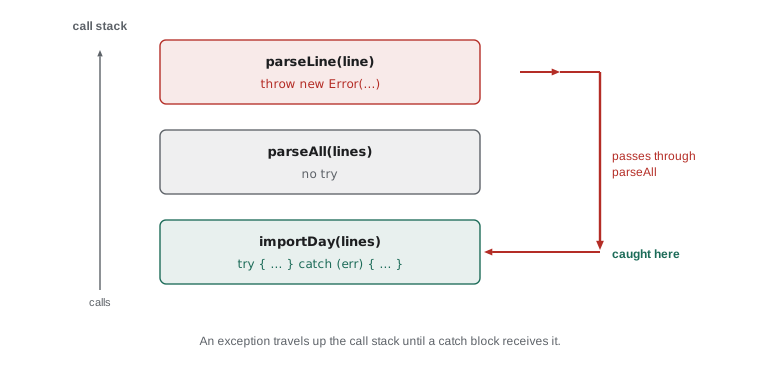
Whether stopping the whole import is right depends on the job. For a bank transfer, stopping at the first problem is correct. For Dev's donation log, it would be better to skip the bad line, note it and carry on. That design choice is about where the try block goes: around the whole import, or around each line. The next example takes the second route.
Custom error classes
For a program with its own rules, it is useful to create custom error classes by extending Error, using the class syntax from Lesson 6. A custom class gives errors a name of your choosing, can carry extra information as properties, and lets the code that catches errors tell your expected, recoverable errors apart from genuine bugs with instanceof.
class ValidationError extends Error {
  constructor(field, message) {
    super(message);
    this.name = 'ValidationError';
    this.field = field;
  }
}

function validateDonation({ donor, boxes }) {
  if (!donor) throw new ValidationError('donor', 'Please enter the donor\'s name');
  if (!Number.isInteger(boxes) || boxes < 1) throw new ValidationError('boxes', 'Boxes must be 1 or more');
  return { donor, boxes };
}

const entries = [{ donor: 'Lakeside Grocers', boxes: 12 }, { donor: '', boxes: 4 }, { donor: 'Northside Bakery', boxes: 0 }];
const saved = [];
for (const entry of entries) {
  try {
    saved.push(validateDonation(entry));
  } catch (err) {
    if (!(err instanceof ValidationError)) throw err;
    console.log(`Check the ${err.field} field: ${err.message}`);
  }
}
console.log('Saved', saved.length, 'of', entries.length);Check the donor field: Please enter the donor's name Check the boxes field: Boxes must be 1 or more Saved 1 of 3
What this code does
ValidationError extends Error, calls super with the message, then sets its own name and records which form field was wrong. The loop validates each entry separately, so the two bad entries are reported with their field names while the good one is saved. The catch block handles only ValidationError and throws anything else again, so a real bug would not be hidden.
The line if (!(err instanceof ValidationError)) throw err; is called rethrowing, and it is one of the most important habits in this lesson. A catch block catches everything thrown in its try block, including bugs you did not expect, such as a TypeError from a typo. If the catch block treats every error as a validation problem, those bugs are swallowed and the program carries on with wrong data. Handle the errors you understand and rethrow the rest.
ES2026 adds a helper, Error.isError(value), which returns true for genuine error objects even when they come from another window or worker, where instanceof can be fooled. It is new, so check that the browsers and Node.js versions you support have it before relying on it; instanceof is fine within one page or program.
Error causes
Sometimes the best response to an error is to throw a new, clearer one that explains what the program was trying to do, while keeping the original for whoever needs the details. ES2022 added the cause option for exactly this. You pass the original error as { cause: err } when creating the new one, and it is kept as the new error's cause property.
function loadSettings(text) {
  try {
    return JSON.parse(text);
  } catch (err) {
    throw new Error('Could not load the hamper settings', { cause: err });
  }
}

try {
  loadSettings('{ "perPallet": 24, }');
} catch (err) {
  console.log(err.message);
  console.log('Caused by:', err.cause.name);
}Could not load the hamper settings Caused by: SyntaxError
What this code does
JSON.parse rejects the trailing comma and throws a SyntaxError. loadSettings catches it and throws a new, plainer error that says what the program was doing, attaching the original as the cause. The outer code prints the friendly message and can still see that the underlying problem was a SyntaxError.
This layering keeps messages useful at every level. The volunteer sees "Could not load the hamper settings"; the developer reading the log sees the syntax error underneath, including where in the text it happened. Browser consoles and Node.js display the cause chain automatically when an error with a cause goes uncaught.
Errors in callbacks
A try block only catches errors thrown while its own code is running. A callback passed to setTimeout runs later, after the try statement has finished, so an error thrown inside that callback is not caught by a try around the setTimeout call. To handle it, put the try block inside the callback. The same applies to event handlers in web pages. Promises and async functions, covered in Asynchronous JavaScript and APIs, have their own way of passing errors along, and with await an ordinary try block works again.
try {
  setTimeout(() => {
    throw new Error('Too late to catch');   // NOT caught by the try below
  }, 0);
} catch (err) {
  console.log('never reached');
}

setTimeout(() => {
  try {
    riskyWork();
  } catch (err) {
    console.log('Caught inside the callback:', err.message);
  }
}, 0);
Throw, or return a result?
Exceptions are not the only way to report failure. A function can instead return a result object that says whether it worked, such as { ok: true, value: 12 } or { ok: false, error: 'boxes must be 1 or more' }. The caller then checks ok. Both approaches are common, and choosing between them is a design decision.
function checkBoxes(text) {
  const n = Number(String(text).trim());
  if (!Number.isInteger(n) || n < 1) return { ok: false, error: `${text} is not a valid number of boxes` };
  return { ok: true, value: n };
}

const typed = ['12', 'lots', '4'];
const results = typed.map(checkBoxes);
const good = results.filter((r) => r.ok).map((r) => r.value);
const problems = results.filter((r) => !r.ok).map((r) => r.error);

console.log('Accepted:', good);
console.log('Problems:', problems);Accepted: [ 12, 4 ] Problems: [ "lots is not a valid number of boxes" ]
What this code does
checkBoxes never throws; it returns an object whose ok property says whether the text was a valid number. Because every call returns normally, the results can be processed with map and filter like any other data. The two good entries are collected as numbers and the single problem is collected as a message.
A useful rule: throw when the problem is exceptional for that function, something its caller should not normally have to think about, or when continuing would be dangerous. Return a result when failure is an ordinary, expected outcome that the caller will always want to handle, such as checking what a person typed. Form validation, where bad input is routine, often suits result objects; a missing settings file, which should never happen, suits an exception.
| Situation | Better choice | Reason |
|---|---|---|
| A volunteer types an invalid number | Result object | Expected and routine; the caller always shows a message |
| The settings file is missing or corrupt | Throw | Exceptional; the program cannot sensibly continue |
| A function receives the wrong type from your own code | Throw TypeError | A bug that should be loud |
| Searching for a donor who is not on the list | Return undefined or null | Not finding something is normal |
| A capacity rule would be broken | Throw a custom error | A program rule that callers must not ignore |
Worked problem
Placing the try blocks
Dev's import reads 200 lines from the donation log. Lines with a missing donor or an impossible number of boxes should be skipped and listed at the end; any other error should stop the import, because it means a bug. Where should the try and catch go, and what should the catch do?
Show solution
- Bad lines should not stop the others, so each line needs its own try block, inside the loop, rather than one around the whole loop.
- The validator throws ValidationError for bad lines, so the catch can test err instanceof ValidationError.
- For a ValidationError, push a note such as the line number and err.message onto a problems array and continue the loop.
- For anything else, rethrow with throw err, so that a real bug stops the import and is reported.
- After the loop, print how many lines were imported and list the problems.
Answer: One try block per line inside the loop; the catch records ValidationError problems and rethrows every other error.
Try it yourself
Parse a box count
Write parseCount(text). It should trim the text and convert it to a number. If the result is not a whole number, throw a TypeError with the message not a whole number. If it is less than 1 or more than 500, throw a RangeError with the message out of range. Otherwise return the number.
The starter's loop calls it for each input and prints either OK and the number, or the error's name and message, so make sure your messages match exactly.
function parseCount(text) {
  // trim, convert, check and return
}

for (const t of [' 30', '2.5', '0', 'ten', '499']) {
  try {
    console.log('OK', parseCount(t));
  } catch (err) {
    console.log(err.name, err.message);
  }
}
Try it yourself
A capacity error
Create a class CapacityError that extends Error. Its constructor takes program and capacity, calls super with the message <program> is full (<capacity> places), for example Kitchen is full (2 places), sets name to CapacityError and stores program.
Then complete book(sheet, name) so that it throws a CapacityError when the sheet is full. The starter's loop catches only CapacityError and rethrows anything else.
// write the CapacityError class here

function book(sheet, name) {
  // throw a CapacityError if sheet.crew.length has reached sheet.capacity
  sheet.crew.push(name);
  return `${name} booked`;
}

const kitchen = { program: 'Kitchen', capacity: 2, crew: [] };
for (const person of ['Priya', 'Jonah', 'Amara']) {
  try {
    console.log(book(kitchen, person));
  } catch (err) {
    if (!(err instanceof Error) || err.name !== 'CapacityError') throw err;
    console.log(err.message);
  }
}
Common mistakes
MistakeA catch block should handle every error the same way.
InsteadHandle the errors you expect, such as your own ValidationError, and rethrow the rest so that bugs are not hidden.
Mistakethrow 'Out of stock' is a good way to signal a problem.
InsteadThrow Error objects, such as new Error('Out of stock'), so that callers get a name, a message and a stack trace.
MistakeA return inside try stops finally from running.
Insteadfinally runs before the function returns, whether the try block returns, throws or finishes normally.
MistakeA try around setTimeout catches errors in its callback.
InsteadThe callback runs after the try statement has finished. Put the try block inside the callback.
MistakeA custom error class should set this.name before calling super.
InsteadIn a subclass, super(message) must be called before this can be used.
Summary and key terms
- Syntax errors stop a file from running at all, runtime errors throw exceptions while it runs, and logic errors give wrong answers silently.
- JavaScript's built-in error types include ReferenceError, TypeError, RangeError and SyntaxError, all based on Error, and every error object has a name and a message.
- A try block holds code that might throw, catch receives the error and finally always runs, even after a return. throw raises an exception; throw Error objects with clear messages and the type that matches the problem.
- Exceptions propagate up the call stack until caught.
- Custom error classes extend Error, carry extra details and let catch blocks handle expected errors and rethrow the rest.
- The cause option wraps a low-level error in a clearer one.
- A try block catches errors only from code running inside it.
- For routine, expected failures, returning a result object can be clearer than throwing.
- exception
- A runtime error that interrupts the normal flow of a program until it is caught.
- error object
- An object describing an error, with at least a name and a message.
- try statement
- A statement with a try block and a catch block, a finally block or both, for handling exceptions.
- finally
- The block of a try statement that runs whether or not an error occurred.
- throw
- The statement that raises an exception.
- call stack
- The list of function calls currently in progress, each waiting for the one above it.
- propagation
- The passing of an uncaught exception up the call stack to each calling function in turn.
- custom error class
- A class that extends Error to represent a particular kind of problem.
- rethrowing
- Throwing a caught error again because the current code cannot handle it.
- error cause
- The original error attached to a new error with the cause option.
- result object
- A returned object that reports success or failure, such as { ok: false, error: ... }.
Practice problems
Work each problem on paper first, then reveal the answer to check.
Which error type does JSON.parse throw for invalid text?
Show answer
SyntaxError.
In what situations does a finally block run?
Show answer
In all of them: after success, after a caught error and even when the try or catch block returns.
Why should a catch block rethrow errors it does not recognize?
Show answer
Otherwise genuine bugs, such as a TypeError from a typo, are hidden and the program continues with wrong data.
What must the constructor of a class that extends Error call first?
Show answer
super, usually with the message.
When is a result object a better choice than throwing?
Show answer
When failure is routine and expected, such as invalid input typed into a form.
Lesson quiz · 5 questions
Score 60% or more to complete this lesson.
Create a free account to save your progress, take quizzes and earn a certificate.