
JS-102 · Lesson 3 of 12 · 27 min
Map, filter and reduce
▶ Video coming soon A video version of this lesson is on the way.
Dev Bhatt sends the Food Hub's newsletter on the first Monday of each month, and the December issue, going out on Monday, December 7, is the one that matters most. It thanks donors before the holiday hamper drive and tells readers what the pantry still needs. Dev's raw material is a spreadsheet export of every donation logged at the pantry's front door: the date, the donor, the category of food and the number of boxes. Last year he added up the columns by hand.
The session planned for Tuesday, November 24 turns that export into a few lines of JavaScript. Mira met map, filter and reduce briefly at the end of JavaScript Programming I. This time Gareth wants her to understand them well enough to write any summary Dev asks for without reaching for a loop. "Each one answers a different question," he says. "map: what does each item become? filter: which items do I keep? reduce: what single answer do all the items add up to?"
All three are higher-order functions, which Lesson 2 introduced. They are methods of every array, they take a callback, and none of them changes the original array. Here is the data the examples in this lesson use.
const donations = [
  { date: '2026-11-02', donor: 'Lakeside Grocers', category: 'tinned', boxes: 12 },
  { date: '2026-11-03', donor: 'St. Mark School', category: 'dry', boxes: 30 },
  { date: '2026-11-05', donor: 'Northside Bakery', category: 'fresh', boxes: 7 },
  { date: '2026-11-09', donor: 'Lakeside Grocers', category: 'dry', boxes: 9 },
  { date: '2026-11-12', donor: 'Riverside Rotary', category: 'tinned', boxes: 18 },
];
console.log(donations.length, 'donations');
console.log(donations[1].donor, 'gave', donations[1].boxes, 'boxes');5 donations St. Mark School gave 30 boxes
What this code does
The array holds five donation records, each an object with the same four properties. The second line reads the length of the array. The third reaches into the record at index 1, the second donation, and prints its donor and number of boxes.
map: transform every item
map calls its callback once for each item and builds a new array from the values the callback returns. The new array always has the same length as the original, and each position holds the transformed version of the item at the same position. Use map whenever the question is "what does each item become?": a number doubled, a price formatted, an object reduced to one property, or a record turned into a line of text.
const donations = [
  { donor: 'Lakeside Grocers', category: 'tinned', boxes: 12 },
  { donor: 'St. Mark School', category: 'dry', boxes: 30 },
  { donor: 'Northside Bakery', category: 'fresh', boxes: 7 },
];

const boxCounts = donations.map((d) => d.boxes);
const lines = donations.map((d, i) => `${i + 1}. ${d.donor} (${d.boxes} boxes)`);
const doubled = boxCounts.map((n) => n * 2);

console.log(boxCounts);
console.log(lines);
console.log(doubled);
console.log(donations[0].boxes);[ 12, 30, 7 ] [ "1. Lakeside Grocers (12 boxes)", "2. St. Mark School (30 boxes)", "3. Northside Bakery (7 boxes)" ] [ 24, 60, 14 ] 12
What this code does
The first map keeps only the number of boxes from each record, the second turns each record into a numbered line of text, and the third doubles each number. Every result is a new array with three items, one for each donation. The last line shows that the original records were not changed.
The callback must return the new value. With an arrow function written without braces, the expression after the arrow is returned automatically. With braces, you need the word return; forgetting it is the most common map bug, and it produces an array full of undefined. If you want to return an object literal from a short arrow function, wrap it in parentheses, as in map((d) => ({ name: d.donor })), so that the braces are not mistaken for a function body.
const names = ['amara', 'jonah'];

const broken = names.map((n) => { n.toUpperCase(); });
const fixed = names.map((n) => { return n.toUpperCase(); });
const cards = names.map((n) => ({ name: n, shifts: 0 }));

console.log(broken);
console.log(fixed);
console.log(cards);[ undefined, undefined ]
[ "AMARA", "JONAH" ]
[ { name: "amara", shifts: 0 }, { name: "jonah", shifts: 0 } ]What this code does
The first callback has braces but no return statement, so it returns undefined for each name. The second adds return and gives the upper-case names. The third returns an object for each name, and the extra parentheses around the braces tell JavaScript that they form an object, not a function body.
filter: keep some items
filter calls its callback, a predicate, for each item and keeps the items for which it returns a truthy value. The result is a new array that may be shorter than the original, or even empty, but the items in it are the same items, not copies, and they keep their original order. Use filter when the question is "which ones?"
const donations = [
  { donor: 'Lakeside Grocers', category: 'tinned', boxes: 12 },
  { donor: 'St. Mark School', category: 'dry', boxes: 30 },
  { donor: 'Northside Bakery', category: 'fresh', boxes: 7 },
  { donor: 'Lakeside Grocers', category: 'dry', boxes: 9 },
  { donor: 'Riverside Rotary', category: 'tinned', boxes: 18 },
];

const dry = donations.filter((d) => d.category === 'dry');
const large = donations.filter((d) => d.boxes >= 15);
const lakeside = donations.filter((d) => d.donor.startsWith('Lakeside'));

console.log(dry.length, large.length, lakeside.length);
console.log(large.map((d) => d.donor));
console.log(donations.filter((d) => d.boxes > 100));2 2 2 [ "St. Mark School", "Riverside Rotary" ] []
What this code does
Each filter keeps the records whose callback answers true: two dry-goods donations, two of 15 boxes or more and two from Lakeside Grocers. The fourth line chains map after filter to show the donors of the large donations. No donation is over 100 boxes, so the last filter returns an empty array rather than an error.
Because filter returns an array, you can test the result's length to see whether anything matched. If you only need to know whether at least one item matches, some is quicker, because it stops at the first match. If you need the first matching item itself, use find, which returns the item or undefined. ES2023 added findLast and findLastIndex, which search from the end of the array.
reduce: combine everything into one value
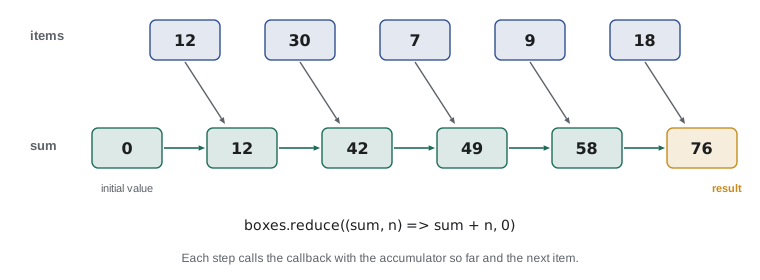
reduce is the most general of the three, and the one that takes longest to feel natural. It walks through the array carrying a value called the accumulator. For each item, the callback receives the accumulator so far and the current item, and returns the new accumulator. After the last item, reduce returns the final accumulator. The second argument to reduce is the initial value, the accumulator before the first item.
const boxes = [12, 30, 7, 9, 18];

const total = boxes.reduce((sum, n) => sum + n, 0);
const largest = boxes.reduce((max, n) => (n > max ? n : max), boxes[0]);

console.log('Total boxes:', total);
console.log('Largest donation:', largest);Total boxes: 76 Largest donation: 30
What this code does
The first reduce starts the accumulator at 0 and adds each number to it, so the total is 76. The second starts with the first number and keeps whichever is larger as it goes, ending with 30. In both, the callback returns the new accumulator and reduce hands it back in on the next step.
It helps to trace a reduce by hand once. For the total, the accumulator starts at 0. After 12 it is 12; after 30 it is 42; after 7 it is 49; after 9 it is 58; after 18 it is 76. Each step is just the callback called with the previous result and the next item.
Always give reduce an initial value. Without one, reduce uses the first item as the starting accumulator and begins with the second item. That works for adding numbers, but it fails in two ways: on an empty array it throws a TypeError, and when the items are objects, the first accumulator is an object rather than a number. Passing 0, an empty array or an empty object as the second argument avoids both problems and makes the intention obvious.
Reducing to an object
The accumulator can be any kind of value, not just a number. One of the most useful patterns reduces an array to an object that counts or totals items by some key. Dev's newsletter needs exactly that: the number of boxes received in each category.
const donations = [
  { donor: 'Lakeside Grocers', category: 'tinned', boxes: 12 },
  { donor: 'St. Mark School', category: 'dry', boxes: 30 },
  { donor: 'Northside Bakery', category: 'fresh', boxes: 7 },
  { donor: 'Lakeside Grocers', category: 'dry', boxes: 9 },
  { donor: 'Riverside Rotary', category: 'tinned', boxes: 18 },
];

const byCategory = donations.reduce((totals, d) => {
  totals[d.category] = (totals[d.category] ?? 0) + d.boxes;
  return totals;
}, {});

console.log(byCategory);{ tinned: 30, dry: 39, fresh: 7 }What this code does
The accumulator starts as an empty object. For each donation, the callback looks up the running total for that category, using 0 when there is none yet, adds the boxes and stores the result back under the category name. After all five donations the object holds 30 tinned, 39 dry and 7 fresh.
Two details matter. The ?? operator, nullish coalescing, supplies 0 the first time a category appears, when the lookup gives undefined. And the callback must return totals at the end; without that line, the next step would receive undefined and fail. The same pattern counts items, builds lookup tables and groups records into lists.
Grouping with Object.groupBy
Grouping records into lists by a key is so common that ES2024 added a built-in method for it. Object.groupBy takes an array and a callback that returns a key for each item, and returns an object whose properties are the keys and whose values are arrays of the matching items. It is supported in current versions of all major browsers and in Node.js 22 and later.
const donations = [
  { donor: 'Lakeside Grocers', category: 'tinned', boxes: 12 },
  { donor: 'St. Mark School', category: 'dry', boxes: 30 },
  { donor: 'Northside Bakery', category: 'fresh', boxes: 7 },
  { donor: 'Lakeside Grocers', category: 'dry', boxes: 9 },
];

const groups = Object.groupBy(donations, (d) => d.category);
console.log(Object.keys(groups));
console.log(groups.dry.map((d) => d.donor));

const sizes = Object.groupBy(donations, (d) => (d.boxes >= 10 ? 'large' : 'small'));
console.log(sizes.small.length, 'small,', sizes.large.length, 'large');[ "tinned", "dry", "fresh" ] [ "St. Mark School", "Lakeside Grocers" ] 2 small, 2 large
What this code does
Object.groupBy calls the callback for each donation and files the record under the key it returns. The first grouping uses the category, giving three keys, and the dry group holds the two dry-goods donors. The second invents its own keys, large and small, from the number of boxes and finds two of each.
There is also Map.groupBy, which returns a Map instead of a plain object and allows keys that are not strings. When you need totals rather than lists, reduce is still the tool, but you can combine the two: group first, then reduce each group.
Chaining
Because map and filter return arrays, their results can be passed straight to another array method. Writing several calls in a row is called chaining, and it lets you describe a calculation as a series of small steps. Put each call on its own line, starting with the dot, so that each step can be read separately.
const donations = [
  { donor: 'Lakeside Grocers', category: 'tinned', boxes: 12 },
  { donor: 'St. Mark School', category: 'dry', boxes: 30 },
  { donor: 'Northside Bakery', category: 'fresh', boxes: 7 },
  { donor: 'Lakeside Grocers', category: 'dry', boxes: 9 },
  { donor: 'Riverside Rotary', category: 'tinned', boxes: 18 },
];

const shelfStable = donations
  .filter((d) => d.category !== 'fresh')
  .map((d) => d.boxes)
  .reduce((sum, n) => sum + n, 0);

const thankYou = donations
  .filter((d) => d.boxes >= 10)
  .map((d) => d.donor)
  .join(' and ');

console.log('Shelf-stable boxes:', shelfStable);
console.log('Thank you to', thankYou);Shelf-stable boxes: 69 Thank you to Lakeside Grocers and St. Mark School and Riverside Rotary
What this code does
The first chain drops the fresh donation, keeps only the numbers of boxes and adds them, giving 69. The second keeps the donations of ten boxes or more, turns each into its donor's name and joins the names into one line. Each step receives the array produced by the step above it.
Chains read well, but each step makes a new array and goes through the data again. For the few hundred records the Food Hub logs in a month, that cost is invisible. For hundreds of thousands of items, a single reduce or a plain loop that does everything in one pass can be noticeably faster. Write the clear version first and change it only if measurement shows it is too slow.
flatMap, some and every
A few relatives of map and filter round out the toolkit. flatMap maps each item to an array and then flattens the results into one array, which is useful when one item produces several results. some returns true if at least one item passes a test, and every returns true only if all of them do. Both stop as soon as they know the answer.
const shifts = [
  { program: 'pantry', crew: ['Amara', 'Jonah'] },
  { program: 'kitchen', crew: ['Priya'] },
  { program: 'hampers', crew: ['Dev', 'Amara', 'Lucy'] },
];

const everyone = shifts.flatMap((s) => s.crew);
console.log(everyone);
console.log([...new Set(everyone)].length, 'different volunteers');
console.log(shifts.some((s) => s.crew.length === 1));
console.log(shifts.every((s) => s.crew.length >= 2));[ "Amara", "Jonah", "Priya", "Dev", "Amara", "Lucy" ] 5 different volunteers true false
What this code does
flatMap takes each shift's crew array and joins them into one list of six names. Putting the names in a Set removes the repeated Amara, leaving five different volunteers. some finds the kitchen shift with only one person and answers true, while every answers false for the same reason.
| Method | Question it answers | Returns | Length of result |
|---|---|---|---|
| map | What does each item become? | A new array | Same as the original |
| filter | Which items do I keep? | A new array of the same items | Same or shorter |
| reduce | What do all the items add up to? | One value of any type | Not an array unless you build one |
| flatMap | What list does each item produce? | One flattened array | Any length |
| find | Which is the first match? | One item or undefined | Not an array |
| some / every | Does any or all match? | true or false | Not an array |
| Object.groupBy | How do the items sort into groups? | An object of arrays | One property per key |
Immutability and side effects
map, filter and reduce are designed for pure callbacks: functions that compute a result from their arguments and change nothing else. A callback that pushes to an outside array, edits the item it was given or prints as it goes has a side effect. Side effects inside these methods make code harder to follow, because the reader expects map to produce a new array, not to change the old one.
The safest habit is to treat the original data as read-only. If you need records with an extra property, return new objects from map rather than adding the property to the existing ones. The spread syntax, covered in the next lesson, makes this easy: map((d) => ({ ...d, large: d.boxes >= 15 })) copies each record and adds one property to the copy. When you do want a side effect, such as printing each item, forEach is the method that says so honestly.
Worked problem
Planning a summary for the newsletter
Dev wants one line: the number of boxes of tinned food received from donors other than Lakeside Grocers. Using the five donations at the top of the lesson, plan the chain and work out the answer.
Show solution
- Decide which items count. They must be tinned and not from Lakeside Grocers: filter((d) => d.category === 'tinned' && d.donor !== 'Lakeside Grocers').
- Check the data: the tinned donations are Lakeside Grocers with 12 and Riverside Rotary with 18. Only Riverside Rotary passes both tests.
- Turn each remaining record into its number of boxes with map((d) => d.boxes), giving [18].
- Add them with reduce((sum, n) => sum + n, 0), which gives 18. With an initial value of 0, the chain still works if nothing matches.
Answer: 18 boxes, all from Riverside Rotary. The chain is filter, then map, then reduce with an initial value of 0.
Try it yourself
Total boxes for one donor
Write a function boxesFrom(list, donor) that uses filter and reduce to return the total number of boxes given by that donor. Return 0 if the donor gave nothing.
Print the totals for Lakeside Grocers and Riverside Rotary, and for a donor who is not in the list, City Hall.
const donations = [
  { donor: 'Lakeside Grocers', category: 'tinned', boxes: 12 },
  { donor: 'St. Mark School', category: 'dry', boxes: 30 },
  { donor: 'Lakeside Grocers', category: 'dry', boxes: 9 },
  { donor: 'Riverside Rotary', category: 'tinned', boxes: 18 },
];

function boxesFrom(list, donor) {
  // filter to this donor, then add up the boxes
}

console.log(boxesFrom(donations, 'Lakeside Grocers'));
console.log(boxesFrom(donations, 'Riverside Rotary'));
console.log(boxesFrom(donations, 'City Hall'));
Try it yourself
Count donations by category
Use reduce with an empty object as the initial value to count how many donations there are in each category. The result for the starter data should be an object with tinned, dry and fresh properties.
Then print one line per category in the form tinned: 2, using Object.entries and forEach.
const donations = [
  { donor: 'Lakeside Grocers', category: 'tinned', boxes: 12 },
  { donor: 'St. Mark School', category: 'dry', boxes: 30 },
  { donor: 'Northside Bakery', category: 'fresh', boxes: 7 },
  { donor: 'Lakeside Grocers', category: 'dry', boxes: 9 },
  { donor: 'Riverside Rotary', category: 'tinned', boxes: 18 },
  { donor: 'Harvest Farm', category: 'fresh', boxes: 4 },
  { donor: 'Bay Street Church', category: 'dry', boxes: 11 },
];

const counts = donations.reduce((acc, d) => {
  // add 1 to acc[d.category]
  return acc;
}, {});

// print one line per category
Common mistakes
Mistakemap with a braced callback returns the new values automatically.
InsteadWith braces you must write return; otherwise every result is undefined.
Mistakefilter makes copies of the items it keeps.
InsteadIt returns a new array, but the items in it are the same objects as in the original.
MistakeThe initial value of reduce is optional, so leave it out.
InsteadWithout it, reduce fails on an empty array and starts with an item instead of your accumulator. Always pass one.
MistakeA reduce callback can forget to return the accumulator if it changed it.
Insteadreduce uses whatever the callback returns as the next accumulator; without return it becomes undefined.
Mistakemap is the right method for printing each item.
Insteadmap is for building a new array. Use forEach when the point is a side effect such as printing.
Summary and key terms
- map transforms every item and returns a new array of the same length; its callback must return the new value. filter keeps the items for which a predicate returns a truthy value and returns a new, possibly shorter array of the same items. reduce combines all the items into one value by carrying an accumulator; always give it an initial value. reduce can build objects such as totals and counts by key, and Object.groupBy groups items into lists by a key.
- Chaining passes the result of one method to the next. flatMap flattens lists, and some and every answer yes-or-no questions about the whole array.
- Keep callbacks pure and treat the original data as read-only.
- map
- An array method that returns a new array of the values its callback returns for each item.
- filter
- An array method that returns a new array of the items for which its callback returns a truthy value.
- reduce
- An array method that combines all the items into one value using an accumulator.
- accumulator
- The running value that reduce passes from one call of its callback to the next.
- initial value
- The starting value of the accumulator, given as the second argument to reduce.
- chaining
- Calling one method directly on the result of another.
- Object.groupBy
- A built-in function that groups the items of an array into lists under the keys returned by a callback.
- flatMap
- An array method that maps each item to an array and joins the results into one array.
- pure function
- A function whose result depends only on its arguments and which changes nothing else.
- side effect
- Any change a function makes outside itself, such as printing or modifying a shared value.
Practice problems
Work each problem on paper first, then reveal the answer to check.
What is the length of [3, 6, 9].map((n) => n / 3)?
Show answer
3. map always returns an array of the same length; this one is [1, 2, 3].
What does [5, 12, 8].filter((n) => n > 6) give?
Show answer
[12, 8], in their original order.
What does [2, 3, 4].reduce((acc, n) => acc * n, 1) give?
Show answer
24, because 1 times 2 times 3 times 4 is 24.
Why wrap an object literal in parentheses in map((d) => ({ name: d.donor }))?
Show answer
Without them, the braces would be read as the body of the function instead of an object.
Which method would you use to check whether any shift has no crew?
Show answer
some, with a callback such as (s) => s.crew.length === 0.
Lesson quiz · 5 questions
Score 60% or more to complete this lesson.
Create a free account to save your progress, take quizzes and earn a certificate.