
JS-102 · Lesson 10 of 12 · 30 min
Dates, numbers and Math
▶ Video coming soon A video version of this lesson is on the way.
The hamper drive ends with pick-up day on Saturday, December 19, 2026. Families collect their hampers at the Food Hub between 10 in the morning and 2 in the afternoon, and Lucy has a list of questions that are all about time and numbers. How many days are left to pack? How many volunteer hours were given in the first week of December? If each pallet holds 24 hampers, how many pallets are needed for 287 hampers? And why did the sign-up page, tested on Sana Qureshi's laptop while she was travelling, show the pick-up date as Friday?
The session planned for Thursday, December 17 deals with all of these. Numbers and dates look simple, but both hide details that cause real bugs: decimal fractions that do not add up exactly, rounding that goes the wrong way, months counted from zero and time zones that move a date to the day before. "Computers are very precise," Gareth says. "They are just precise about something slightly different from what you meant."
How JavaScript stores numbers
JavaScript has one main number type for both whole numbers and fractions. Every number is stored as a 64-bit floating-point value in the IEEE 754 format, the same format most languages use for decimals. It can hold whole numbers exactly up to Number.MAX_SAFE_INTEGER, which is 9,007,199,254,740,991, and very large or very small values approximately. For whole numbers larger than that, JavaScript has a second type, BigInt, written with an n at the end, such as 12n.
Floating-point numbers are stored in binary, and most decimal fractions, such as 0.1, have no exact binary form, just as one third has no exact decimal form. They are stored as the nearest possible value, and tiny errors can appear when they are added. JavaScript Programming I showed the classic case and the cure: work in whole cents. This lesson adds tools for comparing and rounding.
console.log(0.1 + 0.2);
console.log(0.1 + 0.2 === 0.3);
console.log(Math.abs(0.1 + 0.2 - 0.3) < Number.EPSILON);
console.log(Number.MAX_SAFE_INTEGER);
console.log(Number.MAX_SAFE_INTEGER + 2);
console.log(9007199254740991n + 2n);0.30000000000000004 false true 9007199254740991 9007199254740992 9007199254740993n
What this code does
Adding 0.1 and 0.2 gives a value a tiny amount above 0.3, so comparing it with === fails. Checking that the difference is smaller than Number.EPSILON, the gap between 1 and the next number JavaScript can store, is a safe way to ask whether two such results are equal. Past the largest safe integer, ordinary numbers start to skip values, while BigInt arithmetic stays exact.
For money, the rule from JavaScript Programming I still stands: store amounts as whole numbers of cents and only divide by 100 when displaying them. Whole numbers below the safe limit are exact, so additions and comparisons of cents never drift. BigInt is rarely needed in web pages; it matters for things like very large IDs from databases, and it cannot be mixed with ordinary numbers in arithmetic without converting one of them.
Converting text to numbers
Numbers arriving from forms, files and JSON often start as text. Number(text) converts the whole string and gives NaN if any part is not numeric, apart from spaces at either end. parseInt(text, 10) and parseFloat(text) read as many digits as they can from the start and ignore the rest, which is convenient for text like 12px but dangerous for typing mistakes. Number.isInteger and Number.isFinite check the result.
const typed = ['12', ' 7 ', '12.5', '12 boxes', '', 'twelve'];

for (const t of typed) {
  const n = Number(t);
  console.log(JSON.stringify(t).padEnd(11), n, parseInt(t, 10), Number.isInteger(n));
}"12" 12 12 true " 7 " 7 7 true "12.5" 12.5 12 false "12 boxes" NaN 12 false "" 0 NaN true "twelve" NaN NaN false
What this code does
For each typed value the line shows the text, what Number makes of it, what parseInt makes of it and whether Number gave a whole number. Number rejects 12 boxes and twelve with NaN, while parseInt quietly reads 12 from the start of 12 boxes. The empty string is a trap: Number turns it into 0, which is why an empty field must be checked separately.
The empty-string case catches many forms: Number('') is 0, and Number.isInteger(0) is true, so a blank box count would be accepted as zero boxes. Check for an empty string before converting, as the parsers in Lesson 8 did. Always pass 10 as the second argument to parseInt, so that the number is read in base 10 whatever it looks like.
Rounding
The Math object offers four ways to turn a fraction into a whole number. Math.round goes to the nearest whole number, with halves going up. Math.floor always goes down and Math.ceil always goes up. Math.trunc simply drops the fraction, which is the same as floor for positive numbers and ceil for negative ones. Choosing the right one is a matter of what the number means.
const values = [2.4, 2.5, 2.6, -2.5];
for (const v of values) {
  console.log(v, Math.round(v), Math.floor(v), Math.ceil(v), Math.trunc(v));
}

const hampers = 287;
console.log('Pallets needed:', Math.ceil(hampers / 24));
console.log('Full pallets:', Math.floor(hampers / 24));2.4 2 2 3 2 2.5 3 2 3 2 2.6 3 2 3 2 -2.5 -2 -3 -2 -2 Pallets needed: 12 Full pallets: 11
What this code does
Each line shows a value followed by its round, floor, ceil and trunc results, so the differences can be compared side by side. Halves round up, which for minus 2.5 means towards zero, giving minus 2. For the pallets, any leftover hampers still need a pallet, so ceil gives 12, while floor gives the 11 pallets that will be completely full.
Rounding to a number of decimal places needs a little care. toFixed(2) returns a string rounded to two places, which is ideal for display, but it rounds the stored binary value, so (1.005).toFixed(2) gives 1.00, not 1.01, because 1.005 is actually stored as slightly less than 1.005. When exact decimal rounding matters, round whole cents with Math.round before formatting, as the order calculator in JavaScript Programming I did.
console.log((1.005).toFixed(2), (1.045).toFixed(2));

function roundTo(value, places) {
  const factor = 10 ** places;
  return Math.round(value * factor) / factor;
}
console.log(roundTo(3.14159, 2), roundTo(7.5, 0), roundTo(12.3456, 1));

const hours = [2.5, 3.25, 4, 1.75];
const total = hours.reduce((a, b) => a + b, 0);
console.log(`Total ${total} hours, average ${(total / hours.length).toFixed(2)} hours`);1.00 1.04 3.14 8 12.3 Total 11.5 hours, average 2.88 hours
What this code does
The first line shows toFixed rounding two values that are stored a hair below the halfway point, so both round down. roundTo multiplies by a power of ten, rounds to a whole number and divides back, which suits numbers used in further calculations. The last part totals four shifts and formats the average to two decimal places for display.
ES2026 adds Math.sumPrecise, which adds a list of numbers as if with exact arithmetic and rounds only once at the end, so long lists of decimals do not build up error. It is new in 2026, so check that your browsers and Node.js version support it before relying on it; working in whole units such as cents remains the dependable approach everywhere.
Useful Math functions
Math holds many other functions and constants. Math.max and Math.min find the largest and smallest of their arguments, often combined with spread. Math.abs gives the distance from zero. Math.sqrt, Math.cbrt and the ** operator handle roots and powers. Math.sign returns 1, -1 or 0. Math.PI is the constant pi. And Math.random returns a different fraction from 0 up to, but not including, 1 each time it is called.
const boxes = [12, 30, 7, 9, 18];
console.log(Math.max(...boxes), Math.min(...boxes));
console.log(Math.abs(-4), Math.sqrt(144), 2 ** 10, Math.sign(-7));

const radius = 0.3; // radius of a round table
console.log('Table area:', (Math.PI * radius ** 2).toFixed(3));

const clamp = (n, low, high) => Math.min(Math.max(n, low), high);
console.log(clamp(30, 1, 24), clamp(-3, 1, 24), clamp(12, 1, 24));30 7 4 12 1024 -1 Table area: 0.283 24 1 12
What this code does
Spreading the array into Math.max and Math.min gives the largest and smallest donations, 30 and 7. The next lines show distance from zero, a square root, a power and the sign of a number, then use Math.PI to find the area of a round table. clamp keeps a number inside a range, so 30 is cut down to 24 and minus 3 is raised to 1.
Math.random is useful for choosing a volunteer for a raffle prize or shuffling the order of names, and its output changes every run, which is why the next example is not checked. To get a whole number from 1 to n, use Math.floor(Math.random() * n) + 1. Math.random is not suitable for anything secret, such as passwords or security codes; browsers and Node.js provide crypto.getRandomValues for that.
const names = ['Amara', 'Jonah', 'Priya', 'Dev', 'Lucy'];
const winner = names[Math.floor(Math.random() * names.length)];
const roll = Math.floor(Math.random() * 6) + 1;
console.log('Raffle winner:', winner);
console.log('Die roll:', roll);Raffle winner: Lucy Die roll: 4
What this code does
Math.random gives a fraction below 1, and multiplying by the number of names and rounding down turns it into a valid index from 0 to 4. The die roll uses the same idea with 6 and adds 1, so it ranges from 1 to 6. The output is different every time, so run it a few times to see.
Formatting numbers for people
toFixed fixes decimal places but does not add separators between thousands. toLocaleString and Intl.NumberFormat format numbers according to the conventions of a locale, a language and region code such as en-CA for English in Canada or en-US for English in the United States. Both use a comma for thousands and a point for decimals, but other locales differ: fr-CA, for French in Canada, uses spaces and a comma.
const kgThisYear = 18456.75;
console.log(kgThisYear.toLocaleString('en-CA'));
console.log(kgThisYear.toLocaleString('en-US', { maximumFractionDigits: 0 }));

const oneDecimal = new Intl.NumberFormat('en-CA', { minimumFractionDigits: 1, maximumFractionDigits: 1 });
console.log([3, 2.25, 1200].map((n) => oneDecimal.format(n)));18,456.75 18,457 [ "3.0", "2.3", "1,200.0" ]
What this code does
toLocaleString adds a comma between the thousands and keeps the decimals for the yearly total. Asking for no fraction digits rounds it to a whole number before formatting. An Intl.NumberFormat object is set up once with its options and then reused, here showing every value with exactly one decimal place.
Intl.NumberFormat can also format currencies, units such as kilograms, and compact forms such as 18K. Creating one formatter and reusing it is faster than calling toLocaleString with options in a loop. Formatting is the last step: keep numbers as numbers while calculating and turn them into text only for display.
Dates: a moment in time
A JavaScript Date object represents a single moment in time, stored as the number of milliseconds since midnight at the start of January 1, 1970, in Coordinated Universal Time (UTC). That starting point is called the Unix epoch. A Date does not store a time zone; it stores a moment, and the zone only matters when the moment is turned into a calendar date and clock time for someone.
The safest way to create a specific date is from an ISO 8601 string ending in Z, which marks UTC, such as '2026-12-19T15:00:00Z'. The UTC getter methods, such as getUTCFullYear and getUTCDate, then read the parts in UTC, and give the same answer on every computer. The local getters, such as getDate and getHours, read the parts in the time zone of the device running the code, which is why Sana's laptop showed a different day.
const pickup = new Date('2026-12-19T15:00:00Z');

console.log(pickup.getTime());
console.log(pickup.toISOString());
console.log(pickup.getUTCFullYear(), pickup.getUTCMonth(), pickup.getUTCDate(), pickup.getUTCDay());

const fromParts = new Date(Date.UTC(2026, 11, 19, 15, 0));
console.log(fromParts.getTime() === pickup.getTime());1797692400000 2026-12-19T15:00:00.000Z 2026 11 19 6 true
What this code does
The Date holds one number, the milliseconds since the start of 1970 in universal time, and toISOString shows the same moment as readable text. The UTC getters give the year, the month, the day of the month and the day of the week; months count from 0, so December is 11, and Saturday is day 6. Building a date from parts with Date.UTC, again with 11 for December, gives exactly the same moment.
Two traps are visible in that example. Months are counted from 0, so January is 0 and December is 11, while days of the month start at 1. Days of the week run from 0 for Sunday to 6 for Saturday. And a date-only string such as '2026-12-19' is read as midnight UTC, but a string with a time and no Z, such as '2026-12-19T10:00', is read as local time. Always include the Z, or a time zone offset such as -05:00, when a moment matters.
Time zones and display
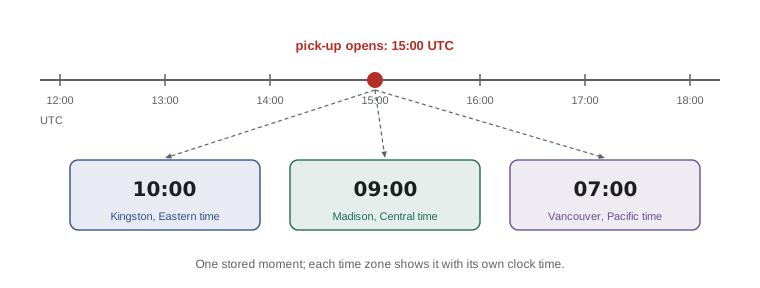
To show a date or time to a person, format it for their locale and time zone with toLocaleDateString, toLocaleTimeString or an Intl.DateTimeFormat object. Giving the timeZone option explicitly makes the output the same on every device, which is what the Food Hub wants, because pick-up times are always in its own city.
const opens = new Date('2026-12-19T15:00:00Z');
const time = (zone) =>
  new Intl.DateTimeFormat('en-CA', { timeZone: zone, hour: '2-digit', minute: '2-digit', hourCycle: 'h23' }).format(opens);

console.log('Kingston:', time('America/Toronto'));
console.log('Madison:', time('America/Chicago'));
console.log('UTC:', time('UTC'));

const long = { timeZone: 'America/Toronto', weekday: 'long', year: 'numeric', month: 'long', day: 'numeric' };
console.log(opens.toLocaleDateString('en-CA', long));
console.log(opens.toLocaleDateString('en-CA', { timeZone: 'UTC' }), opens.toLocaleDateString('en-US', { timeZone: 'UTC' }));Kingston: 10:00 Madison: 09:00 UTC: 15:00 Saturday, December 19, 2026 2026-12-19 12/19/2026
What this code does
The same moment is formatted with a 24-hour clock in three time zones: 10:00 in Kingston, 09:00 in Madison and 15:00 in universal time. The long format spells out the weekday and month for the Food Hub's own zone. The last line shows the short date styles of two locales, with Canada's English format using year, month and day, and the American one month, day and year.
The Food Hub is in Kingston, which uses Eastern time, America/Toronto in the time zone database, so every date on its pages is formatted with that zone. The short date formats are a separate trap. 12/11/2026 means December 11 in the United States but 12 November in much of the world, and Canadian forms use both conventions. The ISO form, 2026-12-11, is unambiguous everywhere, which is why it is the best choice for data and a good choice for display when readers may come from different places.
Date arithmetic
Because a Date is a number of milliseconds underneath, subtracting one Date from another gives the difference in milliseconds. Dividing by the number of milliseconds in a day, 1000 times 60 times 60 times 24, which is 86,400,000, gives days. To move a date forward, use the setter methods such as setUTCDate, which handle the ends of months and years automatically: day 32 of December becomes January 1.
const DAY = 24 * 60 * 60 * 1000;
const today = new Date('2026-12-17T00:00:00Z');
const pickup = new Date('2026-12-19T00:00:00Z');
console.log('Days to pick-up:', (pickup - today) / DAY);

const thanks = new Date(pickup);
thanks.setUTCDate(thanks.getUTCDate() + 14);
console.log('Thank-you letters due:', thanks.toISOString().slice(0, 10));

const shifts = ['2026-12-03', '2026-12-01', '2026-12-05'].map((s) => new Date(s));
shifts.sort((a, b) => a - b);
console.log(shifts.map((d) => d.toISOString().slice(0, 10)));
console.log(pickup > today);Days to pick-up: 2 Thank-you letters due: 2027-01-02 [ "2026-12-01", "2026-12-03", "2026-12-05" ] true
What this code does
Subtracting two Dates gives the milliseconds between them, and dividing by the length of a day gives 2. Adding 14 days with setUTCDate moves past the end of December into January automatically, giving January 2, 2027. Dates can also be sorted and compared directly, because they behave like their millisecond numbers in arithmetic and comparisons.
A copy made with new Date(pickup) is important there, because setUTCDate changes the Date it is called on; without the copy, pickup itself would have moved. Date objects are mutable, unlike numbers and strings, which is one of several design choices that people have complained about since 1995. Days that are not 24 hours long, at the changes to and from daylight saving time, are another reason to do date arithmetic in UTC.
For the current moment, use new Date() or Date.now(), which returns the milliseconds directly. Their values change every time, so the examples in this course always use fixed dates.
Temporal, the replacement for Date
The Date object was copied from Java in 1995, in a hurry, and its problems are well known: months from zero, mutability, poor time zone support and confusing parsing rules. TC39 has spent several years designing a replacement called Temporal. It reached the final stage of the standards process, Stage 4, in March 2026, and is expected to be part of ECMAScript 2027. It already ships in Firefox 139 and later, Chrome and Edge 144 and later, and Node.js 26; Safari support is still in progress. The code runner on this site depends on your browser, so the example below is a listing.
// Temporal: separate types for plain dates, times and zoned moments
const pickup = Temporal.PlainDate.from('2026-12-19');
const today = Temporal.PlainDate.from('2026-12-17');
console.log(today.until(pickup).days);        // 2
console.log(pickup.add({ days: 14 }).toString()); // 2027-01-02
console.log(pickup.month);                    // 12, counted from 1

const opens = Temporal.ZonedDateTime.from('2026-12-19T10:00[America/Toronto]');
console.log(opens.withTimeZone('America/Chicago').hour); // 9
Temporal fixes the main problems directly. It has separate types for a calendar date with no time (PlainDate), a time with no date (PlainTime), an exact moment (Instant) and a moment in a particular zone (ZonedDateTime). Months count from 1. Every value is immutable, so add returns a new value instead of changing the old one. And durations such as 14 days are real values. For new projects that only need to support current browsers, Temporal is the better choice; for code that must run everywhere today, Date with UTC methods and Intl formatting remains reliable.
| Task | With Date | With Temporal |
|---|---|---|
| A calendar date | new Date('2026-12-19') (really a moment at midnight UTC) | Temporal.PlainDate.from('2026-12-19') |
| Month of the year | getUTCMonth() + 1 | .month |
| Add 14 days | copy, then setUTCDate(getUTCDate() + 14) | .add({ days: 14 }) |
| Days between two dates | (b - a) / 86400000 | a.until(b).days |
| Same moment in another zone | Intl.DateTimeFormat with timeZone | .withTimeZone(zone) |
| Changes the original? | Setters do | Never |
Worked problem
Pallets and pick-up timing
There are 287 hampers, a pallet holds 24 and the truck can take 5 pallets per trip. Pick-up opens at 15:00 UTC on December 19. How many pallets and truck trips are needed, and what time does pick-up open in Madison?
Show solution
- Pallets: 287 / 24 is about 11.96. Any leftover hampers still need a pallet, so round up: Math.ceil(287 / 24) gives 12 pallets.
- Check: 11 full pallets hold 264 hampers, leaving 23 for the twelfth pallet.
- Trips: 12 / 5 is 2.4, and a part trip is still a trip, so Math.ceil(12 / 5) gives 3.
- Madison uses Central time, which in December is 6 hours behind UTC, so 15:00 UTC is 9:00 there. In code, format the Date with timeZone: 'America/Chicago' rather than subtracting hours by hand, so daylight saving time is handled for you.
Answer: 12 pallets, 3 truck trips, and pick-up opens at 9:00 in Madison (10:00 in Kingston).
Try it yourself
Volunteer hours report
The array hours holds the hours of each shift in the first week of December. Print three lines: the total, the average rounded to one decimal place with toFixed, and the longest shift found with Math.max and spread.
The lines must read Total: 31.5, Average: 3.9 and Longest: 6.
const hours = [4, 2.5, 6, 3.5, 4, 3, 5.5, 3];
// print the three lines
Try it yourself
Days until pick-up
The Input box holds a date in the form 2026-12-10. Read it with readline(), create Dates at midnight UTC for that day and for pick-up day, 2026-12-19, and print the number of days between them in the form 9 days until pick-up.
If the date is pick-up day itself, print Pick-up is today instead. Add T00:00:00Z to each date string so the result is the same in every time zone.
const typed = readline();
const DAY = 24 * 60 * 60 * 1000;
// create the two Dates and print the message
Common mistakes
Mistake0.1 + 0.2 === 0.3 is true.
InsteadBinary fractions are approximate, so the sum is a tiny bit off. Compare with a tolerance, or work in whole units such as cents.
MistakeNumber('') gives NaN.
InsteadIt gives 0. Check for an empty string before converting form input.
Mistakenew Date(2026, 12, 19) is December 19, 2026.
InsteadMonths count from 0, so 12 is January of the next year. December is 11.
MistakegetDate() gives the same answer on every computer.
InsteadIt uses the device's own time zone. Use getUTCDate() or Intl formatting with an explicit timeZone.
MistakesetUTCDate on a copy is unnecessary.
InsteadDate setters change the original Date. Copy it with new Date(date) first if the original must not move.
Summary and key terms
- JavaScript numbers are 64-bit floating-point values; most decimal fractions are approximate, and whole numbers are exact up to Number.MAX_SAFE_INTEGER, with BigInt for larger ones.
- Number converts whole strings and gives 0 for an empty one; parseInt and parseFloat read leading digits.
- Math.round, floor, ceil and trunc round in different directions; toFixed formats a string; work in whole units for money.
- Math offers max, min, abs, sqrt, sign, PI and random, which is not for secrets. toLocaleString and Intl.NumberFormat format numbers for a locale.
- A Date is a moment stored as milliseconds since the 1970 epoch in UTC; months count from 0.
- Create dates from ISO strings with Z, read them with UTC methods and display them with an explicit timeZone.
- Subtracting Dates gives milliseconds; setters change the Date in place.
- Temporal, which reached Stage 4 in March 2026, replaces Date with immutable, clearer types.
- floating-point number
- A number stored in binary scientific notation, exact for many whole numbers but approximate for most fractions.
- Number.EPSILON
- The gap between 1 and the next number JavaScript can store, used as a tolerance when comparing.
- BigInt
- A number type for whole numbers of any size, written with a trailing n.
- locale
- A code such as en-CA that identifies the language and regional conventions for formatting.
- Intl.NumberFormat
- A built-in object that formats numbers for a chosen locale and options.
- Date
- A built-in object representing one moment in time as milliseconds since the Unix epoch.
- Unix epoch
- Midnight at the start of January 1, 1970, in UTC, the zero point for Date values.
- UTC
- Coordinated Universal Time, the reference time standard with no time zone offset.
- ISO 8601
- The international standard date and time format, such as 2026-12-19T15:00:00Z.
- time zone
- A region's rule for converting universal time to local clock time, such as America/Toronto.
- Temporal
- The newer built-in date and time API with separate, immutable types for dates, times and moments.
Practice problems
Work each problem on paper first, then reveal the answer to check.
What does Math.ceil(50 / 24) give, and why might you want it?
Show answer
3. Any leftover items still need a whole pallet, box or trip.
What is (2.5).toFixed(0)?
Show answer
'3', a string. toFixed returns text.
Which number represents March in new Date(Date.UTC(2027, m, 1))?
Show answer
2, because months count from 0.
Why include Z in '2026-12-19T15:00:00Z'?
Show answer
It marks the time as UTC, so every device reads the same moment.
How do you get the number of whole days between two UTC midnights a and b?
Show answer
(b - a) / 86400000, or with Math.round to guard against tiny errors.
Lesson quiz · 5 questions
Score 60% or more to complete this lesson.
Create a free account to save your progress, take quizzes and earn a certificate.