
JS-102 · Lesson 7 of 12 · 31 min
Modules with import and export
▶ Video coming soon A video version of this lesson is on the way.
Paul Desrosiers' request, one place where the Food Hub's rules live, has been on Mira's list since the first session. By early December her code for the Food Hub has spread across several pages: the sign-up page has its own copy of the function that formats volunteer names, the newsletter script has another, and the lunch counter calculator has a third, slightly different one. When Lucy asked for names to be shown as first name and last initial, Mira had to change all three and missed one.
The session planned for Tuesday, December 8 is about the cure: modules. A module is a file of JavaScript that keeps its variables to itself and chooses what to share with other files. Other files import the parts they need. With modules, the name formatter lives in one file, every page imports it, and a change is made exactly once. "Modules are the biggest organizing tool the language has," Gareth says. "Everything in the capstone hangs on them."
There is one practical twist for this course. The code runner on this site runs one file at a time in your browser, so it cannot load a second file with import. In this lesson, code that uses import and export is shown as plain listings, with a file name in each caption, so that you can see exactly how two or more files fit together. Each listing is followed by a runnable single-file version that behaves the same way, so you can still experiment. When you build the capstone on your own computer, you will use real files.
Why modules exist
In the early web, every script on a page shared one global scope. If two scripts both declared a function called format, the second silently replaced the first. Developers protected themselves with naming conventions and the immediately invoked function expressions from Lesson 1, but large sites still broke in mysterious ways when a new script was added. There was also no way for a script to say which other scripts it needed, so pages had to list them in exactly the right order.
Different communities solved this in different ways. Node.js adopted CommonJS in 2009, with a function called require for loading files and an object called module.exports for sharing values. Browser developers used several loader libraries. Finally, ES2015 added a module system to the language itself, called ECMAScript modules, or ES modules for short, with the keywords import and export. ES modules now work in every modern browser and in Node.js, and they are the standard for new code. This lesson teaches ES modules first and then shows how CommonJS differs, because you will meet both.
Your first module
A module is just a file. Any top-level variable, function or class declared in it is private to that file unless it is exported. You export a declaration by writing the keyword export in front of it. Another module brings an exported value into its own scope with an import declaration, naming what it wants in curly braces and giving the path of the file it comes from.
// format.js
export const ORG = 'Riverside Community Food Hub';

export function formatName(first, last) {
  return `${first} ${last[0]}.`;
}

function secretHelper() {
  return 'not exported, so private to this file';
}// main.js
import { ORG, formatName } from './format.js';
console.log(ORG);
console.log(formatName('Amara', 'Osei'));
// secretHelper is not visible hereThe import declaration names two exports from format.js. The path './format.js' starts with ./ to mean "in the same folder as this file", and includes the .js extension; browsers require both. secretHelper was not exported, so main.js cannot use it; the name simply does not exist there. Here is a single file that behaves the same way, using a function scope to stand in for the module's private scope and destructuring to stand in for the import.
// format.js, simulated: the function scope plays the part of the module
const formatModule = (() => {
  const ORG = 'Riverside Community Food Hub';
  function formatName(first, last) {
    return `${first} ${last[0]}.`;
  }
  function secretHelper() {
    return 'private';
  }
  return { ORG, formatName }; // the exports
})();

// main.js, simulated: destructuring plays the part of import
const { ORG, formatName } = formatModule;
console.log(ORG);
console.log(formatName('Amara', 'Osei'));
console.log(typeof secretHelper);Riverside Community Food Hub Amara O. undefined
What this code does
The function wrapped in parentheses runs once and returns an object holding only the values it chooses to share, just as a module shares only its exports. Destructuring that object gives main its two names, so it prints the organization and the shortened name Amara O. The helper stays inside the function's scope, which is why typeof reports undefined for it outside.
This simulation is not just a teaching trick. It is almost exactly how developers faked modules before ES2015, and it is roughly what bundling tools still produce when they combine many modules into one file for a browser. Real modules are better because the engine enforces the boundaries and can see the whole set of dependencies before any code runs.
Named exports and default exports
There are two kinds of export. Named exports, like the two above, are exported under their own names, and a module can have as many as it likes. Importers must use the same names, in curly braces, though they can rename them with as. A module can also have one default export, written export default, which is the module's main value. Importers choose their own name for a default export and write it without braces.
// stats.js
export function sum(list) {
  return list.reduce((a, b) => a + b, 0);
}

export function average(list) {
  return list.length ? sum(list) / list.length : 0;
}

export default function summarize(list) {
  return `${list.length} values, total ${sum(list)}, average ${average(list)}`;
}// report.js
import summarize, { sum as total, average } from './stats.js';
import * as stats from './stats.js';
console.log(summarize([12, 30, 18]));
console.log(total([1, 2, 3]), average([4, 8]));
console.log(stats.sum([5, 5]), typeof stats.default);report.js shows the main import forms in two lines. summarize, without braces, receives the default export. sum as total imports the named export sum under the local name total. The second line is a namespace import: import * as stats gathers every export into one object, so stats.sum and stats.average work, and the default export appears as stats.default. The equivalent below runs in one file.
const statsModule = (() => {
  function sum(list) {
    return list.reduce((a, b) => a + b, 0);
  }
  function average(list) {
    return list.length ? sum(list) / list.length : 0;
  }
  function summarize(list) {
    return `${list.length} values, total ${sum(list)}, average ${average(list)}`;
  }
  return Object.freeze({ sum, average, default: summarize });
})();

const { default: summarize, sum: total, average } = statsModule; // the import line
const stats = statsModule;                                     // import * as stats

console.log(summarize([12, 30, 18]));
console.log(total([1, 2, 3]), average([4, 8]));
console.log(stats.sum([5, 5]), typeof stats.default);3 values, total 60, average 20 6 6 10 function
What this code does
The simulated module returns a frozen object with the two named functions and the default one stored under the name default, which mirrors how a real module namespace looks. Destructuring with renaming plays the part of the import line: default becomes summarize and sum becomes total. The three numbers in the first call add to 60 with an average of 20, and the namespace object reaches every export, including the default.
Which kind should you use? Many teams prefer named exports almost everywhere, because the names are checked: misspell an import and you get an error straight away, editors can rename a function everywhere it is imported, and searching the codebase for a name finds every use. A default export suits a module that exists to provide exactly one thing, such as a single class or a single component. Avoid a module that has a default export and many named ones, which confuses readers about which is the main one.
| Form | Example | Meaning |
|---|---|---|
| Named export | export function sum(list) { ... } | Share sum under its own name |
| Export list | export { sum, average }; | Share several existing names at once |
| Renamed export | export { sum as total }; | Share sum under the name total |
| Default export | export default class Hamper { ... } | The main value of the module |
| Re-export | export { formatName } from './format.js'; | Pass on another module's export |
| Named import | import { sum, average } from './stats.js'; | Bring in named exports |
| Renamed import | import { sum as total } from './stats.js'; | Bring in sum, call it total here |
| Default import | import summarize from './stats.js'; | Bring in the default, any name |
| Namespace import | import * as stats from './stats.js'; | All exports as one object |
| Side-effect import | import './setup.js'; | Run the module, import nothing |
Module scope and other rules
Modules behave differently from ordinary scripts in several ways, all of them improvements. Each module has its own module scope, so top-level declarations never leak into the global scope. Module code always runs in strict mode, so mistakes such as assigning to an undeclared variable throw errors. At the top level of a module, this is undefined rather than the global object. And import and export may appear only at the top level of a module, not inside functions or if statements.
Import declarations are also hoisted and static. Before any code in a module runs, the engine reads all its imports, loads those modules and their imports in turn, and links everything together. This set of files connected by imports is called the module graph. Because the structure is fixed before the code runs, tools can analyse it: bundlers can leave out exports nobody uses, a technique called tree shaking, and editors can tell you instantly when an import points at a name that does not exist.
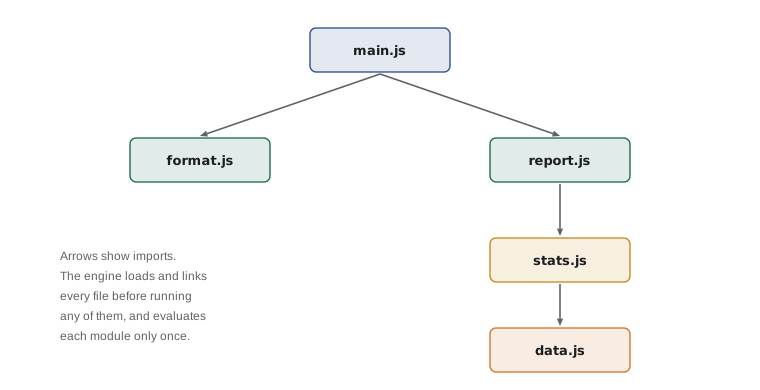
Each module in the graph is evaluated once, the first time it is imported, however many other modules import it. Every importer receives the same values. That makes a module a natural home for shared state, such as a cache or a settings object, because there is only ever one copy. It also means a module's top-level code, such as a console.log, runs only once.
// The registry module is created once and shared by everyone who imports it
const registry = (() => {
  console.log('registry module evaluated');
  const programs = new Set();
  return {
    register(name) { programs.add(name); },
    list() { return [...programs]; },
  };
})();

// signup.js, simulated
registry.register('Pantry');
registry.register('Kitchen');
// newsletter.js, simulated
registry.register('Pantry');
console.log(registry.list());registry module evaluated [ "Pantry", "Kitchen" ]
What this code does
The module's top-level code, including its console.log, runs exactly once, just as a real module is evaluated once no matter how many files import it. Both simulated importers work with the same set of programs, so the duplicate registration of Pantry is ignored by the set. The final list shows two programs, shared by every part of the program.
Imports are live bindings, not copies. If a module exports a variable declared with let and later changes it, importers see the new value. Importers cannot assign to an imported name themselves, though; doing so throws a TypeError, because the binding belongs to the exporting module. In practice, export functions and constants and let the module change its own state through functions, which keeps the rules in one place.
Modules in the browser
To use modules on a web page, load the entry module with a script element whose type attribute is module. The browser fetches that file, finds its imports, fetches those, and so on through the graph. Module scripts are deferred automatically, so they run after the HTML has been parsed, just like the defer attribute from JavaScript Programming I.
<!-- signup.html -->
<script type="module" src="js/signup.js"></script>
Two practical points trip up beginners. First, module scripts must be served over HTTP; opening the HTML file straight from your disk, with a file address, makes the browser refuse to load modules for security reasons. A local development server, which most code editors can start with one click, solves this. Second, browser import paths must be complete: './format.js', not './format' and not 'format'. Short names without a path, called bare specifiers, such as 'lodash', work only when a bundler or an import map tells the browser where to find them.
Modules in Node.js
Node.js supports both module systems, so it needs a way to tell which one a file uses. Files ending in .mjs are always ES modules and files ending in .cjs are always CommonJS. For ordinary .js files, Node.js checks the nearest package.json file: if it contains "type": "module", .js files are ES modules; otherwise they are CommonJS. Recent versions of Node.js can also detect ES module syntax in an unmarked .js file, but setting the type explicitly is clearer and faster.
{
  "name": "riverside-data",
  "version": "1.0.0",
  "type": "module"
}
CommonJS, the older system, uses ordinary function calls instead of keywords. A file shares values by assigning them to module.exports, and another file loads them by calling require with a path. Because require is a normal function, it can be called anywhere, even inside an if statement, and it loads the file synchronously at that moment. That flexibility is also its weakness: tools cannot know in advance what a file will load.
// format.cjs
function formatName(first, last) {
  return `${first} ${last[0]}.`;
}
module.exports = { formatName };

// main.cjs
const { formatName } = require('./format.cjs');
console.log(formatName('Amara', 'Osei'));| ES modules | CommonJS | |
|---|---|---|
| Share a value | export | module.exports = ... or exports.name = ... |
| Load a module | import ... from | require(...) |
| When loading happens | Before the code runs, as a whole graph | At the moment require is called |
| Imports are | Live bindings | Copies of the exported values |
| Strict mode | Always | Only with use strict |
| Top-level await | Allowed | Not allowed |
| Runs in browsers | Yes, natively | Only through a bundler |
| File markers in Node.js | .mjs, or .js with "type": "module" | .cjs, or .js without "type": "module" |
Mixing the two used to be painful. An ES module has always been able to import a CommonJS file, receiving module.exports as the default export. The other direction, calling require on an ES module, was impossible for years and produced the error ERR_REQUIRE_ESM. That changed recently. Node.js 22.12, released in December 2024, and Node.js 20.19 made require able to load ES modules without a special flag; Node.js 22.13 and 23.5 stopped printing an experimental warning; and Node.js 25.4 declared the feature no longer experimental. In Node.js 26, the current long-term support line, require of an ES module simply works, with one limit: if the module or anything it imports uses top-level await, require throws ERR_REQUIRE_ASYNC_MODULE, and you must use import instead.
Gareth's advice for new work is simple: write ES modules, set "type": "module" in package.json, and treat CommonJS as something to read and occasionally call, not something to write.
Importing JSON with import attributes
Modules can import more than JavaScript. ES2025 standardized import attributes, a with clause after the path that tells the engine what kind of file it is loading. The first type defined is JSON. Writing with { type: 'json' } makes the engine parse the file as JSON and give you the resulting value as the default export. Node.js requires the attribute for JSON imports, and current browsers support it too.
// rules.json
{ "openTime": "9:00", "hampersPerPallet": 24, "programs": ["pantry", "kitchen", "hampers"] }

// rules.js
import rules from './rules.json' with { type: 'json' };
export const HAMPERS_PER_PALLET = rules.hampersPerPallet;
export const PROGRAMS = Object.freeze([...rules.programs]);
The attribute is a safety measure. A server could send JavaScript code in place of the expected data; with type: 'json', the engine refuses to run anything that is not JSON. You may find older articles that write assert { type: 'json' } instead of with. That earlier syntax was replaced before it became standard, and Node.js 22 dropped support for it, so always use with.
Dynamic import
Static import declarations load everything before the code runs, which is what you want most of the time. Sometimes you want to load a module only when it is needed, such as a large chart library that only the monthly report uses. The import() expression does this. It looks like a function call, can be used anywhere, and returns a promise that resolves to the module's namespace object. Asynchronous JavaScript and APIs explains promises; for now, the pattern is await import(path) inside an async function or at the top level of a module.
// report-page.js
const button = document.querySelector('#show-chart');
button.addEventListener('click', async () => {
  const { drawChart } = await import('./chart.js');
  drawChart(document.querySelector('#chart'));
});
Organizing a project into modules
Good module boundaries follow the jobs in a program. Gareth's plan for the Food Hub's library, which the capstone builds, splits it by responsibility: one module for the fixed rules, one for parsing and checking records, one for calculations, one for formatting text, and a small entry module that re-exports the public parts. Each module has one reason to change. If Lucy wants a new date format, only the formatting module changes.
// index.js: the library's public entry point
export { RULES } from './rules.js';
export { parseDonation, validateDonation } from './records.js';
export { totalBoxes, byCategory } from './stats.js';
export { formatBoxes, formatName } from './format.js';
An entry file that only re-exports is often called a barrel. Pages import from it with a single line, such as import { totalBoxes, formatBoxes } from './lib/index.js', without needing to know how the library is arranged inside. Keep barrels small and avoid circular imports, where two modules import each other: they can work, but a value may be undefined at the moment it is first used, which leads to confusing bugs.
Worked problem
Splitting a script into modules
Mira's sign-up script has four parts: a frozen RULES object, a function that checks a volunteer's form data, a function that formats a confirmation message, and code that reads the form and shows the message on the page. Decide which modules to create and what each exports.
Show solution
- Fixed data that several pages need: rules.js, with export const RULES = Object.freeze({ ... }).
- Checking form data is reusable logic with no page code: validate.js, with export function validateVolunteer(data), importing RULES from './rules.js'.
- Formatting is also reusable: format.js, with export function confirmation(volunteer, shift).
- Reading the form and changing the page belongs to this one page: signup.js, the entry module, which imports from validate.js and format.js and is loaded with script type module.
- Only signup.js touches the page, so the other three can be reused by the newsletter and by the lunch counter, and tested on their own in Node.js.
Answer: Four modules: rules.js, validate.js and format.js export reusable pieces with no page code, and signup.js imports them and handles the page.
Try it yourself
Simulate a module
The module units.js, shown in the last paragraph of these instructions, exports BOXES_PER_PALLET and pallets(boxes) and keeps a helper, roundUp, private. Write a single-file equivalent: a function expression that runs immediately and returns an object holding only the two exports.
Then destructure the two exports, as an import would, and print pallets(50) and pallets(48). With 24 boxes to a pallet, they need 3 and 2 pallets. Finally print typeof roundUp, which should be undefined outside the module.
The module: const BOXES_PER_PALLET = 24; function roundUp(x) { return Math.ceil(x); } export { BOXES_PER_PALLET }; export function pallets(boxes) { return roundUp(boxes / BOXES_PER_PALLET); }
const unitsModule = (() => {
  // declare BOXES_PER_PALLET, roundUp and pallets here
  return {}; // return only the exports
})();

// destructure the exports here, then print the three lines
Try it yourself
Renamed and namespace imports
The starter simulates a module labels.js with a default export and a named export, stored as default and badge on an object, as a real module namespace stores them.
Write the single-file equivalent of import makeLabel, { badge as volunteerBadge } from './labels.js'; using one destructuring statement, then print makeLabel('rice') and volunteerBadge('Amara'). Finally, print Object.keys(labelsModule) to see the namespace.
const labelsModule = Object.freeze({
  default: (item) => `SHELF: ${item.toUpperCase()}`,
  badge: (name) => `VOLUNTEER: ${name}`,
});

// one destructuring statement here, then the three console.log lines
Common mistakes
Mistakeimport { formatName } from 'format.js' finds the file in the same folder.
InsteadIn browsers, relative paths must start with ./ or ../ and include the extension: './format.js'.
MistakeA default export must be imported with curly braces.
InsteadDefaults are imported without braces and can be given any name; named exports use braces.
MistakeEach file that imports a module gets its own fresh copy of it.
InsteadA module is evaluated once, and every importer shares the same values.
MistakeOpening an HTML file from the disk is fine for testing modules.
InsteadBrowsers refuse to load modules from file addresses; use a local development server.
Mistakeimport data from './rules.json' assert { type: 'json' } is the current syntax.
InsteadThe standard syntax is with { type: 'json' }; the assert form was dropped.
Summary and key terms
- A module is a file with its own scope that shares values by exporting them.
- Named exports keep their names and are imported in braces, optionally renamed with as; a default export is the module's main value and is imported without braces under any name. import * as gives a namespace object of all exports.
- Modules run in strict mode, imports are hoisted and static, the engine builds the whole module graph before running code, and each module is evaluated once.
- Imports are live, read-only bindings.
- Browsers load modules with script type module from a server, using full relative paths.
- Node.js treats .mjs files and .js files under "type": "module" as ES modules, and .cjs files as CommonJS, which uses require and module.exports.
- Since Node.js 22.12 require can load ES modules, a feature no longer experimental from Node.js 25.4, except when top-level await is involved.
- Import attributes with { type: 'json' } import JSON files, and import() loads modules on demand.
- module
- A file of JavaScript with its own scope that shares values through exports.
- ES module
- A module that uses the standard import and export syntax of ECMAScript.
- CommonJS
- The older Node.js module system that uses require and module.exports.
- named export
- A value exported under its own name, imported with that name in curly braces.
- default export
- The single main value of a module, imported without braces under any name.
- namespace import
- An import of all of a module's exports as one object, written import * as name.
- module graph
- The set of modules connected by their imports, which the engine loads before running code.
- live binding
- An imported name that always shows the exporting module's current value.
- bare specifier
- An import path without ./, ../ or /, such as a package name.
- import attributes
- A with clause on an import that states the kind of file, such as type json.
- dynamic import
- The import() expression, which loads a module on demand and returns a promise.
- barrel
- An entry module that re-exports the public parts of other modules.
Practice problems
Work each problem on paper first, then reveal the answer to check.
How many default exports can a module have?
Show answer
At most one. It can have any number of named exports.
Write an import that brings in the named export total from './stats.js' under the name sumAll.
Show answer
import { total as sumAll } from './stats.js';
In Node.js, which file extension always means CommonJS?
Show answer
.cjs.
Why does a console.log at the top of a module run only once, even if three files import it?
Show answer
Each module is evaluated once and its results are shared by every importer.
What error does require throw for an ES module that uses top-level await?
Show answer
ERR_REQUIRE_ASYNC_MODULE; use import or import() instead.
Lesson quiz · 5 questions
Score 60% or more to complete this lesson.
Create a free account to save your progress, take quizzes and earn a certificate.